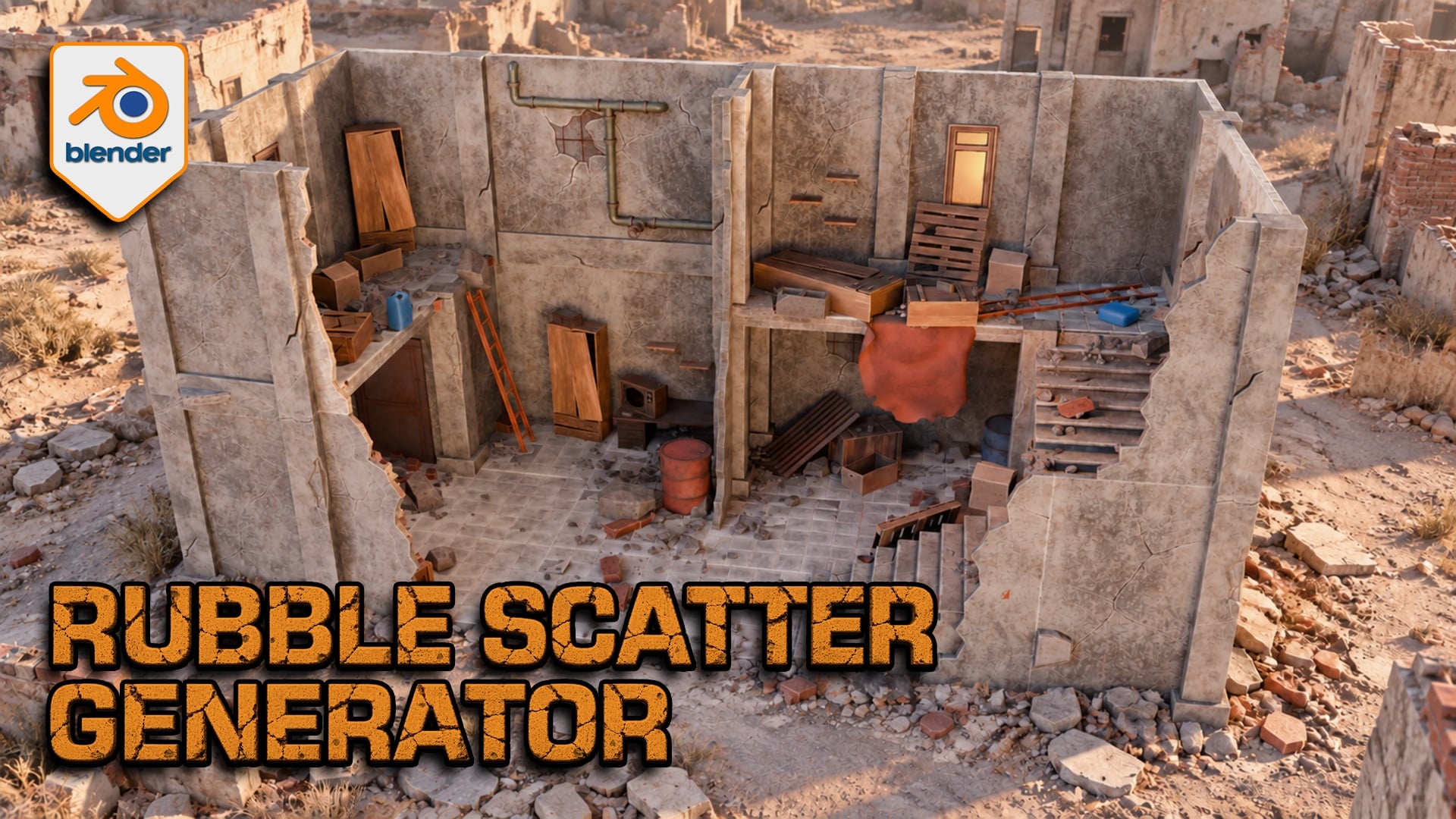
Rubble Scatter Generator for Blender
1 month of Skillshare
Available with PurchaseFree
All memberships will be billed automatically on a recurring basis until canceled. If eligible for a free trial, cancel before the trial ends to avoid being charged. Offer only valid for new paid subscribers. See full terms of service here.
About this product

3D Tudor
Bestselling Blender Author & 3D Educator
Build debris around your architecture
A ruined floor needs more than evenly scattered rocks. Rubble Scatter Generator for Blender lets you gather fragments near walls, vary the mix across open ground and preserve the areas your composition needs to keep clear. Work with editable Geometry Nodes controls and furnished demonstration scenes.

A six-second tour shows rubble across the furnished scene, including floors, stairs and wall edges.
Direct where rubble collects
Assign receiving surfaces and architectural occluders, then balance geometry-based accumulation with Open Area Fill. Use a painted Rubble_Density mask or local repellors to protect a doorway; attractors can add local coverage. Planar influence works across height, while non-planar influence helps separate storeys. Check intersections around your own geometry.

A simple wall study makes the distribution readable: larger fragments gather near the architecture while smaller pieces extend across open ground.
Choose from 51 designs in eight categories
Mix fine stones, gravel clusters, bricks, breeze blocks, concrete slabs, concrete chunks, reinforced slabs and timber. Each of the 51 HIGH sources has a paired LOD representation: these are alternate detail levels, not 102 unique designs. Adjust category density and scale before polishing the finish.
Match the finish and manage working detail
Shared controls cover colour, edge wear, dirt, top dust, roughness and normal strength. Camera-based HIGH/LOD selection, optional distance culling and a viewport Preview Fraction help you manage detail. LOD follows the active or assigned camera, not the viewport orbit; performance depends on your scene and hardware.

The material controls sit beside the furnished scene, showing where to adjust colour, edge wear and dirt.
What you receive
One ZIP containing the native Blender project and Getting Started guide. The project includes the generator, paired HIGH/LOD source collections and furnished demonstration scenes. Best for artists building ruined interiors, architectural studies and static environment compositions in Blender.
Start with the configured example
Extract the ZIP and open the project in Blender 5.2.2 LTS. Switch to Rubble Studio | Building Scatter and select 3DT Rubble Studio | SELECT ME. We opened and evaluated that configured scene at frame 1. The separate detailed Scene saves the generator viewport evaluation disabled and has no active camera; the guide explains how to inspect it.
Questions before you buy
Can I use my own debris? Yes, with suitable origins, flat source collections, paired HIGH/LOD numbering and equal source counts. Custom meshes need appropriate UVs and materials; arbitrary shaders do not inherit the supplied finish controls.
Is this a demolition simulator? No. It creates static procedural scatter rather than a rigid-body collapse. No Unreal Engine, Unity or UEFN project is included.
Do I install a Python add-on? No. This is a Blender Geometry Nodes project. Earlier Blender versions are not certified by the 5.2.2 check.
Neil — 3D Tudor
FAQs
What are digital products?
Digital products at Skillshare are expertly crafted tools, resources, and templates developed by top creatives that are available to you for purchase. With a wide range of resources to suit every creative need, they are actionable, making your learning experience real and unforgettable.
How can I purchase a digital product?
Anyone can purchase a digital product on Skillshare — click Buy now to enter your payment information and complete your purchase. Once payment is complete, all files will be available for download instantly from this page. You'll also receive an email with a link to download your digital product after purchase.
Is there a limit to how many times I can download a digital product?
No, there is no limit to how many times you can download a digital product. Even if a product is removed by the creator, you can still access the download page in most cases by logging in to your Skillshare account.
Can I get a refund or cancel my digital product purchase?
Digital products are non-refundable and cannot be returned or canceled. To learn more, see our refund policy in the Skillshare Help Center.
Can I make and sell my own digital products?
Absolutely! Visit How can I sell a digital product on Skillshare? to learn how you can create, list and sell your own digital products on Skillshare.