Transcripts
1. Simplifying Productivity: Introduction: Are you struggling to balance a full time job with your side
hustle or passion project? Maybe you often find yourself
overwhelmed with tasks and unable to find as much joy in the work
you're doing as you like. Or maybe you have a
successful business, and want to find ways
to get some time back and find a
little more balance. Welcome to part time
productivity one oh one. This class is
designed to help you solve that problem
and find deeper, more fulfilling
approaches to your work, embracing a minimalist
approach to productivity, and by the end of it, you'll be achieving more by doing less? Who doesn't want that,
right? Hi. My name's Simon, and I'm a busy freelance
theater director who turned a part
time side hustle into a full time career as a content creator and
digital entrepreneur. So I now create tech
and productivity videos weekly on my YouTube channel Better creating and run a huge Notion template
and resources business. With hardly any help. And you know what? It got
overwhelming very quickly. I've learned from experience and a load of research
how to shift to a more productive
and efficient way of working whilst trying to juggle these multiple
responsibilities and making the most of my time. This class is all
about maximizing your productivity
without sacrificing your personal life
or well being. In these four lessons,
we'll discover the most effective solutions that I've found out there that can truly unlock the joy of part time productivity
effectively. We'll explore various techniques
such as goal setting, brain dumping, and
prioritizing what matters, and we'll delve
into the tools to help you create a second brain, however you like,
and strategies to schedule deep work
sessions more effectively. By the end of the process,
I'm hopeful that you'll experience a transformation in how you approach your work. We'll learn how to do
more in less time. Know what to focus on,
and most importantly, you'll find joy in
your work by making space for a bit more
creativity and inspiration. So join me on the journey and follow the simple
steps in each lesson. I've included
essential exercises and a tile of resources
for you to engage with as deeply as
you want to between each video lesson or as you go, so do it at your own pace. And finally, I'd love for you to share a few things for
your class project. And so we can all see,
most likely that we have a similar out of mess to get organized and that
we can all do it. So, please upload to the project gallery as you
work through the class. The following a before
and after pick. So the first shot should
be of the mess you create with our brain dump.
We'll do it a bit later. And then perhaps a second
photo of the goals, projects, and tasks map
that you will create. This could be readable content. But you can also keep
it private and just do a quick shot to show us before
and after from a distance. Secondly, I'd also
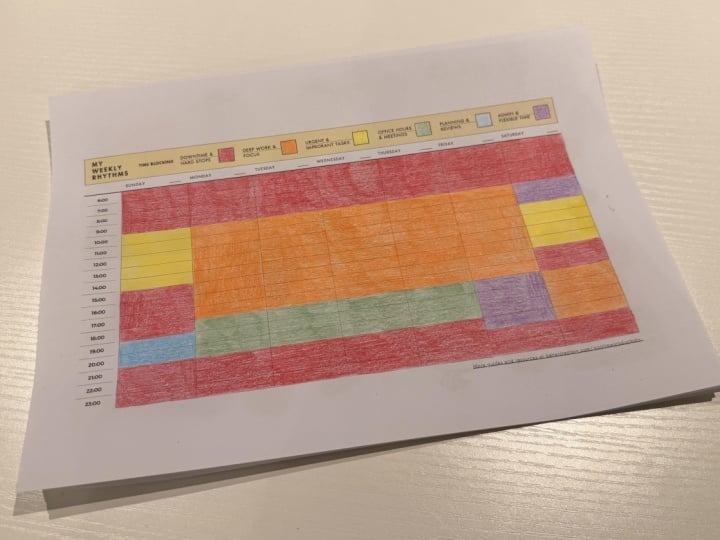
love you to share your completed weekly
rhythms template, we'll look at in the
scheduling section for your part time
productivity plan, make sure to make it colorful. And finally, please
comment a reflection in the discussion board
on how you found the process and what's
come out of it all. Now, since I suspect, many of you are dealing with similar challenges
of organization. I'm hopeful that this sharing can be super empowering for all of us to see where we all
started and where we end up. Soon, we'll have unlocked your part time productivity
potential together. So the first step, it's time to review
and reflect and find your North Star. Oh.
2. Lesson 1: Review, Reflect & Effective Goal Setting: Let's talk about goal setting. I believe that proper
goal setting is the single best way
to both simplify your life and focus where to commit your
energy more effectively. The process of setting
effective goals can be life changing
and will ensure you are always
spending your time on the actions that actually
move the needle. Imagine if you could
identify the 20% of actions that you take that
have 80% of the impact, how much more
effective you'll be, and how much time
you can claim back. But this is the thing, right? For that to happen, you
have to do it right. And the thing is,
most of us just haven't really got
an idea of where to start and how to do it in a meaningful or
more rigorous way. This is the process
that works for me. It's designed as a
yearly reflection. But today, we'll focus on the
basics of goal setting that you can do in a smaller way for a month or a quarter
whenever you want. And if you want to, you can go deeper and commit to the full
yearly planning session. There is a larger video guide to doing your yearly
review along with a prompted notion template in the resource section for you
to check out if you want to. To do this exercise, you'll
need access to your calendar. A few hours of
uninterrupted time and an open and honest approach. Maybe you want to find a calm, private space to work, or maybe you'll work better by inviting some friends to join you for a group reflection and a planning session together. You'll find the prompted
workbook, which is this one, linked in the resources section, and you can use it to follow
along with the process. Or if you're a notion user, check out the prompted goal
setting notion template that includes this and a full system that
you can duplicate every year in notion and
keep it all in one space. Now, once you've
downloaded this, I recommend you do
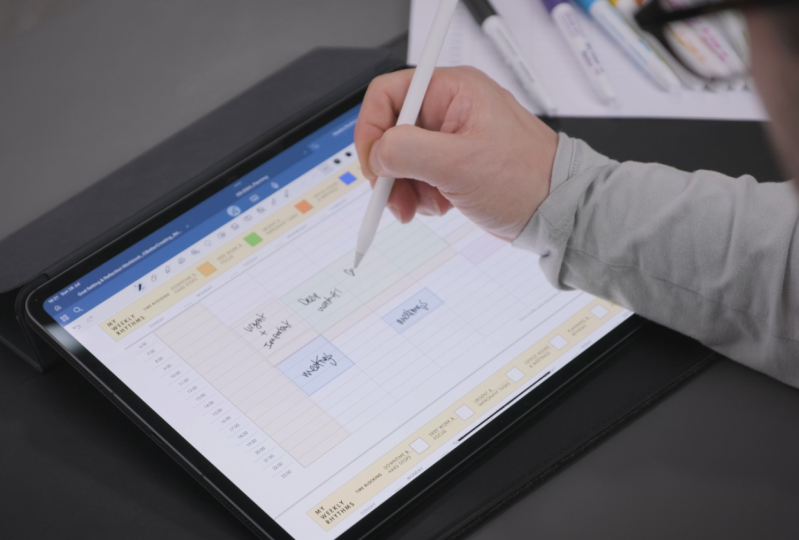
something like this. Open up your note taking app of choice, mine
is good notes. If you want to do it on an iPad, you can always print it out, and I'm going to click in port. I'm going to find the
file and open the PDF. And then you can annotate your heart's content within
the system. Cool, right? So, it's time to set up your environment
for focused work. Take a few deep breaths. No need to second
guess the process. I'll break down the
stages I use through this lesson so you
can either pause the lesson in each part
and work along with me or watch the whole
video as an overview, and then use the workbook afterwards to do a
full guided process. Stage one is to look
back and reflect. We do this to be able
to make more rigorous, informed decisions when we
set our goals moving forward. Now the first part is
a calendar review. Go through your calendar
week by week and ask, what is the most significant or important
events, projects, activities, moments that you spot or you're reminded
of, and write them in. Now, what we're going
to do as we do this, we're going to write an event, going to then decide if we
think it's a win or a loss. Now, the losses
can be hard to do, but they're just as
important as those wins, so make sure to
remember to do that. And as you work,
leave a space under each stage so that you're able to react to them
in the next part. This is my significant events. Pause the video, and
let's go for it. So let's talk about
those winds and losses. The second part of this process is to use what I like to call, and you've probably heard of it, the 80 20 rule for
an 80 20 recap. Now, from your
significant events, you'll have a list
of wins and losses. Now, you can identify the 20% of actions that leveraged the
biggest impact on your life. Think, what out of the list
up there moved the needle. Start with which 20% of winds had the most
positive impact. We should be doing
more like this, and then follow up with
identifying what 20% of your losses leverage the most negative or detrimental
impact on your life. And we should be
doing less of these. And then you can write up
your best 20% of winds in here and best 20% of losses
in here, and away you go. Now is the moment to pause the video if you're
following along. Finally, in the
reflection section, I've got some
journaling prompts. I love to use prompted
reflections to more deeply take lessons away
from what I've looked at. These are the examples I use. Things like the biggest risk I took this year was,
the wisest decision. Finishing sentences like this
is really powerful and can really make a difference to how you focus your energy
into reflection. And then I have a kind of two part question
in this system, and the second is
some key questions. And I group mine in these areas. Major milestones,
challenges to overcome, personal growth and development, self care and well being, relationships and connection, professional or academic growth. Gratitude, forgiveness.
There's tons in there. Now, I find prompted thinking is the most effective
way to go deeper and be more accurate with
setting useful goals. I recommend setting
a timeer for say five to 10 minutes each
section, and just write. Now, I'm a big fan as well
of using a Pomadoro counter. And actually, my favorite
is the endl app. That's a great little
app that will play AI generated music to
help you flow and focus, all connected to a timeer, so you can manage your focus
sprints in your writing. Out, I linked it in
the resources section. So, if you want to use these
examples and crack on, now's the time to
pause and do it. Part two of the reflection
process is looking forwards, and this is where we begin
to properly set our goals. Now, again, using prompts and
a timer is a great way to focus your energy and write more rigorously on some subjects
that will help you. I've included a ton
in the workbook. First, look at what the
year looks like ahead. And there next, what
will it be about? There's a bunch of prompts
you can see there to do that. Then I move on to the
prompts that really help me to discover my purpose. And here are a few
of my favorites that designed to help you dream big and visualize a little bit. No fear. What would you like to do if you knew you
couldn't fail? Role models, who are the people that you
most admire and why? What qualities do they possess? We've got your future self. Imagine you've achieved
everything you ever wanted, what you look like
now as a person, what are your qualities
and achievements that define you a dream deferred, what is a dream that you've always held and never pursued. And I really like this
one, an ordinary day. What does your ideal
normal weekday look like? What are you doing, who
are you doing it with. These are great visualization
techniques to give you a clearer image and a goal
to actually work towards. Now, if as you hear these, you're thinking, no way that's too heavy, too much effort. Where do I even start? I encourage you to remember, most of the answers are probably already
there inside you. You're just not looking
at them right now. I dare you to let go, avoid thinking too hard
and go with your gut. It will be worth it. You
can pause the lesson here and reflect if
you're working a lot. Step three, this stage is
the actual gulf setting bit. Now, I discovered this method
for Gal setting in 2023, and I absolutely love it. It's a great ten minute exercise
that I highly recommend. It's a great place
to leap off to set real visionary
goals for yourself. My version is based
on a combination of ideas that I've
learned from Ali Abdul and a few methods by older
self improvement authors like Jim Rn and Zieg Ziegler. Here are the three stages. And again, you can pause the video to do each
one as you wish. So step one is to set a timer. Take 10 minutes to lift
everything you might want to do ever in
the next ten years. And there's some
problems for you. Step two, you're going to write next to each item a time frame, the number of years
you imagine for each goal or dream to take. So, one, three, five, or ten. Then finally, and I
love doing this in notion is group the
goals by time frame, one year, three years, five years, and ten years. As Ali Abdel says
about this process, the point of setting goals for
the three to ten year time horizon isn't really to actually work towards
them right now. The wins of fate are naturally
going to change stuff, and no one knows what
might happen tomorrow. So these goals are
obviously not set in stone, they're purely what we want to be heading
towards right now. So, once you've completed this, you can now finally write
out your goals for the year. When you write out your goals, you want these to be
achievable enough that you can believe in them and be
inspired to reach them. And I want you to write them as if they've already happened. Now, I recommend keeping
this between, let's say, three to five goals
for each and consider spreading them across
your life areas like business relationship, self development, and so Great. So you should now have
collected all of your goals. Now, there's a final section in the workbook
which talks about next steps about making
these things happen, right? That's where we need to go next. There's a couple of
nice ideas in here, like adding milestones
for each goal, which can help you
along the way, write down obstacles
that you might have come across in
solutions to them. But I want to focus on some systems around our
tasks and actions next. Because we now know what
to focus our energy on, but we need to make sense of the tasks and steps
towards that. Because without
the right systems to keep track of all this, we might just get overwhelmed
with it all immediately. In fact, you may well already be if you've done
this process so far. So the next step
of your part time productivity journey is to find the simplest system we can to organize and hold
that information so that you don't have to. It's time, my friends
to talk about finding you a second break. See
you on the next lesson.
3. Lesson 2: The Brain Dump & Second Brains: Let's talk about your task list. I think the biggest
challenge for many of us feeling overwhelmed by our to do lists and work is the feeling of having
to hold everything. I'm sure you've recognized
that feeling of the weight of too many items that you're juggling just
hanging over you, as if you're trying to keep
all the plates spinning with no time to focus on any
one thing properly. Now, we'll look at
how to prioritize what matters most
in the next lesson. But first, let's embrace the
other part of that problem, having to hold and
remember everything. We might compare
this to the feeling we get when we are
in a cluttered home. If your environment is
cluttered and messy, you'll never quite find
true clarity in focus. Time to spring clean
your to do list. Now, the concept of
a second brain was coined by David Allen in his seminal book
getting things done. And after I discovered
it, I couldn't go back. The idea is to build a
second brain that you trust to hold and remember
all your ideas, projects, and tasks so that
you don't have to, leaving you time in space to
have ideas and take action. Now, the single
best way to clear the mental decks and get
started with setting up a second brain at
the same time is to do what David Allen
calls a brain dump. We are going to
essentially do that thing that Marie Condo gets people
to do with their clothes. But you're doing it
with you to D list. So we're gonna make
a massive pile. Sort through it all and
then have a big clear out. Now, I personally use notion as my digital second brain to hold my projects and tasks,
notes and ideas. But I recommend doing
this essential step first using pen and paper. If later, you like the idea of trying notion as your system, or maybe simply as a custom
task and project manager, I've created both free and
paid notion templates based on these concepts that you can download via links in
the resources section. So let's do our brain dump. Number one is capture. Get it all out of your head. We are going to write
down every task we can currently think of onto
some pieces of scrap paper, one task per piece of paper
and lay them on the table. Now, if you're super
busy, be brave. I know this could be
a little overwhelming when you write everything
out and have to confront it, but it's all worth it. Write every single task down however small,
work across areas, if it helps like personal life, work life, family,
health, anything else. And make sure to have a camera
ready because I want you to take a before and after
photo of this process. This is the moment to pause
and write those tasks. Stage two is to
organize, sort them out. Now, you might find you want
to lay out a set of cards or pieces of paper each
with one of your goals on, since this is where we
know we want to be going. And finally, add one
more card called a Sunday maybe more
on that in a bit. Now, before you do this, make sure to take that
before photo of the mess. So the first step in
this process is to sort your tasks into
groups or projects. Now, according to David Allen in his book, getting
things done, a project is any task with
more than one action. Title the projects. If you like to color code, now's the time to
get those nice pens out and code those projects up. Now, with these
little project piles, which goal might each
of them sit under? If you notice projects or tasks that don't sit under any goal, ask yourself, do I really
need or want to do this? And if not, throw it away.
You're decluttering. Now, if you think yes, but
it's not relevant now, maybe put that in the
Soday Maybe section. Pause the video here if you want to get this done whilst
following along. Great. You should now have a
set of organized projects, task lists, and related each of those to
one of your goals. That's all kind of hierarchy,
goals, projects, tasks. Now, please remember to
take the picture of After. Now you've organized
it all so we can see the difference between the mess and the order. So what's next? Well, it could be worth now
considering adding all of your tasks and projects into
a digital task manager. Now, for me, this has been
an absolute game changer because it allows me to look at my projects and tasks at
the right time and the right place without having to sort through pieces of paper, and it's always with me. I swear by the app notion to do this mostly because
it's so customizable. And to that end,
you can download my free Notion task and
project manager template via the link in the resources
section and give it a go. The advantage of a digital
organization system like this is that
you can automate reminders to review
your projects and organize your daily
task list each day. Another way to take away
the stress of having to remember what to do
and when constantly. Check out my extended
guide video on YouTube. If you want to go further
with this approach to task management and project
management in Notion, and see how these customized templates can meet your needs. So far, we've cleared
space to take action. Now we just need to
know where to start. So the next step
towards becoming a part time productivity
master is to learn how to prioritize effectively using something called
the efficiency matrix. See you on the next lesson.
4. Lesson 3: The Efficiency Matrix & Prioritising Tasks: Okay, we focused where we're
heading by setting goals. We've cleared the
decks and organized all the tasks and projects on our plate for some head space, setting up a simple
second brain. But here's the thing. There are only so many hours in the
day to get all this done. And the idea here is meant to be a minimalist one to
do less, not more. It's time to embrace
the power of priority. Part time productivity is
about putting your energy in the right place and knowing that you can do less, because A, you are avoiding the busy work that isn't really
important, and B, that the actions you
are taking are the ones that will really move the needle towards where you want to go. So in the last
lesson, we organized all our action items into projects and task lists
for those projects. Now we need to put
those task lists in order of importance, but we need to go about
it strategically, not just with
guesswork or instinct. For this, I love Stephen
Covey's time management matrix. Importance clarifies
the significant value or impact it will
have on your goals. Urgency, well, that's
pretty obvious. It's a simple
diagram that divides your items into four categories. Important and urgent first. Important but non urgent second, that's that deep
work you need to do. Unimportant but urgent third and unimportant and
non urgent last. You could do this by writing these up in order
on the next side of your project cards or list and add any hard deadlines
next to them. With this in place,
you'll be able to have a clear view of
what you need to do, when you need to plan, or defer, delegate, or eliminate
each of these. So I'm going to
do this simply by using tags in my
notion. Task manager. And this is where something
like a digital task manager really comes into its own. So here you can see a simple
copy of my task manager, and I've got a view here
for the priority matrix. Now, I've actually renamed mine to be things
that are top of mind, important and urgent, deep work. That's important stuff, which isn't urgent that I need
to make proper time for. Urgent and
unimportant, cool mum. It's a bit cruel. Bit of a joke. And then four is low priority. So that's the unimportant,
urgent stuff. So, as you can see, up here, I have a little important
thing here saying, Is it important and a
little urgent thing? Is it urgent? And
as I change it, if I make it important,
it's deep work. If it's important and
urgent, it's top of mind. There you go, you can
see the differences. So here, create a second brain. That's important, and
urgent, top of mind. I add it to my system. And I'll see it turn
up in the right area. Of course, the great thing
about this is that you can also add a due date to when
you want to do something, and you could even add it to a project like my side project. And then from here, I simply
add it to the system. And it turns up with the
date and everything. So it also means that I can
view it in a calendar view, I can view what is
assigned to me. It all makes life a lot easier. Now, another way to look at this efficiency matrix is to combine it with
the concept of do, delegate or defer
from David Allen. Take a look at this graph. Based on the matrix,
you'll be easily able to decide for each task
how to approach it, whether you do it immediately, delegate it, defer it, which is to plan, or eliminate. This is how I break it down. Do. Is it 2 minutes or less to complete
it? Just do it now. Delegate. Can you give
it to someone else? Send it now. Defer. Do you need to defer it to
a different time? I set a due date for this, so it pops back up in my
system, or eliminate. Realize it's not important or
urgent and just delete it. These are key to get right, so you have more time in space. I would suggest that
each day you'll want to focus on important
and urgent tasks early and unimportant
and non urgent tasks late? Or not at all. But we should also
remember to make real time for those important but
non urgent tasks, too. These are often the things
we repeatedly put off, but they can often be where true value and
impact can be found. And for that, we need to plan. That leads us to our final
lesson in this class, how to schedule
your days to enable some deep work on what matters
most. Let's take a look.
5. Lesson 4: Scheduling Work & Downtime: It's time to look at
your weekly rhythm. Now effective
scheduling is about understanding how you work
and when you work best. But also, it's about planning in action items that you
might often neglect. Remember, we are not pursuing high performance productivity. We're pursuing part
time productivity. And that includes time off, you know it, or working on things that don't
feel like hard work. So scheduling to
take action and not take action in the right
ways is in my opinion, the essential approach to a happy and productive balance
for your days and weeks. This lesson, you're
gonna need your to do list with priorities, an empty week in
your calendar view, or go to the resources
section and get my weekly rhythms template page. That's a great place to start. And you'll also want to
look at your main calendar. I'm looking at my
Google calendar through this Notion
calendar view, and my task manager I'm going
to use is the one online. Paper is great for
this, but it can also be great to do this
exercise in the calendar itself so that you can then literally repeat the rhythm of where you're gonna
block out your time every week and edit into it. So, schedule your work and
downtime with a weekly rhythm. It's time to decide on that weekly rhythm
that you want to take. First, reflect on these
five questions using color coding and create yourself a weekly
rhythm template. This is a way of allocating
times in the week that are best for you
to do each thing. It will create your personal
time blocking template. Start with the important stuff. What blocks of time in
your week are best to be kept completely clear
from work and protected. Now, whilst this
might seem extreme, planning in your time off in
a calendar is surprisingly powerful to ensure you actually take it and don't
accidentally book a meeting. I have my full days off
on Saturday and Sunday. That's why these will need
to go somewhere else. Set a boundary, and part time
productivity is possible. So, what will be
your hard stop pens down end of the day that you
want to protect at all cost. For example, for me, I
might put that in at 6:00 P.M. And I'm just
going to write in here. Hard stop. Time off. Now, you could set
that every day. I'm going to color code it
as yellow as my time off, but you might just want to
set that on certain days. Maybe not every day
is possible for that. I would ask you to
have a full stop on at least two
days of the week. Greg McKeen, who wrote
this book Essentialism famously has set himself a
5:30 P.M. Hard stop every day, where his kids are actually
allowed to come in and drag him from the desk
if he hasn't finished. That's accountability. Love it. Next, when do you want to get
multiple tasks completed? These are for the urgent
and important work that needs to be hit quickly. So, for example, that
might go in there for me. You can see I've already
got my lunch breaks, and this is going to be And
by setting it to repeat, you can see it turn up
in every week, see? Nice. What blocks of time are best for
you to focus on deep uninterrupted work on
a single important task, such as for me, video scripting. Add longer blocks to the calendar for these
deep work sessions. I personally put these
at the start of the day as I run out of energy at
times in the afternoon. These are for some of your
important but non urgent work, or I've called on my
system deep work. Next, are there any times in the week that are
always going to be great blocks of time for arranging meetings
or appointments? This is a great
approach to meetings, particularly when combined
with a tool such as Calendly, where you're able to block out availability slots
on certain days and times against your name. And this is a really fantastic
way to manage bookings, and people can just book in. So you're also avoiding the extra admin of e mails
back and forth to set a time. Here, I've got my office hours that match my available time. Finally, allocate
some time blocks for dedicated time to do a weekly review and for
scheduling the next week. Like any good motor, we have to maintain the system, or it will fall apart. That essentially
means you spend time looking at all your tasks
and projects and goals, seeing what's done, what
you need to update, and then setting a plan
for the next week. So you should now like me have a clear template for your week. I've got weekends clear, and then I have my
set of various areas, and flexible, creative
time, hard stops. A that one needs to
be changed color. I've got my office
hours in there, my deep work and
urgent, important work. How about that?
Now we have a map. It's time to action things. And from here, you
can simply insert your tasks from your
task list each week. Make sure to share a copy of your weekly rhythms map
in the class project. So now I'm going into
my task list for my single most important task, and at the moment, it
is to publish a video. I call it the O T, and in my setup, I have a daily priority
that allows me to pick what I'm
doing on each day. This idea is a really great
thing to try and check out the book the O T to learn more about it in the
resources linked below. In a single day, I can usually three to
seven tasks at once, and if one is focused
on a larger task, then the others are smaller. So I'll list a few things
that are possible, but it's those deep work
sessions that really matter. Let's briefly focus on how
to approach deep work. For my deep work sessions, I love that endl
app to use also as a palmadoro counter to keep me going and in the
pocket focused. Essentially, this times out 25 minutes stints of work
with a five minute break. But you could use your
favorite playlists and a simple timer
to do the same. Remember, to set your
notifications and digital devices to silent and see what a difference it makes
when you get your work. Linked a wider video on some useful focus
tips and tools in the resources
section if you find this part of the process
tricky like I do.
6. Final Thoughts & Next Steps: Well, congratulations. You've made it to the
end of the class. I'm super proud of you for sticking through it and
making it this far. Now, together, we've learned
some powerful skills, such as how to set effective
goals through reflection, how to organize and
prioritize your tasks for maximum part
time productivity. And I hope that in time it
will give you that deeper, more fulfilling approach
to work that you can sustain to help
you achieve more, have a greater impact
in the way you want and or whilst
doing a bit less. Thank you for joining
me on this journey, and I can't wait to see where these new found
skills will take you. On that note, please
remember to share some of your progress in the
project gallery below. It'd be great to see your
weekly rhythm, your goals, and projects, even that
initial brain dump mess. I can't wait to see
how you've applied the techniques into
your own specific life. Now, it is time to put what you've learned into practice
and keep the habit. So if you want to go
a little bit further, consider coming over to better creating.com and finding
better creating on YouTube, where I'm sharing great ideas, tools and tech like this to help you create and curate
your best life. Now, that's videos, Notion
templates, and all the rest. And check out part
time productivity.com, where you can join
my mailing list to go further more exercises and content around
this process that I hope can keep you going
with it into the future. All the best, taking
your side project or business to the next level, and I hope you're as
excited as I am about the changes these skills
can bring to your life. And with that, well, I better get back
to creating. Sea.
 Simon From Better Creating, Productivity, Organisation & Notion