Transcripts
1. Intro To Marketing Automation and HubSpot 1: Hi, my name is Adrian Hall Berg. Welcome to marketing
automation using HubSpot. So in this course, we're not only going to cover and learn about
marketing automation, but we're going to
learn HubSpot as well. That being said,
I'm also going to use another tool
called send in blue, which is a great alternative
for those of you who need a automation tool that is completely free and
you get all features. So it's a competitive
or a competitor to say like HubSpot
or to Mailchimp. But in Mailchimp you have to pay for the automation features. Send in blue, you
get all these CRM, text message, email
drip automation. You get all these
different tools and you can start building your
funnel out for free. You can send 300
e-mails a day for free. They only start charging you when you send
more than that. So it's very scalable.
That being said, whether you're using
HubSpot or not, we're going to learn
marketing automation. Now. What is
marketing automation? Why is it so valuable? Well, within the world
of digital marketing, you can specialize in a
lot of different things. You can have an SEO specialist or a content marketing and
social media specialists. A marketing automation
specialist is one of those most important aspects
of digital marketing. Because digital
marketing is online. It's using the
Internet, using in content, social media, ads, all these things,
E-mail communication, because it's all digital. You can learn automation
and automate a lot of different steps throughout the customer journey. So e.g. you can automate
customer reviews now you're getting and
filter them out in a way so you only get four or
five plus star reviews. So that's automated now, people are getting reviews to
the business and you don't have to have a person
pushing that exactly right. You can automate referrals. So now you're getting
more referrals to your business automatically. You can automate
communication at specific times in the
customer journey, e.g. what if I'm a customer, I'm viewing a specific page on a business's website, right? Well, that could be a trigger in HubSpot and then I can
automatically get, say, a text message that has a discount code for
that specific product. Now I'm more likely to
purchase that's automated. Or maybe I'm looking
at a service page for a B2B business and
I get an e-mail that's inviting me to join
a free webinar that's about that service so I can learn more about
it that's automated. So you can create all
these different scenarios and it will help the
entire marketing engine, the entire marketing program and the business grow automatically. So it's super valuable to
have this automation skill. I just read a Neil Patel, I saw a video on
his social media, how he is talking about how important marketing
automation is and how that's such a valuable skill to help businesses save money and grow. So if you want to learn
marketing automation, if you want to learn HubSpot. And even if you don't
plan on using HubSpot, this course is still valuable for you because we're
still going to learn automation and you'll get to see different examples
of how it works. So if you need to learn HubSpot, if you need to learn
marketing automation. I'll also introduce another
tool that's free for those of you who want to build out your
funnels and you don't have a lot of money to invest
in a tool like HubSpot, we can look at sin
and blue as well. I use both of them
in conjunction for different reasons
to save money. I use HubSpot for inbound
and I use send in blue for cold outbound account-based
marketing campaigns and then add APIs
connecting the two of them. It's this whole complex thing so we can take a look at examples. Either way, no matter
what your situation is, I hope that you learn more about marketing automation and find it helpful
and valuable. So that being said, I'll introduce
myself a little bit. My name is Adrian Hall Berg. I'm currently a marketing
executive and I got my start way back in 2015, learning marketing from
a free webinar online. And I took notes and I
started to implement and practice what I
learned from that webinar, building my own funnel,
selling affiliate products. And I got my first
online sale from an affiliate link and I
was so excited about it. Fast-forward. I then leverage that
experience to get my foot in the door of an
entry-level marketing job. So I got a job as a
marketing specialist. And in the job I got on job
experience at a great mentor. And after two years
working at that company, I was promoted to the
marketing and media manager. So it all started
for me and just by learning from a free resource. So now I'm a marketing
executive and I'm teaching and training and helping
others learn marketing as a valuable
skill on my courses here. So that's a little bit about
me without further ado, let's dive right in collectors in next video and we'll learn about marketing
automation and HubSpot.
2. How To Use HubSpot & Automation Examples: Alright, welcome,
and we're going to take a look at marketing automation
and set some things up. Take a look at some examples
that are already set up. So let's dive right in. These are the different things that are going
to take a look at. So we're going to just look at a simple e-mail drip automation usually used for lead nurturing. If somebody opts into
a lead magnet or opsin gets a quote form, fills out pretty much
any form name and email. Then you can follow up
with text or an e-mail, nurturing them with
more information so you can stay top of mind. This can also include
like a newsletter, um, things like that. So then we can look at
referral automation, how to automate getting
referrals from customers. Automate Google reviews,
how to get Google reviews, and then lead scoring, which is something that's for
more advanced automation. But if you have high kind of activity traffic coming to your site and interacting
with your business. And it's a B2B business, than lead scoring can be very valuable for
your sales team. So before actually we look at all these different automations
on a case-by-case basis. Let's learn and do a quick
overview of HubSpot, since that's what we're
gonna be learning. So I'm going to go over
HubSpot just so you can understand the different
parts of the platform. It's very user-friendly,
but I'll just go through it just
so you're aware. Then we can take a look at sending blue as well,
which I mentioned. So let's take a look at HubSpot. So HubSpot, we
have our contacts. These are basically anybody
that's in the system and to have a contacting
Needham first name and an email minimums. So you just need
a name, an email. And then you can add
more information. Every contact is individual, so that can be your leads
and your customers. You can create different lists. So you can segment less on different criteria
for contacts you can make less that fell
out a certain form. A list of people contact you, visit a certain page, a list of contacts who
have became customers, ordered a certain product,
whatever the cases. You can also have companies. So for B2B type businesses, if you're dealing with
businesses as well. So you can have multiple
contexts in one company. So you have one company, let's say it's Nike dot com, and then you can have 5,000 contacts under that one company. All the contexts can be at different levels, CEO, managers, store manager,
designer, whatever, and then the companies. So those are kind
of how that works. I'm over here in marketing. All these things can connect
to your different platforms. So you have your ads. So you can take a look at
some add examples here. So we have some ads coming in. This is just an example. So you can track your
and connect HubSpot two different ad accounts including Facebook,
Google, and LinkedIn. Those are the only ones right now that you can connect to you. You can create campaigns
directly from HubSpot. And you can create custom audiences
directly from HubSpot. So you can use your list
to create audiences. So you could, you could create an audience for
your Facebook that, and it will show up in your Facebook ads for
those of you who are familiar with creating
custom audiences and Facebook ads,
you can do that. So, yeah, you can create custom audiences
directly in HubSpot, send it to your ad account. So that's pretty useful. Email. So this is where you
can create different emails. When you create an e-mail, you can either do a
one-off email and send it or you can create
an automated email, regular emails, just kind of a one-off email to a group
of people or an individual. You can use this as your
email client as well. Instead of using like a Gmail, you could use HubSpot. Alternatively, you can also
link your Gmail to HubSpot So that all in and
outbound emails and the e-mail is tracked. That can be useful for B2B salespeople who
want to keep track of all their email communication
in a sales pipeline. So you can do that
or just create automated emails or
chair and then used for email drip sequences
similar to like lead nurturing. So those are emails. Then you can create landing
pages as well if you want to. So you can create landing
pages directly from HubSpot. You can link your
domain to HubSpot. So I don't use, I've
used them before, but I generally create landing
pages on my own website. Which is linked to what? Plane? Top spot. So then you have
your social media. So it also can link to
social media accounts. You can post and schedule
posts directly from HubSpot. You can analyze and track your social media directly
from outside as well. So if you've used
like later.com or Hoot suite to schedule posts, you can do that using
hotspot as well. And so you don't have to
use those other platforms. It doesn't connect
with TikTok though and all of the accounts. So it connects with Facebook, instagram, Twitter,
and LinkedIn only. So if you want to use Pinterest and TikTok
than I, which I do. So I use a later.com, but analyzing different
content is good here. So then you have website. This is if you use HubSpot website builder
which you can use, they have their own
kind of website. You have to pay for it. Or you can just use
their SEO tool. I don't really do that with the website because I
use a WordPress website, but they have that function
here if you want to, which is kinda separate
from your landing pages, then you have campaigns. So campaigns are
basically just folders or segments that keep track of
all the different elements. So you can just create a campaign and all that really does
is give it a name. So we can do test campaign. Just to see That's
pretty much all you do. And then you can assign yourself as a user,
but that's it. You can add more
information here. But once you create a campaign, let's say you create
a landing page. You can mark that landing page
as part of this campaign. Or if you create an e-mail, you can mark that email
as part of this campaign. Or if you create ads,
you can mark ads as part of that campaign
and your social media, you can mark that
as your campaign. That way. You can click through
to this campaign and you can see
all the elements. So you can see assets, which is everything
I just described. So I'll show you your emails, your social posts, your
landing pages, your ads. All right, Here, I'll
show like performance, how many contacts as generating, how much money these deals
closed things like that. So it's just a way
of organizing all of your digital marketing
elements from social to landing pages and just keeping track of them all part
of one specific campaign. Moving on to the Sales tab. In sales you have deals. Deals are how you organize your sales process and your customer journey
through sales. So you can have
different deal stages. So a deal doesn't
necessarily mean a customer. A deal stage can
be prospect, met. Deal stage can be proposal sent. A deal stage can be
in negotiation and deal stage can be closed
one or closed lost. Those deals are organized by the sales process and
the customer journey. So you can see examples here. Appointments scheduled,
qualified to buy, and when contacts come in here, you can add contacts here. And then you can move
them to each stage. Or you can use automation to automatically move customers
to different stages. Or you can use these
stages is triggered. So let's say I have
some contact here. These are, these are deals here, so I can move these
around, right? So these are closed one, let's say a contract sent or I'm usually
it's progression. So you start from left to right. So none of these
triggers are set up, so I can move these around. So let's say this
is our first deals and these are all
customizable by the way. So you can customize and build these deals stages based on your sales process for
each business, right? So anyway, you can set
these as triggers. So I have a context here
and you want to send them an e-mail when you move
on here, you can do that. So I'm going to move this
contact from here to here. That changes the deal
stage and an automation is set up so that that is a trigger to send some type
of e-mail communication. So you can build out automated
communication through email and text depending on different stages of
the sales cycle. And you can customize these
to match the cell cycle. So I'm going to move
that back over here. Yeah, great. So that's how deals work. That's the biggest part of
the cell's drop down here. You can also do tasks
which are just reminders. I'm tasks, or you can create tasks from
automation as well. So you can automatically
create tasks from automation. To remind you, maybe I move a contact over to
decision maker, bot in, and then
that is a trigger to send you a task to
email that person. So maybe you need
to call them or email them or send
them something. So you can build tasks into your automation for salespeople depending on your sales process. Then you have meetings
which you can link up to like Zoom
and things like that. So that's just sales meetings. You can build the quotes. And different kinds of other sales tools we
won't get much into, but they have other
features here that can be helpful
depending on your business. So that's most of it. Then we have reports. Reports can be very helpful. That's where HubSpot
is very powerful because when it's
connected to everything, when it's connected to your ads, accounts and your website, you can track customer
acquisition very, very detailed. You can say, Hey,
this contact came in from organic search
or from Google. So let's take a look at some dashboards I've set
up for this business. So this is like
website analytics. So right here, this report, we can see sessions broken
down by day, by source. So we have all our sources here. And I'm actually going
to make this bigger. So we can see it
moved me over here. Alright, so direct traffic and you can toggle
these on and off. So if we look here, this is organic search. So these are a website
traffic from organic search. This is organic social. Website traffic from organic
social or paid search is website traffic
to and paid search. Social, paid social. So you can track
things like that. Website visitor
engagement, bounce rate, things like that. So let's take a look at
channel performance. This is a good one. So we can see contacts, new contact conversion from ads. So we can see Google ads. So these are contexts that
are added from Google ads. So for by day or Facebook, we can see Facebook
is added here. So in different contexts
or added clicks. So we can see the amount of
clicks from different ads. We can track our email
opens and things like that. Let's see ad spend here. So we can see how much
we spent in ads on. You can just build reports and customized reports for
pretty much anything. Let me keep track. Web conversions and all
sorts of things here. So you can build custom
reports and deal stages. Let's see what do we have one? Sales if we come to sales, we can look at how many
we did it in sales, how many contacts are created, how many deals were created, and so on, so forth. So those are reports and
dashboards and you can create custom reports based
off of all the data that's tracked in the system
and things like that. So now let's take a
look at automation. So under automation, we're gonna be focusing on workflows, which is where an
automation sets up. So let's just create
a or actually lists. Let's take a look at one, every workflow, every automation, every
business should have. So this is a inbound lead
actions, notifications. So any form has filled
out is the trigger. So every workflow, every automation starts
with a trigger. What starts this automation? So the trigger here is anybody on the website has
filled out a form, then we break it out. So I have multiple
forums, right? So I'm going to break it
out into different forms. So it's a branch that breaks
out into different forms. So I have this web form. This is the general form. I have a specific product form, a specific form for different
campaigns here, right? So depending on which
form people fill out, I'm going to send them
different communications. So let's look at this one. They fill out are just
regular quote form. So I'm going to create a
salesperson as the owner. I'm going to send them an email, just a thank you. Email, acknowledging
that they've filled out a form and
we've got the request. Then I'm going to send a notification email to
our sales team saying, Hey, I'm a new lead
came in on website. I'm going to wait one day and then I'm going to
send him an email. Benefits, It's just educational
benefits of this company. Waited day, send them a
referral e-mail like, Hey, refer somebody
and get a gift card. So that's part of a
referral automation. So this just happens. They'll get an email to
refer and things like that. So another automation
we can take a look at is send
feedback for reviews. So this one's pretty cool. So if somebody becomes
a new customer, we're going to wait 3 h, then we're gonna send
them an e-mail that says, Hey, thanks for
becoming a customer. Give us feedback on a form. Depending on that form. The form, we can
take a look at it. So under marketing, we also something I miss is
lead capture and forums. So you can build the forms and embed them on your website. So let's look at
our feedback form. So if we look at this form here, it says it's all whited out. To highlight it just
so we can see it. Firstname e-mail on a
star rating one to five. How many stars would
you give this company? So they can select four
or five or one-star. So this is part
of an automation. If they select
four or five-star, will send them another
email that asks them to leave a review on Google if they select
12 or three star, just as thank you,
but that's it. So this is a little filter. We asked for feedback first. And then here it says
on scale of one to ten, how likely are you
recommend if they do? Like a seven or up? We send me another
e-mail and says, Hey, we refer somebody. So this is a filter. They only we only ask
the customer to leave us a review on Google
if they fill out this form and do a
four or five-star, if they do a one-to-one
three-star and we don't ask him to leave
us a review on Google. Of course they still can, but they don't get an
e-mail that says that. We can look at that here. Right here. So this automation. So if they selected a four or five-star on that
form, that's the trigger. You have to select
a four or five on that form and
that's the trigger. So once you do that, they get sent another e-mail
to leave a review on Google. So that's examples of
marketing automation. So I'm kinda going through
some examples here. We'll get into these specific
automations in more detail. But I'm just going
through, you know, how HubSpot is set
up, how it works. Let's finish that up. And then we can move on to actually building out
some automations. So we went through the menu items that
are pretty important. Let's head over to settings. And so, right when
you get HubSpot, one of the first
things you wanna do is it's called tracking code, is you want to install
oh, yeah, there it is. You are the tracking
code onto your website. So that way spot can track
on your website activity. So make sure to do that. Then you can connect
it to your social media accounts and
your ad accounts. So besides that, let's
take a look at property. So this is data management. So you have different subjects. You have contacts,
you have companies, then you have deals.
Those are three ones. You have other ones
like invoices, events, product, and
things like that. But we're going to the main ones that are mostly used or deals. So deal properties. Let's take a look at that. So these are different
pieces of information, different data pieces
associated with deals, e.g. is it steel status or stage? Deal stage right here. So you have all
your deal stages. So I can open this up. Anyways, we have our properties, so Deal properties, amount, amount, Annual,
Recurring Revenue, different things, and you can create different properties. So let's go to contact
properties now. So contact properties, you
can do firstName, obviously, lastName, different
things like that. Mobile number. If a referral mobile number, so different customized ones. So here's an example of a form I did I made
a referral form, right. So I have an automation. When a new customer is created, they get sent an email
and we can look at that, asking him to refer somebody. Now, I actually use this in a different I have this
belt and HubSpot, but I actually use this part
automation and send in blue, but I haven't set up here. So we looked at this
form already, right? Oh no, we looked
at the elements, so it's white because
it's embedded on a background on the website. So your name, your email,
your mobile number, your referrals name, referrals, e-mail, and referrals,
phone numbers. So somebody can refer an ad that referred
person right here. So they fill out this form. And I created these
custom properties. So if we go back over to
Properties, we can let care. Referral, mobile number. What are the what
are the firstName? So yeah, mobile number, if we do like firstName, referred, firstName,
and things like that. So those are custom
properties that I created. Then once those costume
properties are created, I added them to this form. I have the referral
e-mail setup. So that's just an example of
creating a custom property, using it in a form and
using it in an automation. So, yeah, So we have
custom properties. So anytime you want to create
a custom field in a form, so if we go to forums and
then create a new form, and it's not in here, or are you don't have a
piece of data you want to collect because it's
specific to your business. You know, you can
create a new one, you can create something here. So when you create a
property, this is a field. Let's do checkboxes. So this is creating
a new property. So the object type is contact. So testing checkboxes,
maybe you want to ask specific questions and have
people check the box on a form or something like that
so we can add them here. So let's do like
question one at auction. Question to add option. Question, three, different
things like that. Create. And now it's a
checkbox and a forum. So here's the form. Let's just update and
publish this form. So this is the embedded code, so I can embed this
form on our website. I don't go back here or
we can view the form. So see email now we have these different
checkboxes, Right? Then let's say we want
to automate a response. Let's say question three, we want to send an
email question to you. We want to send an
email on question one, we want to send an email. We can come back over here. And let's create a new workflow. Leave a blank. And what's this form called? On the name I forgot. It's test form, right. Let me go back over to forums and just take
a look and make sure I get it right.
Test form yet. So let's set up a trigger
for this workflow. So the for the trigger will be a form submission and it will be the test form on any page. Apply, Filter and save. So that's the trigger somebody
fills out that test form. Then let's create a branch. And let's do test. I'm sorry. So we have these
different filters here. Let's do contact properties and then search for that
contact property. So we just did a testing
checkbox, right? We created that is
any of 12 or three, apply filter and save. So now we have this branch. First branch, sorry,
let's edit that. So question one,
Let's make it one. So that's one branch
update filter. Now we make another branch. At another branch,
contact property. Test checkbox is any M2. We can name this branch
question to apply filter. And another branch,
contact property. Test. Checkbox is any other
question three and Q3. So this is just an example. So now I'm saving it, it's
another branch as well. We'll build out. So we have question 12.3. So if they filled out that form and the second one,
those two things. So now I can send, hey, let's send an email.
Send an email. And let's create some
e-mails here actually. So I can go over to e-mails. This saves automations,
save automatically. So anytime you make
something somewhere else, like I'm about to create
an e-mail automated. Let's just do plain email. Name it. Q1, reply. Okay. Settings. You have
your firm name, your e-mail, subject
line, things like that. Let's just subject
line is high then. This is just a test. So I'm publishing this e-mail. Now, come back over
here to this workflow. I'm just going to
refresh the page. And for Q1, I'm going to hit
send email and reply one. So you can see how
this is built out. So I have a specific form I
made with different kind of check boxes and depending on
what the person checks on, I can send them a
specific email. So that's just an example of a workflow that
you can set up for to create specific
communication depending on what field
they form filled out. So an example, maybe you
have a question like, what services are
you interested in? A, B, or C. If they select a, you send them an e-mail
designed for service a. If they select B, you send them an email design for service B. So that's an example of
how this could work. So those are custom properties. I just wanted to
make sure you were aware if you want to create any kind of data tracking or her information for contacts, deals, or companies, you can create custom
properties here. So let's just look at the
options real quick and then we can wrap up this
intro to HubSpot and move on. So contact property is
create new property. Test too, I'll say Select. And this is the group
of the contact. So let's say contact
information. So you can do contact activity like if they visit a webpage, contact information is
data specific to them. Next. And then these are all the
different input options. So we can do single line text, multiline text, that's what
they write something in. Single checkbox,
multiple checkboxes, drop-down, select radio, select Date Picker,
calculation score, different things like that. Like we could do score. The score will take a look at. This is part of lead scoring, where if people look
at or view a website, you can give them
a score of one. If they open an e-mail, you
can get an a score of two. And then if they
reach a score of ten, you can send a notification
to a salesperson saying, Hey, this isn't active hot lead. So we'll take a look at
that later in this course. But I think that pretty
much wraps up HubSpot. We went through a lot
of different things, reporting, contacts,
lists, marketing, tabs, you know,
email landing pages. We didn't look specifically
at landing pages, but they have them there. So hopefully this
gives you a good intro to how HubSpot works and some little examples
throughout of how you can put some
things together. So we'll continue on
and in the next video, and we'll take a look
at sand and blue, which is similar to
HubSpot, but free. You can upload unlimited
amount of contacts. You only start have
to start paying when you send more than
300 emails per day. But you can create
automation as well. So I'll show you an example of an automation I
have here and send in blue for one of my funnels. And that is e-mail
drip automation. So in the next
video, we'll look at example of email
drip automation. We'll look more in detail
for referral Automation, google review automation
where Drew kinda looked at briefly
and lead scoring worksheets set lead scoring
up from scratch because this HubSpot doesn't
have it set up. So we'll set that up. And that's an
advanced automation. That's really helpful if
you have a lot of activity, a lot of contacts, interacting with your website, with your content,
things like that. So what? I hope you learned a lot so far, if you're overwhelmed,
don't worry about it. You know, just practice
setting up some automations. A simple drip automation
which we'll look at, but yeah, we'll continue on in the next videos to dive in. So this is HubSpot. This
is an intro to HubSpot. Hope that helps and I'll
see you in the next video.
3. SendInBlue Automations: Hey, So moving on
to send in blue. So this is the
program I mentioned, but it's I've used counted
the other day like eight different e-mail
automation programs before our platforms and from Mailchimp
to Salesforce, pardon? Pen, a bunch of other ones.
I don't really remember. Weber. Weber. So out of all of them, I, I came across and in
blue and I like it a lot for people
learning marketing, for startups, for
small businesses, because it's absolutely free to get all the features so you can build out
all the funnels, all the automation you
need without charging. Whereas like HubSpot, they'll, HubSpot charges you
just to get access to some other features. There are little
features that are like upgradable with
this, like timing. But overall, you can build out really robust systems and
get access to all things. It also has SMS. You can buy credits
very affordably. It's like a couple of
dollars for hundreds. Like we can look here. Just real quick as an
example, United States. So it's like $1.14 400 text messages or $5.70 per
500 text messages. So that's cool. You can add that to
your funnel as well. Now, they only start charging you when you send
more than 300 e-mails a day. So when I set up a new business or I'm trying to
create for myself, I have a lot of different
kinds of brands that I promote on social media and SEO, and paid ads on paid campaigns
to build email lists. And then I so like
affiliate products, affiliate links,
things like that. So for me, I use and in blue for all those brands
because I don't have the money to start up right away to invest in something
like really expensive. So I'll build out
all my funnels and I never go over
300 e-mails a day. I'd never even paid for it and
it just works really well. So we can take a look
at an example here. One of my accounts, and I'll just run through it real quick so
you see how it works. So send in blue. You can come over here
to more apps right away. You can activate CRM,
which I've done. If you're a B2B space, CRM is really nice to create
deal stages and you can move contacts throughout a deal stage similar to HubSpot deals. So you can create deal stages here and then move contacts to different deal
stages and edit these. So let's look at our campaigns. Campaigns. You had
email, emails, one-off e-mails to
send to people, and then templates is
used for Automation. Templates is where
you will build all your e-mails that you can use for automations
over and over. So these are the templates
I have made in my account. I'm coming over to
contacts real quick, skipping over these
things, go into context. This is where you can import another great thing about sin and blues that you can import unlimited amount of contacts
so they don't limit. Whereas the Mailchimp, they charge you over 2000 contacts. This company is building out
a cold e-mail automation for they add 68,000 contacts. I added in descend in blue. Now I sent them all more
than 300 e-mails a day, so I had to pay for the e-mails, but it's still very affordable. So that's really nice. So we have 12 contacts here. A list. We can create different lists. Different lists. You can use lists to segment
groups of people. Can also create, I'm going back over to
context different filters. You can create a filter or a segment is what
they're called. The segment people out. And then forams, you
get access to forums. Once your arms you can create forums and embed
them on your site. So let's take a look at a form. So I have this form here. Local SEO training
often get access. This on a landing page of mine. You can build your form. You can create custom fields. So if I want to add a, they're called the
attributes and send in blue. So I can add an attribute here. I can choose what
the attribute is. I only have these four right now in this account and another can have more if
you want to create. Attributes are just like data points or information
you want to add. If you want to add attributes, you can come over to
settings, contact attributes. So contact settings
and attributes. And create new attributes. I'm actually going to
leave this MS there. You can make it required. So I'm going to hit Next. Now, this is a
form going through the forums you can add to list. So I have a list here. You can create a
list adolescence. So if they fill out a form, add them to this list. So I'll go next. Double opt-in. I don't want to double opt-in. Simple confirmation email. Let's see what's
the double opt-in. Yeah, I don't wanna do that. I've had this on the whole time. So single confirmation email. Let's see, we need
to select my email. So when someone
fills out this form, I want to send them an
e-mail that gives them access to the training. So I need to find
local SEO opt-in. I guess I don't know
which e-mail it is. I hit Cancel. And then hit Next. Now, confirmation email. Yeah. No confirmation email next. That's right. Turn to this step
confirmation page. We do want to send them
to a confirmation page. So this one is interesting. It's a little, I guess broken. I'm not used to having
it be like that. So what I'm gonna do is
go over to my automation, just investigate so
we can look at this. This is a form and I
want to send them to my I want to send them an
e-mail that gives them the pass code to
access the training. So I'm going to head
over to campaigns. I'm going to find
my automation SEO. Local SEO often has submitted
the form local SEO Ogden, send email, local SEO opt-in. So let's check. Take
a look at this. Okay? Perfect. Yeah. So yeah. So when somebody
fills out this form, what happens is they get
sent to this list, right? Because I had them add to
this list at local SEO often. And when they get
added to that list, I haven't automation
as the trigger. That list is a trigger. And then they get sent this
email which gives them instructions to
access the training. So I'm gonna go back over and simple e-mail. No confirmation e-mail
confirmation page. I didn't want to
send them to a page. So I have a thank you page for opting into the SEO. I just don't remember what it
is right now. That's okay. So anyway, sorry about
that Moving right or wrong. Right along here. We'll send you page. Then message it says thank you. So anyway, that's our,
that's our forum. So we can embed this form
now right here at this code, and then we can embed it
onto our landing page, e.g. this is the landing page I have. And this is that
local local SEO page. And this is the form. So now there's an SMS right here because
I just added that, but this is that form
right here on the page. So you can create forums. Now, we have our contacts, we have our forms, we have our campaigns. Let's take a look at automation. So let's take a look at
that SEO automation. So local SEO. So they opt into that form and they're added to this list. So I created a trigger
and that trigger is that contact
fills out a form. Oh, it's a forum, not a list
because I could do both. So let's look at this. I can do contact details. These are all the triggers you can create with sending blue. So I can say contact
is added to a list. And then I can do local
SEO opt-in, okay? Or that will do the same thing. You can do a form
contact submits a form, any form, local SEO opt-in. So it's the same
thing essentially. I have the trigger as
they felt that form. But in the forum settings, when they felt the form, they
also get added to the list. So that's the trigger. And then I send them an
email right away that says, Hey, thanks for
requesting how to rank a local business
SEO training. Here's the link and
here's the password. So you click on that link,
you put in the password, and that's the email. And then I also tell
them I k I have all these other
marketing trainings on my Skillshare account so you can check
those out as well. So that's kinda what this funnel is designed for automatically. So then I wait 15
min and I send them a second e-mail right after that first email, I
sent him a second email. Then I wait one day and I
send them another email. So all these little
buttons you can do actions or send an email, send a text message, send yourself a notification. So I could send myself and
notification that says, hey, somebody just
fill out this form, but I have another
automation for that. So I have notification for notification anytime
anyone fills out any form. See here my trigger is submitted any form and then
my action is send a notification in the
notification is an email template that sends to me and lets me know that somebody
filled out a form. So let's take a look at that automation
and finish that up. So we have our
email wait one day, send another email, wait two
days, another e-mail a week. Today's another email.
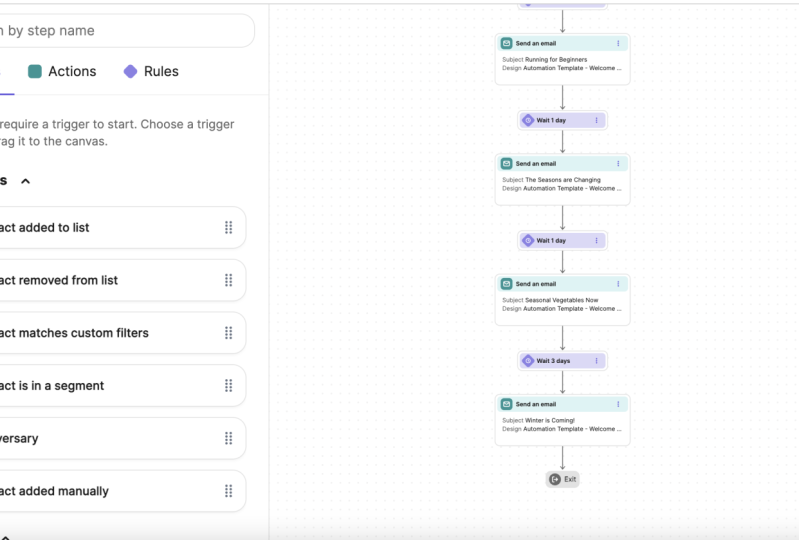
Wait three days, send an email on and on. So I have like 12345678 emails. They get sent out over the
course of like 15 days or so. And then it just ends. You can also create exit conditions. So if say somebody, let's say I create
automation where people are getting follow-ups and then they reply to me in the e-mail. I don't want them
to get continue the rest of the
automation, right. So I want to opt them
out so I could say, Hey, what's the exit condition? Well, I could say, Hey, they replied or opened or clicked or not replied
but clicked or opened. So if they clicked an e-mail on optimal on or another one
I could do is a list. So if somebody responds to me, I can manually add them
to a list and say, hey, there In my I could
create a list that's like responded contacts. And then if they get
added to that list, optimum of this workflow
and this automation. So let's kinda just a very
linear drip, automated drip. So yeah, That's automation. You can create a workflow. Choose from these templates
or just do blink. So we can do like test1,
start automating. Then we can create a trigger. So I'm going to
head over here to contacts and create a new list. Like I said, you can add import contacts and
create contacts. So I'd go to Lists, add new list, test1, and create empty list. Now let's say I can
create a form now. So I'm going to create a
form in the forum settings. I can add anyone who fills out that form gets
added to this list. And then I can embed that
form onto my website like a subscription form or a contact form or a
lead magnet form. I'm not gonna go through the
motions to create the form, but that's something you can do. So now I can come here, create trigger, contact
added to a list, test one right there. Okay. So somebody
fills out a form, they are added to this list that triggers this automation. And then I can send
them an email. And I can choose from
all my email templates. And then I can choose an email. Then create like a delay. So delay for one day and then send another
email, so on and so forth. So you can create a lead magnet, a landing page that
offers some value in advanced content. People opt in. Then you collect
their email address, they get added to a
list from that form, and then they get the list is a trigger or the forum
has a trigger to. So instead of doing a list, I can delete it and I can
do contact submits a form, and I can create that test form. So add to a list,
I would recommend, even if you use the form is the trigger and
you still want to add them to a list just so
you can have them segmented. And that's pretty much it. So that's an example. That's pretty much how
send in blue works. Again, you can upload
any amount of contacts, create any amount of emails, and credit any amount
of forms and send automated drip campaigns to people who've fill out a form. So yeah. And then you have That's pretty much it. That's
all the motions. Just head over to
send them blue.com, sign up, activate your account, and then it's good to go. So that send in blue kind
of overview, contacts, lists, automation
campaigns, templates. Templates are used for
automation emails, one-off, email sense. Yeah, thanks for watching
and I hope this helps you learn a little bit
more about marketing automation and send in blue. I'll see you in the next video. If you want to learn
lead magnets and funnel building and check
out my other courses on Skillshare about
those as well.
4. How To Be Successful With Marketing: Alright, so before I leave you with the strategies and methods, tactics that we just went over, I just want to share this
productivity strategy with you to help you get the most out of
your marketing journey as you continue to
learn other things. So, yeah, let's just
get right into it. Alright, so I have this
illustration here, and this is U on the left. You have your business
goals or learning goals. Maybe you want to learn a valuable in-demand
skill like marketing, or you're trying to learn
how to market your business, or maybe a business
you work for, whatever the scenario is. This is you and you
have your goal on the other side of the canyon
here, this pot of gold. And what happens is, this is a scenario we
can all identify with. And we start, we hear about some new tour tactic or
a shiny object syndrome. And we start to do something. Maybe it's building a marketing
funnel or social media, or developing a good website
or social media ads, paid advertising on Google or Facebook or
something like that. Or maybe it's chatbox. You know, there's all
these things that we can do to market and
promote a business. And then we start to do
one of these things. Then we could get that shiny object syndrome
and we learned about something else or
are introduced to another idea that we
think is really cool. So we start that and
then we started that. And what we're left with is
all these half build bridges that actually don't really
get anywhere, right? So what I want to recommend is that you pick just one tactic, one tour tactic, one strategy. Excuse me, one thing
that will be the most valuable to helping market
and promote a business. And you just stick with
that one thing and finish it, complete that bridge, and then you can move to
the second most valuable, the second most impactful thing. And then you can
just go on and on. Then it will take you
to the other side, get to where you
wanna be and you'll see a big improvement in traction in the growth of whatever business
you're working on. So I've identified 73 plus
different tools and tactics, different bridges that
will help businesses grow. The question is, which one is the most impactful
for your business? That I cannot. I don't know. If you need help, you can if
you need help figuring out what that one
impactful tactic is, the one bridge will
have the biggest impact on the growth of your business. Then you can just head over
to my website, AH, marketing, dot biz and connect with
me and then we can, I can help you figure that out. So that's the strategy I wanted to share with you
to help you be productive. I hope that helps and
really just focus on that one bridge at a
time and go from there. Alright, so that
concludes this course. This was an intro course
to give you ideas and strategies to and the mindset
to help you be successful. I hope you learned
some valuable methods and strategies to help you be improve your marketing and develop that skill set no matter what your
circumstances are, maybe you're learning to
market a business you work for or to help improve and
grow your own business. Or you're just trying to
learn an in-demand skill. But as long as you
keep on learning and practicing these
things we've talked about and continue to learn
and develop those skills. You'll be better equipped
with an in-demand skill. You just need to
keep on practicing, learning and doing things like actually hands-on
in practice as well. If you enjoyed this course, please leave a positive
root, positive review below. I'd really appreciate it. And there are lot of other courses on my
Skillshare profile. If you want to learn about
some other strategies and tools and tactics related
to Digital Marketing. My name is Adrian Hall Berg. You can learn more about finding the one bridge and
impactful strategy to help grow a business
from my website. Ah, marketing, dot biz. Thanks for participating
in this course and good luck with your marketing
journey wherever it may be. I'll see you next time
in another training.
 Adrian Hallberg, Digital Marketing CMO