Transcripts
1. Promotion Video: In our data life, better in our school IF
OR in our work-life, we are constantly bombarded with what we need to do and complete. Even while watching this video, you most likely received a
new e-mail or message that you need to respond to or
take care of urgently. How can you do everything
simultaneously when you are busy with so
many things simultaneously? Is there a way to
organize your work or tasks and be more efficient? Many of you may have a system
for completing your jobs or tasks and you're constantly
trying to get over them. You'll keep your
to-dos in a notebook, in writing, or atheroma, understand an app on
your mobile device. Maybe you use sticky
reminder notes at your desk or on your
computer screen. Or you use different
applications and follow your to-do
list in this way. Let me tell you many times
these simple methods taken, those are adding reminders
may not be enough to keep you call or
incomplete control. This guide will tell you
the methods you can use in your daily life to be more
efficient and action-oriented. If you have questions about the techniques I have explained, you can send me a message or comments in the questions
and answers section. If you want to learn the methods to systematically complete your work or projects that you want to
achieve in your career, school, or private life
without any delay, please join me in this
exciting journey.
2. Key to Efficiency: There are five steps
you need to follow to complete the work
you want to do. These steps are
capture, clarify, organize, reflect, and
engage, respectively. There are probably
many people among you who start the
day in crisis mode, you may feel like
you have to deal with an endless fire every day. You have to do so many things simultaneously that you often
don't know where to start. The main reason for
this that you do not already have a
system or strategy. This lack of technique or
strategy causes you to put your priorities or urgent
tasks and appending order. As a result, you feel
overwhelmed and stressed, not to mention the feeling of not being able to
complete anything. In times of crisis, people usually attempt to
react in the following way. Oh, how could this be? What would I do now? I don't know where to start
to solve this problem. It's not my fault. No, no, I didn't do it. Unfortunately, I don't
have time to solve this problem because I have a lot to do and
enough on my plate, there is another urgent thing
that I need to deal with. This is not a plant situation and I have no time
to prepare it. It was so sudden and everything happens
out of my control. In this training, you will learn the methods that you should
do in your daily life at your workplace systematically and efficiently without stress. To summarize this lesson, you should use a
system that will help you increase your
productivity and focus. In this training, you will
see how to use a system in your daily life that will help you to decide what to do next. That's all I wanted
to say for now, and I'll see you
in the next one.
3. 5 Steps to Efficient Task Completion: One was last time you had an uncomfortable or
irritating feeling that there was something
in the back of your mind that you should do. Something You have wanted
to do for a long time, but you keep putting it off. Do you tend to procrastinate
Again every time you say, okay, I'm starting
now, calm down. Don't panic. This
is very normal. And we all do this
procrastination. Often. Most of us experienced this feeling
quite regularly. This problem often makes it
difficult for us to focus. Suppose our brain
is a hard drive used to store data in computers. The more application or data you store on
your hard drive, the slower your computer is. Our brain is not
a storage device. Therefore, if you want to keep
everything in your brain, it will slow you down. If you don't follow a
specific methodology, such as systematic
repetition system. The more you try to keep the things you need
to do in your brain, the slower you will be. And most of the time, you will not be able
to remember anything. Because our brain is not as storage tool for the work
to be done by its nature. On the contrary, it
is a focusing tool. Therefore, you need
another storage tool other than your
brain for the tasks. Whether the task is
trivial or essential. Unit the captured those
tasks outside of your brain. Vehicle up and loops. The unfinished tasks
that make your restless and constantly
remind you of yourself. Open loops are unfinished items or tasks that you have
no idea what to do. These open loops can
include your life goals, such as graduating
from high school, college, or a master's degree. As well as things you need to
do right away like fixing, get clogged toilet, or replacing
a flat tire on your car. I'm sure many of
you are trying to complete these open loops that we don't want to deal with. Because I have been dealing with the same problems
for a long time. Most of the time.
These open loops have brought me
nothing but stress. What was the results? Somehow? I couldn't complete the
open loops that I wanted to start and ends until I started
to follow a new system. Dealing with these and
similar tasks that's have been waiting for
a short or long time, we will put more stress on you. You'll feel highly overwhelmed and eventually cause burnout. You no longer want
to do anything about the situation. Open-loop. Key idea. Think about completing
your open loops before putting them in. So where can you collect
Europe and loops? The answer is in
collection containers, also known as inboxes. Inbox can be an e-mail inbox, a physical inbox
stray sound recorder, a laptop, mobile app, or a task manager inbox. The first step is captured. Captured all your open loops, vector lifetime goals
or small tasks, and add them all to wellness. You can download and install a task management app to
capture your open loops. If you're a Mac or iOS user, you can download the thing SAP. It is a onetime purchase
application and has an excellent interface
that is very easy to use. You can also
download and install the to-do app if you
want free software. If you are going to use to do is I recommend starting
with the web version, not the mobile version. The second step is clarify. In this step, you will define the next physical action to
complete each open-loop. Don't get stressed about how
you will do all these steps. I'll tell you practically how to do all of them one-by-one. The third step is organized. In this step, you will create lists and projects that will help you act according to the physical actions you have determined for your open loops. Fourth step, review. Review of all your lists
and files regularly to help you make smarter choices
about what tasks to tackle. Finally, the fifth
step is engage. Start doing the accident. She determined in the
first four steps. To summarizes this and plan a hat hobby you will complete your open loops
are missing items. Open loops are incomplete items that you are not
sure what to do yet. Five stages of
getting things done. Our capture, clarify,
organize, review, and engage.
4. Rethink About Your To-Do List: Most probably your current
too though this isn't helping you keep track of your tasks comprehensively or efficiently. You can use your to-do
list for daily reminders, but you may not know
where to manage lifelong goals or
overarching projects. For example, assume that
you constantly think, you hope to write
a novel someday. Still, you don't know where to summarize the steps
necessary to achieve it. Are on days when
you are in a rush. You write it to do list on your phone as you
walk out the door. But you forget that
the list even exists. Key idea, capture, make a single list of everything
you have and should do. If the open loop that
needs to be done is written in more
than one list, it will be more difficult to
move any of them forward. The first step to efficient
task completion is to capture each of your open
loops in a single list. Let's call this list inbox, inspired by email terms. First, I will define the list as inbox to catch all open loops. For now, I want you to write your open loops on a
blank sheet of paper. Take a piece of paper
and pen and write down whatever you have to
do on this piece of paper. Starting from the very top. It doesn't have to
be just business. Write down the things
you need to do at work, home, or school. Write everything down, and don't bother thinking about
how to do it for now. Your goal here is to capture everything in one
inbox or one list. Later in this training. Other recommend some mobile device applications
for the inbox. Still a paper pen or digital note-taking
game environment is sufficient for this exercise. Now, whenever a new
open loop pops up, you can keep it in
your inbox or list instead of worrying about how
to deal with at the moment. Once you've got your
list of open loops, you can come back to
it when you have time. Think about what needs to be done and organize accordingly. Summary, gathered all your
open loops in our list. We named it inbox. Your inbox or list
can be a document, mobile app, or folder. If you are trying to track your open loops in more
than one location, it will be much harder to move
forward with any of them.
5. Can The Action Be Taken or Not?: Why do we typically feel so overwhelmed when looking at
the list of things to do? This is because
most of the time, the tasks on your list
are defined as such. Setup, meeting,
clean the kitchen, do homework, get
the car repaired, do the shopping, go on vacation. List like this. Don't
really tell us what to do. In fact, most of the time we start doing
what we think we should do. And after a while, we realized that we skipped one
or more of the steps. Let me try to explain
what an example you are at work and need to set
up a meeting about the topic. Set-up meeting task
is on the to-do list. Well, you send the meeting
to the relevant guests. However, some of the attendees reviews after sending
the meeting invitation. Why? Because before sending
the meeting request, you did not check
whether the invitees were available at the
time you specify it? Ultimately, those Hoover
unavailable reviews the meeting. If you had checked the
participants calendar before sending the invitation, you wouldn't have to deal
with the notation again. The next step inefficient
task completion is to clarify the next physical
action required to complete each open-loop before
taking action. Key idea. Clarify. Decide if you can take action, advise an open-loop or not. You can clarify what
needs to be done for each open-loop by asking
yourself the following question. Does this open-loop
require action? We can define actionable items as thinks that needs to be done. Typically, we can provide
actionable items such as a reply to an X person's e-mail or prepare for our next meeting. If an open loop does
not require action, we can call it a non
actionable item. Items that do not require
effort to include respectively. Trash, for example, staff, you don't need items you
don't need right now, but you will need later. Reference items you
should refer to that contain helpful
information. Once you determine
which items are actionable and non actionable, you can prioritize
your actionable items. You can also edit your non
actionable items later. Summary, decided by asking yourself what to do
with an open-loop. Does this open-loop
require action or not? For open loops that
cannot be processed, you do not need to do
anything at this time. Actionable items are things
that require action.
6. Clarify: What's Next Action?: Actionable items are items that need to be done
something about. However, we don't usually
clarify what needs to be done until we start doing the work and get to
the middle of it. This lack of direction can often make things
feel overwhelming. Key idea, clarify. Actionable items require
physical and visible action. For example, awake
and actionable items such as set-up, a
doctor's appointment. How can you clarify
what you need to do to move the MSc doctor
appointment action forward? The answer is to determine the next physical action
required to do this task. We can redefine the setup
doctor's appointment example to make it more
tangible and physical. Call the pediatrician,
Ms. Shelly, and set up an appointment for
next Saturday before noon. Some items may require more than one physical
action to complete. My advice would be to determine the next
physical reaction to begin with. Key idea. If a task takes less than two
minutes to complete, do it. Now, this fundamental
idea is one of the most essential steps for efficient task completion. If the time you
spend on the action will take less than two minutes, take action immediately,
and do that. Now, this is because
planning one to complete a two minute task will take longer than doing it. For example, you have
an action on your list. Face, I'm your mother. It takes a while to plan this
and write it on your list. Instead. You can immediately call your mother and complete
irrelevant item. In this way, when you complete a task that will take
less than two minutes, you will keep the number of
open loops in your list low. Once you have defined your
next physical actions, you can add them to your
next to-do list or calendar, or if possible, assign
someone else to do the work. Summary. For actionable items, ask yourself, what is the
next real physical action? Next actions need to be
physical and visible. It's like replying to an email. If an actionable item will take two minutes or less, do it now.
7. Next Actions List: Once you have more
precise that determined the next physical actions
for your open-loop. How can you be sure that you are actually performing
those actions? The next step in efficient
task completion is to create a series of lists
that you can regularly use, which we will call projects. In this way, you will efficiently perform the
actions you have defined. To begin with. You can start with
the daily to-do list. Keeping such a list
will also help you achieve your
long-term goals. Key idea, organize. Use a list of next actions to follow your daily reminders. For example, imagine that the full set pipe in your
bathroom has cracked. As a result, water
is leaking slowly. If you don't take
action immediately, the severity of the
liquid increase, your house will float. Instead of specifying an action such as fixing the full
state in the bathroom. The first physical action
should be to turn off the main water wealth
coming to the house. When you review your list, the clearer your action will be. You will know what
you need to do, which will give you
great convenience in finishing the task. Make your next action
list more manageable. You can divide it
into different areas. The areas you will specify
such as work, home, garden, children, and school are examples of keeping
your next action list. Summary. Your next action list will show all the next actions you need to take as
soon as possible. Every action in your
next action list must be physical and visible. You should review
this list every day.
8. Who Should Do This?: You don't necessarily
have to complete an actionable item
most of design. For example, let's
say your company has a customer database
update assignments. Let this be the entry of the email addresses of new
customers into the computer. You could try outsourcing this assignment
to another person that the company you work for. For example, you can ask your colleague to enter the
data into the database. You can follow
your tasks done by someone else in your
next action list. With the weighting for tech, you can easily track the
tasks as scientists, someone else with the
weighting for label. You can separate the
task you need to do in your mailing list
and give them to someone else using
different tax. I recommend that you review this list once or twice a week to make sure any
tasks you assign to someone else or
running smoothly. Summary, to keep track of the actionable items
you have authorized, label these tasks
as waiting for. You may not be the
right person to complete every action of lies. More new list. You're waiting lists,
keeps track of the tasks you expect
others to complete.
9. Use a Calendar: Our next action list
covers everything we urgently need to work
on as a next step. Well, what kind of path will you follow for the
Task Unit to do later? Instead of adding such non-urgent and
time-consuming tasks to your next action list. You can add them
to your calendar. Key idea, organized. Use your calendar on the
fourth time-based tasks. For example, imagine seeing an actionable item that needs to happen on a specific date. In that case, you can
edit to your calendar. However, you should not set a reminder if this action does not really need
to be done that day. For example, if you know that
the only way you can meet with your group of friends
is after six PM on Friday. You can add it to your calendar. Or if you are taking the
school or personal training, you can add the day and time of the strength
to your calendar. On the other hand, if the relevant action cannot take place on a particular date, do not set a reminder
for yourself. Adding good reminder for
an activity that can be completed can put you in a constant loop of
procrastination. That way, when you see a
reminder on your calendar, that's when you will truly understand that it
needs to be completed. You will stop procrastinating and not miss the day
you need to finish. For example, unit per pair representation on
Venus de still, you are busy on Wednesday and your whole day eras
result for meetings. Therefore, preparing for the
presentation on Wednesday, we'll not do you any good because you will not finish
the presentation entirely. After all, you will
be at the meeting. Blocker calendar for
the tasks you need to complete and only do that
job on the day and time. Use it. In this way, you will feel better
at the end of the day. Use your calendar on
the four tasks that can be done on certain
days and times. Summary. Using your
calendar for date specific tasks will help you know what you really
need to do that day.
10. Organize Your Projects: You may need to do more
than one action to complete some of your
actionable items. We can call these items that require more
than one action. Project. Projects can be exemplified as tidying the garage,
washing the car, buying a new computer, buying a new house, it can often be challenging
the progress through projects involving
so many steps. I will talk about the
metrics to help you complete your projects and break them into manageable small pieces. Key idea. Each time you can move
your project forward, focusing on the next
physical action. For example, let the name of your project beta summer
holiday organization. What next action
needs to be taken immediately to move
this project forward? If you're going with
your spouse, friend, or a group of friends, you will first sit down and
determine the holiday date. Action. Set the day and time to discuss the holiday details
and add them to the calendar. If you add it to your calendar, you will feel more
comfortable because it is much easier to read something done in another tracking system. Then to keep it in your mind, you should add this to
your next action list. And once you are done, it will be much easier for you to identify the next section. Then each time you check
your next action list, you can gradually move your current project
or projects forward. Summary. Projects are tasks that require multiple
actions to complete. Consider what immediate action the project needs to move
the project forward. Each project must have an
action in the next action list.
11. What Do We Do With Non-Actionable Items?: Now you know how to organize
your actionable items. Let's see what to do about things that cannot
be acted upon. Remember, not
actionable items are things you can't or don't
need to do right now. Key idea. Make your list as much as
possible without clutter. Your main goal is to
make your list as operational as possible and
not allow any confusion. Otherwise, you are less
likely to use this list. I mean, don't ever keep
open loops in your list. Instead, you can organize these items into lists
for weekly review. These open loops can include future projects or thinks
unit to access over time. Make your list as functional as possible by keeping
it clutter-free. Summary. Organize your non
actionable items into various lists to
remove them from the list. Not actionable items
are things you can't do or don't
need to do right now.
12. How To Follow Up Future Projects?: Most of you definitely
have projects that you think you will
do or want to do one day, but you may not have time to devote to these
projects right now. If you want to follow
these projects soon, you will need to
pursue them elsewhere. Key idea, keep a list of later or possible projects for
future potential projects. Add them to the next or
possible project list to keep track of potential
projects or ideas. This list might include learning to code, playing the guitar, making your own garden sofa, or reading some of the world's most
famous classic novels. Likewise, this list can be your inspiration when you are ready to start
something new. To get the most out of your later or possible
project list. I recommend that you review
this list once a week. In this way, you can
start the project on this list and continue
when you have time. You can add inspiring ideas or projects to this list and
refer to them individually. Summary user later
possible projects list to track projects you want to consider
for a later date. This can be a parking
lot for projects and a place of
constant inspiration. To get the most
out of this list. Review it regularly.
13. Prepare For a Specific Time: Your actionable
items may contain subtasks that you
eventually have to tackle. How can you prepare
for this task in advance to reduce some of
your future workloads. Key idea. You can use a reminder file to save items for a specific time. For items that cannot be
processed at the moment, you will eventually
need to do something. I used the things app for this. I prepared a monthly file for the tasks I need to do
later in the application. For example, each month, I have to put my garbage
container in front of my house for collection
on a specific day. Since these days
change every month, I add a reminder to
the things app that says Set the garbage
container on the road. The application gives
me this reminder, ends I completed
after it reminds me. A reminder file is a way to tickle your memory
in the future, and it's a place to put things, units access for
a specific time. You can use this
monthly reminder file in all areas of your life. For example, you can add
birthdays, holidays, meetings, and other things you plan to attend to on a
particular day or month. Summary. Your remainder file can help you keep track of any item
for a future date. Your reminder file is a way to tickle your memory
for a future date. Define each month
individually in the app you use to create
your reminder file.
14. Weekly, Monthly, and Annual Reviews: People tend to feel their best right before they
go on vacation. This is because they have completed their unfinished
work before going on vacation and left their
current position in a place where they can return
to it after the holiday. The most important thing to pay attention to is to
think carefully about each list and determine your action plan for
unfinished tasks. Key idea. Collect open loops and review your
list once a week. You should refer to
your next action lists and calendar every day. However, you will also need
to do a weekly review. So make sure all your lists are helping you
achieve what you need. Choose a specific day
for your weekly review. On this day that
you will determine. You have to go through all
your open loops one by one. Next. You should ensure that
the actions you set for your open loops are as complete and up-to-date
as possible. In other words, you will examine all your projects and all the activities you have
determined one-by-one. Thanks to the victory view, you will be able to update unspecified open loops
to make them actionable. This will cause a
significant contribution to the progress of
your current projects. As you review your
projects or lists, you'll be able to trust
that it accurately describes the things that
need your immediate focus. In addition, the more
reliable your system is, the faster and easier
your speed and efficiency will be to get things done
and not stress you out. This system will give you
the confidence to overcome them without feeling the stress of the constant waves of duty. Summary, the weekly review
includes the following steps. Collect new open loops and
add them to your list. Make sure to review
each item one by one, and move it to the
related project or list. Keep your project
or list up-to-date.
15. What Were The 5 Steps To Efficient Task Completion?: Hi. In this part of my course, I will give practical
examples and reinforce the topics that I explained
in the previous chapters. What were the five steps to
efficient task completion? Capture, clarify, organize, reflect, and engage. Capture. Write down everything you
have in mind and plan to do. Don't keep it in your mind. Remember, our brain is
not as storage area. The contrary, it is an
excellent focusing tool. As an example,
Consider a computer. What happens if you opened many programs on the
computer simultaneously? The response time of
the computer decreases its speed and therefore its
overall performance decrease. The more todo items you
keep in your brain, the slower it will
respond to you. And sometimes you'll
forget some things. If you keep the open
loops mentioned in the previous
chapters in your brain, your stress level will increase constantly and you will
not complete most things. In the following videos, I tried to explain step-by-step
how you can complete your to-do items
more efficiently and make the subject
easier to understand. I'll see you in the
following video.
16. Write All The Open Loops You Have In Your Mind!: Step one, write down any
open loops you have in mind. For this, I use a
program called things. This program can only be used
on Mac or Apple devices. However, you do not necessarily
have the user program. I use. Many paid or free
software options, work on Windows and Mac operating systems and
Android mobile devices. In the examples I will give, I will show how I use
the things application. My favorite feature of the
things that is when you press control and
spacebar at anytime, the quick capture
pops up and provides a quick to-do entry of the
open-loop in your mind. Let me quickly show you how I save open loops using
the things app. I press control and space k. The pop-up on the screen allows us to
enter a new to-do item. Let's enter a few open loops. Order pizza, pay the electricity
bill, pay the rent. Pay the cortex. Surprise your mom
on Mother's Day. The following video,
I will talk about the clarifies step that you will do after the capture step. See you in the next one.
17. Practical Example: Clarify!: Second step, clarify.
Clarify step. You must determine the
next physical action. Suppose the loops you call it in step one are well-explained, and the next physical
activity is straightforward. In that case, it will be pretty easy for you to complete
all the open loops. Let's try to understand it
together with examples. Let's set an open-loop
in the capture step. Setup a meeting. We captured an open
loop in the first step, set up a meeting. So what do you see when you look at it
for the first time? Setting up a meeting is
not clear on its own. Here is how we can clear it up and turn it into a
physical action. Submit as suggestions,
the agenda of the person who needs to attend
the meeting for Project X, and potential meeting hours
based on their own schedule. Another example,
decide on a vacation. At first glance, this open-loop or what you're about
to do looks good, but it doesn't involve
any physical activity. Here's how we can do this
to make it actionable. Make a list of places to go
for vacation according to the family budget and talk to your spouse, girlfriend
or boyfriend. Another example, check out the sulfur from
the furniture store. Check this out on
the furniture stores website for opening hours, then they can turn it
into a physical action. Another example,
organize the garage. Here's how we can change it. By x, y, z sized
boxes from shop a. Track the order called Jack
for your purchase order 549. Instead. Think about relocation. List. The pros and cons of relocating on a piece of paper. You should pay attention
to the examples I have given to determine
the next physical action. Ask yourself this question. What is the next
physical action? Once you identify this
first physical action, you will see that the
work you need to do or the project you need to
complete is progressing. There's a saying that starting a business is half
of finishing it. Definitely the right
approach, in my opinion. I recommend using the action
verbs that I will list shortly to determine your
next physical actions. By review. Visit, list, watch, right, rate, plan. Send an email, call at, try, at the calendar, revise, lesson, move, send the message. Try rewriting open loops are actions you have already written using these
action words. Now, let's add our open loops
are thanks to our inbox. Using these action
words with the things app will save all our
open loops in our inbox. The things up. It's already defined as Inbox. Move, move the close box in
the attic to the garage. Send a message. Send the message about
what you need to bring to your friend for the
weekend. Barbecue party. E-mail, e-mail your colleague coincident to send
the meeting notes, called the class
teacher on the phone to talk about your son's situation. Talk to Jennifer about which room you will
make a guest room. We can give many
more such examples. Again, always ask
yourself this question. What is the first action
to complete this task? First of all, you need to understand yourself
before you do anything, is the work you will do or want to do something
you would actually do? Can you design this task differently so that
it is completed? These questions are about
personal awareness in general. For example, you have to prepare a critical presentation
or homework on Tuesday, which will take up all your day. However, you have a meeting or a lecture from
morning to evening. Tuesday. Therefore, you
don't have time to prepare the homework
or presentation. This is where personal
awareness comes into play. If your whole day is filled, it is more appropriate to make that presentation
at another time that is convenient for you. Never promise yourself
what you can't do. If you can't do that task
when you premise yourself, it will come back to you like
stress and low motivation.
18. Practical Example: Organize!: Third step, organize. I suggest that you organize your open loops or tasks
in a truss system. I would like to show
you how I organize it. I receive hundreds of new notifications and
messages a day in my inbox. Therefore, I first
categorized and notifications or messages
that come to my inbox. I decided for each
incoming key male, should I add this
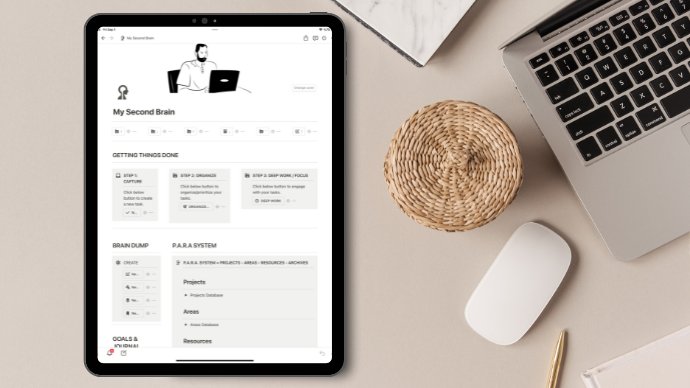
email to my task list, edit to my calendar, keep it in Notion for reference, or send it to the red late
rep to read it later. Being organized in this way helps me a lot for Inbox Zero. I'll show you how I do this in more detail in the
following lessons.
19. Practical Example: Projects and Areas: After adding my open
loop to the things app, I divide them into two
categories and organize them. The first category is projects, and the second is areas. Projects can be defined as tasks expected to be completed
at a particular time. In other words, we can
define all tasks with a specific start and
end date as projects. Areas are constantly recurring and have no definite
starts and ends state. Let's have an example together
to see the difference between the project and
the area more clearly. Now, think about the
items on the list. Then in a moment, we will determine
together why some of them are projects and some
of them are areas. Laying grass in the
garden of the house. Buy a house, house maintenance. Recruit a new project manager. Management, graduate
from university. Marriage. Now pause the video and identify the projects and
the areas yourself. Is it a project or an area to put grass in
the house garden? The correct answer is, it is a project because this ToDo has a specific
beginning and ending time. Its output is the growth
of grass in the garden. Buying a house, a
project, or an area? The correct answer is project. Because buying a home also
has a start and end time. The output is the
purchase of the house. Is on maintenance, a
project, or an area? The correct answer is area. Because maintenance is a process that
requires continuity, there is no specific
start and end time. Recruit a new project manager. Is the project or area. The correct answer is project. Likewise, this task also
has a start and end dates and its output is the recruitment of
a new project manager. Is team management a
project or an area? The correct answer is area. Because The Management is
an ongoing assignment, there's no starting
and ending time. Is graduating from the
university a project or an area? It is a project because it has a specific start
and end periods. Still, the extended tears may vary depending on the
graduation conditions. Its output is a
university degree. Is marriage a
project or an area? The correct answer is area. However, it has an
initiation date. You have many
responsibilities to ensure the continued
to offer marriage. The end date is uncertain.
20. Project and Area Definition: Now we will assign the tasks in the inbox to projects and areas. As I mentioned before, I will use the things up. But you can also do
this in other apps. You can find the
application list in the resources section. Let's add our projects
and fields to inbox. Tasks are a subset of projects, or we can say that projects
and can pass tasks. Projects are also the
subset of the area. Or in other words, we can say that areas consists of projects. Most of the time. I don't ask projects
under areas. I can easily access projects at the top of the
list on the left. It makes prioritization
is for me. I can see the projects I have
not added under the area. However, it is not easy to view and prioritize the
projects under the areas. This is the method I use. You can choose the way that
suits you best. If you wish. You can follow all projects
under separate areas. It totally depends on
your personal preference.
21. Weekly, Monthly Annual Review & Practical Examples: The fourth step is reflect. What tasks are open
loops do you have to deal with on the
current day or week? Which ones are good? Which tasks should you choose
based on this week's theme? What do you want to
achieve this weekend? And what tasks do you need to accomplish related to
what you want to achieve? I'm doing a weekly review
for the reflection phase. For this reason, I asked myself
the following questions. What is important this week? What was this week's theme? What do I want to complete or achieve by the end of this week? The weekly review of keeps your mind from backing
up on remembering. It gives you a high
point of view of that. You can see like
a bird's-eye view away from the daily demands. It ensures that none of the
open loops are overlooked, thus giving you a confidence. Here are some other
main topics that I will recommend in
the victory review. Email. I completely
reset my e-mail. I read all the unread emails and send the ones
requiring action to the application,
calendar or plan. The tasks in my
schedule needs to be wholly complete and precise. I cleaned my computer's desktop and downloads folder
of every week. This way, I can get a clean
start to the following week. I make sure the inbox area
in the thing SAP is clean. Tasks or open loops. Make sure all tasks
are up-to-date. In other methods of reflection
is a monthly review. You may have longer-term tasks. In the monthly review. I have summarized
what you can do in weekly and monthly
reviews in a table. As I mentioned in
the previous lesson, you can clean up your emails
during the weekly review. You can check your calendar. You can clear your desktop
and download folder. You can review your notes. Finally, you can be sure that your open-loop or
tasks are up-to-date. In the monthly review, you can achieve the goals that you don't need to
check every week. You can update your
project lists. You can update your fields. And finally, you can review what you said
you might do one day. As a third branch of reflection, you can do an annual review. I usually do my yearly review during the last
week of December. Here are the things
I want to do in the next three or five
years and my life goals. We can rank the weekly, monthly, and yearly
reviews like this. We can liken the week to
review a bird's-eye view from about 100 meters
above the ground. On the other hand, the month review allows
you to look down from the sky biplane and see
a broader perspective. We can liken the annual view to looking at the world
from the space station.
22. Take Action! / How Do I Take Action In My Daily Life?: This lesson, I will
explain the fifth and the final step,
engage or action. Here you only need to complete the open-loop that
you have specified. You can use it to do
list you set for this, select your To-Do Tasks from that test and complete the task. Here are some questions you
should pay attention to and ask ourselves. What can I do? For example, today,
you will take your car to the service
for annual maintenance, but your wife also needs
to guard the same day. In this case, ask
yourself before you put the items you cannot
do on your to-do list. Can I really do this? Do I have enough time
to complete this task? If you have a meeting all
day on irrelevant day, do not spare four hours for
what you want to do because you have an appointment that day and you don't have
time to spare for it. Do you have the energy
for the work you will do? You should not put new tasks after six or eight o'clock in the evening because
it is the end of the day for those
who work overtime. Therefore, you may
not have the energy to start something new
at the end of the day. What are my top priority
duties or responsibilities? Don't waste time on things
that don't really need priority by adding them to your list just because
you liked them. Instead. Take time for your
priority tasks and add them to your to-do list. I follow such a method for determining the task
in my daily life. First of all, I look
at my calendar. For example, I have
a meeting between 1011 o'clock then
from 1130 to 12, and other meeting appears. In this case, I have a gap of
30 minutes between 111130. I am getting and completing some of my tasks databases
in this space. First, I start with my
most important project and mark the task that I can do that day
for that project. My filtering criteria
or project priority, time to spend, energy
to spend, respectively. I constantly update
all open loops and task under projects and areas until completing
the task is unavoidable. There is a problem if a
task appears more than once during the week and it's
still not completed. This problem is that the
relevant action is not explicit. Not about motivation, time
or energy or creativity. If something is unclear, you don't know where to start. As I mentioned before, to advanced irrelevant action. Ask yourself the
following question. What is the next
physical action? You can break the relevant
work into smaller parts to make this easier than
after taking it apart, you will see that
you can quickly identify the first task
that needs to be done. Next step, is this
action important to me? Is this action my
responsibility? When you answer these questions, you will come closer to reality. This allows you to approach the relevant action
realistically from a different point of view and think or thinks that needs to be done
for you will be clear. If you see a task for more than two days,
you must change it. To do this, you can
follow these steps. The definition of the task
cannot stay the same. You need to use a
more specific verb when describing the task. You should make the
task easier to do. You have to make the task
visible and tangible. You should ask whether this
task is essential or not. That's all I'm going
to tell you for now. You can contact me with
questions and answers area about any issue
that comes to your mind. I will assist you as
soon as possible. Thank you.
 Eralp Sendan, Industrial Engineer / Program Manager