Transcripts
1. Introduction : Hi, everyone. In this course, we'll be learning on how
to create 30 days of viral post content with Chat
GBD in just 15 minutes. Thank you so much for
picking up my course. Now, what exactly is Chat GBD? Cha JBT is an advanced
AI language mod developed by Open AI. Today, Char JBT is widely
used for a variety of tasks, including for writing assistant, answering questions,
brainstorming ideas, and even for creative tasks like story writing and
content generation. Now, for this course,
we'll be utilizing hat GBD to brainstorm ideas
for our social media. Now, what are the contents
that we will be going through? The first one will
be the steps on how to register for hit GBD account. So if you're someone
new to hATGBD, please go through these steps on how to create a new account. Secondly, we'll go into
what makes a post go viral. So in order to ask hagbil to come up with viral content idea, we first have to understand
what makes a good post. Next, we have to understand
who is our targeted audience. By understanding who is
our targeted audience, we cannot let
Chagbil know so that the information that they provide us will
be more relevant. Next, we'll be asking
Chan chibi to bring some content teams as well as timing our posts
for the best results. Last but not least, we'll
be going through on how to tabulate a 30 day viral content plan into a
table so that it's easier for you to
look through as an overall and knowing where and how to create a good graphic
together with the post. Now, ita Ferdo let's
jump right into
2. How To Register For A ChatGPT Account: How do we register
for ACACVD account? To get started, you can
visitopen.com or straightaway directly visit chart dot.com and click on the TRHGVD account. For new signup, please
click on the signup button and you have a few ways
to create a new account. You can either log in
with your Google account or Microsoft account
or Apple account, or you can choose to log in
with your email address. So if you sign up with
your email address, you wouldn't have to
have a strong password as well to access your
Chart GBD account. Once all this is done, you would then have to
check your inbox for a verification email
from OpenItey. Now, once everything is done, you'll be able to view
Chart GBD main panel, which is this right here. Now, let's go to
the next section.
3. What Makes A Post Go Viral: Now, what makes a post go viral? It is crucial that we
understand what are the key ingredients so that
we can let hajbii know. After that, they'll
be able to give us content that have
these four elements. Now, first, a post that goes viral must be
emotionally engaging. It can be a funny meme
or inspiring code that can touch people's emotion. Next, it has to be relatable. So if you're selling something that got to do with mother care, you can write a post
about the struggles of working from home because
you would have to take care of your kid at
the same time as well. So this is something that is
relatable to your audience. Next, it has to be timely. So you can post about
a trending topic like a popular event or a popular quote or
even a popular meme. So in this case, it will be both timely and emotionally engaging. Last but not least, it has
to have a visual appeal. It can be an eye catching
images or well edited videos. So for this, we can also
ask hajbli to let us know what are the
images that we can use? They can give us a few ideas, and then we can create
our own graphic before posting our post. All right. So here, I've already told Char Jib that
as a social manager, viral post must be
emotionally engaging, relatable, timely, and
has good visual appeal. I've asked them that later on, please provide content
that these four elements. So this is the part
where we put in more input into Charb so that the feedback or the
response that they give us is more relatable and useful.
4. Understanding Your Audience: Next, understanding
your audience. So by understanding
who is your audience, you'll be able to
tailor your post to your audience emotion,
interests, and needs. This will then indirectly increases the chance
of viral sharing. Now, it's important
to know who is your audience first so that
we can let Chad Chibi know so that later on the
30 days content plan would be more relatable to
your targeted audience. Now, let's start identifying
who is our audience. First, let's look
into age based. So either you're
targeting Gen Z, which is around 18 to
24-years-old or Millenis which is 25-40-years-old
or GenX, which is 41, 56 or Baby Boomers,
who is 57-75-years-old. So this is one of
the ways on how you can categorize
your audience. Now, beside age base, there's also interest
based audience. Audience at your targeting, it can be travel lovers, tech gigs, foodies, gamers or fashionist staff,
et cetera, et cetera. Or you can look in
terms of profession. For example, like
entrepreneurs, startups, corporate professionals,
freelancers, and creatives. Next, location based. So location based is quite
a very general scope. Either you're targeting in
terms of country, let's say, like Maysia, Singapore, US, UK, or you want to target
in terms of travel nomads, urban dwellers, or rural
or suburban residents. Next, lifestyle based audience, for example, like parents,
students, pet owners, minimalists, et
cetera, et cetera, or values based audience, such as spiritual audience or health conscious individuals or socially conscious
audiences, and many more. So these are the few
ways that we can categorize our audience
so that we can let Chachibi understand more
about our targeted audience. So let's say the niche
that I'm in is fashion, Perfect. So now they
have already updated their memory that this is
our targeted audience. Now, let's jump right
into our next section.
5. Brainstorming Content Themes: Next, brainstorming
content teams. Now, content team is
essential to ensure that our post is consistent,
engaging and effective. There are a lot of
categories for content team. One of it is educational. Now, for educational content, the goal is to teach or inform the audience
about specific topic. For example, how to guide, tutorial, webinars
or product demos. Next, we also have
entertaining content. The goal is to engage the
audience through fund content. For example, it can be memes, challenges, quizzes,
funny videos or gifts. Next, it could be
inspirational content. The goal is to motivate
your audience. For example, it could be code, personal journeys,
motivational videos, customer testimonials,
et cetera. Besides, we also have
behind the scenes content. The goal is to give the
audience a sneak peek into your process or
daily operations. For example, like office tour, day in the Live post, production process, or
employee highlights. Next, we also have
product focused content. The goal of this is to promote about a product or service. For example, it could
be new product launches or how to use specific
products or unboxing videos. Besides, we also have
event based content. The goal is to
highlight upcoming ongoing or past
events, for example, like event countdowns,
live stream, recaps of events or special
announcement, and many more. So these are just a few of the content themes that
we might be using. Now, let's go to Chart
GBD to ask them to generate five content
themes for our niche. So my niche is fashion niche. This one you just
put in in whatever niche that you are in right now. Then they will come up
with a few content names that are suitable
for you to use. Alright, so Cha GBD
has come up with five content theme that is
suitable for a fashion brand, as well as it aligns with
my audience scope here. So they have came up
with five content theme. The first one is Effortless
Staple Series Aday the live European city style
dit beyond the trend series, fashion and function
Minimalist challenge. So now that we have put in
all this input into CharGBD, we can then go on
to our next section which is about timing our post.
6. Scheduling And Timing Your Posts: Now, it's about scheduling
and timing your post. Posting when your
audience is most active, it will maximize our post reach. Now, let's put it this prom into our hajbli which is what
are the best time to post on XXX for a travel
blog targeting XXX. So this platform here, just put it in whatever platform that you're planning to use, and then for this niche, we'll change it to fashion in my case here, targeting XXX. Since just now we've
already put in our targeted audience
into Chachib, we no longer have to use
the same prompt again. Now before we get into Chachi B, this is just a very general
schedule for posting that I've gotten research and
sources from Sprout Social, as well as Buffer as well as
cold schedule, et cetera. So for example, on Instagrab
based on their data here, the best days to post is usually Tuesday, Wednesday, and Friday. The best time is between
9:00 A.M. To 11:00 A.M. We also have
data from Facebook, Twitter, Linkin, Tik Tok,
Pinterest, and YouTube. So this is just a very
general information. But to get the
precise information, let's put in this prom into
Char GBD so that we can get an information that is relatable to our
target audience here. All right. So Tach
Bile has come up with all this information
telling me that for Instagram, the best time to post
is Monday to Friday, between 6:00 to 9:00 A.M. And 11 to 2:00 P.M. As for Facebook, it's from Monday to Thursday,
between this time frame, as for Tik Tok,
Monday to Friday, between all this time frame. Now let's move on to
our next section.
7. Tabulating a 30 Day Viral Content Plan: Alright, so this will
be our last section, which is tabulating a 30
day viral content plan. Now, up to this stage, we have already told Cha JVD, who is our targeted audience? What is our content themes, and what is the best time
to schedule our posts. So from this stage, I'll be
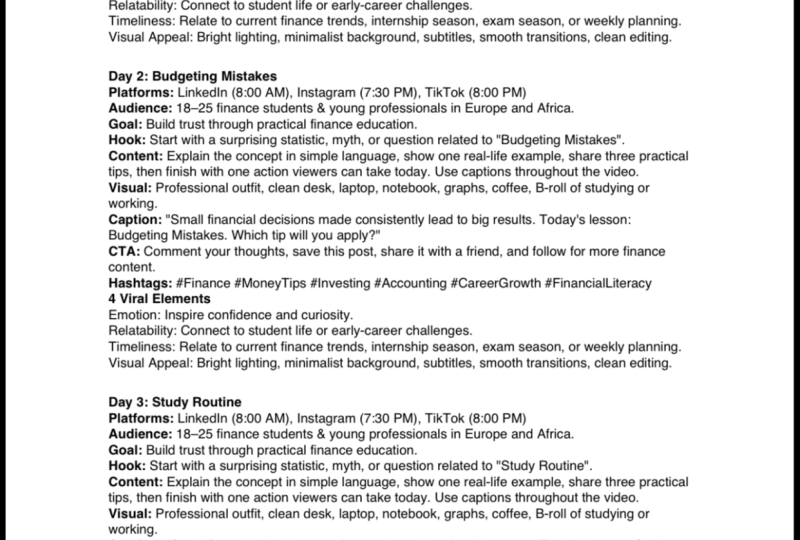
asking Cha JBD to create a 30 day social media
content schedule for travel brand targeting XXX. Now, I'll ask them to include
details such as post date, time, topic, content type, target audience,
and call to action. So for example, let's look
at the post date time. They will then get
this time from our previous section where
we have already asked ChargBD when is the best
time to post our content. Now, the output
that they will come up with would be
something like this. They will come up with a full
schedule saying day one, you have to post at
which time, which topic is more suitable. What
is the content type? You should use image or text, and who is your target audience, and what is the call to action? Now, the results that
you might get might varies, but at the
end of the day, it will all be
tabulated into a table, so it's easier for you to look at whenever you're
scheduling your content. Now, without further ado,
let's jump right into CharBD. So if I ask gbi to create
a 30 days plan right now, it will take some time
because they're going to think of 30 days content. So for this lessons purpose, instead of asking them to
create 30 days content, I'll just ask them to
create seven days content. But if you want a
plan for, let's say, two months or five months or
even one whole year content, you can just put in
in how many days that you want them
to come up with. There you go. They have
crafted everything here, putting at which day
that you should post, what time or which platform,
what are the topic? And then the content types
should you use carousel image, video or image text, and what are the details here, as well as call to action. So these are just a very draft content plan for seven days. If you're looking
forward for 30 days, then you just have to change the seven days to 30
days and they will come up with a 30 days social
media content plan for you.
8. Conclusion: Alright, so we have come until the end of
our section here. From this course right here, we have learned on how
to register for a hGB account on about what
makes a post go viral, understanding our audience,
brainstorming content teams, scheduling a post, as well as tabulating a 30 day
viral content plan. As a matter of fact, I've
actually prepared a PDF file, which I'll put in
the resources down below that you'll be
able to keep track on whatever output that Char GB has given
you so that you'll be able to use this
as a reference in your future content planning. So you can have a view here.
This is the audience column where you can fill
in with all the audience input that
you're putting in. Here we have content teams,
scheduling and timing. So these are the
scheduling and timing that CharGB suggested
to me just now, as well as 30 day
viral content plan. So you can put everything
in this PDF file so it's easier for you to refer back on whenever you feel like. Once again, thank
you very much for picking up my course.
See y'all next time.
 Christine Choo, Elevate with ChatGPT!