Transcripts
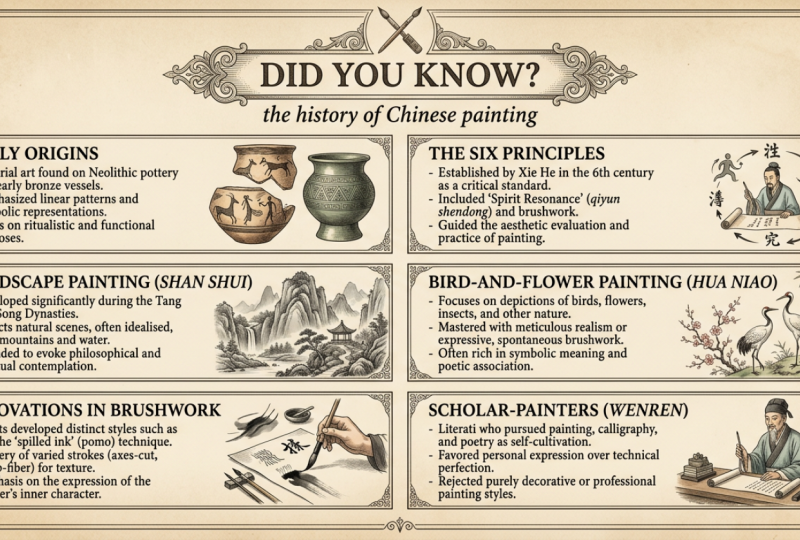
1. First (1): There. Welcome. In this class, I will teach you how to create educational
infography like this. We'll focus exactly
at this style. All the image that
you are seeing here created by EI with just
one simple prompt. That's what we're going to
see together in the course. I'm Ahmed, and I will be your guide for
creating this type of educational infographic using EI with just one simple prompt. If you are ready, let's get.
2. The Ai Tool: No, the first thing
that we must know it's what EI tool we are going to use for generating this type of
educational infography. Simply, we use NanobnanaP, but there is a small problem. It's lots of people will type nano Banana Pro and we use it with Gemini,
and it's limited. You can create lots of image, or they will go for Pay tool, for example, this or Let's
make look at this or this. For example, this, you must pay $11 a month or if
you go to this tool, which is very popular,
you must pay, for example, if you pay monthly. Must pay $9 a month, and you have limited credit in each one, it's
limited credit, for example, nano banana Pro, you have limited credit, you can create lots of image. And the same thing for Gemini, you must pay for be able to create image with
Nan banana Pro. The thing that we
are going to do, if you make Roqil,
you will find flow. This is what we are going to do. We simply go to
Google, we write flow. We make account with your Gmail, simply make account
with your Jim. As you see here, Google Labs, click at the first result, make account with your Jim
and you'll get like that. So the first thing
that we make look, I have, for example,
here, number of credit. And if I must upgrade the tool, it's with Google AI, so you get credit and
you can use flow. But but we are going to
use everything for free, and we will not use any credit. Why? Because the time that
I'm recording this video, no banana, it's
completely for free, as you can see, nano
banana and non banana Pro, each generation use zero credit. So why I'm going to pay for something I
can use it for free? Why I pay for Gemini or
pay for this or pay for this and pay for
any tool that use an banana P. When I can
use it with flow for free, as you can see, for flow now, it's completely for free, Nero banana and nur banan P. So simply the thing that
you must do now is just go make an account with
flow with your Gmail, just simple account and you can use Nerve banana for free. Now, we know the tool
that we're going to use. Let's make quick look at flow. So flow, you can generate
with video or image. We will generate image. So simply here you
can change the model. We will use Nur banana P, and here you can change how
the image want to look. And here you can
output per prompt. So here you can get one image to image three
image or four image. So we just write our prompt
here and click Generate, and we can get
results like this. For free, we're not
going to pay for any tool to use Nano Banana Pro. Now, the thing that I want you to do is go make an account, and in the next
lesson, we'll start working at our prom.
Now, see you in the next
3. Prompt Infrastructure: Now let's get start
and see how we get this exact result
with our prompt. Now, let's get start.
So the first thing, the most important thing
that I want you to understand this is
not just a prompt. It's a template system.
This is what you must know. So most of people write
random text to AI, and they hope they got the
result that they want. But here we are doing
something different. Our prompt will give you
always the same result, no matter the topic, as we see
here, no matter the topic. It's about cars or
it's about animal. You will always get
the same result. So here, it's not just a prompt. It's a template system. This in your mind. And the
result always look the same. Layout, look, for example, here, always look the same. That's what we are learning
today. No, let's get started. So the first thing,
this is our prompt. I don't want you to
be afraid and look very complicated. Just relax. We will see this
prompt in detail. So let's start
diving in this prom. So the first thing before we start see each
word in this prom, let's know the basic. Let's imagine we are
building a house. So the first thing, we must know that we must do the pillar. So here we have three pillars. The first one is the visual
identity of the image. So here, I told him, for example, in ninth
century, why I write this? This is the style
of the whole image. So here we tell the EI
what area, what color, what our technique here he is going to use
when we write this. Don't worry, we'll see
in detail what we write. So when we see the
ninth century, here, the AI automatically, think of the Botanical box, and that's the
style that we want. This is the style that we want. This is what technique
that we want. Next, in every other
detail, which is this one, for example, earth
tones lie work, that's point in the
same direction. So this is how we get
consistent result every time. As we see, it's always
same result every time. I we know the visual
identity of the image. So the next one, as we see, let's imagine we are
building a house. The second one it's
the layout row. When I told them it
exactly six panel, two col three row. If we go to the
image, we will find, as I told them exactly
six image six panel, one, two, three, four, five, six, one, two, three,
four, five, six. I told them two col
one, two, one, two, one, two, it's the same one, two, and I told them three row. If we go here, one,
two, three, one, two, three, and one, two, three, one, two, three. I just know, I'm
building the house. Always imagine you
are building a house. I give him the visual identity. Then I give him the layout rule. I told him, Look, I want six
panel why I'm doing this? This is how I control the
structure of the page. So without saying that without layout rule, do
whatever you want. Maybe sometimes he give me five. Sometimes he gave me eight, sometimes he gave me only two. So I'm controlling the
structure of the page. Not sometimes he give me nine. Sometimes he, for example, give me six panel,
sometimes he give me three. No, no, I want control the
structure of the page. As I told you, Always imagine you're building a number three, it's the content rule. If we make look, let's
make it big here. If we make look here, look, always the same title, uppercase and always have three, one, two, three,
one, two, three, one, two, three, three fact, I always have three
fact and always have one antique illustration
as you see here, one, one, one, one, the same here, three fact, here, uppercase, and here one illustration. Here the same one illustration, the same here, the same here,
the same here, the same. How we do this? This is
by the content rule. I told them uppercase, three or four fact. As we see in the image, we always have three or four fact. And one antique illustration. The same thing here. So here I give him
the content troule. So this is the first
thing that we must know about our template.
This is the first thing. I give him the visual identity, the layout rule, and then I
give him the content rule. Now in the next lesson, we will dive more in detail in each word we write in the spam. Now, we take the basic
of our template, then we will go in detail in each word. No,
see you in the next
4. Prompt Formula: Now let's break down
this prompt line by line. So here is
the full prompt. This is the four prompt.
I know it's look long, but every single line has
arisen and we will see it. By the end of this listen,
you will understand it, and you will be
able to change it, fix it, and make it your own. So let's go through it
section by section. So the first is create detail Education infographic
page title Did you know with subtitle,
insert your topic here. So the start the
title and subtitle. Why we write this? So this
is the title, Did you know? You can put any title here. It's not mandatory
to put Did you know? You can put any name here, but the subtitle
must be your topic. So the topic that we're
going to talk about, for example, let's
see an example. For example, here, here, BMW car for the subtitle and BMW car because our
topic it's BMW car. But for the title,
I can change it. For example, here,
I put Did you know, and here I put it W.
So for the title, you can change any
title you want. It's not like you
must write this. No, you can change anything. You can put any name. For the subtitle, it
must be the topic. For example, the brain and
for example, the title, it's the brain and the subtypter
inside the human brain, which is the sub
typle it's our topic. Let's see a result for
this exact example. So simply I take the prompt. I write here the brain, which is our title with the subtypter inside the human
brain, which is our topic. And let's start and
let's see the result. So this is the
result that we got. As you see here, the title is the brain and the subtitle
inside the human brain, and he gave me this infographic. As you see here, the brain and inside the human
brain, as you see here. So this is the first line, which is we put the title, which is any title we want, but for the subtitle,
just write your topic. So second thing, which
is the visual identity. So here we write all this.
Why we wrote all this. So this whole block control how the image look as we
see in the previous liston. Why we write this one? So this give the AI
reference point in history. So when I write this, the EI now the point
history that I want. So here, the AI immediately
so here the AI will think for old biology
textbook, Hanraw museum. So here we go back
to the history. The second thing, which is
Sepia parchement paper. If you look in the Google,
we see this style. We see this type of paper,
and that's what I want. This is exactly what I want. So here I'm as I told you, this whole block
control how them look. So by this, I will control
how the image look, as I told you imagine his house and we building step by step. And then I write grain texture, that's why why Because I want them to be slightly rough
and like real old paper. If I remove this, for example, it will be a small problem. Let's see together. For example, if I remove this from the prom. When I remove it, for example, this is the result that I got. I don't know if
it's clear or no, but look at the different of the color from here and here. Look, this is how the color look and look for
this, how the color. So that's why I
write this exactly. If we remove it, the
background can look flat and distill as we see here,
the color are changed. L. Not only the background. So you must write it. Then we write this, why we write this This is for L, the color. Without this, EI maybe
add bright color, heal the vintage mood. So that's why we write this. Then then we write this fine hand ink line work and soft water color shedding. That's why this is control how the illustration or
draw inside each panel. When I write hand ink,
so automatically, the AI will understand
I want draw looking outline and not
computer generation. Then when I soft gently color
fill, not solid blocks. So together, they create that beautiful organic old
book quality as we see here. For example, as we see here, look at this it's amazing, Let's be honest. It's amazing. Now let's go to the next one, which is the layout
rule, which is the AZ one, to be honest. As I told you, it's
a short section, but really important. The word exactly is
a key without this, AI decide the layout itself. Sometimes, as I told you, maybe he do four,
five, six, seven. For example, when we
remove the layout rule when we remove this
part from the prompt, we will go results like this. We'll go like this exactly. I'm not going to tell
you this result is bad. No. It's good. I'm not going to
say this is bad, it's good, but we
don't want this. We want six cannons.
So if you remove it, you let AI guess. He will give you a ram then
think. Maybe, for example, here, he gave me only this
and only one illustration. So if you remove it,
maybe he give you two, three, four, or he
give you sample one. So if we remove the layout
rule, everything will change. AI will do anything you want. That's why we write this six
panel two column three row, so we can get result
like this 12, three, one, two, three,
one, two, three. Now, we go to the next one, which is constant
rule, as I told you. So when we write this, I told him in each panel. For example, he write
uppercase or lowercase, and he just put three
or four fact as we see, no overcrowding, so he don't
put lots of information. So this is simply tell the AI
what put inside each panel, each inside each
of the six panel. As I told you, uppercase, for example, every
panel need a title, uppercase bold, and if
you see the result, it's uppercase and bold. I told him, for example,
three, four fact, no overcrowding, he'll
give me three or four, for example, here, one, two,
three, one, two, three. For example, here,
one, two, three, four. So here he give me four fact. If I always want him
to give me only three, just remove this number four. So three or four
fact, only not more, this keep panel clean and
readable too much text, keep the wins lock which
is we go to the next one, which is one antique
illustration per panel. If we see this example, for
example, one illustration, one illustration,
one illustration, one illustration in each
panel, one illustration. So he told if maybe I can
tell him two illustration, two antique
illustration per panel, and let's see example together. So we simply come here
and we write two, and let's see the
result together. So here I told him I
want two illustration, not only in the last one, I told them one illustration,
one, one illustration. And in this, I told
them two illustration, one, two, one, two, one,
two, as you see, one, two. If I want three, I
will write three. If I want four, I want four. But let's be honest, one or two it's enough. It will be overcrowding
with the illustration. So it's just simple one
like this, for example. Or like this, for example. So when we change this number one by number
two, everything could change. So simply, I want you to understand the prompt and you
can change it by your own. You can use it as a template. You won't change
the illustration. You won't change the panel, you won't change the
uppercase, lowercase. So just understand it and you
can change it as you want. Now let's go to the next one, which is negative prompt. So simply here,
no cartoon style. I told him don't do cartoon style or
three D, for example. Why I write this? Look, EI tool are trained on
billing model image, and they love using them. So when you give AI the freedom, he will give you a random thing. So maybe he'll give
you cartoon style. I don't want cartoon style.
I told him negative prompt, no cartoon style, for example. And you can put a
negative prompt, anything you don't want
to see in the image. So without this you will get good result but not under
style that we want. We don't want cartoon
inside our image. So no cartoon. That means no kits,
no flat design, no modern a icon style, for example, no glossy, no three D. So here we
put a negative prompt. So maybe if we remove this, if we remove it in the prompt, we'll get a different
result. We'll see it later. Let's go to the last
section of this pomp, which is this, why
we write this? Why we write all this? This is simply to tell the EI every time
you use this pomp, keep everything
identical, same border, same spacing, same font. So always when you
use this prompt, give me same border, same spacing, same
font, same everything. Now by this, we make a full breakdown for this
prompt line by line. We see the negative prompt. We see the content trule, we see the layout rule, we see simply the
visual identity. We see the title
and the subtitle. So we see all the
prompt line by line.
5. Prompt Results: See the results
of our prompt and what's happened when
we make some change. So if you remember, for example, here, what's the difference
between this image? Look, here we have
this and between this. For example, here is the
difference that I told them, I want two antique illustration. I make change in the prompt. If we make look here, for
example, this is our prompt, if we go back here, scroll down here, if we
scroll to this, where is it? As you can see here and two correct antique illustration
as you see here, too. Here I change number one by two. I told him, I want
two illustration, so we get a different result. So here, two illustration. But if you go back to this, we will find only
one illustration. This simple change, give
me a different result, as you can see here,
two illustration, here to illustration
to illustration. And here, only one illustration,
for example, here. Now, when I make another
change, for example, if you go back
here, for example, here I choose the topic
perfume, for example. When I scroll down,
what's the difference? If you remember, what's
the difference between the other infographic and this? This if you focus, there is only two fact. But in our prompt, we have three or four. I told them I want
three or four. The change that I make, I say, I want only two fact, if you go back
here, where is it? As you can see here, two short, scientifically fact triton
nuclear, as you can see here, I change number three
or four by number two, I told him I only want two
fact and the same thing, two antique Illustration, as
you can see here, only two. So I change here, number two, and here I change number
two I told him I want two illustration
and only two fact. If I want only one fact, I just simply write one fact. We'll try it together.
But let's see the other changes that we make. For example, here, I told him about chocolate and
I make some change. I only get five, as
you can see here. But with two illustration, as you can see here to station, here, I told him
I want chocolate. I can invite, for example,
here in the title, the history of Chocolate or in the subtitle in the
title Chocolate. And in the subtitle, the
history of Chocolate. As you can see here, the
result, to be honest as well. I like it. I like the image. He simply give me a very,
very good illustration, as you can see here, two
antiqueillustration, these two, there's
two, there's two. And he told me only five, why? Because I make change. Now, let's see another one, for example, here,
I see the same. I say I only want
two fact, four, here the thing that I
change, if you can see here. Here I have six. But
here I have only four. Why? Because I make change. Where is this change?
Let's see together. The change that I make is here. I say four, I want only four in the previous prompt, we write. We want six, but here I say I want only four panel and two
row, which is two and two. Here I have only four panel
with two row and two. As you can see, with two
illustration and two fact. This is fact number and
this is fact number two. This is illustration
number one, two, one, two, one, two, one, two, and this result. The same thing. It's
very good to be honest. Look at. It's very, very good. Now, let's see another result for another prom
so the same thing, I get two results, as you can see here, two
fact, two restoration. The result, to be honest.
Wow, it's insane. Now, for example,
here, in the coffee. Look, I make a mistake here, but he still give me the result. Here in the title, I
write, I want coffee. And instead, I write
the history of coffee. I just forget the
word coffee and write the history of so
he gave me the subtitle, the history of as
you can see here. Let's see our prompt. So here the page title is
Coffee, which is coffee. And the subtitle, the history
of and I make a mistake. I didn't continue
writing coffee, but he still give
me a good result, as you can see here,
which is not that bad. To fact, four panel, two row two column, as you can see here,
with two illustration. As I told him, look,
for example, at this. Simply, well, look,
there's two fact at this. So you can change
any topic you want. For example, here I make another change,
so look at the result. I change the prompt, I get
different results simply. So here, if you compare
it by the previous image, and if you compare this prompt
by the previous prompt, this prompt, it's bad.
Look at the result. It's not that good. So
always, as I told you, as much, you give detail to the prompt as much,
you get good results. So give him in detail what you like and what
you don't like. So simply if we make
look at this result, it's not that good always, always, look at what he wrote. Maybe sometimes he make mistake. In the end, it's EI. Maybe at the end,
he makes a mistake. Now let's see
another example and then we will do
example together. For example, here, I told him
about the history of Egypt. You make look here, Egypt, cheese look and
you make the old, for example, here,
the history of Egypt. He told me this result.
I told him to fact, I want to colon two panel, to row, and he gave
me this exact result. Now, let's make together and
make some change together. We simply copy paste
our pump here. And the change that
we are going to make, so let's make it here, only one. Let's say only one fact, how you will give me the result. So we give him six.
We give it six panel. And we want only one fact. So here for the title,
let's put it CR in general. So we told him CR and
here the history of C So here the history. The history of C and we click Generate and
let's see the result. So we get to result to image. Let's see if he really do and give me only
one fact or no. And then we will
make another change. This is our result
if you make look. He really give me only one fact, as you can see, one fact. He doesn't give me
two or three or four. So he give me just one
illustration as I told him. Oitration, one illustration, one illustration,
one illustration, and he give me the
history of car with some fact if we see at the other result,
the same thing here. So the first card and then those card now
let's make change and I told him give me three
unique illustration so here, for example, let's put it to
fact here, too short fact. I told them here simply
what is it? What is it? Let's try number three, and we see if we can get
good result or no, because we make three
tested results. And let's change and put this. Where is it, where
is it, where is it? And here for the upper case, let's put it lower case. Lower case. And let's make another
change, which is here. I told him I want only four. Unless number two. I want only two with two
car and two row here, and let's see the
result together. So this is the change
that we make let's see if DI can give us what
we want or not. Now as you can see here,
now, this is the result. And as you can see, we get a totally different result
with totally different topic. Why? Because I didn't
try nothing here. Do you think we will
get results for cars? No. I do it to show you when you put
this without nothing. I will give you result random. He will give you random result. As you can see here
he chose animals and give me two fact
with three illustration. The same thing here, give
me he didn't write nothing, did you know, and he put the
same data insert your topic. Here choose a random topic. Let's make another example
with the same prompt. Let's just copy
paste the prompt. I already have the prompt, and let's write course,
the result that we want. So here. Cars. And here
the history of car. And let's see the
result together. As you can see, I put
the prompt without any topic and the AI
choose random topic, and he gave me totally
different topic from the image one
and the image two. So always, don't forget
to write your topic. That means even if you
don't write any topic, you always get result. But here, the AI will decide he give you just random result. So here, this is
our first image. Let's look at our first
cars the history of cars. And here he told me, this
is the history of car. The same thing here, give
me the history of car, but here give me a
different result. But I put the same
prompt, by the way, I didn't change nothing
if you make it look here. I make 63 or four fact. So here I just put the same
prompt with any change, but he still give me
definitely asset due. AI sometimes make mistakes. So here, I go back to
the prompt number one. I didn't change anything, so he gave me just
result about cars. But here he me I don't like it. But this illustration, I like this illustration,
to be honest. Look at this one. This
illustration as well. This is how we write our prompt, and this is how we
got this result. And as I told you, look at this prompt, it's
not just prompt. It's a system template. So you make some change, you get different results.
You make some change. It's a template and you make some change, you
get different result. Look at this prompt. It's not just prompt. It's
a template system. You can make any
change and you can get many results and
many different results. Now, see you in the next
6. Last : Most important
thing is to show me your result and submit it
in the project section. I want to see your work and
I want to see your result. And you must show
me two results. Result number one,
the same prompt without changing anything, only change the topic,
choose any topic you want. And the second result, I want you to make some
change as I do here. For example, change the number, change the number of
illustration, change the color it's up to you. The
most important thing is to show me two result, the same prompt and make
some change at the prompt. And as I told you, it's
not just a prompt, it's a template system, and now you have
endless amount of education infographic you
can post it in Instagram, Facebook, or you can make
your own YouTube channel, and even you can sell it
as a digital product, for example, in Gam Road or NIT, this type of education
infographic have high demand. And of course, if you want
more course like that about nano banana and how to
create image like that, don't forget to follow me for getting more courses like
that. Now, see you in the next
 Ahmed
Ahmed