Transcripts
1. SQL 1 Intro: Hi, I'm Peter. In this course we're gonna
go over sequel and how to extract data or get
data out of a database, companies are collecting
more data on customers, on their own product and just
about the world in general. And it's becoming more and more useful to be able
to know how to get that data and how
to build reports and make meaningful
decisions from that data. You no longer need to
be a data engineer to come across a SQL database, knowing how to build
your own reports, it can help you
answer questions, understand your customers and product better and
advance your career. It also helps to
better understand how computer systems
work and let isn't, isn't possible in the
programming world. Together we'll work through
some examples involving an ice cream shop that has a lot of questions
about their data. You do not need any previous programming experience
to take this course. Sql itself is designed
to be fairly readable, so it should be at least a nice introduction
to programming. It's also a great way to
get started if you're looking at becoming a
data analyst or site. This course will cover the
sequence select query, which is just for getting
information out of a database. We won't cover how
to input data, how to delete data,
or how to alter data. We will however,
work on how to data, how to analyze it, how to filter it, and how
to relate it to other data. Also in the database, I've been working in and
SQL-based databases since 2010, either on my own projects, have been further
my career, my work, or just to make
data-driven decisions. There are a lot of
different SQL-based programming languages out there. Once you know what, it's
fairly easy to transition that connects one and they'll just be a few keywords are some taxing, Let's different whether you use the dash or Microsoft
servers equal, the actual query run
is going to be the same or really
close to the same. Excited to be
teaching this course. And I hope to see you
in the next video.
2. SQL 2 Select: Sql databases are basically
like really fast, really big Excel sheets. You have different columns
that define what can go into the database and then rose that populate those columns
with actual data. You can also have
multiple tables in a database just like Excel can have multiple sheets
in a worksheet. So for our first query, we're going to be
getting all the rows and all columns from
a specific table. So let's head over
to the emulator and you can find this at
this website here. Also be a link in
the description in case you don't
want to type it in. So we're going to
start with the Queer that's already populated there, select star or
asterisk from stores. So when we run
this, it's going to return all the columns in the stores table along with all the rows that
are in that table. So let's dissect this
and go over each part. Select is the keyword we're using to extract
or get data from the database if we wanted to delete or insert
or altered data, those that have
different keywords. So as long as we're
starting with select, we're gonna be getting data, the database and not
touching What's in it, are not changing what's
in the database. Star or asterisk here, usually called star in
programming is a wildcard. It means grab everything. So this is usually
the columns here, so we're just grabbing
all the columns. From is the other keyword
that lets us know where this data is or from what table do
we want to grab it? And stores is our table name. So this table here
is called stores. So we're getting all of the rows and all the columns
from the stores table. Let's say we just wanted
specific columns way this is looking a bit too much. We can simplify this. So let's say we just want these, the street, city and state. We can put those three
column names in instead of the wildcard separating
each one with a comma. And then we can run that. Now we get a lot cleaner
of a datum and we're just looking at the information
that we want syntactically, these are typically
separated out on a new line, but that's not necessary to run. That's just make it look nice
to switch out the table. We're just going
to replace this. If we reload the page, we'll see the three
tables that are in this database store's
inventory and flavors. So instead of select
star from stores, Let's take a look at flavors. Here we can see
we've got our three flavors from our stores table, and we can go back to stores. Take a look at that table
near the end of this course, we'll go over how to combine
data from two tables. But for now we'll just
work in one at a time. Some side things to note here, sql is not case-sensitive, so this could be lowercase and it would still
work just fine. Or the table could be all uppercase and it
would work just fine. Usually, the SQL commands
themselves are in uppercase and the
tables and columns are in lowercase just to
make it easier to read. So using what you've learned to create a query that selects all the flavors and shows the flavor name and the
date they were created. I'll pause for a few seconds. Go ahead and pause the video right now and to give yourself
some time to build back. Alright, let's go ahead and
build that query together. So typically if I don t know the column name or I'm not
sure how it's spelled. I'll just start
with the wildcard and go to the right table. So we're gonna select star from flavors and TIC that the name or title of The flavor is called Name and created
is just created. So I'm going to change
those out in favor of I'm going to
change those out. So let's do name comma created. Let's go ahead and run that. And then we have
our three flavors and the three dates
that they were created.
3. SQL 3 WHERE: So getting data from a
table is pretty cool, but let's say you only need a few of those rows to show up. How would you filter it? That's where the where
clause comes in handy. So this is where
you can filter off specific mathematical
operators are basic math that you
can put it in there. So e.g. if we're looking
at our stores table, there's a lot of
different stores there. Let's say we just want to get the highest profiting stores. We can filter where the profit is greater
than a certain number. So let's do 150,000. We only get the three stores
that are high profiting. The kind of filtering
you do depends on the data in the column
that you're filtering. So since this is a number, I can use greater than, greater than or equal to. Or I could even do maybe low profiting stories that are less than
or equal to 150,000. I could also check
exact conditions where the profit is exactly 8,000. And so this is filtering
based off a number. Let's move over to a
string or a piece of text. Sometimes they're
called strings. So let's maybe take a
look at the states. I could use the
equal operator and get all the states
in Pennsylvania. But typically when I'm
working with texts, I like to use is instead. So is this the same
thing as equal? It just reads easier if you're using texts
and sub numbers. If I want the
opposite, I can turn on in there so I can
get all the stores where the state isn't Pennsylvania in this case,
there's just new York. Typically when
working with texts, I used like to filter my data. This allows me to find
substrings within the string itself or look for specific keywords
within a piece of text. So let's say I want all
the states that are like main street light allows me to search for a substring
or a word within a piece of text so I can get all the
streets that are on north. How this works is it's searching first string, so
the single quotes, let's me know that
there's a piece of text or string there, then the percent sign is
like the wildcard for like, just like how asterisk
is the wildcard for select percent
sign means anything can go here any number of times until you find the
string north loops, and then it can end
with whatever you want. If you want it to say
end with North Avenue, you would take off that percent sign at the end
and then it has to end in North Avenue or let's
say we want to start with 100 and we don't
care what street it is. Bosnia search where it begins with 100 and ends
with anything else. So, so far we've gone
over numbers and we've gone over text. Let's also take a look at
dates and null values. So let's take a look
at all the data. To do that, I'm going to
comment out my where clause. So by putting two
dashes in front of it, it just tells the compiler or the database to
ignore that line. So ignoring my where
clause gets me all the data again and
now I can look at it. Let's take a look at all the stores that have
been opened since 2019. So I'm going to filter where my open date is
greater than 2019. Now we need to pick an
exact date in 2019. So I'm gonna do Twain 18th, January 1, doing year, month day. I'll see you. There have been
three stories that opened up since January. Dates work a lot like numbers. So I can also do greater
than or equal to this date. Alright? Do the opposite. And I can say where the open
date is less than that date. So these are my first
stores that I opened up. The other thing you
might have noticed is this null value in some of these dates can be in any column type. It
doesn't have to be dates. It cost me numbers are taxed. And it means, it
means that there's no data in that row
that it's empty. It's gonna be really
helpful sometimes databases won't
delete information, instead they'll infer deletion
based off what's null. So e.g. instead of deleting the street that closed
down in Queens, I'm assuming this door is opened if it doesn't have
it closed date. So let's take a look where
all my stores is null. And null should be, oh sorry, we're closed is null. So these are all the
stores that are opened. And let's say I want to
find all my clothes stores. I'm going to say
where they are not pull will still give
me Y1 close store. Okay, So far we've
gone over a lot. We've gone how to
filter numbers, we've gone over how
to filter dates, and we've gone over how to
filter text or strings. The final piece that we're
going to throw in here is adding two filters
to the same query. So let's go over how to find all the high profiting
stores in New York. I'm going to start
by filtering where the state is equal to New York. To add another filter to this, I'm going to add, and then I can add a second filter just like
I would the first one. So in this case, I'm
going to check what profit is greater than 100,000. And I can add as many
filters to this as I want. I can also add another
filter to check where the close date is not null. It's a good rule of thumb to always add in
a few conditions, even if you might not
need them to make sure that you're
filtering data correctly. So for this video, the challenge will be to
list all the stores that have opened up in
New York since 2020. Pause here to give yourself a couple of minutes
to figure it out. So we're going to first filter where the state is
equal to new York. And we're also going
to filter or the open date greater than 2020, And we just need to
start on January 1st. Actually, we want the
ones on January 1st. So let's do greater than
or equal to and we get a 118 is East River, Philadelphia, New
York, free crack knee. It is actually a town
in New York. It's tiny.
4. SQL 4 Data types: Before we continue,
there's one more datatype I want to go over
and that boolean, boolean are true or false.
They are on or off. They're like light switches. In our flavors table, we have our bestseller column, and this is a boolean. It's also sometimes
seen as one or a zero, or one is true. Zero is false. So to filter on there, I can select where my
best seller is one. Or I could also put
true in here as well. The non bestsellers, I can
filter where it is false. I could also change this out
to where it equals zero. So billions are quite simple, but the way you filter
on them kinda looks a little busy depending on
which way you prefer. Row. Each column can be
filtered on differently depending on what type
of data it stores. And this is defined when your database administrators
sets up the database. If you're unsure what a
specific column type is, there are different commands
that you can run within SQL to get that information
out of the database. Because this is one of the
things that's going to vary depending on which
specific language you're in. This is also something
that I can ever remember. It's something I have
to Google every time. And typically you just write Table info for the SQL language. I'd Google table
info for SQL light. So I got this command. I'm going to switch this part
out for my table flavors. Then I get a table
about my table. So this is the information
about the table flavors. Here I can see the
different column names in my flavors table. I can see their type. Integer here is a programming
way of saying number. Text means text or string. This can also sometimes
be like an n var char. And that's just an older
way of saying text. Float is another type of number. Integer has to be a whole number where a float can be a decimal. We have our date and then we also have boolean that
we just talked about. The last topic I want to
talk about in this video is the concept of implicit
or explicit data. This is really
helpful to keep in mind if you're experimenting
in a new database and you're not quite sure what the different columns mean or how to get the exact dating. One. Explicit data is data that is clearly
stated in the day. So in our example, if we take
a look at our stores table, it might be explicitly
stated that the state is Pennsylvania
or New York. However, it's implicitly
implied that the store is still opened by not
having a close date. Sometimes how we
think of data isn't the best way to store
it in a database, e.g. if the store, while it'd be
nice to have a Boolean here, if the store is open or closed. It would also mean that
there were two columns that told you the same thing. And so they always
had to be the same. And if there's
ever a difference, it could cause issues you might feel to your
data incorrectly. So it's better to have
one column and stuff too. So let's just something
to keep in mind. I hope it helps as you guys
explore your own databases.
5. SQL 5:6 Sorting and Grouping: So far we've been
working in tables that have a very few
number of rows in them, so you can see them
all on one screen. Rarely is that ever the
case out in the wild with real important data
that we talked about in the introduction
to this video. Typically tables
might have thousands, if not millions of rows in them. So getting the data you want at the top so you can
see it is really helpful and that's
where ordering or sorting our data is
going to come in handy. So to do that, after
our where clause, we can order our data
that's been filtered. So e.g. let's take a look
at all of our flavors. Now, if we wanted to order
these by their cost, that is sort our data. We're going to use order bias. I'm going to say
order this table. And then I pick a
specific column that I want to
sort the table by. So I'm going to sort by
cost and by default, you can see it's already
sorted in ascending order, meaning the numbers get
larger as you go down to change that or
descending order, I can do DESC as my shortcut to tell it that I want that column in
descending order. And now I get the highest cost first and the lowest cost last. See if we can use this on the stores table to list
all the stores in New York, ordering them by the
highest profiting store first and the lowest profiting
store in New York last. Alright, let's build
that career together. So first let's take a look at these stores table and we're not going to
order by anything. So let's select
star from stores. We have our state and
we have our profit. So let's begin with our filter. So we're going to filter where the state equal to New York. And typically I
use single quotes. But that gives A's
double-quotes. It just depends on the
language you're on. Sql light can use both. Some only prefer single
quotes or double quotes. And now we want to order
these by the prophet, except that's the wrong order. So we're going to do
descending to get highest profiting stores first and most profiting stores last. Now that we can order our data, Let's move on to
grouping our data. Grouping allows us to do is, it allows us to
combine multiple rows into a single row and aggregate our data to get summaries of the information
inside our database. This is extremely helpful
in large databases. So let's group our
states together and get the profits and information of number of stores
in each state. So to do that, let's first just get some data from our states. Then let's group our data
by the state column. Now, right now, if we
just run it, how it is, we will just see the two rows and all
the columns in them. This is just picking the first
row from those two groups. If we actually want
to summarize data, we need to use specific
keywords in our select portion. So instead of doing star, Let's first list the state. It's now we can see
we have two states. Alright, let's then get the count of number of
stores in each state. So to do that, we're going to
count the number of stores. Now to do the number of
stores I could pass in the ID and that would
count the unique, that would count the
number of IDs in each row. Or I typically just do the
wildcard because we want to just count how many stars there are and that's
usually easier. Finally, to get the profit, we need to add up
all of our profits. So we're going to call
the Sum function. So this here was
the count function, so it counts the number of
things that you give it. Our SUM function is going to sum or add up all of the
column we give it. Or it's going to add up all the rows of
the column we get. So we're gonna give
it the profit column. We get our state, our count, and our profit for each state. One more nifty
function to use is the average function or AVG. And that's going to also
give us the average for the profit in each store. Now this data is
kinda looking messy. These columns up here aren't
that nice to look at. So we can give these columns names by just declaring
their name here. So our name is going to show as the number of stores
or maybe just the count. And that looks a bit cleaner. Whereas our sun can be the sum and our average can
show up as the average. Adding column names just makes the data look a little bit cleaner when
you're on the report. And it also makes it a lot easier if you go
back to it to know exactly what information you're trying to get out
at certain points. One thing to note is you
can't use spaces here. So I couldn't say total profit. That's going to throw an error. So I'm going to use underscores
to get around that. Or if you really want spaces, you can do single quotes and
that will give you a space. Typically though,
in my experience, you'll see an underscore
used instead. And finally, I can combine this with other queries
so I can throw a where between my thumb and group by an order to filter the data
before it gets aggregated. So I could only
look at my stores where the profit
is above 100,000. I can just get the count and total profit and average of
just my high grossing store, in this case, two in each state. Whereas when we don't
have that filter, we can see that there
are three states, three stores in New York. This would also be a
great place to filter out our closed stores
so I can say where the closest date is null. So now we're just looking at open stores and get their
calendar and profit. So we went over quite
a bit in this video, we went over how to
sort our data using the order by clause. Will also learn how
to aggregate or group our data
using the group by clause will also learn about the different orders
that these can happen in, as well as different
functions we can call within our select Column area.
6. SQL 7 JOIN: So far we've covered
quite a bit. We've gone over how to grab specific columns out
of our databases, how to filter the data
within each table, how to sort it, and
how to aggregate our data to get summaries
of what's inside. In the next few videos, we're going to switch to know dealing with multiple tables. So now's a great time
to pause if you're uncomfortable with the topics
we've gone over already. Being repeat a few videos, or just try the queries out on your own,
experiment a bit more. Before continuing on, we're working across multiple tables, continues to build upon what
we've already gone over, especially going to be used the where clause and
the group by clause. So make sure you have
a strong understanding of those before
continuing forward. So SQL databases use
relations to connect data. Relations are when one row references another row
and a different table. For this, we're gonna go
to the inventory table. So the inventory table
has three columns in it. Let's take a look at that now. Let's get everything
from inventory. So this has a lot of
different rows in it, but we're just interested
in the three columns. So first we have the
store ID, the flavor ID, and the camp store ID is actually the ID of the
store in the stores tables. If we go to stores,
Let's find Store ID1. So store ID1 is our 100 Pine Street in
Harrisburg, pennsylvania. Going back to inventory, we can do the second column
references a specific flavor. So if we go over to
our flavors table, let's find out what's
flavor number one. Flavor ID1 is vanilla vista. And going back to inventory, we can see that there
are ten vanilla vistas in our Harrisburg
ice cream shop, but it's not that
convenient to have to use the Store ID to filter
the inventory table. So instead, what we
can do is we can join these two tables together on those specific relationships. Let's connect those
using the join clause, this one kinda long
and it's hard to read. So let's join this to
our flavors table. I'm going to use join clause here and I'm
going to pass in what table I want to join on. So in this case it's flavors. Now we can run that and bringing a lot of different results. That's because we
haven't told it what I D to join on with. Some soldiers joined
with flavors. We now need to define
this relationship. So we're going to say where the flavor ID equal to
the id is a lot shorter. Now, we want where
the flavor table, where the flavor id
from our inventory is equal to ID on our
fingers table. Here it's a bit easier to read. Now I can see that store
number one is low snacking. See store number
three is running low on Vanilla vista as
opposed to flavor ID1. Going off what we learned
in the last video, see if you can aggregate this
data and get a summary of how many flavors are in stock
across the entire company. So how many Villanova's
desire there? How many chocolate? What's the truck on home? How many chocolate cares
or they're in stock and how many pecan pies are in stock or cross the entire
all the stores. Continuing off our joint to
start aggregating our data. We're going to
ungroup it by the id. Now we can also group by
the flight flavor ID. It really doesn't matter.
Both ones will return the same because they're
both basically the same. But this doesn't quite
give us our count yet because we're
still selecting star. So let's just get the
name of our flavor. And let's count how
many rows there are, just to make sure we're
getting a good thing. So, so far we see that we have our three
flavors and we have four inventory or inventory
lines for each flavor. Now let's grab the sum of the count to get how many are in stock across
the entire store. So we can see from
this table that are pecan pie is running low. So we should probably
order some more.
7. SQL 8 Alias: In this video, we're going
to go over how to join three tables together
as opposed to just two. So at the end of this
video, we're going to know which stores are
running on, flavors, what flavors are running low on, and what address we need
to ship those flavors too. So to get started, Let's grab our
address information from the different stores. Have our stores here from, let's join those onto inventory. Now we can see we have our stores repeated
multiple times. That's because for
every one row in stores there's three or four
in our inventory table. Actually going to
get a combination of all of those rows combined. This is important
detail to note. So if we were to
do this joint and then try and sum up our profits, we would have enormously
huge profits, which would look really cool but would ultimately be inaccurate. That's because
whenever we're joining tables, it's finding matches. And for every match
it creates a new row. And we're getting those rows. What we're seeing
are those matches. So for every match
we get around. Now, let's filter this to make sure we're just
getting our open stores. And let's add another
filter to just get the flavors that are
running low on inventory. So let's go where the
count is less than five. So we just have a
few stores that we know we need to
ship new flavors. Now this is where we're
going to run into a problem. If we tried to join again here we would run into an issue. If we tried to add another
join to our flavors table. When we define the relationship, we're going to run into
a problem where we have multiple columns called id now. So I couldn't, so if I did where flavor id is equal to id, we're gonna get an error. And that's because
the database doesn't know which ID column we mean. We have to specify it further. And to do this,
we're going to use the same trick we used
earlier with column naming. So we're going to add
aliases to these table. Now, aliases just
mean we're defining a shortcut or a short-hand
name for these tables. We could write out
the table name and then a period and then specify
which column movement. But there's a faster
way of doing that and that's adding aliases
to our tables. So just like we added aliases to our column names,
we're going to use S. And then I'm gonna
do an S for stores, add-on for my inventory
and call that I, and then for my flavors,
I'm going to call it f. Typically the culture
on sequel is that your alias is one
letter for a table, maybe a few if you
have a few repeats, I tried to keep it 1-3 letters just so it's nice and short. Some languages don't
need the acid. So you can just do from stores S and it knows that S is
the alias for Store. Go ahead and clean
up the rest of this. I'm going to specify
that closes coming from stores and count is
coming from inventory. Now we're getting to the
same data and it's looking a bit polluted with columns. So let's filter this out to just get the
information we need. So we're going to
need the count. So let's grab the
inventory count, Let's grab the flavor. So let's grab the flavor name, and then let's get the address
we need to ship it to. So this is gonna be
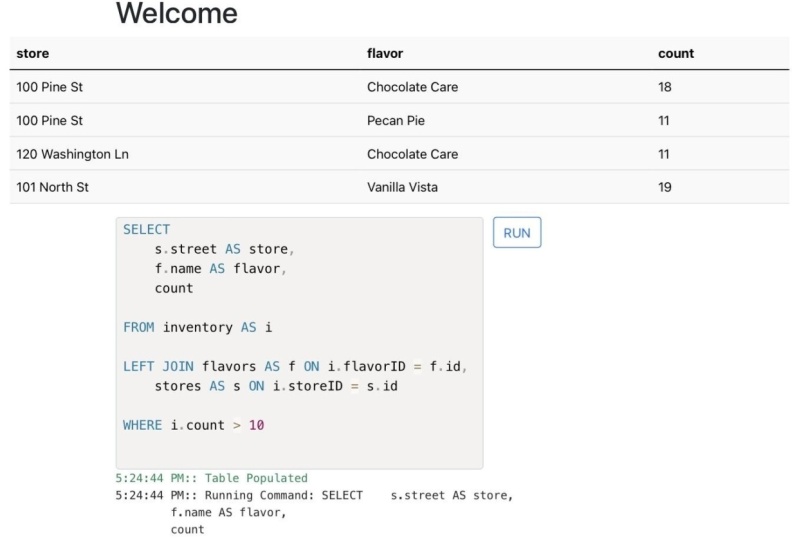
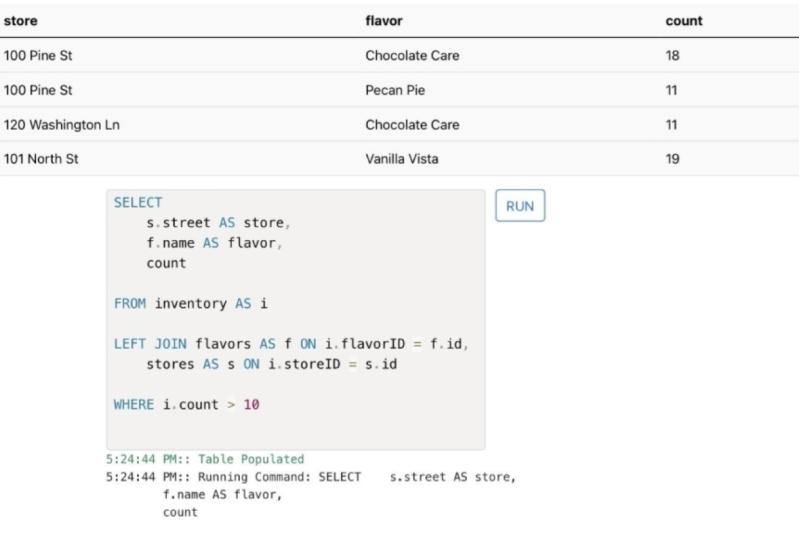
the store Street, Store city and the store state. Let's go ahead and run that. Here's a report of
all the flavors, their inventory that are running low and what actress
need to ship it to. This challenges a bit more
advanced than our other ones. So if you're looking
for a good challenge, see if you can also calculate
the cost it would take to refill each of those stores
backup to ten barrels each. Repository few seconds
while you figure it out. Alright, that was a bit
more complicated of a challenge than
they usually do. We've not really talked
about using math inside our select statements, but we can sneak them in there. So we're going to
start by bringing the flavor cost and I forgot my comma
between columns there. So now we have the cost
of each flavor and we want to multiply it
by however many It's going to take to get
that count up to ten. Take our cost and we're
gonna multiply it by ten minus the inventory count. Lemons in parenthesis here, to tell it to do the ten minus I count before it multiplies
it by the cost. So let's go ahead and run
that and we can see the cost of it take to refill each one of these inventories
backup to ten units, or maybe we want to
fill it up to 20 units. Take a look at that.
8. SQL 9 LEFT JOIN: Sometimes tables
don't always have the data that we want
or expect in them. In this case, join is
just showing us matches. That's what's doing, what's
called an inner join. So it's showing
what's on both of our tables that match
together in both of them. But it can also be nice to see where that data is missing. So we know if something is missing or something needs
to be taken care of. In this case, we're
going to want to do what's called a left join. Usually I like to think of
this as a Venn diagrams. On the left, I have my first
table on the right circle, I have my second table
where they overlap. That's a normal joint. So that's why it's called an
inner join because it shows the two tables what
matches in both tables. Our left join is going
to show us everything on the left table or the original table with
the data that it matches. So let's take a look
at store number form. So store number four
has four flavors in it. But if we take a look
at our flavors table, we only have three flavors. We can see ID number
three here is missing. What most likely
happened was there was a flavor but it got
deleted or discontinued. And instead of doing a
discontinued or delete a date, they just removed the
data from the database. Now we don't know about
this flavor is, however, this mysterious flavor number three isn't showing up when we join on our inventory table. That's because we don't
have a flavor for it. So it's only showing
us what's matching. Matching the flavor I
AD's to the flavor table. So to get all of the data from
the matching and preserve our left table or I
inventory table and get all the information in
it with what's matching. We're gonna do a left join, and this is going to
show us that flavor in ID3 and how that
has an old name. You can also do a right join, but typically I don't
see that as often, so we're not going to
cover it in this course. Preference is to use a left
join over a right join. It's just the inverse. It'll preserve the right table
instead of the left table. There's also what's called outer joins if
you're interested in that and that will preserve
what's in both tables. That goes a bit outside of
the scope of this course. So we're going to leave
it just with left joins.
9. SQL 10 INDEX: Alright, congratulations, you've made it to
the last video. We've gone over all the basics. You need to start generating
your own reports, start playing around in SQL and start experimenting
with data. Databases really are fun
and really exciting. I know that sounds
kind of weird, but it's really cool to see how data is stored and
how it relates to different tables
that we can store such complex data
like human behavior, I want to leave with
a few more tidbits of information just as you prepare to work in
your own databases as opposed to this
dice test database. So the first is select is safe. Select isn't going to
insert or change data. But it could take a long time to get the data depending on
how you're running it. So we're going to
talk about just a few safety procedures to
make sure you aren't slowing up the
database and causing any issues for someone
else that's in it. Typically, most databases will have a copy of the database that you're working in
degenerate reports. So make sure you talk to a
database administrator to see if you're working
in the actual database or in a copy of it. So you can run larger
reports without risking slowing down the
database for other behaviors. So there's two things
we're going to talk about to speed up your queries. The first is going to be limiting the number
of rows are returned. So if we do take a look
at our inventory table, because that's the
longest one with the most number of rows. We have a lot of rows. Now, this one has
maybe ten or 12 rows. But when you're dealing with production data that
has millions of rows, doing just select star from
could return a lot of roads. And if you're just
doing it to get the column names
like I usually do, that's a waste of processing and it could
slope the database. So what I usually tack on
the end of mine is a limit, and then ten limit, limit restricts the number
of rows returned to four. So even if you are in
a larger database, this comes out a lot quicker depending on your SQL
language and subduing limit at the end
you might do top five and then you select query. This is the light, so it
doesn't work that way, works with limit five instead. Then the final point
I'm going to bring up is using indexes. So as we're talking
about relationships, those relationships are
unspecific columns. Typically these columns
which are IDs, are indexed, which means the database
resorts this column so it knows how to quickly
find rows within it, indexing, indexing and something
that they'll do beforehand and it's defined
uncertain columns, usually for joins, these are
all going to be indexed, so join should go
pretty quickly. But on your where clauses is
where you might slow down. If you're filtering on a
column that isn't indexed, it could come
across really slow. Or if you're filtering
for a text match, that could also be really slow. So if you find one of your
query is running slow, see if there's another way
to get that information without filtering
on those columns, might find that the data you
want isn't another table. In which case it'll
be faster to join to the other table and
filter on a column that is indexed as
opposed to sticking with one table and filtering on a column that isn't indexed. But usually that's in
very complex databases is just something to be aware
of as you continue forward. I definitely talk to your
database administrator, talk to the people
in your company for just running around
in a database to see if they have any
best practices or warnings before you
proceed forward. With that. That's
everything we're going to cover in this course. So we've gone over
how to get data, how to filter data, group data, and how to combine it across
different tables. I really hope you've
enjoyed this, please let me know if anything didn't make sense in
the comments below. I'd love to explain
it further and make these videos better so
that it does make sense. And you can play around with data because it
really is a fun thing to do. Thanks for watching
and good luck on your Reporting endeavors. If you found this course useful, I'd really appreciate
if you left it a review that
helps other people find this course
so that they too can also generate the
reports they need.
 Peter Flickinger, Filmmaker, Programmer and Teacher