Transcripts
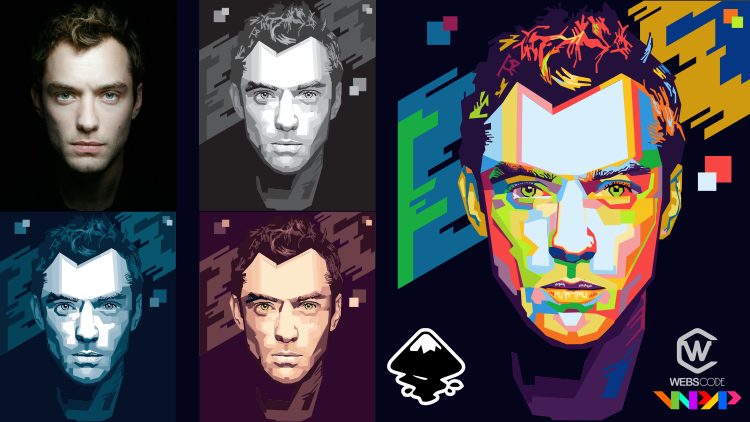
1. what will you learn?: Hi guys. My name Martin Bonanza Discourse. You will run toe Make factor in WP AP style using in Skip Strike two in 16 1 introduction hip some Montreal The first is what is the blue AP then? W a theory so terms of trapping number eight so far and will use Don't look for the stars. One off the material is changing. Color photos, two photos, Gray scale and the last set off area per session toe, namely fascinating grayscale. The first material. Mike Bassett A's and the results are like this. Then make the passage area in April and the results are like this next make process knows and the results are like this. Make First said more. The result is like this make beset forehead. The result is like this make prosthetics result is like this. The result is like this make passage. The result is like this make, but said higher. The result is like this makes us it. The result is like this. Continue. Make the background. The result is like this. Finally, take the final result fast, said Driscoll, and the result will be like this. In six and three, we will run coloring the first material to learn calorie using the blue pallets. The result will be like this The second learned coloring You seeing the body palette. The result will be like this and finally learn coloring. WP AP The result will be like this. This is the material in this course if you are interested andro known.
2. What is WPAP: What is WP AP the bill U P A piece done with this Pope Art boat trip A 90 indignation, but Park Geun refunded by with Abdul Razek Assani, or artist, an illustrator from Indonesia. One characteristic of this type off part is the use off color. It is unusual and commonly has in a strictly vertical or horizontal India Gunnell Off line or safe, the concept of photo tracing in the bell. U p a piece, dignified dressing. We're prob at images referring to a proto grip, but throughout the process, up in proficient a shin and certainly an impression that the world for this has ah, unique artistic value.
3. WPAP Result: Hi guys. There are several example of WP AP results. Among them can be poster banner like this for more detail. You can see it on Google Open Google in the browser w p a p See Like image. This are some off the WB AP Results Form W B A P ARTIST CAN be seen The typical art off WP AP is the praise since off colorful, intersecting feel and for the color there is no standard requirement depends on the creativity off. WP ap actus in combining them.
4. Terms of creating WPAP: term off crafting W B A P purse for said from in straight beside being from and straight tryto by sitting the slope or the directionally line pipe in the grace 30 degrees 45 degrees. The way did is commonly used is to click the first note control click see picture click control. Click With this technique, the land created by the slope I'll tow my Dekalim, multiplied by 5 10 degrees, secon not cool off. Sometimes when we play a stride land straight because the notice toe type when zooming or we look like a coast off deck to avoid this is to register the note poin, for example, from 5.23 point third at horizontal and vertical feel. Quote from where the himself As far us possible, I will make fill the pricing results, stand Powell vertical and lay down horizontally. Off course. The placement off horizontal and vertical line earlier don't force your script, and they made the resemblance because similarity is the mangle off. WP AP
5. Software and Tools Used: on this course I using skips off where with person. Zero boil 92.2. But you can see the escape website to see the last person off escaped under in Scapegoat org side click underdone Ludeman for In skip, the less is Ferson zero boy in 92.4. So what I use is this. The 2000 and 17 person and the last person. 2000 and 19. No problem. If you want to use the less person you can, the old may also make your escape in creating w p A. P. There are several tool use among them the 1st 1 in selector with circa one. Then zoom with the F three Sarkar Proactiv Zoom used the F trees or cut on the keyboard and hope to use it. Does, um, in press the control on the keyboard plus click the most? Does a moth oppressive plus click most then busy, are told with shortcut, See less f sick And finally the a dropper told sweets or cut F seven. This is a tool that will often the use when in creating wpht in skip. Remember this or cattle. So speed up and simplify recreating the William Baby
6. Download Foto Source: Hi guys. In this section we will look for photo material for w baby learning before looking for photo material were commended. Did you first see this, Victor? So for good photo material for WP ap help several create area that is done. You support those with, like, thing toe bright like this. We'll make it difficult. Oh, their mind that nuts are brightness as well as for two with dark like things like this Then for those that are blurry like this are also not recommended because it will make it difficult to make w p a p for good photos, which are like this photo was like, Thing is clear and has ah, high resolution. Okay, those are some create area in to seeing photo material. No, look for photo material to use. Open the broza by google dot com We will look for ah, for trade photo type of threat. Men see, like image here. There some for trip photos. We will just one off them as a beginner. It seemed this photo is way table s material because they are in tow. Money, difficult detail. So we will learn to make w p a p use this photo. Please don't let this photo right click Save image Us. Okay, it's safe. So this is a photo. Did we will use to create W P A. P. Next open the escape click new file, click and drag the photo into in escape, said the photo Toby Grayscale Force before making of asset checking for those toe grayscale by do a click photo Salik filter color, great scale take on life. Or if you said red, green, blue and lightness said it will be like this, then click play close. This is a photo that we have changed toe grayscale, which will be used to create ah W P a p in the 16 it has finished. We'll continue to then excess in.
7. Set the Work Area: Hi guys. In the 16 we will set the work area before we have met the picture. Become grass scale like this. Now continue to set the work area first remove the pitch border in the file the common properties on the border and take the so border said Oh, and so pitch birder. Then click the few layer Icon Ting lawyer Oneto source photo and the It's a new layer and them it if I said gray scale. So for the photo defeat the lock icon in this section So the photo done move when making w p A p in the fasted grayscale layer used to make WP a peep assets next except this File force click file Safe Name it WP eight People threat men Next said the color palette to be used in the sex in We will use the grayscale palette in which they are some great color from the doctors to the brightness to use this violet, please don't know the source palette That has been a paged so discourse it has been downloaded. Move the grayscale ballot. Right click, Copy, Move toe, See Program file See, Like in escape, Sir and Violet, right click base because the palate already exists. Select copy and replace. Okay, So a new Greece scale palette has been added later. The great scalpel. It will epper here. It has not apparent like this. Close the escape. First click the file with then opened the in skip file again. Double click. Click the small arrow in this. Excellent. Make sure the grayscale palate a purse. It has not separate yet. Check about escape. Make sure you're in skip. It's at least person. Boom boy in 90 toe point toe and above. Okay, we have finished managing the world area. We processed toe the next section.
8. Facet Eye: hi guys in the six, and we will start marking festive grace. Girl, make sure you're still remember Term off crafting W p A p. So I really remain your first for from crafting WP AP First, make sure the passage is from in straight, then second not called and third at horizontal and vertical Philip forcible. So that is the term off crafting W J. P. Then there are safer alto that will be used frequently. The free Fear 16 has been notified. This is a tool that will be used frequently. Course selector with shortcut F one zoom with the F trees or car busier with Sarkar C plus F six. And finally the a drop with sort ep seven. With this often used in making faces, namely selector and busier, the more I see the for short cut off the stool. Okay, in the SEC said we will make face it under is please zone in the area first use It is, um, I can or sore cut F three are you can also you scroll and the most. Here I will resume. His ace used the busier tool or deceive plus F six shortcut started making facet. First of all, make place it on the way part off the A. Make sure the passage from in striped it's like this. Give the weight color according to the color off the photo source. Continue by making an order area. Make sure that Phyllis, based on darkness or brightness like this, I will make their dark feel. If the handle a poor like this under first by pressing control plus zip disabled the handle on the top like this, disable all handles, then we can continue growing. Pass it. Okay. We had met the aria. Give Blake see for the wet area missing or cross because the newly created Blake area off right the white area to bring up the web. Ari again, we will make this Blake area below the with area by clicking the selector. Then select lower selection One step or you can use the done so are cut on the keyboard. Okay. Here. The white area has here it continue by clicking the busier tour here. I will continue driving in this Phil. For a beginner, the reminding darkness or brightness will be difficult. But how fully you are not easily discouraged and often try like this. True, If you have corrupted this field, give the color a little duck according to the source, and click the lower selection one step like before next. Make the area first like this, a little dark area to the end gift gala. Then click lower selection one step again. 46 give of bright color. And do bit done how you have to know this process will repeat itself until all those horse photo are close. For beginner, it might be a little boring, but don't give up quickly because this is the art of crafting W P. A. P. Okay, continue to make this area give the propriety color. Then Richard Dunne, then continue in the sexual. I'll give this area again with a little darker, then picture done. And this Phil gift wife. And you don't okay. Until here, the left has been made process through the right set off the The process is the same. So make sure the facet from in straight mixer it's not called. It would happen like this. You can guess. Continues from Boyle are struck from the beginning. I will continue this. Okay. Like this. Give it a dark color and do a page done. Continue by driving an area that has not been selected. Continue driving here this field gift of bright color and this one give a slightly darker color like this. Don't forget click pages done. Leslie. The picture in the six n This will give a dark color do great to done, and this failed Give bright color like this. Okay, Jamal. First. Or if I said the a part, it's finished. It's then click taken. Aided object. I will eliminate the stroke. So block all facets that have been made in the stroke. Pain, sex in select. No pain. Okay, so it can be seen. The stroke is gun to see temporary. If I said results, click the icon on the source. Put the layer here. Okay. And the state you have finished making a placid we process toe the next section
9. Facet Eye area and Eyebrows: hi guys, but about making If I said before, Are you used to it Now? Continue to make passage area off the A in a row So keep in Maine make sure to make a play set for him in straight and not cough. Defend the busier for zoom First continue to make part off the area for this field. Give Black said the field to the back Does by done then continue to make this part. Give white collar They are safer off Akhtar that make beginner filed toe make double your baby parse We're gonna done know the condition for creating a w p A. P second beginner find it difficult Oh, the mind up or brights area beginner get boring in making passive so it can solve it foreign for myself In making the wolf I said it can take our to become a great serial passage It does not include WP AP coloring. I hope my student did not experience it But if you can determine the darkness or lightness about facet Bill this will be very exciting like this Eyeing the process will never be throughout the result gone here I will just remind the process. Make sure to use the busier told to drop, I said. For light or drop Phil, adjust to the photo or source. If there is a field that is not clearly Barrett or drug, then in prophecies and it's needed then in coloring, you also have Toby this on the foot. The source. If the color is different from the source of the photo, then the research will not be similar to the photo. Source. Can be side profile in making WP a People said So make sure you understand the basic principalists off crapping W p a. P 46 in the all fill in the area and a Breaux's Don't forget. The new Phil is positioning at the bottom by clicking. The stones are cut on the keyboard. This process will continue until all areas off the A's and a bro are cooperative. Bypass it. Please follow the process way. Theo Way, Theo way. Theo, - we owe but way Theo way. Theo, if you feel you have finished it, making the face it area off the in a brawl like this act. If it this elector or Sarkar f one block the entire film in the Edit off the exception. See, like the stroke when say, like no pain. So the result will be like this if in light order coloring, it's not in accordance with the source of the photo, you can check it. Way, Theo. To see the temporary results, click the A taken on the photo source layer. Okay, Don't forget to say it. First, we will process to the next section.
10. Facet Nose: you guys. Next, we will make our facet in the area off her nose. Zoom. Inda knows area. We will make it in the area first. If it the busier toll are soft art Syphilis absent. Make sure the facet from in stride and no call. - Okay , give it a dark color way Used this elector toe color this part. Give the color a little dark. Okay, It must be remembered. It you file crafted position at the bottom Used the lower selection, one step icon or the shortcut pitch done on the keyboard Way . - Finally , at this interface it Give it a wipe. No. See the result first. Activate selector are one block then removed the stroke act If it the edit of bacon from the stroke pen select no point. It's dark. First thing developed like this. Okay for the passage, the news area is finished. See the result. Click a second on the source Photo frame like this in the six n field can be added. Then this failed gift of bright color. Okay, newly created block Remove the stroke and the result will be like this already looks familiar. Okay. 46 it's a Penis. Continue to the next section
11. Facet Mouth: hi guys. In this section, we will continue to make Fiset on the more in the morning. Activate the busier and make sure the passage is form in stride. And no, here, make good up part. First give it a color, then go to the section In drawing facet. You can experiment toe that remind the darkness or brightness because here there is a little light, then say, though, can be added. No, if it happened like this can continue by clicking on the point are We drove the field here . I drove so far outfield with leather upper coloring. We look like Sadio in the lips, Then give the color a little darker way. Theo. Continue driving the lower lip area also at Safeco Field, so that the lip looked familiar. Make sure the Saito Phyllis made to make the color of the photo short. It is already activate selector or if 1% Lee block that have been made. Then remove the stroke. Defeat the object on the stroke pine select no pain and the result will be like this. Click the icon on the source. Put a layer. This is the result. Okay, 46 is finished. Don't forget safe First Crossette to the next section
12. Facet Forehead: hi guys into six in. We will continue to make faster on the for him. First up, if it the soft photo, click the icon on the source for the layer. Zoom in on the forehead. After 50 of these here, start driving on the forehead. Make sure for the first it from on straight and knuckles do the same process as before. Space iffy fell. This undocked nous or brightness drawing fell according to the source. Color off those and make sure the newly crappy feel said it position at the back. Used. The lower selection. One state icon are sort done in the 16. You can add a little higher land like this. Just color, according to the source Off Way, Way Theo, you're going to see I make her feel on this for head with a colored Gradison that it's starting from the filled with bright color in the middle. Then it's gradually given a dark color. It's fill. All facets have been made. First frame of the stroke. Look, you're seeing selector. The stroke left. Select no, and this is very salt. It's him that this feel has not been given color under force. Give what color a little to the section and give the color a little girl block the world Fiset again and l a minute The stroke DiBella is too dark being developed. - If the color fill right, see the result. Click the icon in the short porter layer and this is the result. Okay, For this section it's finished. Continue to the next section.
13. Facet Cheeks: Hey, Gus, into 16. We will continue to make first step on the area in making budget feel leather. Make sure they're facet form instead. And your course first off if it source for the click the Wazir Cool. I will start by making a bright Phil. Sorry. First up if it the grayscale fasted layer continue to make prices off the section. I'm not tired off telling. I think there from the basis for making first fill namely, can determine the light on darkness off Phil. Then in making a film, you will not for beginner. Don't be afraid off making a film room because it's a learning process. If in thought its world and the results are not so familiar. Photo source it is. Okay, that will be your experience for information. I also at the beginning off learning were not directly similiar. Unlock it ugly, but I think in until finally it can be like this for the process of making the stick. Facet will be a little long. So please followed If I said making the completion way . Theo way, Theo way, Theo way, Theo Way, Theo. - Way , Theo. - Way , Theo. No way , Theo. No. If it finishes like this. If it's elector, look the entire press. It has been made. Click The edit of Bacon under stroke Select. Then the result will be like this. If the color is still not right, you can change like this. - Click the icon on the source to see the result and present results like this. Okay, 46 it's finished. Continue to the next section.
14. Facet Chin: hi guys in the sex and we are still in making fast it on the chin area. First up, defeat the source, put the layer, then zoom in on the chin area Still with the same goal. Click busier RC plus except the facet firm instead. And no, in the process off making first said, I think you have more ice it so I wanted Stop peddling. Please follow the process. Don't forget for the newly created Position it on the back using the pitch. Don't shortcut way , Theo Way Theo, - we owe if Ulgen has been conferred with. Pass it like this. So I said, lock you seeing selector or if one then select the ended object on the stroke paint select no pain and the result will be like this way. Click the icon on the search for the layer to see the results with photos and this is the result for this session is finished. Continue to the annexation
15. Facet Ears: hi guys. In this extent, we are still marking process. If I said that will be made the airpark I prepared this or for the layer zoom on the air's yes, you see the process of making defensive Bracewell is almost complete, just a few part like ours higher. And with this in process interpret six In this make this year process according to Dark, are bright way Theo way, Theo, - you see in making facet ears, Macedo must also be added to make it look familiar. If you have finished it, you selector or one look bicep. Then click the edit of Dick Icon on the stroke Man select If gallery is still not right, the tingling, of course, - click the A one on the photos or slayer to see the result for resistant. It's finished continued to the next section.
16. Facet Hair: hi guys in the six and we are still marking first set on the higher 16. If it this or sport the layer first, click the busier for the higher part, I will stop from the part first because the high color is the same color as the background color. So for the edge off your higher, you can't pro Feiss like I did way. Theo, it's all connected like this. Don't give black course because we will make the white part off the higher course. So here I will do and you prop again to the term end area off. Higher way, Theo, making the wet part of the higher you can adopt or bright part in the middle so that the higher locks a dough, but it must be adapted toe source photo. Yeah, way Theo can be seen in the West. Those sources off irregular, higher so you can make the parts apart like the process. I mean, makes her all fill our because it will affect the final result off our grayscale process. More facet detail are hence, the result will be familiar to the original photos way , Theo. - Way , Theo. No way, Theo way, Theo if the world facet off her has been made in gallery. Next we call on the dock, are sex and like this, said the first position off the higher at the earlier with a click selector. Then select lower selection to but, um are can you sort cut and on the keyboard so the result will be like this block percent higher. Click the edit of just icon from the stroke Twinlab, a corn on the sore sport layer and this is the result for the section it finished. Continue to the next section.
17. Facet Neck: hi guys in this section, we are still making faster. This time we make pass it on the neck. Defenders off the layer force bring the busier tool and his own inferred ending for the next looks. Not so I will make the neck area according like being way Theo. It's likeness. Look off Rcep then removed the stroke. See like no. When the stroke man, you can zoom out to see the result way Theo and click a second on the sore spot. A layer is the final passage off the neck. 46 it's finished. Continue to the next session.
18. Background: Hi, guys. Decision. We will create a big room Strike two, your screen rectangles and square stool. Our source got F four. Make a square according to the size off the source Photo like this. Give said the position off the big room behind by clicking the lower selection icon to but , um, or source and from the keyboard. The result will be like this because the original background is only black, so we can pro fais to make an interesting make grown still using the busier toe. I will make a background like this. Activate the handle on the top first like this different all handles and start marking Migron. Don't forget to use plus control. Last click so that the lines are made are place improv ice from the women. But make sure there is no course way , way. Theo. No. Oh, - way , Theo way, Theo. - It seemed like the background on the right. It's still not real. Deal, of course. And make it get use. Click plus control plus click. - Okay , position the big grown behind your sort, cut and or picture done. But if you want to position in front, you sort cut home or it up. If it feel right block off, I said, Eliminate the stroke. Say like no pan on the stove. And this is the result for the section it's finished place steppers. We will continue the next section.
19. Check Final Result: Hi, guys. Decision. We will create a big room Strike two, your screen rectangles and square stool. Our source got F four. Make a square according to the size off the source Photo like this. Give said the position off the big room behind by clicking the lower selection icon to but , um, or source and from the keyboard. The result will be like this because the original background is only black, so we can pro fais to make an interesting make grown still using the busier toe. I will make a background like this. Activate the handle on the top first like this different all handles and start marking Migron. Don't forget to use plus control. Last click so that the lines are made are place improv ice from the women. But make sure there is no course way , way. Theo. No. Oh, - way , Theo way, Theo. - It seemed like the background on the right. It's still not real. Deal, of course. And make it get use. Click plus control plus click. - Okay , position the big grown behind your sort, cut and or picture done. But if you want to position in front, you sort cut home or it up. If it feel right block off, I said, Eliminate the stroke. Say like no pan on the stove. And this is the result for the section it's finished place steppers. We will continue the next section.
20. Coloring Blue Palette: Hi, guys. Send real. Start learning the color. You see the blue pallet at the new layer force named the blue. Click the passage grayscale layer profusely. Look the source for the layer first, then click the facet grayscale layer. Blockbuster grayscale, right click copy. Click the layer blue pallet, right click this the skull pass. It gave force only the blue pallet layer is active. Then at the Blue Pallet, the file is in the folder palette attached to the course. Blue Pallet Copy moved to see program files Escape San. While it like this because it already aces, I really sell a copy and replace. If the edit blue palette does not a poor year in the section, then it's good file surfers then select the file with. Then they opened in scape file. So the blue pallet well at first click the blue pallets and hear some colors off the blue pallet. Starting from the dock Chris to the brightest for this blue palette, there are 15 colors. The zoom area will be choleric. I will stop coloring, starting with the doctor scholar furs in the scullery, especially in using the blue pallet. Not so difficult because the first set already excess. So just coloring. Based on the dark or bright face, it will start from the practice filled and move on the flight leader. Purse color, bright colors if there are still feel like this. Did you know, of course, just said it fits by our it like this. Okay, continue coloring in this film. Give the color a little bright, then before I hope you can determine the coloring like this because in the remaining the dollar they are no standard rules for information coloring material. Losing the Blue pallet Not include in WP AP coloring Montreal But in this course I profiled this material. This material, in my opinion, is very necessary for beginners because the color in the blue pallet will be this year to use in coloring. And it's easy toe deter mined the light dark course in the coloring so that when you have entered the WB AP coloring material, it's this year to just dark and light colors. Make sure color choosen for coloring mates the color of the asset because the result will remind some blame to the original photo. The time in the blue pallet coloring process just approximately five minutes. Police, not the process way , Theo. - Way , Theo. - Way , Theo. - Way , Theo. So way , Theo. - Way , Theo. - Okay , this is the final list off coloring. Using the blue pallet discoloring process will work if the color selection it adjusted to our life. Except this file. And this is the result. This isn't has finished. Continue to the next session.
21. Coloring Body Palette: Hi, guys. If profusely, we have lower nip coloring using the blue pallet. So in the 16 we will learn coloring. Using the body palette. Look in the layer six in Have different facets. Chris a layer by clicking on the lock icon. Then facet grayscale block, right click copy in the layer blue palette. Look first, then at a new layer. Give the name off the body. Balance the layer body palette. Right click this said the first set position next to the passive blue pallet. And this is the first set that we will use for allowing the body palette. Make sure besides the body palette layer for the older layer, it's Lockett. Click the lock icon and what is act. If it is the body pilot player, the 16 reuse the body ballot. I have added the body ballot and this is the color. Death is in the body palette. You have a body palette, please. Of course. In a way, don't look. The file pilot attached to discourse. Right. Click the body palette. Copy. Move Toe C program files escape sand while it right click base. Because I already exists. Tell a copy and replace. We go back to escape. It's already added. The body palate will pepper in the section, but if it doesn't ever seven scared force, then select the file. Quit and open the in skip double click in skip. If it is open, click the small arrow here and see if the body politic floor like this. Click the body politic and this is the color used. The color facet grayscale at the layer body palate for the coloring process, just like the blue pallet color according to the top or bright asset. And I will start by coloring using that fast set first in coloring this body palette not different from the blue pallets. Hollering. Please sell a duck bill first and give it just continue coloring the bright field in following the body palette. The result. Off bright color Will a person to be Macedo different from the blue pallets. The color in the body palette consists of brown color that makes the color off human skin. So the final reason that will be a chief it in the calorie indecision is the faster we'll look like a Fekter. Save us the profuse material in the Blue Pilot six and coloring. Using the Blue Pallet is not included in WP AP material. However, I see this process needed for beginner in learning gallery. So don't be afraid to try our colors because in the 16 year are required, do the ableto filled up our bright colors. In this coloring process letter, you will feel whether the color use is appropriate or not way . Theo Way Theo Way Theo Way, Theo way, Theo way Theo. So way , Theo. If it feels in appropriate listing the dollar until you feel the right you see here At first I give up our pro. But after being not, he said, the color does not make the bright color. So 18 the purple to burn looks, the other is pushed together. Don't be afraid to imagine color way, Theo Way, Theo way, Theo. Oh oh, and it looked like with Penis fasted color and using the body politic, I will check the field first like this. Okay, after we take everything. And here the final result off coloring. Using the body palette 46 it's finished. We will process so the next session. The lesson is coloring. Using W B A three colors
22. Coloring WPAP: Yes, if we were already coloring using the body palette like this. Now we will continue to learn coloring W p a p This activity their passage Crispy layer, of course. Block passage grayscale right. Click copy then at a new layer Name W P A p. If you have Paret, click This said it Position. I will arrange it. Uh, the bottom Make sure. Ah, layer. Besides the WP a bi layer a locket then at the bill u p a p pallet in the same way as the profuse Ishan Liston. Love the palate. Attach to discourse for the W K P pallet. I have three pallets, namely the palate color one color too and valid. Galateri it has been downloaded. Block off the WP eight people it right click Copy Move to see program files escape. Sarah, my lip. Fred Glick. This okay? The WP a people, it has been added. We check in skip, it doesn't appear place. Quit the inscription course, Then open the in skip again. Double click the in skip file after Inskeep opens Act if it the newly added salad Here are three pallets for quality color one. This is the color inside this color and this quality color. Three. Free to use any palate, but I will use polit color to force, so we just learned to color w baby Using the palate color toe the foreign from the for a few section for drop and bright color in the e p. A p. The ballot is the foreign, so you sold the able to fill where the color is stuff right if previously in the blue pallets and pallets for dark color, only one color. But in WP AP coloring is not recommended. So in the selection off, the color must be different in it Will you can see here I will call it the passage filled with different colors but still in accordance with dark or bright calories. The difficulty in coloring the belief the A P is in the for mining the color to be used. Sometimes the calories is too dark to bribe from the existing faucet, and the result will be the parents and not like the original photo for information. The color of the WP A people it used in this course is an example. Besides the three free few scallop palate you can use order colors. The color you said yourself. Or you can copy the color of the palette that already exists on the Internet. For the WP AP coloring process. It takes around 20 minutes. You can follow the process to complain way , Theo way, Theo Way, Theo. - Way , Theo. - Way , Theo. No way , Theo. Yeah, way, Theo Way, Theo. - Way Theo. - Okay , this is the final result. Off coloring WP ap using palette color. You can check again if there are colored it. Do not much the light or darkness. Okay, this is the end of the WP A. Pickers help the material out is easy to understand and follow. Thank you.
 Martin Purnansyah, Design & Programming