Create this viral Wizard Cat with Midjourney AI | Arnold Trinh | Skillshare

Playback Speed


1.0x


  • 0.5x
  • 0.75x
  • 1x (Normal)
  • 1.25x
  • 1.5x
  • 1.75x
  • 2x

Create this viral Wizard Cat with Midjourney AI

teacher avatar Arnold Trinh, Multi-Disciplinary Creative

Watch this class and thousands more

Get unlimited access to every class
Taught by industry leaders & working professionals
Topics include illustration, design, photography, and more

Watch this class and thousands more

Get unlimited access to every class
Taught by industry leaders & working professionals
Topics include illustration, design, photography, and more

Lessons in This Class

    • 1.

      Introduction

      0:44

    • 2.

      Generating Wizard Cat on Midjourney AI

      4:04

  • --
  • Beginner level
  • Intermediate level
  • Advanced level
  • All levels

Community Generated

The level is determined by a majority opinion of students who have reviewed this class. The teacher's recommendation is shown until at least 5 student responses are collected.

71

Students

1

Project

About This Class

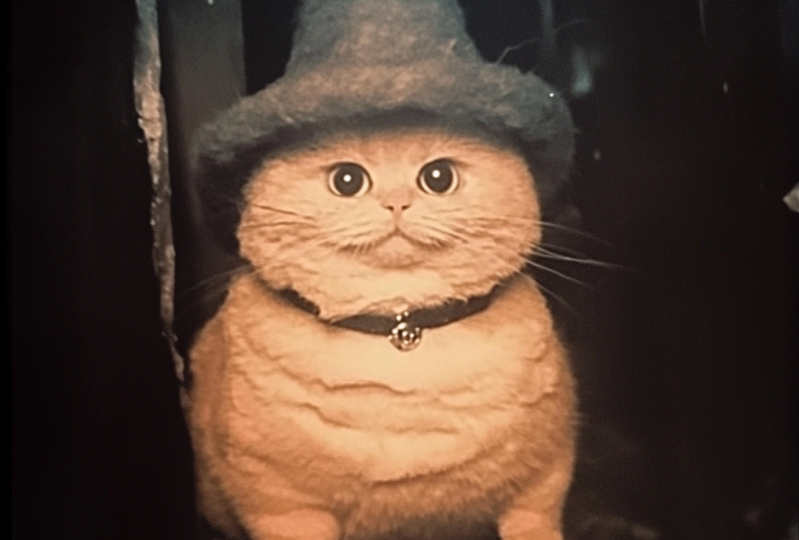
Have you seen this chonky wizard cat on your social media feed? Join in by creating your own as well. As someone who loves experimenting with AI I’ve found that creating a fun, magical character like a wizard cat helps practice generative image skills and keeping up with contemporary conversations. 

In this short class, we’ll take some time to craft your ideal chonky wizard cat. I'll walk you through how to prompt MidJourney effectively, using --sref and --cref so you can create this cat within a few minutes!

You’ll learn how to:

  • Set up shortcuts on Midjourney 
  • Reference image and styles
  • Develop characters with personality, like our magical wizard cat!

No experience with MidJourney is required, and you don't need any fancy tools either—just an idea and your imagination!

By the end of this class, you'll have generated your own adorable, wizarding cat, fully customized with elements that feel true to your vision.

Meow you soon!

Meet Your Teacher

Teacher Profile Image

Arnold Trinh

Multi-Disciplinary Creative

Top Teacher

In 2017 I quit my 9-5 job as a Designer because I realized there was so much more life I was missing out on. I was showing up at the office before the sun went up and left after the sun went down, wasting away my creativity to make advertisements for someone else's dream.

Over the next few years I had to learn fundamental skills in creating a business from my content creation. Eventually leading to a fully sustainable career that allowed me to travel and live in places like Hawaii, SE Asia, Bali. (Fun Fact: Most of my classes are filmed in different locations because I move so much!)

I've been doing this for 7 years now, and my classes are here to teach you the necessary skills to make a career for yourself in all aspects of content creation.

My goal is t... See full profile

Level: All Levels

Class Ratings

Expectations Met?
    Exceeded!
  • 0%
  • Yes
  • 0%
  • Somewhat
  • 0%
  • Not really
  • 0%

Why Join Skillshare?

Take award-winning Skillshare Original Classes

Each class has short lessons, hands-on projects

Your membership supports Skillshare teachers

Learn From Anywhere

Take classes on the go with the Skillshare app. Stream or download to watch on the plane, the subway, or wherever you learn best.

Transcripts

1. Introduction: This is my favorite character recently, and it's crazy because I woke up the other day to 20,000 views and 1,500 something likes on just a random throwaway Instagram account. And this reflects the growing movement of being able to join in on conversations online by being quick to it and by recreating something that's going viral like a meme, a person or a character. In this case, it's the Wizard cat. This class, we're going to learn about how to reference the character and how to reference the style so that you can create something that is the same look as this cat or even literally recreate this cat so that you can join in on their conversation, as well. And we're going to do all of this on mid journey. So let's get started. 2. Generating Wizard Cat on Midjourney AI: So to create this cat, you can either start by going on Discord and doing it or on the web client. Now, I've been used to discord since I've been using it forever, and I'm going to do it on Discord. So the first thing to do is to get the image link of the cat to reference. So I have the image ready. I'm just going to drag it in and have the cat uploaded on Discord. And then from discord, I'm going to copy the link towards this image. Now, what I would do next is simply to slash Imagine. I can type in Cat whatever you want for this part. But essentially, it's to get down the character reference. Which is dash dash, CREF, character reference, and then insert the link and then do the same thing, dash SRAF for style reference. That way, it has the same character and the style. Now, a trick that I use on the discord thing is I would do slash prefer Suffix which would include this in all of my prompts. So I would prefer that and then slash slash character reference and slash slash style reference, which was what we just did. So after you do this, all your generations is going to have this cat referenced in both style and character. So then you can type in cat making pancakes, maybe a chalky cat, writing on paper, cat riding on a bicycle in village with grass. So once you have that set up, all your regenerations are going to come out with that cat. And so here's our first result, just cat, but it brings out a wizard cat, which is a chunky orange wizard cat. And then here are the other ones still generating and we can get a little preview here. This is the chalky cat making pancakes. So it's still that wizard cat, chalky, orange and making pancakes. And then we're seeing this other one starting to come in, too. It's the chalky cat writing on a piece of paper or writing on paper. And then there's that same cat writing on paper. And it should take any Segall. Oh, the bicycle one came first. So here's that same cat riding on a bicycle. And then the paper one just about finished, and here it is. Alright, so now if you want to use the web client, all you got to do is go on Mid journey on the web client and then do the same thing. So we'll do slash character reference, have that same image, and then slash or double dash style reference, and then that same image again. And then you can see that they're both referenced on the bottom here. And then from there, you can type in chalky cat making pastries, or whatever your imagination takes you too. And then here we'll have the Chalky cat making pastries being generated, and then it should come up in a few seconds. Now, we could also come up with more. So style ref again, and then a character ref. And then we could have this cat do something else like maybe he's in the ocean or he's at a castle or just whatever is creative. So chalky cat at a castle. And then here he is generating or making some pastries. Super cute. And then we can go back and check on the other progress. So 33%. And usually it takes under a minute to create. And here are some of the other generations Chunky cat on a plane, and then here riding on a bike. And then here's the one with the Chunky cat at a castle. So that's it for How to Make This cat. If you make some, as well, please share in the project. This cat literally makes my day every time I see it pop up on my pen. So thanks a lot for watching, and I'll see you next time.