Create professional looking No Code website using Claude and WordPress | Karan Rathore | Skillshare

Playback Speed


1.0x


  • 0.5x
  • 0.75x
  • 1x (Normal)
  • 1.25x
  • 1.5x
  • 1.75x
  • 2x

Create professional looking No Code website using Claude and WordPress

teacher avatar Karan Rathore, Creative Technologist: Video Editing, AI, and 3D

Watch this class and thousands more

Get unlimited access to every class
Taught by industry leaders & working professionals
Topics include illustration, design, photography, and more

Watch this class and thousands more

Get unlimited access to every class
Taught by industry leaders & working professionals
Topics include illustration, design, photography, and more

Lessons in This Class

    • 1.

      Introduction

      0:41

    • 2.

      Add prompt in Claude

      1:30

    • 3.

      Use HTML code in wordpress

      1:29

    • 4.

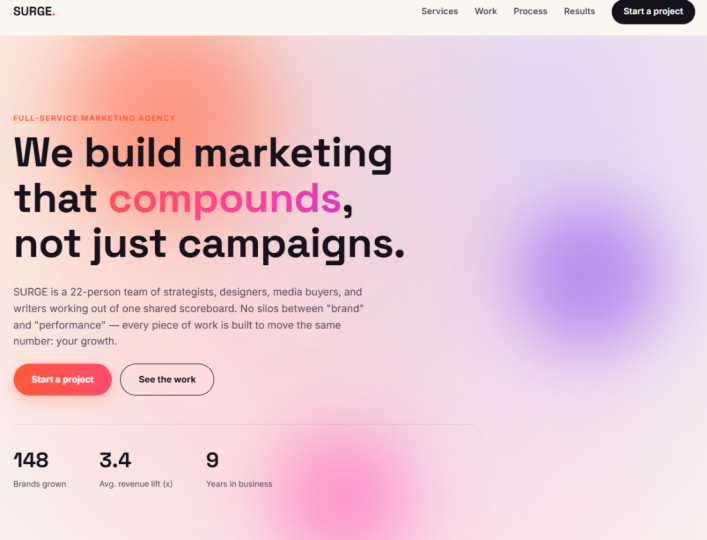
      Create Agency style website

      1:08

    • 5.

      Find and Replace image code

      0:55

    • 6.

      Project

      0:14

  • --
  • Beginner level
  • Intermediate level
  • Advanced level
  • All levels

Community Generated

The level is determined by a majority opinion of students who have reviewed this class. The teacher's recommendation is shown until at least 5 student responses are collected.

74

Students

1

Projects

About This Class

Are you a designer, freelancer, or creator who needs a stunning professional portfolio, but the thought of coding makes you want to close your laptop?

Welcome to the future of web design. In this class, you will learn how to build a premium, high-converting professional website from scratch—without writing a single line of code. By pairing the advanced AI reasoning of Claude with the unmatched flexibility of WordPress, you will discover how to act as the creative director while AI handles the heavy lifting.

Whether you want to showcase 3D renders, video editing showreels, or digital products, this course gives you the exact blueprint to launch a self-hosted website that looks like it cost thousands of dollars to build.

What You Will Learn

  • The Speed-Prompting Method: A single, powerful prompt for Claude’s free tier that instantly generates a complete UI section-by-section layout.

  • Premium Visual Layouts: How to break out of boring, standard WordPress templates using advanced block grouping, columns, and spacing hacks.

  • Maximizing Free AI: Strategic workflows to get elite design logic from Claude without hitting daily free-tier usage limits.

Who This Class Is For

Intermediate WordPress users who want to accelerate their design workflow using AI. You should already know how to navigate the dashboard and add blocks. No coding or paid AI accounts required.

Meet Your Teacher

Teacher Profile Image

Karan Rathore

Creative Technologist: Video Editing, AI, and 3D

Teacher
Level: Intermediate

Class Ratings

Expectations Met?
    Exceeded!
  • 0%
  • Yes
  • 0%
  • Somewhat
  • 0%
  • Not really
  • 0%

Why Join Skillshare?

Take award-winning Skillshare Original Classes

Each class has short lessons, hands-on projects

Your membership supports Skillshare teachers

Learn From Anywhere

Take classes on the go with the Skillshare app. Stream or download to watch on the plane, the subway, or wherever you learn best.

Transcripts

1. Introduction: Current CT professional. In this class, I'm going to show you how to build complete professional website from scratch with absolutely zero coding required. We are going to use clot and WordPress. Our SCR weapon is clot. I will walk you through exactly how to prompt clot to generate a high converting site structure and write all your website code. Then we will take that code and drop it into the Wordpress, page that code and see how our website will look like. For our class project, we are going to build a clean modern website. By the end of this class, you will have a live portfolio business landing page. Ready to share with the world in the 2. Add prompt in Claude: So let's go to our clot, and I believe that you know the basics of WordPress and clot. So let's go with this one. I want a website. Prompt that is very text heavy and dynamic for WordPress in STML CSS, and Javascript. Keep them separate, clean for faster page speed. I want the website for my sales of artwork. Keep the area of some art with blank Achip so I can replace the link in them later on. Keep them dynamic and trendy website. Now let's try to create one. It asks me some questions that darker more minimal white, bold, colorful, and maximalist Earth organic WAM. Or let's try to use Earth organic WAM and answer this question also. What type of art you are selling painting, fine art, digital illustration, photography. I'm using digital Illustration pages do you need? Single page one scroll. So I want this one just yes summit. So this is some questions that it has asked me, and let's see what it will give 3. Use HTML code in wordpress: So the code has been updated. Now let's simply click on the intex and copy this STML Copy and paste it here. In the page section, you have to click Add page. Once you click here, it will direct you here. I have added the title. Now let's add the STM by clicking STMLer If it's not visible, then you have to type S click here and edit STML with the STMLtPaste it. With this one, now let's CSS try to add the CSS that is si. Let's copy this one and paste it here with this script of Javascript, let's click this one, copy it and paste into the Javascript. Now let's update and save. Once you click View Page, you will see this beautiful website is here. This is complete website that has been created. Once you click here, all these are working really amazing testimonials. It has also added the post that I've asked it to keep it blank, can add images here. I want to add image, I can do that. 4. Create Agency style website: Let's try to create again, a website that is at some animating element continuously moving. I want this website for marketing agency. If you need help, ask me questions. Now, let's try again with another website. Keep the bold energetic light, this one, scrolling, floating, drifting, shape, animated gradient, background moving cursor. Let's animated gradient. Full rebuild for marketing agency, adapt existing structure. No, full rebuild for marketing strategies. So I have answered some simple questions here. And it will generate a website for me. Again, I'm using the same process. Let's download this one. Let's double kick this one and this is the website that has been built. How beautifully it has created the website. Love to see, and we can see the images section has been left, as I have 5. Find and Replace image code: This is a free software where you can open your code and replace it anywhere in the media. If there is any images, you can replace it with the image section. Like if you want to find that specific area where you can add your images, then you simply have to click here, right click Inspect Element. Here, you can see the image link has been marked here with hash. Once you click here, Work line, copy this text here, control F, paste, and you will see the same work line here, and you simply have to replace has with the link of your image. That's all you have to do, and it will work perfectly fine. And this is how you can create a website, fully professional website using Clo 6. Project: A class project, let's create your own website by following the same step that has been shown in the class and share the screen shot in the project section. I would love to see what you have created. I will give a feedback on it. See you in the next