Transcripts
1. Stop Overthinking ChatGPT Prompts for Work Tasks : Sometimes the hardest
part of using ChatGPT for work is simply
knowing what to type. You open the chat box, stare at the cursor, and suddenly everything
feels unclear. You want help with a task, but you start wondering
if your prompt is wrong, too short, too vague, or missing something important. A lot of beginners
feel exactly this way. If that has happened to you, you are not doing
anything wrong. When people first start
using AI for work task, the biggest challenge
is not the tool itself. It is deciding what to focus
on when writing the prom. So instead of trying to
write the perfect prompt, we are going to slow things down and simplify the process. Here you will see that
writing a useful prom can be much easier
than it first appears. When I first started using
Ja TPT for daily work tasks, I also tried to make
my proms complicated. I thought I needed
long instructions and detailed explanation, but the results often
became confusing or messy. Over time, I noticed
something interesting. The prompts that work best
were usually very simple. They focus on one clear task. That simple idea is what
we will explore here. We will begin by
understanding why simple proms often work
better than complicated ones. Then we will walk through a small example step
by step so you can see exactly how to write one clear prom for
a real work task. By the end, you'll have created one simple prom that you can actually use in your daily work. This approach works
well on its own, and it also connects
naturally with many other ways people use
JAPT for productivity. As we go, we will look at the
idea behind simple prompts, then slowly build a short prompt together until it becomes
clear and complete. If you have ever felt stuck, staring at an empty prompt box, you are absolutely in the
right place. Let's begin.
2. Create One Simple Work Prompt You Can Use Today: When beginners try
using Ja GPT for work, many people worry about
doing the wrong way. They wonder if their
prom needs to be long, detailed, or perfectly written. The good news is
that it does not. Here, you will create
one very simple prom for a real work task. The prom will be your project. We will build it slowly
across the lessons. Each part will add
one small piece until the final prom
feels clear and complete. The only material you need
is a simple text note. You can use a notebook, a document on your computer, or even note app on your phone. Nothing complicated is required. As we move forward,
you can follow along and write the
prompt together with me. If you prefer, you can also just watch first
and try it later. Both ways work perfectly fine. By the end, you'll have
one finished prompt that asks Chachi PT to help
write a short work email. This is a very common task, and it's a great way to
practice clear prompting. Finished result will
be a short prom you could copy and paste
directly into Chachi PT. Keep it simple, keep it relaxed. Even a quick version is enough, you are already doing
the right thing just by exploring this. Next, we will look
at the small idea that makes simple
proms work so well.
3. Focus on One Clear Task When Writing Prompts : Many beginners think prompts must contain many instructions, but the real reason prompts sometimes fail is the opposite. They try to do too
many things at once. Imagine asking someone
at work to help you. But instead of one request, you give them five different
tasks in the same sentence. They would probably pause and ask which one
you want first. Activity works in a similar way. When the prompt focuses
on one clear task, the response becomes much
easier to understand. So the simple idea here is this, a useful prompt focuses on
one task and one outcome. This means you decide exactly what you want
Chachi PT to produce. For example, if your task
is writing a work email, the prompt should only
ask for that one thing. If the prompt also asks for
a summary, suggestions, and a checklist all at once, the response can become messy. When the prompt stays
focused on one task, the results becomes cleaner. Think of it like asking
a co worker for help. If you say, can you help me write a short email
confirming a meeting? That request is clear. But if you say, write an email, summarize the meeting, suggest improvements, and
create a schedule. That request becomes unclear. So here's the simple
idea we will use. First, decide the single task. Next, describe the situation. Finally, tell Chachi PT
the result you want. This mold structure
works well because it keeps the prom focused
and easy to understand. In a moment, we will
build our example prompt slowly so you can see how
this works in real life.
4. Write the Task You Want ChatGPT to Do : A lot of people freeze at the very beginning
of writing a prompt. They start wondering
what words to use or how detailed
the prompt should be. If that happens to you, take a small breath and start
with something very simple. You only need to write
the task. That's it. Open your note and write
the title of our project. Project title Simple
Work Email Prompt. Now, we begin the first
piece of the prompt. First, write a short sentence that tells Ja chi PT the task. For this example, write a
short professional email. That is the entire
starting point. Next, make the task slightly clearer by
naming the situation. Example, write a short professional email
confirming a meeting. Notice how the prompt
is still very simple. Then read the
sentence once slowly. If the task feels clear, you are already on
the right path. Next, add one tiny detail
about the context. For example, write a
short professional email confirming a meeting
with a client. After that, pause for a moment
and look at the sentence. It is short, it is clear, and it already tells Chachi
PT what the task is. Finally, keep the sentence
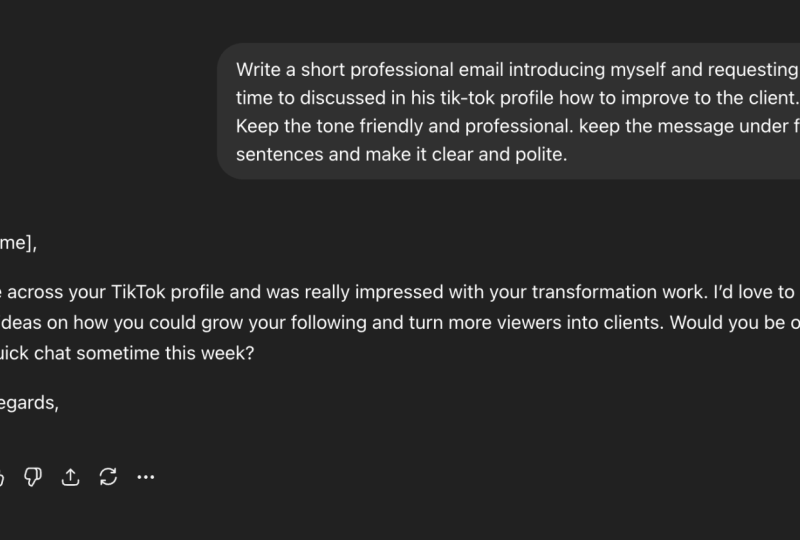
exactly as it is in your note. Your prompt now looks like this. Write a short professional
email confirming a meeting with a client.
That is a strong start. Many beginners try to
jump ahead too quickly, but this first line is actually
the most important piece. You have already told
Chachi PT what the task is. The small step alone
solves a lot of confusion. In the next lesson, we will add a little more clarity so the email sounds
natural and complete.
5. Add the Situation to Make the Prompt Clearer : Sometimes begin or write a prom and the results
feel slightly off. The task is correct, but the situation is
still a little vague. That is completely normal. The next small improvement is simply describing the situation. Let's continue using the
same prom we started. Right now, the prompt says, write a short professional email confirming a meeting
with the client. Now, we gently expand
the situation. First, add the day
of the meeting. Example, write a short
professional email confirming a meeting with the client
schedule for Tuesday. Next, add the purpose of
the meeting. Example, write a short professional email confirming a meeting with a client scheduled for Tuesday
to discuss a new project. Then read the prompt again. It now feels more natural. After that, add one
small tone instruction. For example, write a
short professional email confirming a meeting with a client scheduled for Tuesday
to discuss a new project. Keep the tone friendly
and professional. Now pause and look
at the full prompt. It is still very simple, but it gives Ja EPT enough context to
create a useful result. Your prompt now reads, write a short professional email confirming a meeting with a client scheduled for Tuesday
to discuss a new project. Keep the tone friendly
and professional. You did not add
anything complicated. You simply made the
situation clearer. That one change makes
a big difference. In the next part, we will add the final piece that
completes the prompt.
6. Add the Final Result You Want: Many beginners feel
nervous at this stage because they think
prompts must be perfect. But remember
something important. Prompts improve through
small adjustment. They do not need to be
perfect the first time. So let's calmly
finish our prompt. Right now, we have write a short professional
email confirming a meeting with a
client scheduled for Tuesday to discuss
a new project. Keep the tone friendly
and professional. The final step is telling Chachi PT exactly what
kind of result you want. First, add a simple
length instruction, example, write a short
professional email confirming a meeting
with a client scheduled for Tuesday to
discuss a new project. Keep the tone friendly
and professional. Keep the message
under five sentences. Next, add one final
instruction about clarity. For example, keep
the message under five sentence and make
it clear and polite. Now, take a slow moment
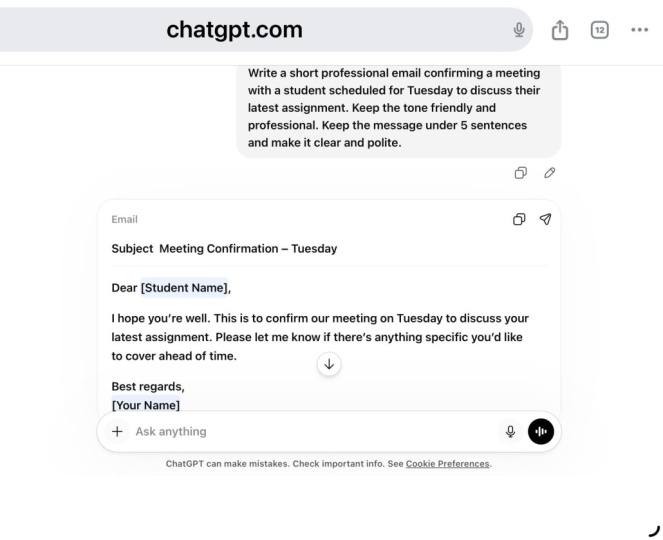
and read the full prompt. Write a short professional email confirming a meeting with the client scheduled for
Tuesday to discuss new project. Keep the tone friendly
and professional. Keep the message under five sentences and make
it clear and polite. That's it. Nothing complicated. Before you might have started
at the blank prompt box. Now you have a clear
prom that tells Jach PT exactly what you want. The task is clear. The
situation is clear. The result is clear. And that is what
makes prompts work. You move from
uncertainty to clarity simply by adding small
pieces step by step. That quiet progress is
exactly how many people become more comfortable
using AI for work task.
7. Share Your Finished Work Prompt : Your project is to create one simple work prompt like
the one we built together. The only material you need is a note or document where
you write the prompt. Now, let's look at
the finished example. Project title simple
Work email prompt. Write a short professional email confirming a meeting with a client scheduled for Tuesday
to discuss a new project. Keep the tone friendly
and professional. Keep the message under five sentences and make
it clear and polite. This final prompt includes
everything we added earlier. First, we wrote the task. Then we describe the situation. Finally, we explain
the result we wanted. This works well because
the prompt stays focused on one task
and one outcome. Your project is to write
a prompt like this and take one screenshot showing
the full prompt you created. That screenshot is the only
thing you need to share. You can create a prompt anytime, even a quick version
in just a few minutes. Many students upload
simple prompts, and that is perfectly fine. No one expects perfection here. The goal is simply to practice
writing one clear prompt. Once you finish a prompt, take the screenshot
and share it. That small snap shows that you completed the process
from start to finish.
8. Answer Common Questions About Simple Prompts : You made it all the way
through the process, which is already a great step. It is normal to still
have few questions. Here are some of the most
common ones. First question. What if my prom
feels too simple? That is a very common feeling. If you ask Ja GPT to
perform one clear task, simple prompts often work best because they reduce confusion. For example, if you want
help writing an email, then you can write a short prom like the one in our
project because a focus request usually produces a clearer
result. Second question. What if the response
is not exactly what I wanted? That
happens sometimes. If the email response
feels slightly off, then you can adjust the prom by adding one more detail about the situation because
clearer context helps HATEPT produce
better results. For example, you
could add the name of the company or the type of
the meeting. Third question. Can I use this method
for other tasks? Absolutely. If you
want Hach EPT to help summarize a document
or draft a message, then you can follow the same
structure because focusing on one clear task makes
prompts easier to understand. A helpful tip is to read your prompt once
before sending it. If the task feels clear to you, it will likely be clear
to ChatGPT as well.
9. Remember the CLEAR Prompt Habit : You just completed
something important. You turn a blank prompt into a clear instruction that
Chachi PT can understand. At the beginning, the prompt box might have felt confusing. Now, you have a simple
way to approach it. You started with a task. Then you describe the situation. Finally, you explain
the result you want. If there's one idea I hope
stays with you, it's this. Prompts work best when they stay focused on one clear task. Over time, many people naturally develop a small habit
for writing prompts. I like to remember it
using the word clear. Choose the task, lay
out the situation, explain the result, ask
simply review once. That simple rhythm is exactly what you were doing
throughout this process. It may seem small, but these
tiny habits often make work tools feel easier
and more natural to use. One interest thing
I have noticed is that once people start
writing clear prompts, they often begin noticing clarity in other parts
of their work, too. Thank you for spending
this time here. Before you go, remember
to finish your project by writing your prompt and
sharing one screenshot of it. The best moment to share is right after
you finish writing it. If questions come up later, that's completely
normal. Just ask. You made real progress today, even if it felt small, and often clarity grows quietly over time as you keep
showing up and practicing. Thank you again, and I'll
see you in the next lesson.
 Paul Nene, Helping beginners take action