Transcripts
1. Class Introduction: Sometimes you sit down to work, and the hardest part is simply
deciding where to begin. You look at the
long list of tasks and everything feels
equally important. Instead of moving
forward, you feel stuck. If that sounds familiar,
you are not alone. Many beginners feel overwhelmed
by too many options. The mind wants to start, but it does not know which
task deserves attention first. This class offers
a simple solution. You will learn how to use AI
tools like ChatGPT, Claude, or Gemini to help choose task, simplify work, and begin
projects with more clarity. I'm Paul, I help beginners
learn new skills in a clear and simple way so they can feel confident
trying something new. When I first started
using AI productivity, I tried to use it for
everything at once. That quickly became confusing. What helped most much simpler. I began asking AI
one small question. Which task should I start with? That small change made
work feel lighter. Here, you will learn the
to choose task using AI, remove extra task that can wait, turn vague work into
clear instructions, break task into steps, and create short work plans
that help you start quickly. This course is designed
for beginners. If you already have advanced
productivity systems or complex workflows, this might feel too simple. But if you are curious about using AI to organize
your daily work, you will feel right at home. All you need is access
to an AI assistant and a place to write
a short task list. By the end, you will be
able to choose task faster, simplify worksteps and begin
projects with more clarity. We will move through the
process step by step, starting with
choosing a task and ending with a comm method
for selecting the next one. Take a breath, open your notes and begin
with the first lesson.
2. Stop Feeling Stuck By Choosing One Task With AI : Sometimes the hardest part of working is not
the work itself. It is deciding what to start. You might open your computer, look at your list
of things to do, and suddenly feel stuck. There are emails to answer, ideas to write down, message
to send, projects to finish. Everything feels important. Everything feels unfinished. If that sounds familiar,
you are not alone. Many beginners feel overwhelmed when they look at
the long task list. The mind tries to hold
too many things at once. And instead of moving
forward, it freezes. If you have ever felt
that quiet moment of pressure where you think, Where do I even begin? Then you're exactly
in the right place. The good news is that you do not need to organize your
whole life today. You only need to
choose one task. That is the simple focus here. By the end of this, you will
know how to use AI to help you choose one clear task
to focus on right now. That single decision can remove a surprising
amount of stress. When I first started
using AI productivity, I did not try to
automate everything. I simply asked it to help me choose what
to work on first. That small change made starting work feel lighter and easier. What we'll do here
is very simple. First, you will gather a few tasks that are
already on your mind. Next, you will ask AI
to help you choose the one task that deserves
your attention right now. Then you will write one clear sentence that
becomes your focus. That single sentence
becomes your anchor. This works on its own,
and it also connects naturally with other lessons about planning and
working with AI. As we go, we will build
one tiny project together. It is quick, simple, and
surprisingly helpful. Take a small breath. You do not need to solve
everything today. You only need to decide
one thing. Let's begin.
3. Create One Clear Task Sentence With AI : Many beginners
believe they must fix their entire task list before
they can start working. That belief can make
everything feel heavy. If you have ever tried
organizing your whole list and ended up more
confused than before, that is completely normal. Instead of fixing everything, you are going to do
something much simpler. You will create one
short sentence that describes the one task
you will focus on today. That sentence will be
chosen with help from AI. Your project is simply this. You will write one
task sentence after asking AI which task you
should focus on first. The material we will
use is very simple. You only need a place to
write a short list of task. That could be Notes app, a text document, or a
small piece of paper. Use whatever you already have. Then you will open any
AI assistant you like. Many people use tools, such as Chachi PT,
Claude, or Gemini. But any assistant that can
respond to text will work. During the next few lessons, we will slowly
build the project. First, you will write a short list of task
already on your mind. Next, you will ask AI to help choose the most
helpful task to focus on. Finally, you will turn that choice into
one clear sentence. The finished result will
look like a single line of text that says exactly
what you will work on. It might sound very small, but this small action
creates clarity. And clarity is what
helps work begin. If you want, you can
follow along as we go. You are always
welcome to pause and write your own version
before moving forward. Remember, this is
practice, not performance. A simple and imperfect
result is more than enough. You are already doing the
right thing by showing up. Let's look at the idea
behind this approach.
4. Understand Why Choosing One Task Changes Everything : Here is something interesting
about the human mind. When we try to hold many
tasks at the same time, the brain treats them
like an open loops. Each unfinished idea keeps
asking for attention. That is why a long task
list can feel noisy. The real problem is not
the number of task. The real problem is that
nothing has been chosen yet. Once one task is chosen,
the mind relaxes. AI is helpful here because it acts like an
outside perspective. It can look at your list
and suggest where to begin, which removes the pressure
of deciding alone. The simple idea behind
this approach is this. Instead of solving
your whole list, ask AI to help you
choose one task. This idea has three clear parts. First, collect a few tasks
that are already on your mind. Next, ask AI to look at those tasks and suggest
which one should come first. Finally, turn that suggestion into one clear task sentence. This works because it removes the hardest
moment in productivity, which is the moment of choosing. Imagine someone who sits down with six task in their head. They might feel stuck
for a long time. But if AI says,
start with this one. The path suddenly becomes clear. For example, if your list
includes writing a report, answering emails, updating a document, and
planning a meeting AI may suggest
focusing on the report first because it requires
deeper attention. Once the choice is made, the mind stops bouncing
between options. Here is the simple
flow we will use. First, gather a few task. Next, ask AI which task
deserves attention now. Then write one clear
task sentence. That is the entire rhythm. As we continue, you
will see exactly how to do each part
slowly and calmly.
5. Write A Small Task List You Already Have : Sometimes people think they need the perfect task list
before asking for help, but that is not
necessary at all. If you already have few
things in your head, that is enough to start. Let's begin by writing
a very small list. The material we were using is simply a note or text document. Our project is called
one task sentence. First, open a blank note. Next, think about a few tasks that are already on
your mind today. Then write them down exactly as they appear
in your thoughts. For example, our project
example begins like this. Write project outline,
reply to two emails, organize notes for lessons,
review yesterday's work. After that, pause for a moment
and read the list slowly. Notice how the mind reacts when it sees several tasks at once. Many beginners feel a small
sense of pressure here. That reaction is
completely normal. Then remind yourself that you are not solving
the list yet. You are simply collecting it. Finally, save the note so you can use it in
the next lesson. Even the small
action is progress. Instead of holding task
only in your head, you have made them visible. That alone can make
the mind feel lighter. Next, we will ask AI
to help us choose
6. Ask AI To Help Choose One Task : Now that the tasks
are written down, the next moment is where
AI becomes helpful. Many beginners
hesitate here because they think they must
write a perfect prompt. But simple language
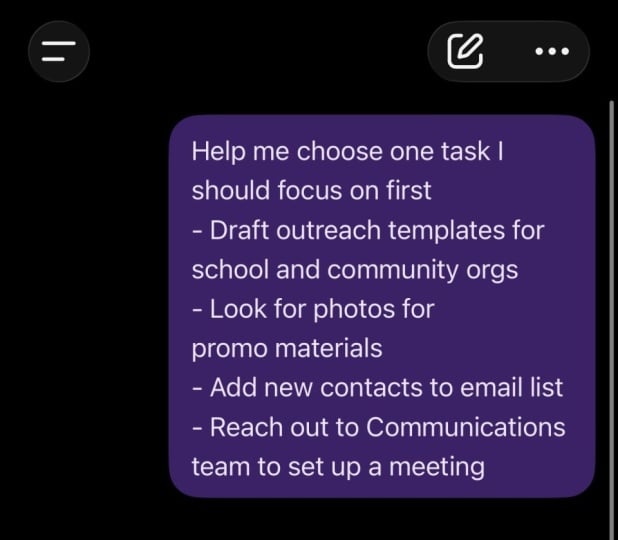
works just fine. Open your AI assistant, then type a short message
that shows the list. For example, you
could write this. Here are a few tasks
I need to do today. Help me choose the one task
I should focus on first. Then paste the same list. Write project outline,
reply to two emails, organize notes for lessons,
review yesterday's work. Next, read the response slowly. The assistant might suggest starting with the project
outline because it requires focused thinking and may unlock progress
on other task. Then take a moment to
notice how helpful it feels when something outside your mind suggests a starting point. After that, choose
the suggested task. In our example, the chosen task becomes writing the
project outline. Finally, return to
your note and place the chosen task on a new
line, write project outline. That single line is the
beginning of your project. Many students feel a small
sense of relief at this stage. The mind no longer has to
hold multiple options. In the next lesson,
we will turn this into a clear sentence you
can follow immediately.
7. Turn The Chosen Task Into One Clear Sentence : Sometimes a task name is
still a little vague. Write project outline might
feel slightly unclear. The mind might still
wonder where to begin. So the final step is to turn the chosen task into
one clear sentence. Start by returning to
your AI assistant. Then type a short
message like this. Help me turn this task
into one clear sentence. I can start right now. Write project outline. Next, read the response slowly. The assistant might suggest
something like this. Write a short outline with three main points
for a new project. Then return to your note and
write the sentence clearly. Our project example
now looks like this. Write project outline,
reply to two emails, organize notes for lessons, review yesterday's work. Focus task sentence. Write a short outline with three main points
for the new project. Take a quiet moment to
notice the difference. At the beginning, there were several tasks competing
for attention. Now there's one sentence. That single sentence becomes
the starting point for work. When beginners see this shift, many feel a gentle sense
of control returning. You do not have to
solve everything. You only have to follow
the next clear sentence, and that is enough to begin.
8. Share Your One Task Sentence : Your project is very
simple and very real. You will create
one task sentence chosen with the help of AI. The material needed is a
note or a text document. Earlier, we wrote a
short list of task. Then we ask AI to help choose the task
that should come first. Finally, we'll turn that task
into one clear sentence. Here is the finished example. Write project outline,
reply to two emails, organize notes for lesson, review yesterday's work,
focus task sentence. Write a short outline with three main points
for the new project. This small project works because it removes
decision pressure. When the mind knows
exactly what to do next, starting becomes easier. To complete your project, write your own task list and
your final focus sentence. Then share one screenshot or photo showing the list
and the focus sentence. Many people complete this
in just a few minutes. Simple projects like this
often create the most clarity. Once your screenshot is ready, upload it and share.
9. Remember The One Task Rule : Mm take a moment to notice
what you just finished. You wrote a small list of task. You ask AI to help
choose one task. You turn that task into
one clear sentence. That is a real progress. If there's one idea to
care with you, it's this. Clarity often comes
from choosing one task. Small steps work because
they remove pressure. When the mind sees
only one direction, starting becomes natural. Here is the simple
shortcut you can remember. Choose, ask, write. The word is CAW.
Choose your task. Ask AI for guidance, write one clear sentence. Once you see that rhythm, it becomes easy to repeat. Interesting happens when
people practice this. After a while, the mind begins
to relax around task list. The list stop feeling
like pressure and starts feeling
like possibilities. Thank you for spending
this time here. Before leaving, remember to
complete your project and share one screenshot of your
finished task sentence. The best moment to share it
is right after writing it. If questions appear later, that is completely normal. Curiosity is part of learning. You have already
taken the first step toward calmer productivity. Sometimes progress begins
with one very small sentence, and over time, those
small sentences quietly build momentum. I will see you in
the next lesson.
 Paul Nene, Helping beginners take action