Transcripts
1. Getting Started with AI for Content Creation: Okay, so AI is basically taking the online
world by storm. I mean, you must have seen
something about AI recently. It really is just
almost like the new, the new frontier of technology. And there's so many
possibilities, so many different
angles you can take. And really it's only limited
by your imagination. I'm probably a
good Wi-Fi system. But basically this course, we're going to look at
really how to automate a workflow for blog posts
and YouTube videos. If you don't have a
YouTube video, if that's, if that's not something
that you're into, but you're doing online content. I guarantee you'll
find something in this course that will help you if you do any sort
of YouTube stuff. Again, this is a way that
you can help your workflow. I've been using
this technique for about two months now and
really starts to boost my online presence
generally in blogging and YouTube and just
general online presence. And you will find
something that will be helpful if you do
any social media, any sort of videos, any
blogging, anything like that. Basically, we're going to
look at how to convert a videos audio from, sorry, from audio
to text using AI. And then we're going to
start to make those things, all that stuff SEO
friendly using AI. We're going to use
an AI to develop a blog post or a thumbnail
or some sort of artwork. And then we're going to use AI for all the social
media posts as well. Here's a little snippet of some of the stuff we're
going to be doing. We're going to be using this. We're gonna be using this
sort of really cool stuff. Let's get it up. You can see all the image
in the background here. I'm gonna show you how
I created this issue. If you know who
Jeremy Corbyn is. It's not meant to be him,
but it's basically him, but probably not
very flattering. So we're gonna be doing
lots and lots of stuff. So do bear with us
as we go through this very short course on how to have a workflow
for your blog, for your blog posts, for your online videos
and all this other stuff, and how you can better
utilize AI technology.
2. Your Content Creation Project: How to Use AI to Improve Your Blog Posts and Videos: I keep for your project,
what I'm going to do, I want you to upload a video, a video that you can
extract the audio from. Now, you can simply just
record yourself and have it on your desktop
and use that one. Or you can put on
some sort of social sharing situation as well. But it's basically a video
or whatever it could be of you talking
about something that you're very
passionate about, or it might be a video that
you already have online that you would like
to turn into a blog. And by using this, you can
follow this course on a step-by-step on
getting that video into a blog post and using that and then maybe share
that blog post with the rest of the community. So we can start to
look at the stuff that you've produced. This is really exciting. And I think this is a
great workflow for lots of different people in lots
of different industries. So look forward to seeing
the stuff that you produce.
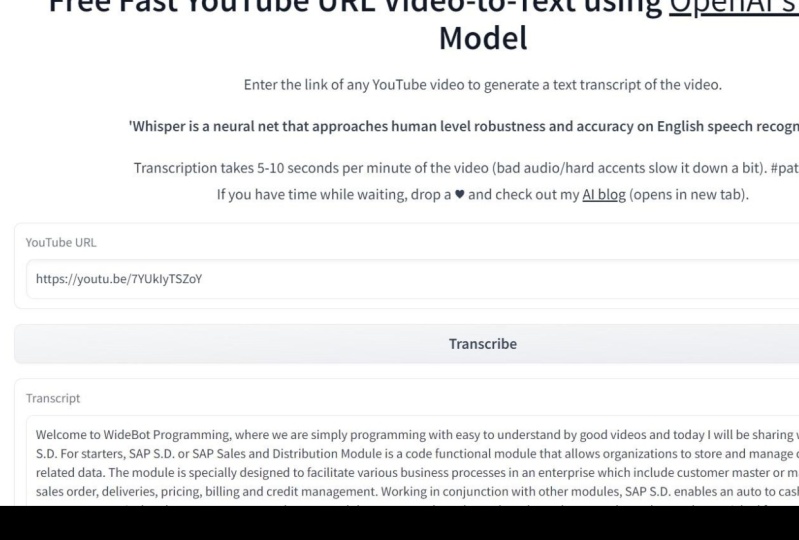
3. Transcribing Videos with AI: Creating Blog Posts from Your Videos Made Easy: Okay, So what we wanted
to do first is to grab all the audio from YouTube video and
convert this into text. And we're going to use
this by doing this AI. I don't what you call it. It's basically a YouTube video
to text AI program thing. So basically I've got
this set of videos here that I have uploaded
quite some time ago. And as you can see, I've got no sort of
just my general texts. Yeah, Hold basically
want to have a summary of the video here. For SEO purposes. I may even want to
change the title, and I also want to then also put a blog post up
summarizing this V0, encouraging people
to go to the video. And then when he
is our texts also for posts and stuff like that. So one needs to do is
just to copy the address. And I'm gonna go over to
this Hugging Face API. I guess I don't really
know what you call it, but basically it's an
open AI sort of program. We'll just paste it in there
and we click transcribe. And this will start
to work on it and convert it into text. So as it's working, I'm just going to
pause the video now and then come back once. It's all done. Okay, back, and as you can see, is converted this whole
video into the text. Now it was only
seven minute videos, so there's probably not as
much text as it could be. Of course, if
you're doing like a two-minute video or something, it's going to be a
lot more texts and l'm probably take more time. Okay, so what we do now is
we've got all these texts, so we just highlight
that, copy it. And here we want to go to
chat GBT to do all the magic. Really want to do is
simply paste it in there. That we could do before
we do this, of course, is go through and
just double-check. Obviously sometimes
it will miss. Sort of misunderstand what
a particular word is. If you're, let's say
your name and a city, or you're using your surname
or something like that. It may just try
and have a guess. I mean, it's cool. Stuff like yeah, I mean, it seems to be pretty accurate. So what we're gonna
do is just to ask Chuck GBT to several
things you could do here, e.g. you could just say do summary. But what we're gonna do is
rewrite this for a blog post. Now, I also like to use headers. So using H1 headers, e.g. I. Tell you just got that wrong. H, H4. Let's see what comes
up now. See how. It's got the introduction,
that's nice. So the summary,
part one. Tomorrow. I'm just going to pause this
now until this is finished. The show what the outcome is. You can see it's done sort of a nice little blog post here. We could, we could give
us some more indications. So like we can ask it
to expand the post. And it'll do that,
which is quite helpful. I'm not gonna keep
doing that now, so I'll just stop that. We could ask it to use
more bullet points, e.g. so yeah, as you can see again, they started to add
more bullet points. So it's all depends what type
of summary or your blog, the format that you want. So that's quickly how
we do the blog post. Maybe worth you play around with this and seeing the types
of things that it comes up, the format that you
want, the outline, the way that you
want it to look, and use that on your own blog.
4. Optimizing Your Blog Posts for SEO with AI: Okay, So what we wanna
do now is look at how we can make this
post more SEO friendly. So let's go back to chat GBT, and now we can do is
just ask it to do this. I sometimes like to go
back to the start and do the whole thing again because it can get a
little bit confused. I think that's just
my preference. So let's say rewrote
this blog post using A4 headers and make
it SEO friendly. So you can just go there. The other thing I
love about this, it's still understands
my spelling mistakes. So MR2, friendly. Since it has got a bit stuck. Try that again. Okay. So it's written as it's given me a title suggestion as well,
which is really helpful. Okay, so I'm gonna go back
to the original post again, just put it here and
I'm going to ask it. Give me a short summary. And it should start to this. Okay, so it's gonna give me
a summary that I could use in my blog post. So I'm going to do, I
am going to take this. So we've got the blog
post here with a title. Then this is particularly like
this title, but, you know, if the depth demonstration purposes, I'm just
going to use it now. So let's start to build
this particular post here. I'm going to do that. I'm going to tell the title
I have for now. It's always worth
going through doing in level little tweaks if
you're going to do this. Okay, so I've just added
the text here like this. Let's go back and we
could add the summary. Summarizes post. I mean, of course if you're
doing this for real, obviously you go for
this and you sort of edit it and you clean
up and stuff like that. But that's just for demonstration purposes
of this to this for now. And then my thing
I've also got SEO. So what I sometimes
do is just copy this and go back to here and say, give me the key
phrase, farm this. So it comes up. So let's title
that put up there. This is a post I'm using. And that should give you now. Then we can take, obviously
if you've got a post, a blog post has a lot
more complicated than this is more helpful. Then you may want to
say, say keywords. If you just gives us, says Give me all the
keywords from the post. Now can put those in. And somewhere in here, where it's asking me for
keywords, key phrases, e.g. let's take a look at this and say I was
looking so far live. Okay, so got the
summary that I've got the blog post title,
blog here, outline. Now, what I would normally do is then put the video in there, but I want to show you something
a little bit different, so we'll leave it for now. But as you can see, that
is a way that you can use Chat GBT to come
up with keywords, SEO. Play around with SEO.
Obviously, again, if this was a live post, you spend a lot more
time and effort into really nailing down these keywords and checking that they were good
ones, et cetera. I mean, enrolling is that
really good keyword conclusion, that's not so good. But you can sort of get the idea that you can start to take. If you've got quite
a complicated post, then you can start to take
out the keywords from there. There are a lot more
relevant and SEO friendly.
5. Crafting Better YouTube Descriptions with AI: Now obviously you want people not only just to go
to your blog posts, but also to view your video. So you wanna make that as
SEO friendly as possible. So another way to
use chat GBT is to take that text again, the summary tasks that we exported from the
first video and ask the AI to help us with
the SEO of the YouTube video. So here I've got 1,000
words YouTube video description from the texts
highlighting keywords for SEO. And now the reason
why I've thousand word is because often it will make it very short summary, I want it to be quite lengthy. You get quite a lot of leeway
with YouTube description. So why not use it? So let's see where it comes up
with from this. And maybe after tweak
it a little bit after. But we can see it's
giving you another title, passive earth from here as k. And so it's giving
you the description. Let's see how far it gets. So don't think that's too bad. We could ask it to expand and give it a little bit more text. But I think it's fine for now. Let's also see if it will give
us some YouTube hashtags. It's thinking, okay, here we go. It's given us some
good ones here. So we could use those in the video as well
if we wanted to. So as you can see, it's really helpful also for
just your YouTube video. Seo as well.
6. Creating Unique Images for Your Blog Posts with AI: One really exciting
thing that we can do with AI is create unique work or thumbnails
for a YouTube video. That is a totally unique, totally hours, totally
our style and I feel. And you can use a AI service that is hosted on discord and
is a myth journey. So just go to mid-June dot
com and follow the prompts. And eventually you'll
come to a page like this. We want to do is find
a newbies sort of room where you can start to experiment and come
up with some ideas. Now, obviously the theme of our video is a
little bit boring. So you probably won't get
anything terribly exciting. But if your video is about
something quite unique, quite interesting,
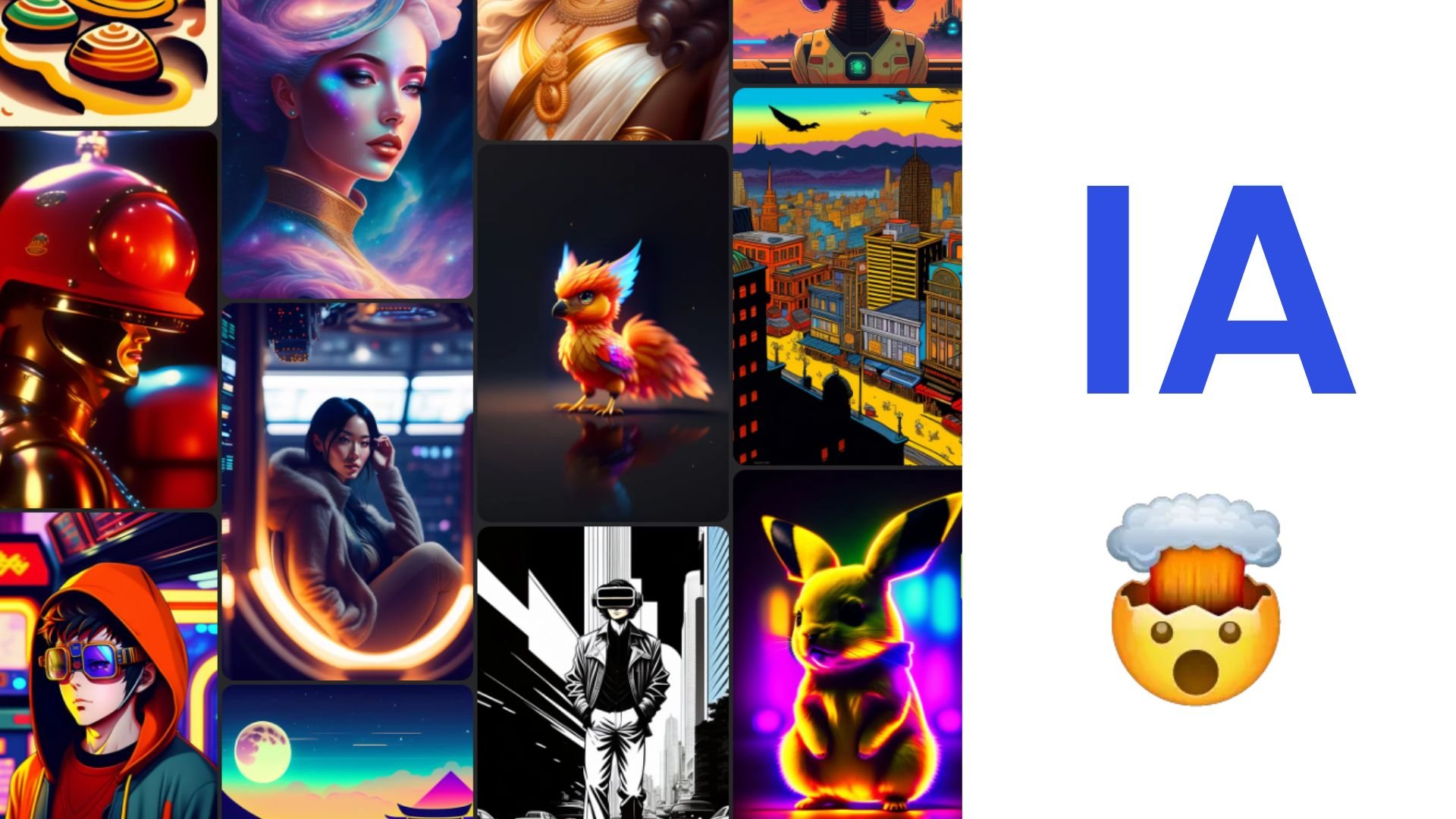
you can see some of the artwork that's
being developed here. Man and his dog, sort of a Batman superhero
thing going on. All these sort of things.
You can start to develop some ideas for,
for some artwork. Now, I'm going to
have a little bit of experiment and see
what can come up with. But as I said, it's a
bit of a boring themes. So probably I'm come
up with anything very exciting, but
let's have a look. Okay, so the prompts I've
put in here is imagine, you just hoping slash, imagine, and he starts
to come up with prompts. And you put, I've put in a blog post about
making money online. Happy, relaxed, enjoying life, sunset old man, I follow, try and give it something
a bit interesting. And version four, stylized 500s, stylized five-hundred,
basically means the level of sort of
imagination, I guess it puts in. And I love this one has just come up with
dinosaur in a child. And let's see what happens. Okay, so we can see here
they starting to come up with some ideas is sort of 62%. I'm not going to
look at this one. The bottom one has gone. This is the, one
of the problems of this website is that I get, so just click on here. Yeah, this is I like this guy. Oh no, this guy, look at this. He's, he's happy he's making a little bit of money
online is enjoying life. So what we can do, we can
pick the number three. So let's find the post again
and we click on you free. And basically it's
going to redo, it's going to base
the next ideas onto that particular one. Okay, I've settled
on this one here. And I think it's
okay. It's here. It looks a bit weird. I think if I was to do
this for a real poster, I probably spent a little
bit more time on it. And obviously things
like his eyes a bit odd, it looks so Zoltan the glass, but I'm not quite sure and
it's obviously a newspaper. And so play around with
that a little bit more. You can sort of eyes, mouth, mouth as well. So it looks a bit odd, but you get this sort of thing. You can basically create
totally unique pieces of artwork and you can still see other people's artwork here. Something seems to work. Some things seemed to
work a lot better. Here you got some really
interesting stuff here that this guy is doing.
That's quite nice. Actually. Black and white logo line art. A boy with glasses is looking
to the front and behind. So obviously there's probably
for a logo for a company. So that's quite interesting
what he's doing there. This grid looks pretty good. You know, some things
seemed to work a lot easier than others. This definitely works
something playing around with and seen how you can start
to use this for thumbnails, for blog posts and further sort of some social media
stuff as well.
7. Streamlining Social Media Posts with AI: Okay, so finally you can
turn your blog post and your YouTube video into
social media posts. So let's have a little look. Turn this blog post into a Twitter post using hash tags. And let's see what comes up. Okay, So there you go. That's like a really simple
thing that you can do. Instant. Again, I'm glad it
can work out my spelling. It's getting really
slow. I think just kinda getting a lot of use around the
world at the moment. That's one of the
floors with this, with this is that it can
get really overused. So you can sort of see
what's happening here. Okay? Facebook post. So
as you can see, you can start to use these. You can just simply
copy and paste that and use it for your
various social media. So just copy and paste. Really, really
quick, really easy. Not too much heat. You
have to really think about just double-check and any
mistakes or anything like that. They can do is just to
find out the hashtags that may be trend in, in a particular post that
you're looking to put online. So I've just said what
the top trending hashtags to do with making money
online. And a guess. Again, it depends
what your theme of your blog post
is, your video. And it will come up
with some ideas. So there's a few tips and
tricks that you can do in utilizing social
media through AI. So that's helpful.
8. Conclusion: The Power of AI for Content Creation and How It Can Revolutionize Your Blogging and YouT: Okay, thank you for
watching this course. I really hope that after
watching this course, there's at least one tip trick, hack website tool
that you discovered. That rule really help you in your personal life
or your career, or whatever it is or
something just to have fun with when you're
a little bit bored. I mean, come on, the AIR, work is really fun. If nothing else, you can play around with that and come
up with all sorts of crazy ideas and thoughts and maybe even developer
postcards to send to your loved ones or something weird and
crazy like that. In this course, we
basically looked at how you can convert a video that's called
audio on it into text. How to take that text
and put that into an AI that will convert
it into a blog post. How to make that blog
post SEO friendly, some keyword ideas, summary,
all that type of stuff. How you can use that in a
YouTube video if you need to. How to develop unique artwork for your blog post
or your videos. And how to use all
that in social media. And that's been the
whole workflow. And I hope you've discovered something really
interesting and fun. Please comment on this
and share your projects. And I look forward to
chatting to you more. Also, if you come up
with any other hacks or tips or tricks, do share that with the
community as well. And then we can use those
maybe in further videos. Thanks for watching.
 Paul Tilley