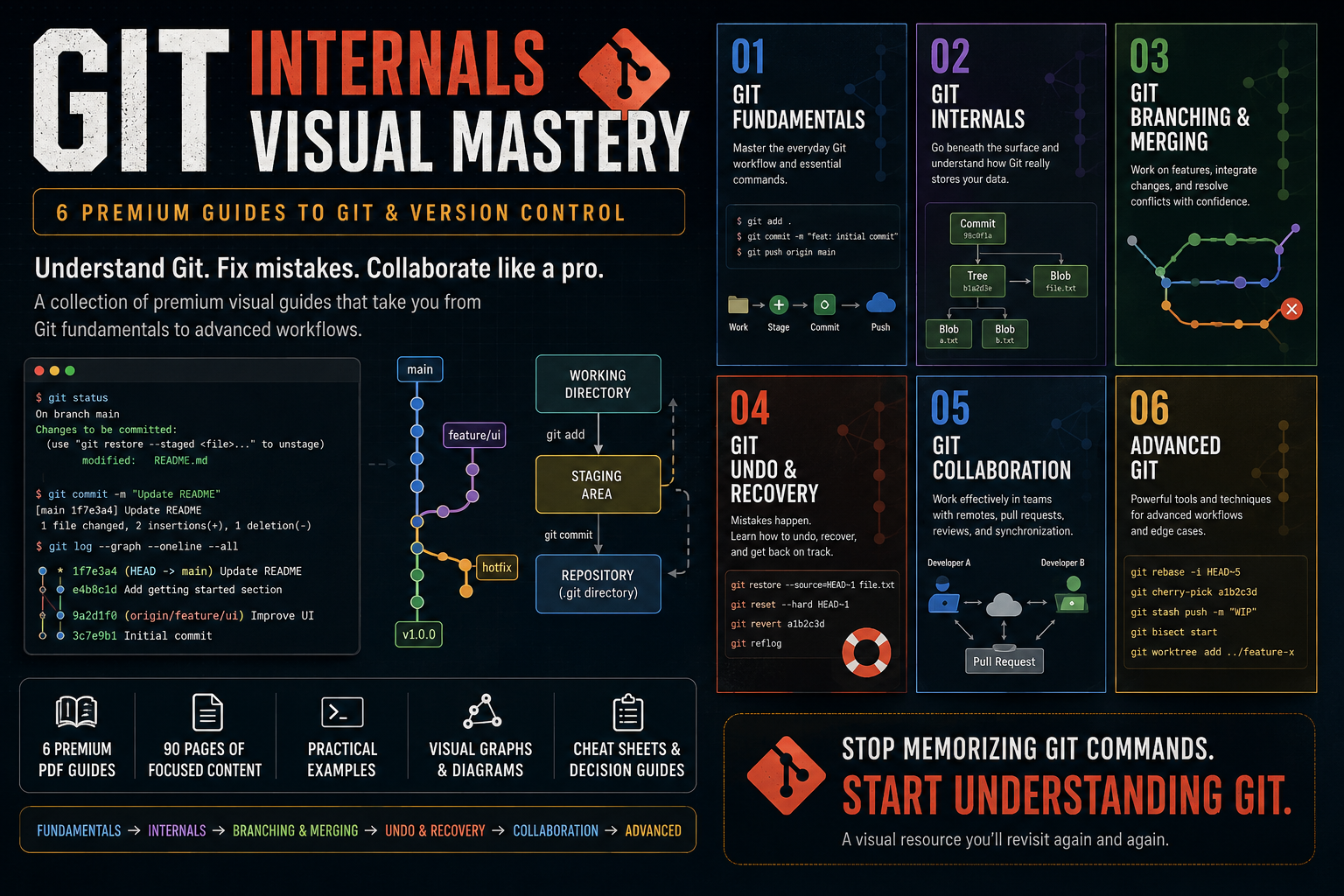
Git Internals Visual Mastery — 6 Premium Guides
1 Monat Skillshare
Mit einem Kauf erhältlichKostenlos
Alle Mitgliedschaften werden automatisch und fortlaufend abgerechnet, bis sie gekündigt werden. Solltest du eine kostenlose Probemitgliedschaft erhalten und Skillshare nach Ablauf dieser nicht mehr nutzen wollen, ist eine Kündigung vor Ablauf der Probezeit erforderlich. Das Angebot gilt nur für neue, zahlende Mitglieder. Siehe vollständige Nutzungsbedingungen hier
Über dieses Produkt

Aymen El Kani
software engineer
Git is easy to use until it isn't.
You can memorize git add, git commit, git push, and git pull without ever developing a real mental model of how Git works or what to do when something goes wrong.
Git Visual Mastery is a collection of premium visual guides designed to help developers understand Git from the fundamentals all the way to advanced workflows.
Instead of giving you another giant Git course filled with endless commands, these guides break Git into focused topics and explain each one through clear diagrams, practical scenarios, Git graphs, terminal examples, and concise explanations.
What's Included
01 — Git Fundamentals
Build a solid foundation with Git's everyday workflow, essential commands, staging, commits, history, branches, and repositories.
02 — Git Internals
Go beneath the surface and understand what Git actually stores.
Learn about commits, branches, HEAD, blobs, trees, hashes, references, and the Git object database.
03 — Git Branching & Merging
Understand how developers work on parallel features and integrate their changes.
Learn branching, merging, merge conflicts, rebasing, and how to choose between merge and rebase.
04 — Git Undo & Recovery
Learn what to do when something goes wrong.
Understand restore, reset, revert, reflog, and how to recover from common Git mistakes.
05 — Git Collaboration
Learn how Git fits into team development.
Understand remote repositories, push/pull/fetch, pull requests, code review, synchronization, and practical team workflows.
06 — Advanced Git
Go beyond everyday Git with powerful tools and techniques including interactive rebase, cherry-pick, stash, bisect, worktrees, and advanced workflows.
Designed for Developers Who Want to Actually Understand Git
These guides focus on the mental models behind Git, not just command memorization.
You'll see concepts explained through:
Visual Git graphs
Architecture diagrams
Before/after workflows
Realistic developer scenarios
Terminal examples
Practical decision guides
Quick-reference cheat sheets
Each guide is intentionally focused on a specific Git problem so you can learn what you need without digging through hundreds of pages.
From Beginner to Advanced
The collection follows a progressive path:
Fundamentals → Internals → Branching & Merging → Undo & Recovery → Collaboration → Advanced Git
You can read the guides sequentially or jump directly to the topic you're struggling with.
What You'll Get
6 premium visual PDF guides
90 pages of focused Git education
Practical examples and workflows
Visual reference material you can revisit anytime
A structured path from Git beginner to advanced user
Whether you're learning Git for the first time, preparing for professional development work, or constantly finding yourself searching for "how do I undo this Git command?", this collection is designed to become a resource you keep coming back to.
Stop memorizing Git commands.
Start understanding Git.
Häufig gestellte Fragen
Was sind digitale Produkte?
Bei den digitalen Produkten von Skillshare handelt es sich um fachmännisch gestaltete Tools, Ressourcen und Vorlagen, die von den besten Kreativen entwickelt wurden und die dir zum Kauf zur Verfügung stehen. Mit einer breiten Palette an Ressourcen für jeden kreativen Bedarf sind sie einfach umsetzbar und machen deine Lernerfahrung real und unvergesslich.
Wie kann ich ein digitales Produkt kaufen?
Jeder kann ein digitales Produkt auf Skillshare kaufen — klicke auf Jetzt kaufen, um deine Zahlungsinformationen einzugeben und den Kauf abzuschließen. Sobald die Zahlung abgeschlossen ist, können alle Dateien sofort von dieser Seite heruntergeladen werden. Du erhältst außerdem eine E-Mail mit einem Link zum Herunterladen deines digitalen Produkts nach dem Kauf.
Gibt es ein Limit, wie oft ich ein digitales Produkt herunterladen kann?
Nein, es gibt keine Begrenzung, wie oft du ein digitales Produkt herunterladen kannst. Selbst wenn ein Produkt vom Ersteller entfernt wird, kannst du in den meisten Fällen immer noch auf die Download-Seite zugreifen, indem du dich in dein Skillshare-Konto einloggst.
Kann ich eine Rückerstattung erhalten oder den Kauf eines digitalen Produkts stornieren?
Digitale Produkte sind nicht erstattungsfähig und können nicht zurückgegeben oder storniert werden. Weitere Informationen findest du in unserer -Rückerstattungsrichtlinie im Skillshare Hilfebereich.
Kann ich meine eigenen digitalen Produkte herstellen und verkaufen?
Unbedingt! Besuche Wie kann ich ein digitales Produkt auf Skillshare verkaufen?, um zu erfahren, wie du deine eigenen digitalen Produkte auf Skillshare erstellen, anbieten und verkaufen kannst.