ABIS CINEMATIC 01 — Signature Cinematic LUT
1 Monat Skillshare
Mit einem Kauf erhältlichKostenlos
Alle Mitgliedschaften werden automatisch und fortlaufend abgerechnet, bis sie gekündigt werden. Solltest du eine kostenlose Probemitgliedschaft erhalten und Skillshare nach Ablauf dieser nicht mehr nutzen wollen, ist eine Kündigung vor Ablauf der Probezeit erforderlich. Das Angebot gilt nur für neue, zahlende Mitglieder. Siehe vollständige Nutzungsbedingungen hier
Über dieses Produkt

Olusola Abisagbo
Professional Photographer and Educator
One LUT. Different Images. One Cinematic Starting Point.
You don't always need 20 LUTs to create a beautiful look.
Sometimes, you just need ONE that works as a strong starting point.
ABIS CINEMATIC 01 is a signature cinematic LUT created for photographers who love rich, slightly dark, moody colours without spending too much time trying different presets and LUTs.
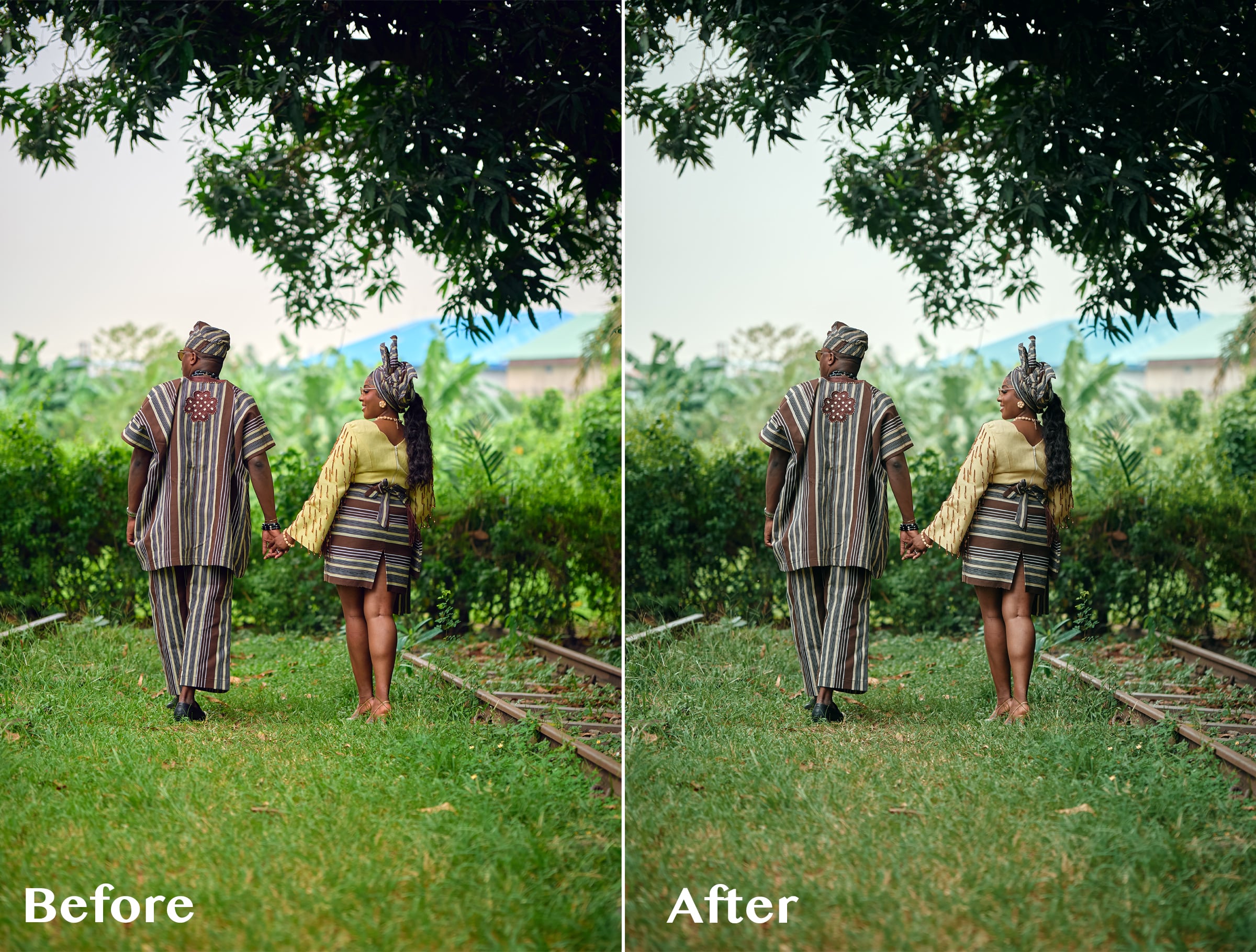
I originally created this LUT while working with wedding images with a lot of greenery. I wanted the bright greens to feel deeper, darker and more cinematic instead of overpowering the photograph.
But while testing it, I discovered something interesting.
It wasn't just about the greens.
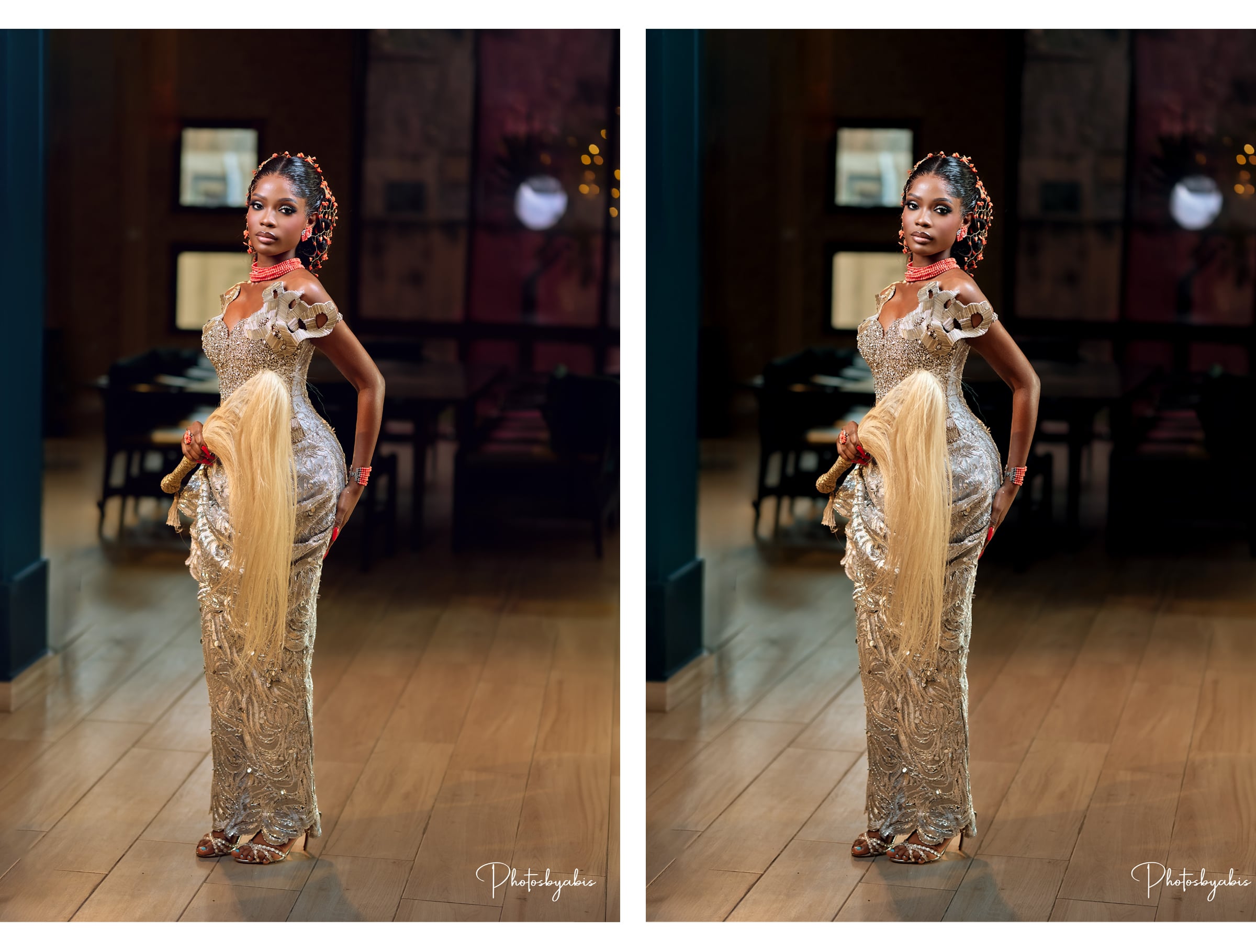
I tested the LUT on photographs with completely different colours, lighting, environments, and it still gave me a beautiful cinematic base to work from.
The secret is knowing how to adjust it.
THE SIMPLE WORKFLOW
1. Apply ABIS CINEMATIC 01
Start by applying the LUT to your image.
2. Adjust the LUT opacity
You don't have to use the LUT at 100%.
Reduce the opacity until the effect feels right for your photograph.
3. Adjust your Levels
Use Levels to refine the brightness, contrast and overall depth of the image.
4. Adjust Saturation if needed
Want some of the original colours back?
Simply increase the saturation to taste.
That's it.
LUT → Opacity → Levels → Saturation
A simple starting point that you can adapt to your own photograph and editing style.
WHAT MAKES ABIS CINEMATIC 01 DIFFERENT?
I didn't want to create another LUT pack filled with 10, 20 or 50 different looks that you have to keep clicking through.
I wanted one versatile LUT that I could understand, control and use repeatedly.
ABIS CINEMATIC 01 gives you the foundation.
You decide how far you want to take it.
Use a lower opacity for a subtle cinematic finish.
Push it further when you want something darker and moodier.
Add saturation when you want more colour.
Adjust your Levels when you want more depth.
The LUT gives you the look. You remain in control of the final image.
ESPECIALLY BEAUTIFUL ON GREENS 🌿
Although ABIS CINEMATIC 01 can be used across different colour environments, one of my favourite things about it is what it does to bright greens.
Grass, trees and foliage can sometimes become too bright or distracting in wedding and outdoor photography.
ABIS CINEMATIC 01 helps create deeper, muted and more cinematic-looking greens, making it especially useful for outdoor weddings, pre-weddings and portraits.
GREAT FOR
Wedding photography
Pre-wedding photography
Portrait photography
Outdoor photography
Lifestyle photography
Editorial images
Photographers who love cinematic colours
Photographers who prefer dark and moody edits
WHAT YOU'LL RECEIVE
ABIS CINEMATIC 01 LUT (.CUBE)
Plus a simple Quick Start Guide showing you my recommended workflow:
Apply LUT → Adjust Opacity → Levels → Saturation
The .CUBE format makes the LUT usable in compatible photo and video editing software that supports LUTs.
IMPORTANT TO KNOW
ABIS CINEMATIC 01 is designed to give you a cinematic starting point, not replace your entire editing process.
Different photographs have different lighting, exposure, white balance, colours and camera profiles.
For this reason, you may need to adjust the LUT opacity, Levels, saturation, exposure or white balance to achieve your preferred result.
And that's exactly how I use it myself.
Häufig gestellte Fragen
Was sind digitale Produkte?
Bei den digitalen Produkten von Skillshare handelt es sich um fachmännisch gestaltete Tools, Ressourcen und Vorlagen, die von den besten Kreativen entwickelt wurden und die dir zum Kauf zur Verfügung stehen. Mit einer breiten Palette an Ressourcen für jeden kreativen Bedarf sind sie einfach umsetzbar und machen deine Lernerfahrung real und unvergesslich.
Wie kann ich ein digitales Produkt kaufen?
Jeder kann ein digitales Produkt auf Skillshare kaufen — klicke auf Jetzt kaufen, um deine Zahlungsinformationen einzugeben und den Kauf abzuschließen. Sobald die Zahlung abgeschlossen ist, können alle Dateien sofort von dieser Seite heruntergeladen werden. Du erhältst außerdem eine E-Mail mit einem Link zum Herunterladen deines digitalen Produkts nach dem Kauf.
Gibt es ein Limit, wie oft ich ein digitales Produkt herunterladen kann?
Nein, es gibt keine Begrenzung, wie oft du ein digitales Produkt herunterladen kannst. Selbst wenn ein Produkt vom Ersteller entfernt wird, kannst du in den meisten Fällen immer noch auf die Download-Seite zugreifen, indem du dich in dein Skillshare-Konto einloggst.
Kann ich eine Rückerstattung erhalten oder den Kauf eines digitalen Produkts stornieren?
Digitale Produkte sind nicht erstattungsfähig und können nicht zurückgegeben oder storniert werden. Weitere Informationen findest du in unserer -Rückerstattungsrichtlinie im Skillshare Hilfebereich.
Kann ich meine eigenen digitalen Produkte herstellen und verkaufen?
Unbedingt! Besuche Wie kann ich ein digitales Produkt auf Skillshare verkaufen?, um zu erfahren, wie du deine eigenen digitalen Produkte auf Skillshare erstellen, anbieten und verkaufen kannst.