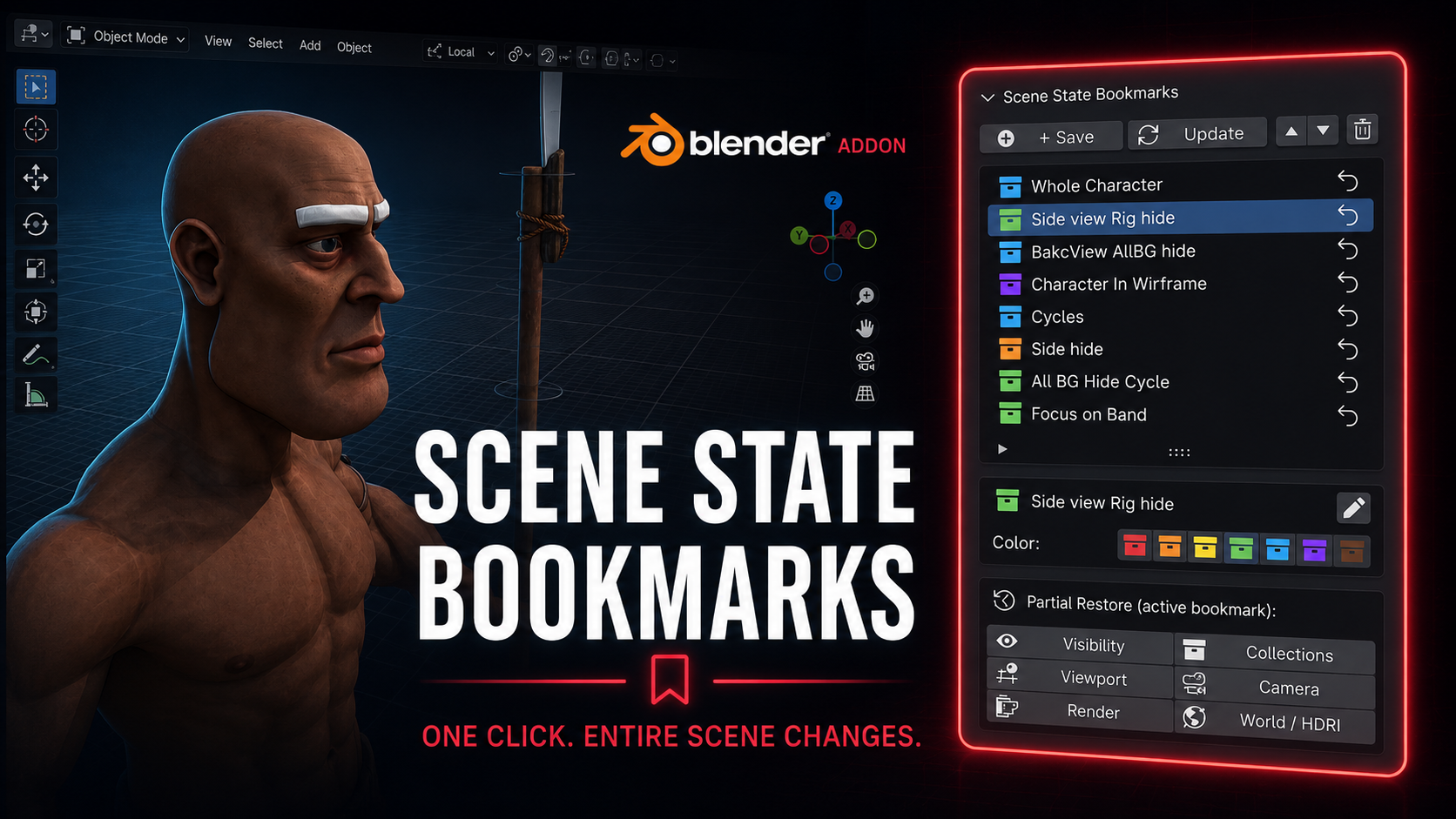
Scene State Bookmarks - Save and Restore
1 Monat Skillshare
Mit einem Kauf erhältlichKostenlos
Alle Mitgliedschaften werden automatisch und fortlaufend abgerechnet, bis sie gekündigt werden. Solltest du eine kostenlose Probemitgliedschaft erhalten und Skillshare nach Ablauf dieser nicht mehr nutzen wollen, ist eine Kündigung vor Ablauf der Probezeit erforderlich. Das Angebot gilt nur für neue, zahlende Mitglieder. Siehe vollständige Nutzungsbedingungen hier
Über dieses Produkt

Salman Naseem
2d 3D Animator
Every animator and 3D artist knows the pain. You spend 3 minutes hiding collections, switching render engines, repositioning the viewport, and setting up the camera just to review one specific shot. Then you need to switch to another setup and do it all over again.
Scene State Bookmarks eliminates that
What it does
With one click you save a complete snapshot of your scene. Every bookmark stores exactly what your scene looks like at that moment including which objects are visible, which collections are active, your viewport position and angle, the active camera, render engine and resolution settings, and your world and HDRI setup.
Restoring that state takes exactly one click.
Who this is for
This addon is built for working artists with real production pressure. If you switch between character close-ups and wide environment shots, between EEVEE previews and Cycles final renders, between wireframe checks and solid shading, this tool will save you hours every single week.
Animators use it to jump between different character poses and camera angles without losing their setup. Riggers use it to toggle between rig-visible and rig-hidden states in one click. Render artists use it to switch between low-resolution preview settings and full 4K Cycles production settings without touching a single property manually.

Full feature list
Save unlimited named bookmarks per scene
Color code bookmarks with 7 colors for instant visual organization
Restore any bookmark in one click from the N panel
Partial restore lets you apply only one layer: visibility only, collections only, viewport only, camera only, render only, or world only
Rename bookmarks at any time without re-saving
Reorder bookmarks up and down to match your workflow
Update any bookmark with new scene state while keeping its name and color
Delete bookmarks you no longer need
All bookmark data is saved inside the blend file so your team gets the same states when they open the file
What gets saved in each bookmark
Object visibility (viewport and render) Collection exclude and hide states Viewport position, rotation, distance and perspective mode Viewport shading type and overlay settings Active camera Render engine (EEVEE or Cycles) Render resolution X and Y Cycles and EEVEE sample counts World and HDRI assignment
Why this is different from other visibility addons
Most visibility tools only toggle object or collection hide states. Scene State Bookmarks captures the full picture: your render settings change, your camera changes, your viewport angle changes, your world changes. It is a complete scene memory system, not just a visibility switcher.
Häufig gestellte Fragen
Was sind digitale Produkte?
Bei den digitalen Produkten von Skillshare handelt es sich um fachmännisch gestaltete Tools, Ressourcen und Vorlagen, die von den besten Kreativen entwickelt wurden und die dir zum Kauf zur Verfügung stehen. Mit einer breiten Palette an Ressourcen für jeden kreativen Bedarf sind sie einfach umsetzbar und machen deine Lernerfahrung real und unvergesslich.
Wie kann ich ein digitales Produkt kaufen?
Jeder kann ein digitales Produkt auf Skillshare kaufen — klicke auf Jetzt kaufen, um deine Zahlungsinformationen einzugeben und den Kauf abzuschließen. Sobald die Zahlung abgeschlossen ist, können alle Dateien sofort von dieser Seite heruntergeladen werden. Du erhältst außerdem eine E-Mail mit einem Link zum Herunterladen deines digitalen Produkts nach dem Kauf.
Gibt es ein Limit, wie oft ich ein digitales Produkt herunterladen kann?
Nein, es gibt keine Begrenzung, wie oft du ein digitales Produkt herunterladen kannst. Selbst wenn ein Produkt vom Ersteller entfernt wird, kannst du in den meisten Fällen immer noch auf die Download-Seite zugreifen, indem du dich in dein Skillshare-Konto einloggst.
Kann ich eine Rückerstattung erhalten oder den Kauf eines digitalen Produkts stornieren?
Digitale Produkte sind nicht erstattungsfähig und können nicht zurückgegeben oder storniert werden. Weitere Informationen findest du in unserer -Rückerstattungsrichtlinie im Skillshare Hilfebereich.
Kann ich meine eigenen digitalen Produkte herstellen und verkaufen?
Unbedingt! Besuche Wie kann ich ein digitales Produkt auf Skillshare verkaufen?, um zu erfahren, wie du deine eigenen digitalen Produkte auf Skillshare erstellen, anbieten und verkaufen kannst.