HotkeyBoard - All blender Keyboard Shortcuts
1 Monat Skillshare
Mit einem Kauf erhältlichKostenlos
Alle Mitgliedschaften werden automatisch und fortlaufend abgerechnet, bis sie gekündigt werden. Solltest du eine kostenlose Probemitgliedschaft erhalten und Skillshare nach Ablauf dieser nicht mehr nutzen wollen, ist eine Kündigung vor Ablauf der Probezeit erforderlich. Das Angebot gilt nur für neue, zahlende Mitglieder. Siehe vollständige Nutzungsbedingungen hier
Über dieses Produkt

Salman Naseem
2d 3D Animator
HotkeyBoard is the ultimate interactive keyboard overlay addon for Blender that helps you master 750+ keyboard shortcuts through visual learning. Whether you're a complete beginner struggling to remember hotkeys or an experienced artist wanting to discover advanced shortcuts, HotkeyBoard transforms how you learn and use Blender.
What Makes HotkeyBoard Different?
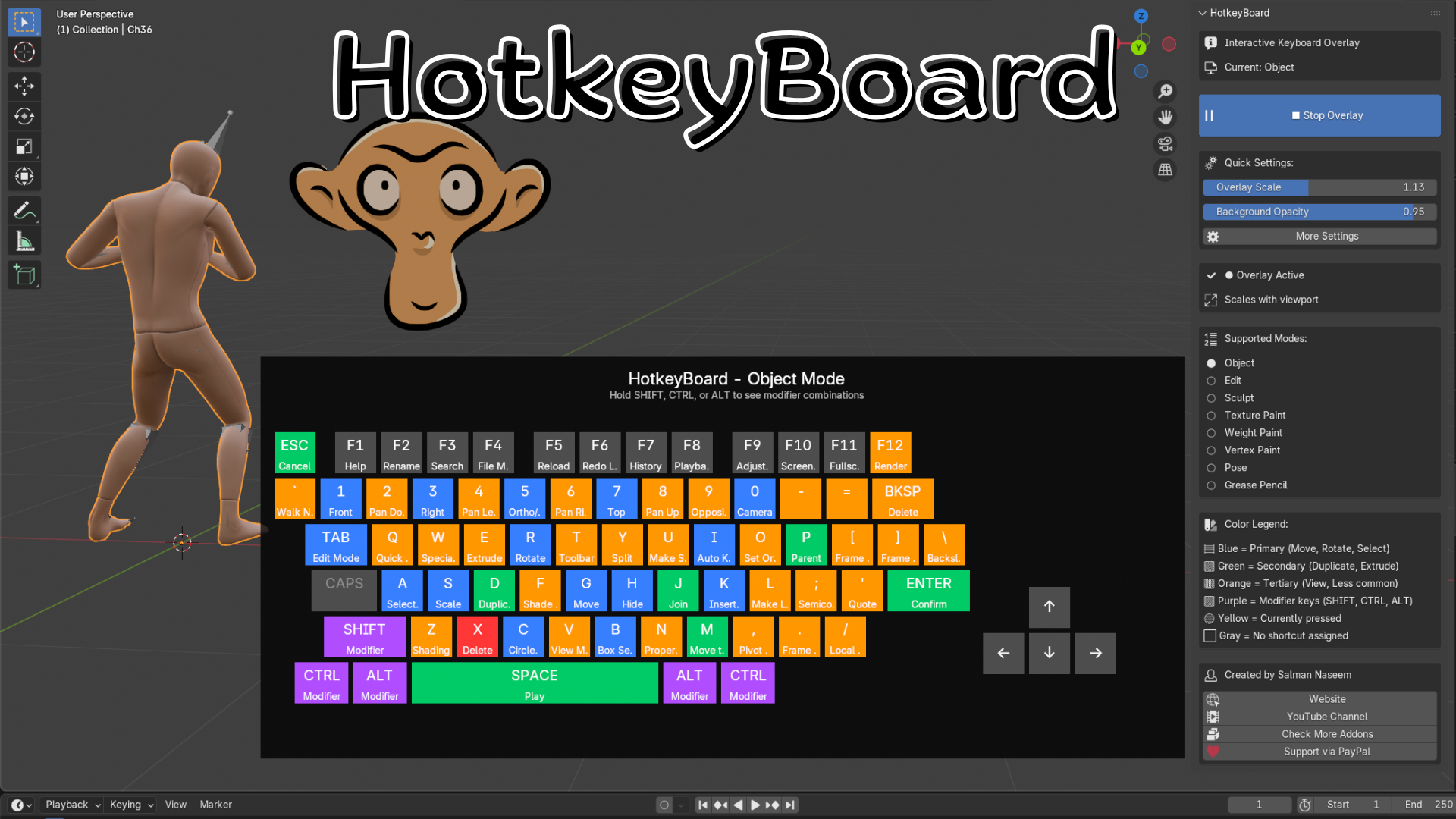
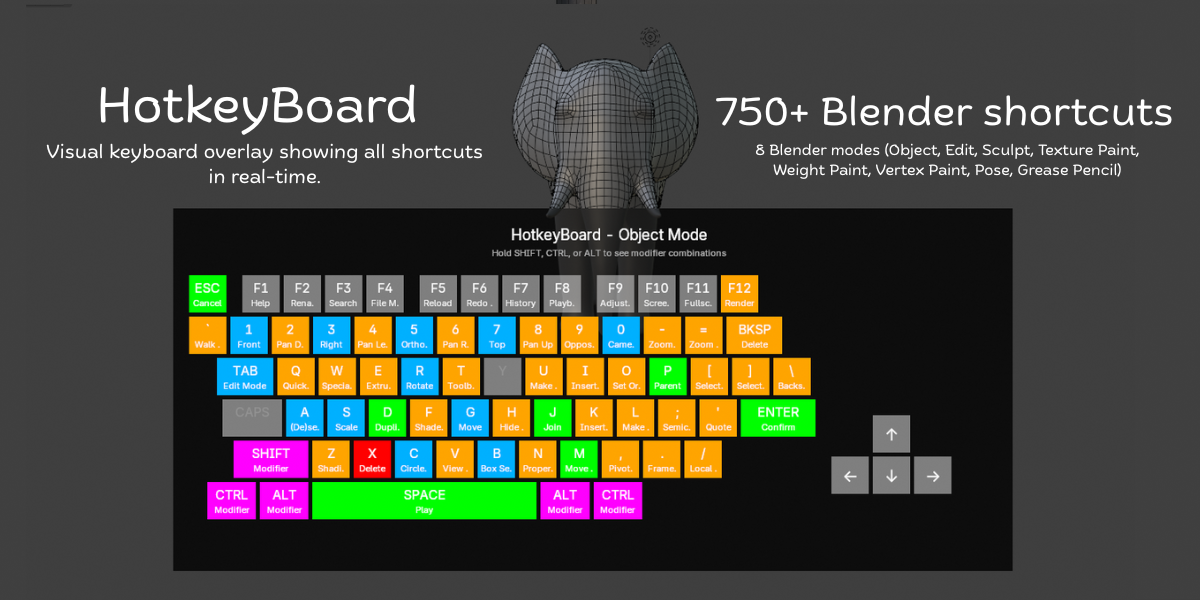
Unlike static shortcut lists or PDF cheat sheets, HotkeyBoard displays a live, interactive keyboard directly in your 3D viewport. Watch keys highlight in real-time as you press them, see shortcuts change automatically when you switch modes, and discover modifier combinations by simply holding SHIFT, CTRL, or ALT.
Key Features:
500+ Keyboard Shortcuts - Complete database covering all Blender 4.5 shortcuts
8 Mode Support - Object, Edit, Sculpt, Texture Paint, Weight Paint, Vertex Paint, Pose, and Grease Pencil modes
Real-Time Key Tracking - Keys highlight instantly as you press them (yellow feedback)
Color-Coded Priority System - Blue (primary), Green (secondary), Orange (tertiary), Purple (modifiers)
Modifier Combinations - Hold SHIFT/CTRL/ALT to see advanced shortcut combinations
Fully Scalable - Adjust from 0.4x to 2.0x or use auto-scaling
Mode-Aware - Shortcuts automatically update when you switch between modes
Smart Numpad Detection - Works with both physical numpad and emulated numpad
Customizable Opacity - Adjust background transparency (0.5 to 1.0)
Zero Performance Impact - Efficient GPU rendering, no lag


All 8 Blender Modes Covered:
Object Mode - Transform, selection, organization shortcuts
Edit Mode - Complete modeling toolset (extrude, inset, bevel, knife, etc.)
Sculpt Mode - Brush controls, masking, remeshing, sculpting tools
Texture Paint Mode - Painting, sampling, cloning, texture workflows
Weight Paint Mode - Weight painting, gradient tools, bone assignment
Vertex Paint Mode - Vertex color painting and editing
Pose Mode - Bone animation, keyframing, IK/FK switching
Grease Pencil Mode - 2D drawing, animation, editing tools
Intelligent Color System:
HotkeyBoard uses color psychology to guide your learning:
Blue Keys (Primary) - Essential shortcuts like G (Move), R (Rotate), S (Scale), A (Select All), B (Box Select), TAB (Edit Mode). Start here!
Green Keys (Secondary) - Common operations like D (Duplicate), E (Extrude), M (Merge), P (Parent), I (Insert Keyframe). Learn these next.
Orange Keys (Tertiary) - Specialized tools like Z (Shading), N (Properties), T (Toolbar), view controls, F-keys. Master when ready.
Purple Keys (Modifiers) - SHIFT, CTRL, ALT - combine with other keys for advanced functions.
Yellow Keys (Active) - Real-time highlighting of keys you're currently pressing.
Gray Keys - No shortcut assigned in current mod
✓ 500+ keyboard shortcuts database (Blender 4.5 optimized)
✓ Real-time key press tracking and highlighting
✓ Color-coded priority system (5 colors, 5 priority levels)
✓ 8 Blender modes supported (Object/Edit/Sculpt/Paint/Pose/GPencil)
✓ Modifier combination display (SHIFT/CTRL/ALT)
✓ Mode-aware automatic switching
✓ Scalable interface (0.4x - 2.0x range)
✓ Auto-scaling viewport responsive mode
✓ Adjustable background opacity (0.5 - 1.0)
✓ Smart numpad emulation detection
Häufig gestellte Fragen
Was sind digitale Produkte?
Bei den digitalen Produkten von Skillshare handelt es sich um fachmännisch gestaltete Tools, Ressourcen und Vorlagen, die von den besten Kreativen entwickelt wurden und die dir zum Kauf zur Verfügung stehen. Mit einer breiten Palette an Ressourcen für jeden kreativen Bedarf sind sie einfach umsetzbar und machen deine Lernerfahrung real und unvergesslich.
Wie kann ich ein digitales Produkt kaufen?
Jeder kann ein digitales Produkt auf Skillshare kaufen — klicke auf Jetzt kaufen, um deine Zahlungsinformationen einzugeben und den Kauf abzuschließen. Sobald die Zahlung abgeschlossen ist, können alle Dateien sofort von dieser Seite heruntergeladen werden. Du erhältst außerdem eine E-Mail mit einem Link zum Herunterladen deines digitalen Produkts nach dem Kauf.
Gibt es ein Limit, wie oft ich ein digitales Produkt herunterladen kann?
Nein, es gibt keine Begrenzung, wie oft du ein digitales Produkt herunterladen kannst. Selbst wenn ein Produkt vom Ersteller entfernt wird, kannst du in den meisten Fällen immer noch auf die Download-Seite zugreifen, indem du dich in dein Skillshare-Konto einloggst.
Kann ich eine Rückerstattung erhalten oder den Kauf eines digitalen Produkts stornieren?
Digitale Produkte sind nicht erstattungsfähig und können nicht zurückgegeben oder storniert werden. Weitere Informationen findest du in unserer -Rückerstattungsrichtlinie im Skillshare Hilfebereich.
Kann ich meine eigenen digitalen Produkte herstellen und verkaufen?
Unbedingt! Besuche Wie kann ich ein digitales Produkt auf Skillshare verkaufen?, um zu erfahren, wie du deine eigenen digitalen Produkte auf Skillshare erstellen, anbieten und verkaufen kannst.