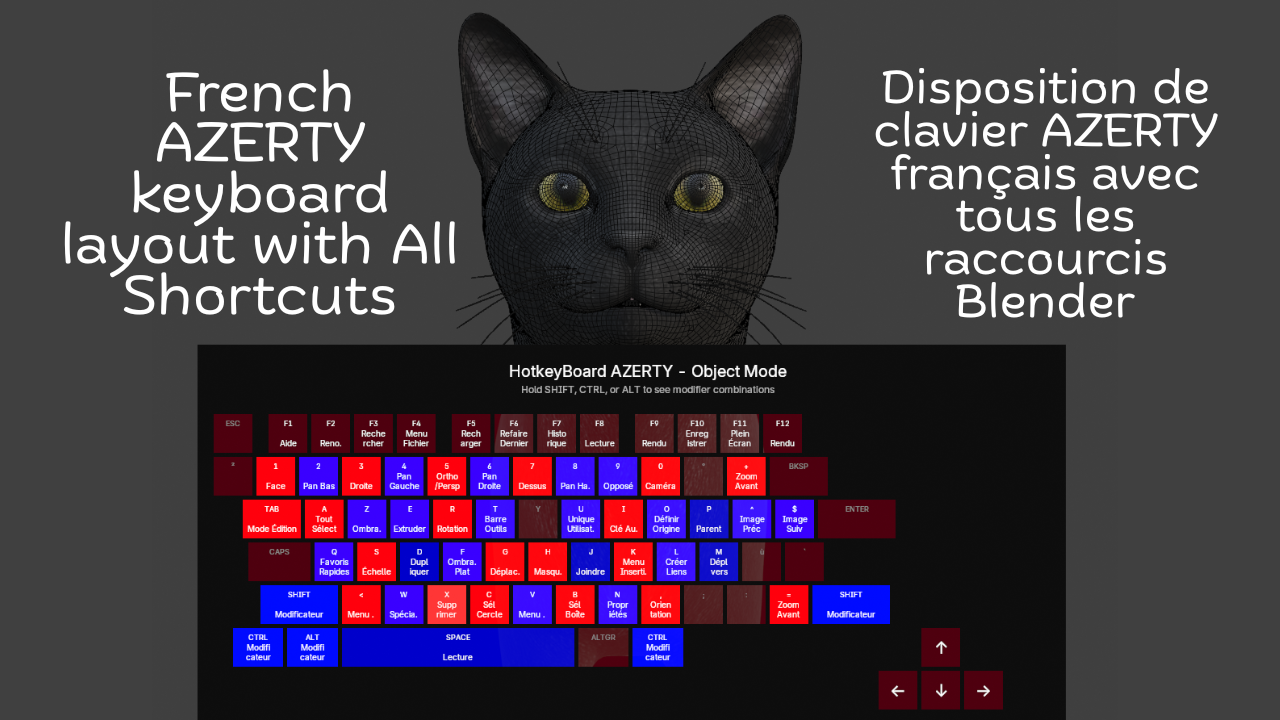
French Keyboard Shortcuts - HotkeyBoard AZERTY
1 Monat Skillshare
Mit einem Kauf erhältlichKostenlos
Alle Mitgliedschaften werden automatisch und fortlaufend abgerechnet, bis sie gekündigt werden. Solltest du eine kostenlose Probemitgliedschaft erhalten und Skillshare nach Ablauf dieser nicht mehr nutzen wollen, ist eine Kündigung vor Ablauf der Probezeit erforderlich. Das Angebot gilt nur für neue, zahlende Mitglieder. Siehe vollständige Nutzungsbedingungen hier
Über dieses Produkt

Salman Naseem
2d 3D Animator
Learning Blender with an AZERTY keyboard shouldn't be harder than with QWERTY. Yet most resources, tutorials, and overlays are designed for QWERTY users, forcing AZERTY users to constantly translate shortcuts in their heads. This slows learning, creates confusion, and breaks creative flow.
HotkeyBoard AZERTY solves this problem completely. It's the first and only Blender addon built specifically for AZERTY keyboards from the ground up. Open it, and you see YOUR keyboard not an adapted QWERTY layout.
Over 500 Blender shortcuts are displayed and color-coded by importance, so you learn systematically: start with blue (essential), add green (common), then orange (advanced). Press any key and watch it light up yellow instant feedback that you hit the right key. This visual learning is 10x faster than memorizing from lists.

Key Features
Core Features:
Complete AZERTY layout (Mac & Windows)
Real-time key highlighting (yellow when pressed)
500+ shortcuts covered (Object, Edit, Sculpt modes)
Color-coded by importance (6 colors)
Modifier combinations (Shift, Ctrl, Alt)
Bilingual interface (English/French)
Custom colors (enabled by default)
Adjustable size (50-150%) and opacity (0-100%)
The addon is fully bilingual. French speakers can switch to see "Déplacer" instead of "Move," "Rotation" instead of "Rotate," and 150+ other shortcuts in their native language. One click in the N panel switches everything instantly.


What You Get
✓ Complete AZERTY layouts for Mac & Windows
✓ 500+ shortcuts color-coded by importance
✓ Real-time yellow highlighting when you press keys
✓ Bilingual interface (English + French)
✓ Automatic platform detection
✓ 6 modes supported (Object, Edit, Sculpt, Paint variants)
✓ Full color customization (7 colors)
✓ Adjustable size (50-150%) and opacity (0-100%)
✓ Custom font sizes
✓ Modifier combination display
✓ Multi-line text wrapping
✓ Zero configuration needed
✓ Minimal performance impact (<1%)
✓ Lifetime updates included


Advanced Features
⚡ Modifier combinations display (Shift, Ctrl, Alt)
⚡ Multi-line text wrapping for long shortcuts
⚡ Smart key highlighting with 250ms decay
⚡ Adjustable scale (50-150%) for any screen
⚡ Opacity control (0-100%) for subtle overlay
⚡ Custom font sizes (8-24px labels, 6-18px shortcuts)
⚡ Settings persist across Blender sessions
⚡ Professional email support included
Compatibility
🖥️ Blender 4.2, 4.3, 4.4, 5.0+
🍎 macOS 11+ (Intel & Apple Silicon)
🪟 Windows 10/11
🐧 Linux (Ubuntu, Fedora, Debian, Arch)
⌨️ All AZERTY keyboards
Häufig gestellte Fragen
Was sind digitale Produkte?
Bei den digitalen Produkten von Skillshare handelt es sich um fachmännisch gestaltete Tools, Ressourcen und Vorlagen, die von den besten Kreativen entwickelt wurden und die dir zum Kauf zur Verfügung stehen. Mit einer breiten Palette an Ressourcen für jeden kreativen Bedarf sind sie einfach umsetzbar und machen deine Lernerfahrung real und unvergesslich.
Wie kann ich ein digitales Produkt kaufen?
Jeder kann ein digitales Produkt auf Skillshare kaufen — klicke auf Jetzt kaufen, um deine Zahlungsinformationen einzugeben und den Kauf abzuschließen. Sobald die Zahlung abgeschlossen ist, können alle Dateien sofort von dieser Seite heruntergeladen werden. Du erhältst außerdem eine E-Mail mit einem Link zum Herunterladen deines digitalen Produkts nach dem Kauf.
Gibt es ein Limit, wie oft ich ein digitales Produkt herunterladen kann?
Nein, es gibt keine Begrenzung, wie oft du ein digitales Produkt herunterladen kannst. Selbst wenn ein Produkt vom Ersteller entfernt wird, kannst du in den meisten Fällen immer noch auf die Download-Seite zugreifen, indem du dich in dein Skillshare-Konto einloggst.
Kann ich eine Rückerstattung erhalten oder den Kauf eines digitalen Produkts stornieren?
Digitale Produkte sind nicht erstattungsfähig und können nicht zurückgegeben oder storniert werden. Weitere Informationen findest du in unserer -Rückerstattungsrichtlinie im Skillshare Hilfebereich.
Kann ich meine eigenen digitalen Produkte herstellen und verkaufen?
Unbedingt! Besuche Wie kann ich ein digitales Produkt auf Skillshare verkaufen?, um zu erfahren, wie du deine eigenen digitalen Produkte auf Skillshare erstellen, anbieten und verkaufen kannst.