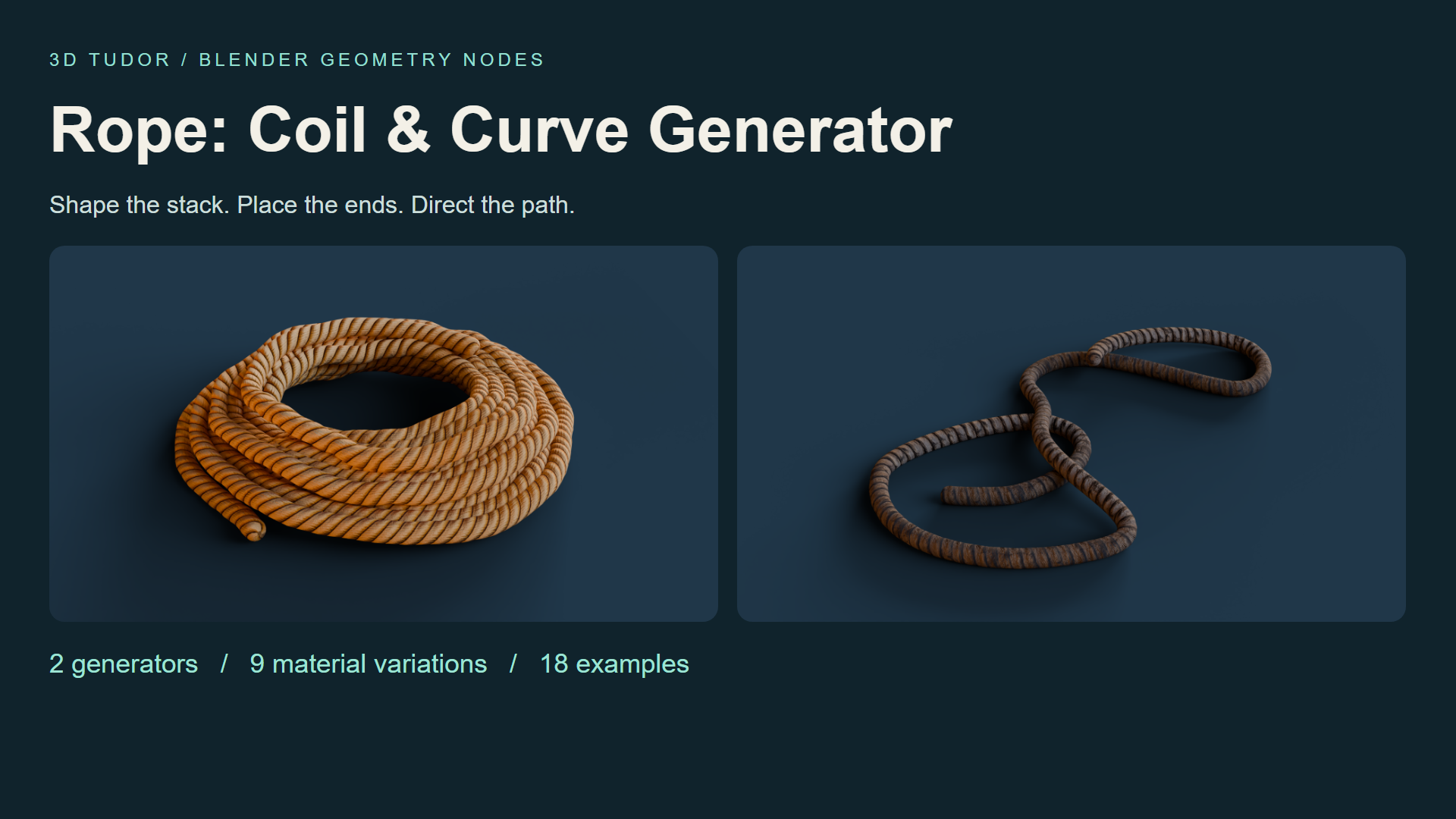
Rope Geometry Nodes: Coil & Curve for Blender
1 Monat Skillshare
Mit einem Kauf erhältlichKostenlos
Alle Mitgliedschaften werden automatisch und fortlaufend abgerechnet, bis sie gekündigt werden. Solltest du eine kostenlose Probemitgliedschaft erhalten und Skillshare nach Ablauf dieser nicht mehr nutzen wollen, ist eine Kündigung vor Ablauf der Probezeit erforderlich. Das Angebot gilt nur für neue, zahlende Mitglieder. Siehe vollständige Nutzungsbedingungen hier
Über dieses Produkt

3D Tudor
Bestselling Blender Author & 3D Educator
Watch Rope Geometry Nodes in action: 3D Tudor’s Blender rope and coil video overview on YouTube.
A rope prop that fits your composition
A coil may look right on its own and still feel wrong beside a crate. The stack is too regular, the opening is too large, or a loose end points away from the scene. Rope Geometry Nodes gives you two Blender workflows for making those choices: shape a coil, or guide rope along an editable curve.
Start from eighteen prepared examples with nine material variations. Keep the supplied objects as references, duplicate one, and adjust the form through its Geometry Nodes modifier.

Build the coil from the outside in
Use Rope Coil to establish layers, thickness and spacing, then refine taper, top inset, variation, seed and organic shape. Compare the outline from your intended camera before working on smaller details.
The upper and lower tails each have visibility, length, angle and tuck settings. Extend one tail towards another prop while keeping the other close. Inner Fill, Inner Wraps and Inner Spacing change the centre arrangement, letting you decide how much ground shows through the coil.

Give loose rope a direction
Rope Along Curve follows an editable Blender curve. Shape a winding length or a series of loose loops, then adjust thickness, end treatment and resolution. The drawing recording shows freehand curve input, giving you another way to establish the route.
Best for: Blender artists arranging workshop, warehouse, dockside or environment props, and anyone who wants an editable starting point for a coil or loose rope in a still scene.

Make the surface suit the shape
The prepared examples include golden, tan, striped, weathered and dark material looks. Choose the finish that fits the scene, then compare Texture Repeat and Texture Rotation before refining seam, around and length offsets. End controls help you adjust the exposed tips.
Keep shape and surface decisions separate: curve and profile resolution affect the geometry; texture controls change how the pattern follows it. Check the result from the working camera before increasing resolution.

Your download includes
Two Geometry Nodes generators in one .blend file; eighteen example objects, split between nine coils and nine curve ropes; nine material variations with packed textures; a getting-started text guide; and three MP4 controls demonstrations.
Rope Coil exposes 32 parameter inputs and Rope Along Curve exposes 13. Some controls are shared between the generators. The recordings cover coil controls, curve controls and curve drawing; they are demonstrations of the setup, not a narrated course.

Before you start
Open the .blend file and duplicate a prepared example. Establish the main coil dimensions or curve path first, refine the tails and centre where relevant, then finish with the material and texture alignment. No add-on installation is required.
The file was opened and its exposed controls inspected in Blender 5.1.2. Cycles is the saved scene engine. Other Blender versions and render engines have not been separately tested. Image textures are packed at 512 × 2048 and 1024 × 512.

What is not included
This is a standalone paid digital product, separate from Skillshare classes. It includes no Unreal Engine or Unity project. Rope paths are arranged manually: there is no gravity or collision simulation, or automatic knot generation. Geometry counts depend on your generator settings.
Until next time, happy modelling, everyone!
Neil - 3D Tudor
Häufig gestellte Fragen
Was sind digitale Produkte?
Bei den digitalen Produkten von Skillshare handelt es sich um fachmännisch gestaltete Tools, Ressourcen und Vorlagen, die von den besten Kreativen entwickelt wurden und die dir zum Kauf zur Verfügung stehen. Mit einer breiten Palette an Ressourcen für jeden kreativen Bedarf sind sie einfach umsetzbar und machen deine Lernerfahrung real und unvergesslich.
Wie kann ich ein digitales Produkt kaufen?
Jeder kann ein digitales Produkt auf Skillshare kaufen — klicke auf Jetzt kaufen, um deine Zahlungsinformationen einzugeben und den Kauf abzuschließen. Sobald die Zahlung abgeschlossen ist, können alle Dateien sofort von dieser Seite heruntergeladen werden. Du erhältst außerdem eine E-Mail mit einem Link zum Herunterladen deines digitalen Produkts nach dem Kauf.
Gibt es ein Limit, wie oft ich ein digitales Produkt herunterladen kann?
Nein, es gibt keine Begrenzung, wie oft du ein digitales Produkt herunterladen kannst. Selbst wenn ein Produkt vom Ersteller entfernt wird, kannst du in den meisten Fällen immer noch auf die Download-Seite zugreifen, indem du dich in dein Skillshare-Konto einloggst.
Kann ich eine Rückerstattung erhalten oder den Kauf eines digitalen Produkts stornieren?
Digitale Produkte sind nicht erstattungsfähig und können nicht zurückgegeben oder storniert werden. Weitere Informationen findest du in unserer -Rückerstattungsrichtlinie im Skillshare Hilfebereich.
Kann ich meine eigenen digitalen Produkte herstellen und verkaufen?
Unbedingt! Besuche Wie kann ich ein digitales Produkt auf Skillshare verkaufen?, um zu erfahren, wie du deine eigenen digitalen Produkte auf Skillshare erstellen, anbieten und verkaufen kannst.