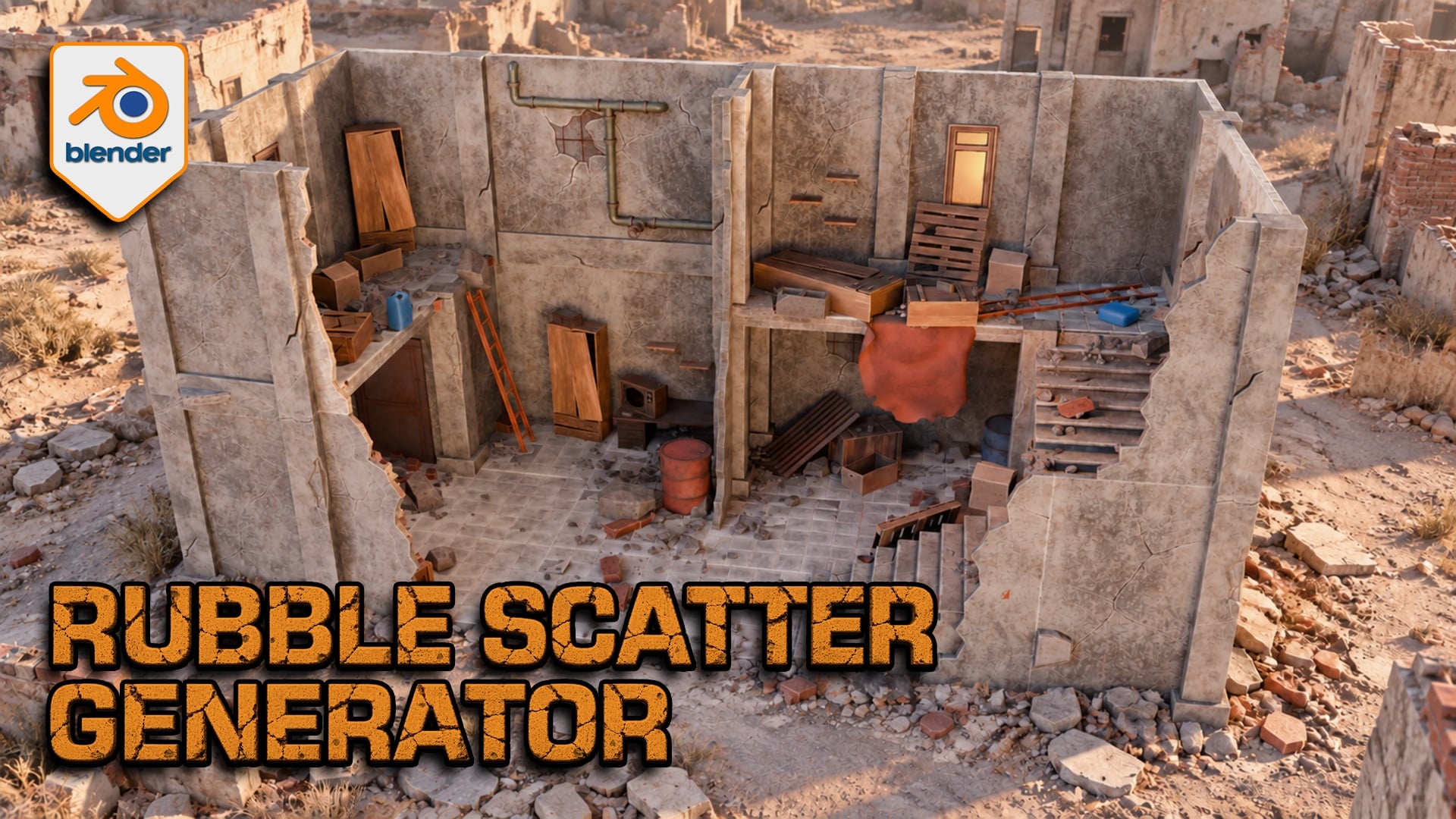
Rubble Scatter Generator for Blender
1 Monat Skillshare
Mit einem Kauf erhältlichKostenlos
Alle Mitgliedschaften werden automatisch und fortlaufend abgerechnet, bis sie gekündigt werden. Solltest du eine kostenlose Probemitgliedschaft erhalten und Skillshare nach Ablauf dieser nicht mehr nutzen wollen, ist eine Kündigung vor Ablauf der Probezeit erforderlich. Das Angebot gilt nur für neue, zahlende Mitglieder. Siehe vollständige Nutzungsbedingungen hier
Über dieses Produkt

3D Tudor
Bestselling Blender Author & 3D Educator
Build debris around your architecture
A ruined floor needs more than evenly scattered rocks. Rubble Scatter Generator for Blender lets you gather fragments near walls, vary the mix across open ground and preserve the areas your composition needs to keep clear. Work with editable Geometry Nodes controls and furnished demonstration scenes.

A six-second tour shows rubble across the furnished scene, including floors, stairs and wall edges.
Direct where rubble collects
Assign receiving surfaces and architectural occluders, then balance geometry-based accumulation with Open Area Fill. Use a painted Rubble_Density mask or local repellors to protect a doorway; attractors can add local coverage. Planar influence works across height, while non-planar influence helps separate storeys. Check intersections around your own geometry.

A simple wall study makes the distribution readable: larger fragments gather near the architecture while smaller pieces extend across open ground.
Choose from 51 designs in eight categories
Mix fine stones, gravel clusters, bricks, breeze blocks, concrete slabs, concrete chunks, reinforced slabs and timber. Each of the 51 HIGH sources has a paired LOD representation: these are alternate detail levels, not 102 unique designs. Adjust category density and scale before polishing the finish.
Match the finish and manage working detail
Shared controls cover colour, edge wear, dirt, top dust, roughness and normal strength. Camera-based HIGH/LOD selection, optional distance culling and a viewport Preview Fraction help you manage detail. LOD follows the active or assigned camera, not the viewport orbit; performance depends on your scene and hardware.

The material controls sit beside the furnished scene, showing where to adjust colour, edge wear and dirt.
What you receive
One ZIP containing the native Blender project and Getting Started guide. The project includes the generator, paired HIGH/LOD source collections and furnished demonstration scenes. Best for artists building ruined interiors, architectural studies and static environment compositions in Blender.
Start with the configured example
Extract the ZIP and open the project in Blender 5.2.2 LTS. Switch to Rubble Studio | Building Scatter and select 3DT Rubble Studio | SELECT ME. We opened and evaluated that configured scene at frame 1. The separate detailed Scene saves the generator viewport evaluation disabled and has no active camera; the guide explains how to inspect it.
Questions before you buy
Can I use my own debris? Yes, with suitable origins, flat source collections, paired HIGH/LOD numbering and equal source counts. Custom meshes need appropriate UVs and materials; arbitrary shaders do not inherit the supplied finish controls.
Is this a demolition simulator? No. It creates static procedural scatter rather than a rigid-body collapse. No Unreal Engine, Unity or UEFN project is included.
Do I install a Python add-on? No. This is a Blender Geometry Nodes project. Earlier Blender versions are not certified by the 5.2.2 check.
Neil — 3D Tudor
Häufig gestellte Fragen
Was sind digitale Produkte?
Bei den digitalen Produkten von Skillshare handelt es sich um fachmännisch gestaltete Tools, Ressourcen und Vorlagen, die von den besten Kreativen entwickelt wurden und die dir zum Kauf zur Verfügung stehen. Mit einer breiten Palette an Ressourcen für jeden kreativen Bedarf sind sie einfach umsetzbar und machen deine Lernerfahrung real und unvergesslich.
Wie kann ich ein digitales Produkt kaufen?
Jeder kann ein digitales Produkt auf Skillshare kaufen — klicke auf Jetzt kaufen, um deine Zahlungsinformationen einzugeben und den Kauf abzuschließen. Sobald die Zahlung abgeschlossen ist, können alle Dateien sofort von dieser Seite heruntergeladen werden. Du erhältst außerdem eine E-Mail mit einem Link zum Herunterladen deines digitalen Produkts nach dem Kauf.
Gibt es ein Limit, wie oft ich ein digitales Produkt herunterladen kann?
Nein, es gibt keine Begrenzung, wie oft du ein digitales Produkt herunterladen kannst. Selbst wenn ein Produkt vom Ersteller entfernt wird, kannst du in den meisten Fällen immer noch auf die Download-Seite zugreifen, indem du dich in dein Skillshare-Konto einloggst.
Kann ich eine Rückerstattung erhalten oder den Kauf eines digitalen Produkts stornieren?
Digitale Produkte sind nicht erstattungsfähig und können nicht zurückgegeben oder storniert werden. Weitere Informationen findest du in unserer -Rückerstattungsrichtlinie im Skillshare Hilfebereich.
Kann ich meine eigenen digitalen Produkte herstellen und verkaufen?
Unbedingt! Besuche Wie kann ich ein digitales Produkt auf Skillshare verkaufen?, um zu erfahren, wie du deine eigenen digitalen Produkte auf Skillshare erstellen, anbieten und verkaufen kannst.