3DT Aztec Shaders for Blender Cycles
1 Monat Skillshare
Mit einem Kauf erhältlichKostenlos
Alle Mitgliedschaften werden automatisch und fortlaufend abgerechnet, bis sie gekündigt werden. Solltest du eine kostenlose Probemitgliedschaft erhalten und Skillshare nach Ablauf dieser nicht mehr nutzen wollen, ist eine Kündigung vor Ablauf der Probezeit erforderlich. Das Angebot gilt nur für neue, zahlende Mitglieder. Siehe vollständige Nutzungsbedingungen hier
Über dieses Produkt

3D Tudor
Bestselling Blender Author & 3D Educator
Build a connected Aztec-inspired surface direction without constructing every material family from scratch.
Environment surfacing often slows down when every stone, clay pot, timber, metal fitting, ground patch and cloth element feels as if it came from a different library. The 3DT Aztec Shaders for Blender Cycles brings 28 stylized materials into one coherent visual range, giving you a practical starting point for ruins, jungle temples, architecture, props and terrain while keeping the individual materials open for inspection and adjustment.
One complete Blender material library
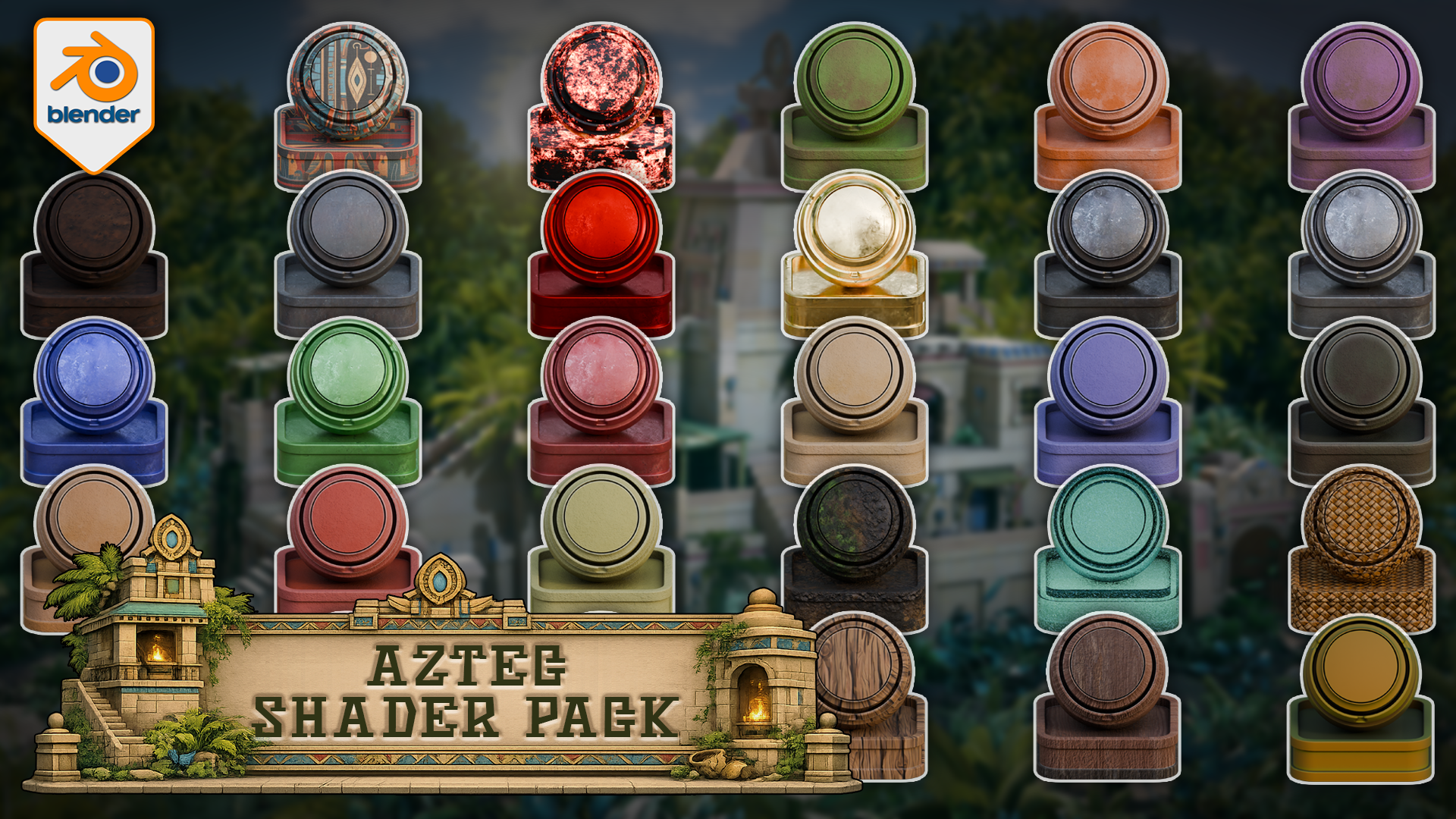
You receive one Blender file containing all 28 materials and 28 same-named preview/application objects. The range covers stone, clay, metal, wood, terrain, cloth, water and supporting surfaces, including Bamboo, Carpet, Charcoal, three clay variations, Dirt, Fabric Cloth Red, Gemstone Red, Gold, Iron Dark, four additional metals, six stones, Terrain, Water, Weave and four woods.
The library contains 26 hybrid materials and 2 procedural materials. It also includes 45 approved loose texture files alongside the Blender file, plus a quick-start README, a visual material reference and Cycles instructions in PDF and HTML formats. This is one complete paid download rather than a set of separate material variants.
 First contact sheet: 14 verified pattern, earth, clay and metal materials from the Aztec Blender library.
 Second contact sheet: stone, terrain, water, weave and wood complete the verified 28-material range.
Why this pack is useful
The value is not simply the number 28. It is the way the surfaces work together. Warm clay, worn metal, varied stone, dark earth, woven fibres, water and timber can all sit inside the same stylized scene direction, reducing the time spent searching across unrelated libraries and then correcting colour or surface mismatch.
Each material has a same-named preview object inside the supplied file, so you can inspect the result before moving it into your own project. Open the Blender file, copy and paste the preview object or material you need, or use Blender's Append workflow. The materials are not preconfigured as Asset Browser assets.
 Stone, clay, metal and wood previews show the connected colour direction of this Blender Cycles library.
Best for
Use the pack for stylized ruin and jungle-temple scenes, architectural surfaces, props, terrain dressing, cloth details, water features and material studies. It is particularly useful when you want a scene to feel deliberately art-directed rather than assembled from disconnected surface sources.
 The full overview shows how all 28 surfaces support one stylized environment direction.
environment direction.
Cycles compatibility
This is a Cycles-only Blender product. All 28 materials completed render proofs in Blender 5.0.1 and Blender 5.1.2. Blender 4.5 is not supported, Blender 5.2 remains unverified, and EEVEE support is not included. No add-on or plug-in is required.
Results on your own meshes can vary with UVs, object scale, topology, mesh density, vertex colours and material settings. The supplied preview objects provide a clear reference for the intended setup, but they do not guarantee identical behaviour on arbitrary geometry.
Not included
This download does not include a temple, jungle environment, model pack, course, add-on, plug-in or ready-made Asset Browser catalogue. The promotional environment is presentation context only. The pack is not described as historically accurate, seamless, fully PBR, game-ready or performance-optimised because those claims are not part of the verified product evidence.
Quick questions
How do I move a material into another Blender project?
Open the supplied file and copy and paste the relevant preview object or material, or use Blender's Append command. The included instructions walk through both routes.
Are the textures packed?
The supplied Blender file was verified with its material texture images packed and no missing external image dependencies. The customer package also includes 45 approved loose texture files for clear access and recovery.
Can I use this in EEVEE?
No. This listing is for Blender Cycles only, with all 28 materials render-proven in Blender 5.0.1 and 5.1.2.
Is this required for a Skillshare class?
No. This is a separate, optional paid product and is not required to complete any class or class project.
If a cohesive Aztec-inspired surface library fits the scene you are building, download the pack, open the material file and start by comparing the supplied preview objects with the surfaces you need.
Until next time, happy modelling, everyone!
Neil - 3D Tudor
For download, access or documented-workflow support, use the support/contact route provided by the Skillshare marketplace.
Häufig gestellte Fragen
Was sind digitale Produkte?
Bei den digitalen Produkten von Skillshare handelt es sich um fachmännisch gestaltete Tools, Ressourcen und Vorlagen, die von den besten Kreativen entwickelt wurden und die dir zum Kauf zur Verfügung stehen. Mit einer breiten Palette an Ressourcen für jeden kreativen Bedarf sind sie einfach umsetzbar und machen deine Lernerfahrung real und unvergesslich.
Wie kann ich ein digitales Produkt kaufen?
Jeder kann ein digitales Produkt auf Skillshare kaufen — klicke auf Jetzt kaufen, um deine Zahlungsinformationen einzugeben und den Kauf abzuschließen. Sobald die Zahlung abgeschlossen ist, können alle Dateien sofort von dieser Seite heruntergeladen werden. Du erhältst außerdem eine E-Mail mit einem Link zum Herunterladen deines digitalen Produkts nach dem Kauf.
Gibt es ein Limit, wie oft ich ein digitales Produkt herunterladen kann?
Nein, es gibt keine Begrenzung, wie oft du ein digitales Produkt herunterladen kannst. Selbst wenn ein Produkt vom Ersteller entfernt wird, kannst du in den meisten Fällen immer noch auf die Download-Seite zugreifen, indem du dich in dein Skillshare-Konto einloggst.
Kann ich eine Rückerstattung erhalten oder den Kauf eines digitalen Produkts stornieren?
Digitale Produkte sind nicht erstattungsfähig und können nicht zurückgegeben oder storniert werden. Weitere Informationen findest du in unserer -Rückerstattungsrichtlinie im Skillshare Hilfebereich.
Kann ich meine eigenen digitalen Produkte herstellen und verkaufen?
Unbedingt! Besuche Wie kann ich ein digitales Produkt auf Skillshare verkaufen?, um zu erfahren, wie du deine eigenen digitalen Produkte auf Skillshare erstellen, anbieten und verkaufen kannst.