Transcripts
1. ChatGPT Course Introduction: Hello and welcome to the
ultimate chat DVT course. My name is borrow
with over ten years experience in IT projects. And I'm really excited to be your instructor
for this journey. In this course, you will learn everything that you need
to start working with sharp GBT to increase your
efficiency and productivity. So by the end of the course, you will understand this
emerging technology and you will be able to write amazing prompts in Chad DVD that's going to help you
in your daily tasks. And what makes this course so special compared to
the other courses, I designed this
course to take you from zero to hero in chat GBT. So if you are a
beginner, don't worry, I'm going to explain everything from the scratch step-by-step. You will have as well access to a hundreds of prompts
that you can use. And you will learn
some secret formulas that you can use to unlock an endless amount of
prompts that going to make you more creative
with the SAT GBT. Alright, so now let's have a quick overview of the
content of this course. First, we will start learning the basics of sharp G, B, D. Then we will jump to shatter
beauty to create an account. And then I'm going
to take you on a quick tour in the
user interface. After that, we will do a deep
dive and four use cases. In the first use case, we will learn how to use
chat GBD to search for it. Next, we will learn
how to use sharp G, B, D to assist us in
the writing process. After that, I'm going
to show you how to use IGBT as programmer or developer. And finally, we're going
to learn how shy GBD can help you as a
content creator. If you want to create
YouTube videos, you can use sharp G, B, D to take your content
to the next level. So whether you are a job seeker, writer, developer, or
a content creator, this course will help you to
learn how to use the power of AI to boost your
productivity and efficiency. So now let's jump
in and get started.
2. What is ChatGPT?: Shot GBD. Mark my words. I was far
more dangerous than nukes. Oh ****, no past month a new AI chat bot called chat GPT has been drawing
a lot of attention, emotional intelligence
spot check GPT coming for your job. But I want to talk
about chat GPT. How many of you plan, how many of you know
what Changi bt is? Because I don't know if
you use this chatbox, but it is insane. We're kicking things
off with an ad that I created using chat GPT. Everyone is talking about it. This is really huge. This one is actually
a game-changer. It is terrifying at the start, but after I tried it, I think it's going
to make us more creative and as well awesome. In this course, you will
learn everything that you need to get started
with Shad GBT. So let's get started. But first, some coffee. Really. The first question is,
what is Chad GBT, Shad, GBT is cutting-edge AI chat bot that can understand
the nature of language. It is created by OpenAI. Openai is a startup
founded in 2015 in San Francisco by Elon Musk
and other AI experts, but Illinois lifts
three years later. And currently the CEO of
OpenAI is Sam Altman. Sad GBD was released
in November 2022. And each Brooks all the
records by crossing 1 million users in
just five days. If you compare to
other platforms, it took Netflix 3.5 years to get 1 million users and
Facebook almost a year. And even Instagram, 2.5 matters. Alright, so IGBT is designed to have a
conversation with you. It's can understand
your requests, but what makes it
special is that you can make up a
follow-up questions and even it admits mistakes and reject in appropriate requests. There are just endless ways on how to use sharp Djibouti, e.g. it can help you with the writing
books, logs, and emails. It can correct
grammar and summarize difficult ticks into simple explanations
or bullet points. It can even help you
to find a job by creating cover
letters, resume, hand. Even it can act as interviewer to practice
for job interviews. And if you are a YouTuber, it can help you to find the next video idea and write
a script for that video. And not only that, if
you are a programmer, it can generate code for you, find bugs and fix
your code. And e.g. if there is a piece of code
that you don't understand, you can ask it and it can
explain everything in details. As I said, endless use cases.
3. How ChatGPT Works?: And now let's understand
how sharp GBT works. Sharp GBD uses a type of artificial intelligence
called the language model. It is like computer program designed to understand
the human language. So sad GBT spends a lot
of time and resources, training and training on massive amount of data
from the Internet, like websites, books,
articles, news, conversations on Twitter,
discussions on their debts, and any other kinds of texts
available on the internet. And that's all to understand the patterns and structures
of the human language. This includes understanding the relationship between words, the grammar, and the meaning of the words in
different contexts. So you might ask now, Wyche IGBT want to
learn all of that? Well, the answer is simple. Shad GBT want to understand
the real meaning behind our text and then generate a
response in human-like way. So the main goal is to make
the interaction between humans and robots as
natural as it could be. And Shad GBT not
only learned about the natural languages
like English, but it also learned
programming languages. That's means chat GBT was
trained on billions of lines of codes publicly
available on GitHub. So Shad GBT already learned
languages like Python, HTML, SQL,
JavaScripts, and more. That's means Shad DBT has
different models that GPT-3 model is used to understand and generate natural
languages like English. And that codecs model
is used to understand programming languages
and codes like Python. Alright, so now let's take
a moment to understand what is the meaning of
the letters G, P, T. G stands for generative. It means that the data model
can create new contents. P stands for pretrained. It's means that the data
model already trained on large amount of text data
before even being put to use. And D stands for transformer, which is type of neural
networks used in shack GBT. Once you start using it, you will notice how
quickly it process your prompts and generate
response in matter of seconds. And that's all thanks to the advanced neural
network architecture.
4. Will ChatGPT Replace our Jobs?: There is one question that
is to find people is shut GBD going to take over my job will after
I tried the tool, I think as IT experts,
we're going to be fine. No, not only fine, we're going to be more
creative and it's going to impact
how we do our job. And it's going to make
it more efficient. And even if it takes
away some types of jobs, if we learn something
from the history, always new jobs will be created, will add the end, whether
you like it or not. Sharp G, B, D is here to stay. And I'm really interested to know what do you think about it? So let me know in
the comment below. Alright, so with
us we have covered the theory part
behind the sharp GBD. Let's move on and
C-sharp GBT inaction.
5. Create Account: Alright, so now let's
go to our browser and go to shatter.openai.com. I'm going to leave the
link in the description. And if you get
something like this, it's going to mean
that the servers are full and you have to try later. Since currently there
are millions of people want to try this service. But if you are lucky like me, then we can login and sign up. If you don't have already
a login to OpenAI, you can select to sign up. It's going to take only 1 min. It's really easy.
So let's sign up. You can use an e-mail address or your Google or
Microsoft accounts. I'm going to sign up using the email address and then we're gonna
give it a password. Once you give those
informations, you will get an email in your mailbox to verify
your email address, like this one here. Then just click over
this green box. This can activate
our account and then it's going to take
us back to Open AI. Here we have to
fill few details. It only needs the
first and last name. Let's do that and
then select continue. This process is two
steps for vacations. That means we have to enter our phone number.
So let's do that. And after that, I'm going
to receive a code on my phone number and I'm
going to put it over here. And once we do that,
we are finally in chat GBT and we can
start using it. As you saw, it's currently free. We didn't add any
payment methods, which is really nice.
6. A Tour of the Interface: Okay guys, so now I'm going to take you on a quick tour in the user interface of Shad
GBT. It's very simple. We're going to start on
the left side over here. And if you select a new shots, you can start a new
conversation with Sharad GBT. And below that, we can
change the UI mood, either too dark or light. I choose always dark mode. It's better for my eyes
and less blue lights. And below that, we have the OpenAI discord
server that we can join while we have already
million and half members. Crazy. What you can do over here joining this course
is that you can share your feedback with
their community and you can as well engage with discussions about OpenAI
with other members. Alright, so now let's
go back to shut GBD. You can find over here
a link where you can find information about
the updates releases. If a cue from Chad GBD team, and the last thing
of the left side, you can look out over here. Alright, so now let's
go to the middle and we have over here
some informations, like it explains how
to interact with IGBT. And then we have
some information about the capacity of IGBT. Like here it says
shut GBT is actually remember what you said in
the previous conversations. And it allows you
to do a follow-ups. And it tells you as
well that the AI is trained to decline any
inappropriate requests. And the last important,
the right side, it's still us about the
limitations and shared GBD. The answer might be incorrect
or biased informations. And here it says that the AI is trained on data up to 2021. That means anything. After 2021, the AI has less information and
knowledge about the events. It's still have to learn it. Alright, so now we come to
the most important element in the UI is the input
field over here. And here you can start
writing message query a prompt to start a
conversation with the AI. And once we hit Go,
the AI can analyze our prompts and going
to respond with a text. So now let's have our
first prompts over here. Who are you? Then? Let's go. Alright, so as you can see, we got a response and
now you might say, okay, this is not really the
answer that I'm looking for. And here you have two options. Either you're going
to select over here, regenerate response and the Eigen and generate
another one like this. And you can switch between
the response like this, between the first and the
second, you think those. And now if you want to
evaluate this response, you can give it a
thumbs up or thumbs down with a feedback. And this of course, can help
the AI to drain and improve. Alright, so that was
the first option to regenerate the response. The second option over here, you can add a follow-up prompts. Let's try this. Explain it again, like
I'm ten years old. Alright, so this
is amazing, right? And we can add another prompt in this conversation
and we're gonna say, explain it like I'm
five years old. This is really mind-blowing. This is the first
time that we have a shot like this with an AI. It is so smart, That's all the follow-up
answers are based on the whole conversation and
understand the whole context. Be aware if you start a new shot over here from the left side, it will not remember the
current conversation. Each new shot, it's
like a new page. Like all of those conversations are independent
from each others. And beneath that here
on the left side, you can start seeing all different conversations
that we started with IGBT. So you can revisit it again and continue the
shot with the AI. Alright, so with
that, we have created a brand new account and OpenAI, and we understood
the main elements of the user interface in OpenAI.
7. First Conversation: Shopping List: Alright, so now I'm
going to start with the first prompts
where I'm going to ask the hardest question that
I face on a daily basis, what should I eat today? So I'm going to ask
shut UP D to give me some ideas on
what to eat today, especially that I'm trying
to lose some weight. So let's ask IGBT
the following, list. Five dishes that
I can eat without carbs because I am trying
to lose some weights. Let's go. Okay, so this is really amazing. Shout DBT gave us
five dishes and it's considered as well that I'm trying to
lose some weight. So as you can see, there's
like everywhere vegetables. But now for me, the
most interesting one is the first option because
I really like chicken. I think this course
you will learn a lot of things
about me and hear exactly the magic of GBD where things get
more interesting. Where I'm going to ask a follow-up question about
the option number one, I'm gonna go and ask
the following question. I'm going to say create shopping list for
the first option. So as you can see over here, I didn't write the full text of grilled chicken or
fish with vegetables. I say just the first option. And that's because
the AI understand the whole conversation and
you remember the old answers, which is really cool. But now I want to be more
specific because here, the first option you can see
there is chicken and fish. And I don't want to buy
fish in the shopping list. So I'm going to be
more specific and say with grilled chicken. Let's go. This is really
beautiful. So now we have a shopping
list for my meal. And not only that, she had GPT add as well at the
end, some contexts. So here we have nodes
about this shopping list. And that's always
what GBT tried to do is to add some recommendations, warnings, ideas,
which really makes the conversation with the AI that's actually be
D, lack of human. Alright, so let's say that
I bought all those stuff. The biggest problem with that's
how I'm going to cook it. So I'm going to ask showed you but do the follow-up question. The question is very simple. What are the cooking steps? I love it. So as you can see, IGBT gave us a step-by-step
guide how to cook this dish. And as usual, the AI at the ends give us
some more context. And this is exactly
the difference between shared GBT and Google. In chat gbd, we can have
follow-up questions and the Eigen to understand
the whole conversation and the whole context. And you feel that's
all the questions and everything is
connected to each other. But in the other
side and Google, each Christian going to
be handled individually. So as you can see with
the help of the GBD, I went from not knowing what
I'm going to eat today. We'll have a bland and guide step-by-step on what to
do in just few seconds. And next we're going to
start our deep dive. And the use cases of Shad GBT.
8. Job Search: Intro: In 2013, I moved to Germany and start
searching for a job. Finding my new job in a new
country was not an easy task. I had to know where
to search for jobs, which skills were required
to be a data engineer, I had to craft the perfect
resume and cover letters. Then I applied to many jobs, repaired for the interviews and learned about the
important questions. And it includes as well
many email communications. I had to do all those stuff
with my third language, German, which was
not easy at all. But many people have helped
me out at the start. But now in the age of the AI, the story is totally different. The process of
searching new job has just been made easy using AI. Alright, so now let's
have an example in order to understand how I can help us
searching for new jobs.
9. Job Search: Where to Search?: Alright, so the first
step by searching for new job is to understand
where to search. So let's ask IGBT about that. So we're going to
write the following. What are the best
platforms to search for job in Germany since I
am in Germany now, let's go. Great. So now we've
got the list of all platforms where we
can search for jobs. Indeed, LinkedIn,
step stone, and zinc. And to be honest, in
the last ten years, I switch between for
jobs and all of them. I found it using step stone. I don't know whether it's
a lock or something, but I really liked
this platform. I found a lot of job there.
10. Job Search: Job Search Strategies: We can ask other
stuff for examples. What are the strategies
for searching or job? What are the best practices? So let's see what charge if
g going to say about that. So we can ask what are the effective strategies
for finding a job? It's cool, guy. So what I can say, all of those advisors are golden
and I cannot agree more. The first one about
networking, of course, having a solid network and
relationships with people, you can increase your chances
to find your dream job. That's why I really
recommend to have a strong LinkedIn with a lots of connections
to other people. Another one, It's about their
resume and a cover letter. It should be perfect if you
are searching for jobs, apply for multiple
jobs over here. Well, that's reminds
me of my second job. I applied over 100
jobs parallelly. I would just send the
applications like crazy. And this is from my side. I think the most
important tip or advice is about searching for jobs,
just apply everywhere. So what I think
about those advices, they are all great,
really like here, stay positive and so on. I really love this
answer from shut GBT.
11. Job Search: Find Top In-Demand Skills: Alright, so now let's
move to the next one. Let's say that you are
a junior data engineer and you want to double-check what are the most in-demand skills required
from Data Engineer. So we can ask IGBT about that. So let's try the following. What are the most in-demand
skills for data engineers? Let's go. Okay, so now let's
take the answer. This is what I love about IGBT. It's not only answering our question and listing
all those skills, but always it gives us like recommendations and
tips over here. At the end, if I take
the answer over here, as a data engineer, I can
say Exactly, exactly. Those are the skills
that you need to master as a data engineer. So this is really great
way to double-check your skills and you know that you are at their correct path. If not, then you have to create a roadmap to develop
those skills. Alright, so now let's say that I'm missing a lot of skills. So what I'm gonna
do, I'm gonna start then ask the expert,
asked they die. So what are the three
essential skills each data engineer must have? So let's see. I'm just saying all the time
through, through, through. I have over ten years
experience with data engineering and
I cannot agree more. So this is really a perfect
answer as an expert. So the first one is about
programming languages. You should have expertise
in Python and SQL. And the second one is about big data technologies
because most of the projects now that's needs data engineers
are big data projects. So this is exactly one essential
skill and the last one. And of course, if
you want to build a pipelines, a data engineer, you should have skills with the ETL processes and
data warehousing. So what I can say, well done for the day, they got it as an expert. I really loved those answers.
12. Job Search: Generate Cover Letter: Okay, so now let's talk about one important step in the process of
searching for new job, which is creating professional
cover letter agarose away. And for that you can
use the power of AI as LGBT in order
to create it. Let's say that you are junior
data engineer and you've found a job at Microsoft, right? A professional cover letter for junior data engineer
at company Microsoft. I know the basic
requirements for the job, but I don't have any work
experience entry-level. So let's see. Okay, so now let's have a look. Shadowy beauty created
the basic layout, which is really great
starting point for you. And as will
beautifully written in perfect English,
how good is the US? And to be honest, if I
wanted to write this myself, it's gonna take me like
around 20 to 30 min. It will not be
perfect like this. And now we have it like in few
seconds, how amazing this. And now let's say that we want to change
some informations. E.g. I. Have a master
degree in Computer Science, and I have some experience
about the Azure Cloud. So let's still charge
a beauty to change that updates the cover letter. Removing that I have
bachelor degree and replace it was master degree
in computer science. Mentioned that I have
experienced in azure clouds. Let's see you guys. It's a British goods.
So as you can see, it's integrated our
wishes we have now here message degree in computer
science and the litter. And as well, it's
integrated by skill about the Azure Cloud and
you can add more stuff, e.g. let's say that's rewrites
the cover letter. To sound smarter and more
excited about the job. It's really funny, but as
well, It's very great. It's using sophisticated
dashboards. It is a same cover letter, but now using some
advanced English words. And if you read it again, you're going to have
the feeling that this guy or girl is
motivated about the job. Alright, so now another
thing that you can do with sharp GBD is to translate the text to
different languages. So e.g. let's say that
this job is in Germany and you want a cover letter in German language.
So let's do that. Translates the cover
letter, the German. Go. Alright, so now we have the
same cover letter in German. I know there are a lot
of translators out there like Google and other
ones as well base in AI. But they have the feeling
that I can't trust the translation and
shared GBD more.
13. Job Search: Create Resume: Alright, so now let me show
you another fun one where we can ask Chad GBD to
create a resume. So let's see how we can do that. Based on the English
cover letter. Writes a professional resume, including my skills, educations,
summary, and myHobbies. Let's go. This is really mind-blowing. As you can see in the work
experience, we have none. Because based on
the conversation, chat GBT understood that we are a junior developer and we
don't have any experience. So he assumed immediately that we don't have
any work experience, which is really correct
based on this conversation. So let's check what do we
have enhancer or here. So we have like small summary. I think it's too much,
we can make it shorter. And it listed exactly
those skills that are required for data engineer,
which is really great. And here we can be
more specific in our prompts where
we gonna give e.g. some skills, some hobbies, but I will not go there
and give like e.g. the e-mail address or telephone number or any personal
informations for the AI. So really be careful what you are giving here in the prompts. You have any way to copy
the text somewhere else. And there you can add your
personal information. But again, this is really
perfect starting point for you in creating your
resume and cover letters.
14. Job Search: Write Application Email: Alright, so now we found a job. We have the documents that
I cover letter and resume. And the next step is
that we're going to go and send an
application e-mail. And of course you are not alone. We're going to use
the shed GBT in order to generate a
professional email. Let me show you how
we can do that. So we're going to say,
I found a job for position data engineering
at Microsoft, writes a professional
job application, e-mail. Let's go. I really love it. It's perfect email
that you get a sense. And I'm really that
you're going to impress the one that's going to
receive such an e-mail. But let's say it's like
really long e-mail, we want to make it shorter. So let's ask DBT to do that. Similarly make it shorter. That's it. Very beautiful. I think that's it.
Perfect. We don't have to add a lot
of information in the email body because we have all the information is
covered in the cover letter.
15. Job Search: Prepare for Interview: Alright, so now let's move to the next step in the process. And let's say that
Microsoft was impressed about geo-replication their
resume and cover letter, and they invited you
to a job interview. So how can she IGBT helped
me in the job interview? Let me show you what
you can do, okay, But first let's understand this unique formula that refund it in sharp Djibouti,
this is Britney down. Good. We can ask for
the AI to act as a person or a rule
to do something. So the formula is act
as personal role. Then we have a dusk e.g. act as the job
interviewer and asked me ten questions about
the data engineering. And another example, act as a professional editor and review my book and one more that
is really interesting. Act as an old wise man and give me the best
advice in life. Alright, so now let's prepare
for the interview with Microsoft using Shad GBT. Let's ask the following. Act as job interviewer asked me ten questions about
data engineering. Let's go. Great content, really
great contents. I'm going to use that as
well as I'm interviewing sometimes people for the jobs that that's going
to work on my team. So I can use those
stuff as inspiration. So now you can go and
check those questions. And if you are not sure about
one of those questions, you can go and ask Shai GBT to give you the answer that
you're supposed to say. So e.g. what could be the
answer of the first question? So let's see. It's
about the concepts of data warehousing. Perfect, true. And if you know all the answers and you'll want to practice, you can say simply give me ten more questions and so on. So as you can see now we
have this smart experts with a data engineer that you can sit the whole day practicing
your interview. This is just mind-blowing.
16. Job Search: Write Emails: Alright, so in the process
of searching for new job, it includes a lot of
e-mails and communications, especially after
the job interview. So what we usually do
after the interview, we send directly a thank-you
e-mail for the interview. So let's see what's
LGBT going to say about that after
the job interview. I want to thank the
interviewers and express my appreciation
for their time. Writes a thank you e-mail.
So let's go and see you. This is really nice stuff. So first we have the thank
you for the interview. And after that, you are
showing that you are impressed about the company and you are excited
to be part of it. And at the ends you are
saying That's okay. I'm looking forward
to hear from you because now you are
waiting for the response. Alright, so there's
like different emails so that you can write, especially after
two weeks if you didn't hear anything
from the company, you can write them
a follow-up e-mail. Let's see an example. I applied for a
job at Microsoft, but I haven't received
any response. In two weeks. Write a follow-up email
asking about the status of my application in a
friendly, professional tone. Let's see. Perfect. It has all
the information that you need as a friendly
reminder in the e-mail. This is really
professional e-mail that you can send Ferriss, you'd give some information
that you applied for the job sequence. You understand that the
process, it takes some time. So this is really professional and
friendly e-mail that you can send to a combining the Schar GBT is just
mind-blowing tool.
17. Job Search: Final Thoughts: Alright guys, so if
you are searching for new job and you're
watching my video on what I can say that the search process can be tough and you might
get rejections. So don't let that
discourage you. For my second job. I sent over 100 applications and I think I got severe
rejections for acceptance. And there is a didn't
even get any answers. It's really just
part of the process. You have to stay focused
and believe in yourself, especially now with the help of the AI and tools like Chef GBD, the process is really
easier and faster. So good luck with that.
18. Writing: Intro: Alright, so let me show
you how shared GBG can help you with writing,
whether it's book, SE, article, or
even master thesis, the process of writing
can seem overwhelming. First you have to
come up with an idea and then choose a
title that stands out. Next, we have to
spend a lot of time researching and
gathering information. Then you have to
create an outline and start writing
the first draft. And after that, you
have to revise and edit your work to make it polished
and grammatically correct. Finally, you have to publish
and share your work. So those steps, it
might take a lot of hard work and
log time to finish, but you are not alone anymore. We have the shared GBT
that can assist you to speed up the process and make
your work more efficient.
19. Writing: Suggest Book Niches: Alright, so let's start with
the first step of writing a book is to generate an idea. So we have first to find a niche that is interesting
to write about. The idea should be trending and as we'll not that crowded. So we can use the
head of Shad GPT-2, generate ideas and
suggest niches. So let's see what it can do. Let's have the following
prompts suggest five niche ideas for
writing a book that are likely to go viral in
2023 ands are less crowded. Let's go. This is really
beautiful. So now we have five niches from the eye. The first one about
the environment, the next one about
the mental hills. But let's say that you didn't find the niche that
you want to write about what you can do now you can add a follow-up
prompts to say, so just three more. So
let's go and do that. Gave me three more ideas. This is really amazing. So now
we have three more niches, and now I'm going
to choose a topic. So we're going to talk about the personal finance and I would like to make
a book about it.
20. Writing: Generate Book Ideas & Titles: Alright, so next
we're going to go in more details where we can ask the chat GBD to give us book ideas about the
topic personal finance. So let's do that. Alright, so let's
try this prompt. I want to write a book
about that topic. Number six suggests
five ideas. It's gone. This is really awesome. Now we have ideas for
books to write about. I would like to write a
book for beginners to explain the basics about
investing, alright, and now the next step is to find the catchy titles
for my book that can hit the draw
reader's attention and make them more likely
to pick up my book. So let's see how shared
GBD can help us with that. Generates five catchy book
titles about investing. For beginners. I really love it. So now we have a nice,
We have an idea, we have a title for our book, we have something enhance and we can start writing the book.
21. Writing: Summarize Articles: Alright guys, so
the next step in the process of writing a book is to do research and gather
information like e.g. reading books, articles,
blogs, and online materials. You find it in the Internet. And here we can use shack GBD to speed up this very
long process, e.g. here we have the Wikipedia
about their investments. It's pretty long text. So what we can do about it, we can copy the text from the Wikipedia and
then go to chat GBD and ask it to make a
summarizations about it. And that's way
faster than reading the whole Wikipedia and extracting the key
points of that. So let's have an example. I'm gonna go over here
and copy the text. Until this point. Let's go now to IGBT. And now I'm going to
ask it to summarize the following text
in 1 bar graph. Now to insert our texts, we have to add double-quotes
so the AI can understand when our text starts and when
it ends. So let's do that. Double-quotes, then paste
the whole text and inter, Oh my God, this is
really mind-blowing, infusing AI understood
the whole text and generated
summarizations about it. You just witnessed the magic of neural networks on speeding
up the process of AI. And that's why we have
response in few seconds. And we can do many
other stuff like e.g. we can turn it into
bullet points, turn the text into
bullet points, go. This is crazy, right? We have now bullet
points from a long text and it's going to just speed
up our process of writing. And now we can go and extract more stuff from the
texts, like e.g. pull out the five most important
keywords from the text. So as you can see, we have it. Now. Imagine that we
have a lot of books, a lot of articles, blogs and so on to read and to summarize how fast now it's
going to be with the AI. You will just gather and collect inflammations
with high-speed.
22. Writing: Generate Outline: So now we have the idea that title we investigated
about the topic. We should start now writing. And the next step is to create an outline to
structure our book. And we can use the hub of shadowy beauty to
generate the outline. So let's see how we can do that. We can write the following. Provide me with an
outline for my book. We have this one. Let's go. This is just awesome. So let's see what
do we have here? It's really detailed. It starts with an introduction, then understanding that concept. I think stocks, bonds and so on. That sitting the goals. I think it's really perfect one. Alright, so as you can
see in few seconds, we have an outline, we have a structure
and plan for our book. But don't forget
one thing that's everything that we
get from Shad GBD. It's like suggestions. It is a great starting
point for us. And if you read taking
your book seriously, you have to edit it and
add your personal touch.
23. Writing: Generate Text: Alright, so now we
have the plan and we can start writing
the first chapter. And we can use chat GBD to
generate the ticks for us. Alright, so now if
you want to ask how GBD to regenerate
it takes for us, we have to be more specific
about the output from the AI. And we can use this formula in order to ask such beauty
derived something. So we can start with right
than the length, the topic. And in which style, e.g. right, 1,000 words blog on traveling in engaging personal
and storytelling style. And another prompt, e.g. right, 200 words article on health habits in informative
and objective style. So after trying a lot
of stuff, each IGBT, I think this formula is very successful and you can use it to generate any
text you want. And I'm really
interested if you unlock any successful
formula in chat GBD, share it with us in
the video comments so we can all benefit from that. So we can say generates 1,000 words for the first chapter. In an engaging and
story telling. Let's go. This is really beautiful. Ancient. Have to
ask maybe for 100, it took little bit more time. Alright, so now let's
say that you went through the chapter
and you think, okay, everything is fine, that ticks is fine. The idea is that the structure, but I really didn't
like the style of it. So you can change the style by using the following prompts. Now write it in the style
of a video game dialogue. Let's go. Alright. So now we have like
NBC and player. This is really funny. Alright? And so you can
learn how to invest. But I will stop it. You can stop the duration by
clicking over here, so we don't waste resources.
24. Writing: Correct Grammar & Punctuation: Alright guys, so now
let's say that I went crazy and I
start writing that takes for Chapter two of my book without letting
the AI to generate it. And I wrote something like this. We still can use
the help of AI to correct the grammar and the
punctuations of our texts. So let's do this. So we can write it
like this, correct? That grammar and
punctuation, this text. So we add our text. Now, let's go. This is really beautiful, so infused the
chat GBD, correct? Everything. I
Rupert's my mistakes. I really wish that sharp GBT existed as I was writing
my master thesis, where I spent days revising, editing, fixing my grammar. It wasn't that easy task at all. Alright guys, so now
if you read my texts, I think those words
are really simple and I don't sound like
professional writer. So let's ask Chad
GBD to change that. Replace my simple words
with advanced English. Wow, now I'm convinced that I shouldn't write the chapter two. I should have led the
AI to generate it.
25. Writing: Final Thoughts: Alright guys, so now I want
to take a moment to talk about using AI in
the writing process. It's really important to
understand that she had GPT or any other AI tools. They will not replace
the human writers. Instead, it's here to
assist us and make the writing process much
faster and more efficient. And we have to remember that
everything that I generate should be reviewed and edited by humans to make sure it
fits your projects. So let's embrace
the AI and never forget the importance
of the human touch.
26. Coding: Intro: As programmers and developers, we don't spend all the
day writing scripts and codes nonstop has
you might see in movies. Instead, our daily
work might include searching for best practices
in Stack Overflow. We also spent hours trying to figure out why our
code is not working, searching for box and trying
to find fixed for them. And we have as well the task of optimizing the
performance of our code. Another important task is to
keep our code well styled, organized and with
comments and not to forget the pain of
creating recommendations, which is very boring
and annoying to do. But now we have new smart
friend that going to make our life way
easier than before. At least I hope. Okay, So now let me show you some examples in order
to understand how the AI is going to help you
with programming and coding.
27. Coding: Generating Code: Alright guys, so
now we're going to uncover the superpower of the model codex inch
IGBT after the ailerons, billions of lines of codes
in the public GitHub. Let's start first
with the basics. You can use chat GBD
degenerate codes, e.g. let's say that we want
to write a function that generates random integers
between one and 100s. So let's see if strategy VTK write this piece
of code for us. Write Python function for generating random
numbers, 1-100. Let's go. I just love this answer
from its activity. Here we have a code
snippets on how to generate random
numbers in Python. And beneath it, we have
always like an explanation line-by-line when
how this code works. So here we have the
function name generates random numbers and the
explanation for that. And then it's
explained the function that is used from
the library random. And this is exactly
what you want in order to
understand this code. This is perfect.
This is amazing, but as real scary.
28. Coding: Explaining Code: Alright, so for the next one, she had GPT can help you
explaining the code. Let's say that you start
working in a new team, in a new company or
any new projects. And the first thing
that you have always to do is to go to the GitHub in order to
understand the codes. And sometimes this
is really painful. Their colleagues and your team
don't add recommendations, don't add comments or
Styles in their codes. So if you are in this situation, you can have really hard time understanding the code or
understanding the project. But now we have a new friend
that has all the time for you explaining all
the codes that you want. So let's have an example. So all you have to do is
writing the following prompts, explain the following. God. And we can add our codes. Alright, so let's
take the outputs. This is really gold. This is crazy. It explains in details everything
line-by-line this code. So first, it's figured
out that this is a Python function
where it converts the CSV files to JSON file and then explain all the
rows of the codes. And this all happened
in few seconds. So this is really amazing
if you are starting new projects and you want
to understand the code, just use the IGBT
to understand it.
29. Coding: Finding Bugs & Fixing Errors: Alright, so now
we're gonna go to the security part of shared GBD, where you can use it
to analyze and scan your code to find
bugs and errors. And not only that, you can ask IGBT to
fix all the errors, this is just mind-blowing.
Let's have an example. Find the errors in the following codes and
suggest solutions to fix it. Now we can enter our codes. So let's go. You know what? Alright, Alright, so let's talk about this again. Will not comment. It just did the job. So let's check the
answer over here. Not only it found the
error in our code, but also it explained
in details what was the era abouts and as well it generated the code
with the fixed. So here we have again my code, the problem in my code, I used the wrong format. So here we have a
year, month and day. And I used in the format only the year and the
month in just few seconds, Chad DBT analyzed my code and find the fixed for it
and explain it for me. This is just mind-blowing.
30. Coding: Explaining Error Messages: Alright, so now let's
talk about the next one. As you are programming
and writing your code, you might encounter some errors. And not all tools and
programming languages provide full explanations and information about the error. So we spent a lot
of time reading the user manuals or searching in Stack Overflow
just in order to understand the error
message of our program. But now we can use judge
beauty in order to help us understanding
the error messages. So we're gonna say explain
the following error message. And we're going to post our
error message over here. So this is really
getting annoying. I'm joking. This is amazing. Look at explaining the
error message in details. So here it's saying there is a syntax error in our
select statement. And instead of using from, we used for, It's like
typo and add the ends. It just gave us
summarizations about the AR. I'm sure this can help
a lot of developers.
31. Coding: Optimizing Performance: Alright, so for
the next use case, we can use shared GBD to optimize the performance
in our code. Sometimes we write
everything correctly. There is no erodes or anything, but once you executed the goods, you will get bad performance. And here we can use the
power of AI in shared GBD to analyze our code and
suggest optimizations, let's have an example. Optimize the following codes
to boost the performance. So now I'm going to enter an
SQL statement. Long time. Let's go. The answer is perfect, I love it. So let's take that. If you're not about SQL, it's really bad practices to use the or multiple
times like this. It just going to waste
the performance. So who shared DBT suggested to use the n operator
instead of using the OR, which is really the
best practices in SQL. And not only that, it
provides us as well with the code snippets and
the next suggestions essays, okay, it optimize
the performance. You can use indexes
on the customer ID, which is just true as
well in our statements, we are using full
outer join and this is the worst type of joint that going to really bring
the performance down. And as you can see
over here, Shad GBT, notice that and suggested to
use different type of join. So here it's saying, okay, you might use inner
join instead. I have experienced with
SQL more than ten years. And I can say this answer
is perfect shape GBD here acted as an expert in SQL and suggests that really
professional solutions.
32. Coding: Styling Code & Commenting: Okay, so now let's talk about the next use case
that I really like. We can use shared GBT to style our codes
and add comments. Let's say that you
are in project and your role is to do code reviews. There is nothing annoying
more than someone's since you record with really bad formats
and no comments at all. So here either you
reject the goods or you're going to go and style it in order to understand it. So if you are a programmer, please pay attention
to the style of your codes and add comments. And now especially with the AI, you don't have any
excuses in few seconds. You can style the whole code
and add comments to it. Let's have an example. So a style my codes, following the P APA style
guides and add comments. Not only that, we're
going to add as well, some prints and add some
prints when it makes sense. So now we can add our codes. And let's go. It's
really bad for mattered. So let's check the answer. This is really beautiful. So as you can see now we have, we'll organize code
with the style and it's really easier to read
than the previous code. So if you take the
code over here, It's really hard to
read those tough. So now we have
everything organized. And not only that,
we have as well, that comments over here
and the AI added as well some brands in our
code where it makes sense. So this is perfect and show DBT was really nice
at the ends and E, two ends and explain the
code for me. Perfect.
33. Coding: Create Code Documentation: Alright, so now
we're gonna go to the next use case where all programmers
love this feature. You can use Chef GBT to generate recommendations
of your code. How cool is this? The most painful step in
the writing process of scripts is now
automated using IGBT. Let's have an example. So
the prompt is really simple. Query it documentation
of the following codes. And we can add our codes. Let's go. So as you can see, sharp GBD, just curious at the documentation
and few seconds. And if I want to create
such a recommendation, it make take lag 10-15 min. If she had GPT has only this feature to
create recommendations, That's really enough to be
the best tool in this year.
34. Coding: Translating Programming Languages: Alright, the next
use case of IGBT is that you can use it
in order to convert your code from one
programming language to another one in software
engineering is we have endless projects that
have the same goal to convert the code of our products from one programming
language to another. Well now we can use
the help of AI to convert the codes and save a lot of money. Let's
have an example. We want now to convert the same function from
Python to JavaScripts. Let's do that using
the following prompts. Converts my Python
codes to Java script. So now we're going to enter
the scripts, and it's cool. Alright, so now let's
take the output. This is really gold. So now we have the
same function that converts CSV files to Jason, but now endeavor scripts and we have an example
code for that. As you can see, sharp GBT loves to explain
everything for you. So not only generated the code, generated recommendations
and explanations with details about
the JavaScript code. So this is really magic
and very good news. If you are immigration projects, you can go and suggest to use chat GBT to speed up the
process and save some money. But here, one thing to notice is that if you are migrating from an old programming
language that does not exist currently
in the public GitHub. And this can be a problem
because the AI didn't find in the GitHub any
code to train on it. So the shared GBT,
and they will only support us on data
that it trained on.
35. Coding: Generating Unit Data: Alright, another use
case and shy GBT that we can ask it to
create a unit test. Now you know that testing is very essential part in
the coding process. And sometimes it takes us like 15 to 20 min to write a
unit test for our functions. Now, we can use jet GPT-2
created a few seconds. So we're going to use
the following prompts. Generate a unit test. For the following
Python function. We're going to use the
same function that converts CSV to
JSON. And let's go. So this is really
nice in few seconds regard to unit tests for our
function and we're going to use it in order to
ensure that everything is fine as we are converting
from CSV to JSON.
36. Coding: Generating Sample Data: Alright, so for the next
one we can use to LGBT to generate dummy
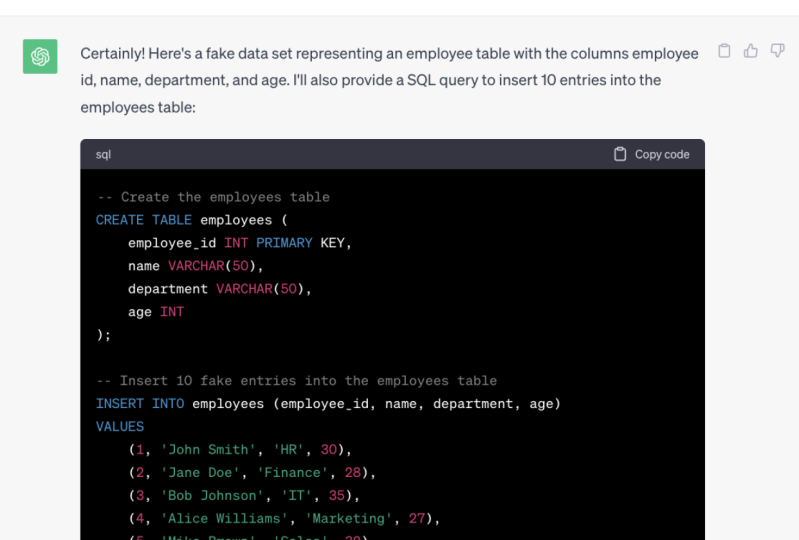
data or test data. Pretty **** good, right? So let's have an example. Generates dummy data in SQL
for table called customers. Each customer should have an ID, FirstName, email, country,
and a score. So let's see. So as you can see,
very powerful, we have now some
insert statements and SQL with few examples. And we can use it
in order to test something or to
practice the SQL. So now instead of throwing
gas the script in this grill, I wanted to show
that that itself. So let's try the following. Show the data as a table
For five customers. Now this is just
mind-blowing Crazy, right? So who needs now tools
to practice SQL? We can use gesture IGBT. So now we can see over here we have this data to
practice this grill. And we can ask it
now to do stuff like find the customer
with the highest score. So now let's write this prompt, write SQL statements to find the customer with highest
score and add the ends. Show the results as a table. This goal, this is just amazing. If you want to learn alone SQL, you can use IGBT to have an examples and to
practice with the queries. So here's shed you
predict created like to statesman's to
solve the problem. And of course explained
everything in details. And we have the results. Michael is the highest
score with age.
37. Coding: Final Thoughts: Alright guys, so we have
again the question is Shadi PuTTYgen replace our
programmers and developers. This is how I think
about is currently, I think it's going to reshape
how programmers works. I don't think that's
we are going to spend most of our time
writing the code. Instead we are going
to be something like good designers or engineers, where we have to
define the blueprint, the concept, or the solution. And I'm going to take over and do the rest by
generating the code. So I think the Eigen
to assist us and speed up the process
of writing the code, which can allow us to start and finish projects way
faster than now.
38. YouTube: Intro: The process of making
videos and content like this may take hours or
even days to complete. You have to find a niche, come up with video ideas. You have to plan and start
scripting your videos. Then the recall
process can start and then hours and
hours of editing. And before you
publish your video, you have to find a catchy
title right there, perfect descriptions
and tags and design a thumbnail that
attracts people to click. But now I'm really
excited that I have such as system besides me that can help me to speed up the process of
creating content. Okay, So now let me
show you how she IGBT going to help you with
creating YouTube videos.
39. YouTube: Finding Niches & Video Ideas: Alright guys, so the
process of creating YouTube videos is very similar to the process
of writing a book. You can use chat GBD
to find a niche for your YouTube channel and as well to find ideas for your content, It's really important to have a trending niche and at the
same time, less crowded. Okay, so now let's ask
LGBT about some ideas. Suggests five trending niches for YouTube channel that are likely to go viral in 2023
and are less crowded. Let's go crazy, right? So if you are searching
for a niche for YouTube channel here
you have five ideas. So the first one is
about the environment, the next one about
the virtual reality, the mental Hills, personal
finance and online training. And of course, if
you want more ideas, you can say, okay, so
just five more, crazy. So now let's pick the
person and finance over here as a niche for
our YouTube channel. Then next step, we have to
find ideas for our videos. And of course for that,
we can use chat GBD to suggest some
video ideas for us. So we can have the
following prompt. Suggest five ideas. A YouTube video
about that topic. Number four, but now let's make it not that easy for IGBT. Let's see the following that
not many people know about. Just to make sure that our video is going to go viral, right? Let's go. Wonderful. Alright, so now we have
five video ideas for our new YouTube channel.
Let's see the result. So the first one
about the depth, the second one is about
the emergency fund. And then the third is like introduction to our investments, then how to create a budget. And of course, this
trending topic, whether we can rent
or buy your home, if I'm going to create a
personal finance general, those are really cool
ideas to start with.
40. YouTube: Writing Script: Alright, so now let's say
that we want to start with a video about creating a budget. So the next step, and
here we have the fun part where we have to write a
YouTube scripts for our video. And of course we
can use the help of the IGBT to generate a
YouTube script for us. So let's have this problem. Write a script for YouTube video with
scenes on the topic. Number four. And now we can add the style
so we're going to have in engaging and easy to
understand style. So here we have to specify which audience we
are targeting is, is the beginners or
the advanced viewers. So I would say here,
Let's go for beginners, for total beginners. Let's go. Let's see the output. This is insanely good. This is really stunning.
This level of scripts, it is very professional. It's not the only writing the scripts what
you're going to say, but also describing their
roles. So here e.g. it says, okay, cuts two shots with the person sitting
with the finance advisor. So as you are
seeing the scripts, you can like fits your video or footage with such a thing. This stuff can help you massively if you are going
to create any content. But obviously we
are not going to copy and paste
everything it generates. It is really great
starting point to reference or outline. If you are creating a
script for YouTube.
41. YouTube: Finding Duplicates: Another use case for IGBT, we can find duplicates
in our scripts. I don't know if you
already noticed. I say often, Alright
guys are okay guys. So you can use shirt GBD
to find those stuff that's repeats over and over and you might want to adjust it. So e.g. here, I have a
YouTube scripts about Tableau and what we can do, we can go and copy
everything from the scripts and then
go to Djibouti. Alright, so we can say give
me a list of words and their frequency occurrence that appear more than four times. And now we add our texts. Let's go. Alright, so now
let's take the results. This is really wonderful. So now I have a list of
all words that I repeat. Tableau Public quiet
with their occurrence. This is normal. Maybe I was explaining
these products and you can go through all the words
like tutorials, It's okay. Tableau data visualizations, public limitations
may be limitations. I should not say it five times, so I have to find
some alternatives, but we can ask our
GBD about that. So let's say, okay, give me five bitter derivatives for the words limitations. With this, instead of me saying like five days limitations
and the video, I can say like drawbacks, restrictions and so on. And with that, you
optimize your videos and scripts and you
sound more professional. And this is really important as the content maker that you
optimize always your scripts, you optimize your videos. And now with the
help of shared gbd, we can do more analyses
for our content. And now there's some
situations where you say, You know what, I don't
create scripts for me. I just operate the camera
and start recording. So how I'm going to
analyze my text? If you've got an
edit your video, you can go to the subtitle. You use your
generator, of course, the whole text of your audio. So what you can do, you can
just go over here and copy everything and go to IGBT
and analyse the duplicates.
42. YouTube: Ideas for Editing: All right, So after
you record your video, the next step is to
edit your video. Here we have small problem. You can not use chat GBT in
order to edit the video, but we can still use shadowy beauty to give
us like tips and tricks, best-practices about the
editing process, e.g. which music we can
add our video, which animations,
soundtracks and so on, e.g. let's say I'm creating YouTube video about how
to create a budget. What is the best music and sound effects to
use in my video? Let's go. To be honest, I haven't
thought about it, whether I'm going to
add background music to my videos and tutorials, haven't done it before. So now if you are seeing this video and you are
hearing background music, It's because of this tip. So here it says I can add
some background music. This tab if music and Acuity, it's relaxed and focus
atmosphere that can help to keep viewers engaged and focused
on the task at hand. So what do you
think? Should I add background music
to my tutorials? And if I do that
during the editing, please give me your opinion
whether you like it or not.
43. YouTube: Generating Video Titles: Alright, so now we're
done with the editing. The next step that
you're going to go and publish our video. But before we make it public, we have to add a lot of stuff like the title
and thumbnail, the description of the
video, and the tags. So we can use IGBT to generate
titles for our videos, your video title and thumbnail. They are very important
thing because they are the first thing that
the viewers can see when they come
across your videos. And based on the title
and the thumbnail, we're going to click on
your video or will not. Let's see how shared you
buddy can help us with that. Generates five YouTube
catchy titles for my video about how
to create budgets. That's kind of catch the
viewer's attention. Let's go. As you can see now, we have five daughters for our videos. At the start, I already
spent hours just searching and analyzing what are the best titles for videos. I found a lot of channels
and alive their titles. It was really painful process to have a catchy title
for your video. But now with the help of day, we can just do it
in few seconds. And then you will have a professional suggestions
from the AI. And if you don't
like those titles, we can always say, okay, give me more five suggestions.
44. YouTube: Suggest Thumbnail Ideas: Alright, so the next step in the process is to
create a thumbnail for our video that's grabbed people's attention
to click on it. And here we cannot use shared
GBD to generate images. It generates only texts, but we still can
ask for advisors. So let's have this prompt. Give me some ideas. For YouTube. Thumbnail
for video titles. Let's add our title over here. That attracts people to
click on my video. Let's go. Alright, so let's
take the answer. We got seven suggestions because
I was not very specific. I was saying some ideas. And if you aren't
content creator, you understand how amazing or
those suggestions. So e.g. here it says, Okay, person
holding a calculator with the trauma and
look on their face with the title of the video. So it's really good
starting points to create a thumbnail
using this idea. Or over here, a
person sitting at a desk with word
expression surrounded by builds and paperwork
with the title of the video of our late in the thought bubble
above their head. This is really funny, but yeah, most of the thumbnails and
YouTube, it looks like this.
45. YouTube: Generate Description: Alright, so now we have the
title and the thumbnail. Next we have to describe
our YouTube video. So we have to add such a
description to our video. And it's really important that the YouTube description matches the content of your video. And having bad description
can has two side-effects. First, the viewers, if
they notice that the description not matching the
contents, they would like, dislike it or not
subscribed for you, which can lead to low watch
time and low engagement. And the second side effect
is the YouTube algorithm is going to analyze everything
that description the title, the tags, and if
it doesn't match, the video is going to rank it slow and it will not
appear in the search. So how we can use IGBT to generate those descriptions,
it's really easy. We just go to the subtitles
over here and copy the whole texts from the
video and then go to IGBT. Okay, So we can write it
like this, re-purpose, this YouTube video scripts into YouTube video description. And then we add our YouTube
scripts. So let's go. Okay, As you can see, we got
the output in few seconds. This is the power of that neural networks
where it analyzed thousands of words and few seconds and respond
to your prompts. So let's see that
text in this video, I'll take you in a short tour
of the Tableau interface. I explained that a
Tableau workbook contains three main
pages and so on. This is perfect for
YouTube description. You'll make sure that
everything that you said in the video is in
the description. And with that, you're going
to get a perfect match for YouTube algorithm
and as well for people that are
watching your videos. So there is no way that
people would say, Okay, if this is unmatching for the inscription and it
was like clickbait. And of course, if you
want it shorter or like more engaging,
we can say e.g. rewrites the
description, but to make it shorter and in
more engaging style. So let's see. So now we have it. It's
little bit shorter than the first one and
it's more engaging. I really love to hear the
answer of Roche IGBT. So I think I have
to go and revisit everything in YouTube and
change all my description.
46. YouTube: Generate Tags: Alright, so next
we can use IGBT to generate the YouTube
tags for your videos. Here on YouTube we can add like around 500 characters as dogs. And that's going to help
the YouTube algorithm to understand your contents. So here we get to see
suggest YouTube tags for my video with the title. And here we add our
title. So let's go. This is really amazing for YouTubers and its followers
were the best practices. Some words on your title should be included in the text as well. So here we have
paycheck to paycheck, and we have it as well here
as the tag is just perfect. Alright, so now we have
everything and we can go and make our video
public in YouTube.
47. YouTube: Understanding The Algorithm: So as you can see, the process of creating YouTube videos and content is really time-consuming and contains a lot of steps. But now with the help
of the AIS LGBT, everything gets
beat up and you're going to be more
efficient and productive. And of course, as content
maker and YouTuber, you are always
learning new stuff, tips and tricks left and right. And now you don't
have to search a lot. Any question that comes in
your mind about YouTube, we can go and ask
her GBT about it. E.g. explain the YouTube
algorithm showed you, but it's trying to
skip this question. Domain requests in 1 h, I totally believe
it's IGBT added this restriction because
there's a lot of people and a lot of
stress on the service. Alright, so now I'm allowed to ask the shadowy beauty again. Alright, so let's
see the answer. The YouTube algorithm
is very complicated. One here shed TBD listed for us the main factors for
the algorithm, e.g. the algorithm checks
the viewer history. So the algorithm going to check, what did you search for? What did you like?
Comment, share to suggest that the video that
you might be interested in. And then it's going to check as well the video engagement. So it's going to
check how many views it has, likes commands. So those numbers are high, you will get recommended
for the others. And the third one, you see that the YouTube algorithm going
to check the titles of the tags and descriptions
to determine whether this video is
relevant for the viewer. So with this, you can
extend your knowledge about the YouTube
algorithm using Shad GBT. And if one of those factors
are not clear for you, you can ask Chad GBD to
give you more details, e.g. we can say elaborate
more about four points. The video freshness. So let's see. Alright, so as you can see, the IGBT gave us
more details about the video freshness and how it affects the
YouTube algorithm. So this means with a simple conversation
with a shack gbd, we can understand
complex algorithm and complex topics like
the YouTube algorithm, to have deep knowledge
about how YouTube works.
48. YouTube: Final Thoughts: Okay guys, so now
the question is, is Chad GBT can
replace our YouTubers. If you go to YouTube
and search for IGBT, you will find a lot
of people talking about how to make
money using YouTube and share GBD by creating contents only using AI
without you being involved. I have different
opinion about that. I think you cannot
replace the YouTubers because they can bring
their unique perspectives, personalities, and
creativity to their videos, which is the essential parts of creating engaging content. And Chad DBT is here
only to assist us. It's going to provide ideas, suggestions, speedup the
process of writing scripts. But I don t think it's going
to replace the YouTubers.
49. The End: THANK YOU: Hi there. I'm really proud that you made it until the end, and I hope that you
enjoyed the journey. And if you liked this course, I really appreciate it. If you go and give me your
feedback and read this course. And of course, if you
have any questions, don't hesitate to contact me. Well, nothing left
to say besides, Thank you so much for watching this course and I will
see you in the next one. Bye.
 Baraa Khatib Salkini, Lead Big Data, Cloud Architecture, Data