Transcripts
1. Introduction: I don't think reading
is about how many books you can read in a
year or a month, or how fast you
can finish a book. And then case should be more about how much you
actually enjoy what you're reading
in how much you're actually getting out of those
books, are you reading, how much you are learning
and how much you are able to use the learning in order
to make your life better, whether it is your
professional life or your personal life. My name is brainer Jimenez. I am an educator and I consider myself a lifelong student. I enjoyed reading
different kinds of books, everything from fiction and even comic books up
to non-fiction books. And in this class today, I want to help you make reading it from
formative experience. I don't want you
just to read stuff, just to finish the books. I want you to really get the most of what
you are reading. So you should take
this class if you were feeling that
getting through all, all of these books that you see on the Internet
and the people recommend to you is not actually making a difference
in your life. Who maybe is the province is not the books
that you're reading, but the way you are reading. So books, you don't
need any kind of scientific or technical
experience to take this class. All you need is somebody
that you are interested in. Something you want to
learn from a computer or even a cell phone
with Internet access. So I'm really glad that
you're joining me here. Thank you very much for
taking the time and welcome. Let's get started.
2. The Reason We Read: There are several
reasons why we read. It may be that you just enjoying
novels or fiction books. And you'll want to read
just for entertainment. That's, that's totally
okay. I do it too. Or maybe you just
want to exercise your memory and
you want to learn some poems or some quotes
by heart as also okay? But there are other times
in which you go to books. You read books because you want to learn something
from those books. Something that's going
to help you make your professional life matter or your personal life
better, for example. So this is the case for,
for non-fiction books. So when you're
reading nonfiction, you're going to find
mostly three things. You're going to find concepts. You're going to
find examples in. You are going to find quotes. So these three things They showed you the
lessons of the book has for you concepts,
examples, and quotes. What the problem is that
we usually tend to, we tend to forget most of
the things that we read. Das every so why would you
want to do if you want to get the most out of the
books that you're reading is start taking notes. And there are three
main reasons why you want to start taking notes, because our memory is limited. That is basically no way you can remember every single
thing that you, that you have read. We all have a limited memory and writing theme that allows the human being to expand this limited
memory that we have. Okay, so when you
write a dislike, kind of having an
expansion of your memory, let's say the second reason
why you want to start thinking notes of what you read is because when you do it, you have an opportunity to process that
information once again. So to say that you are
bringing something, you understand the idea. But what usually happens
is that when you go back to the book or to the
thing that you would read it to take notes on it, you usually get
beeper on that idea. So this second opportunity that you have to
process the idea, you can go deeper on
your understanding. And the third reason
why you want to start taking notes about what you read is
because you will have the opportunity to
review certain details. Because it's going to
happen that you will need certain fields that you
know, you read somewhere, but you just don't remember the whole thing or you don't
remember a secondary where you get a front end if you have a record of the things
that you're reading, the most important idx examples or quotes
and you have Fred, you can easily go back and
review those teachings.
3. Paper or Digital?: A lot of people may
wonder, what's better. Show you read paper books, regular books we should,
you'd read Abel's. Well, I will say that
it doesn't actually matter much for referring
the case of learning. They both have advantages
and disadvantages. Of course, like if you are upgrading a regular
book like this, you don't have to worry about battery life or any of that. But at the same
time, if you read, if you choose to read e-books, you can also have some
other advantages. Now when it comes to getting
the most out of this books, one thing that you want to do is highlight important
things from the book. And depending on what kind
of books you are reading, like if you read down on paper
or your reading and using your iPad or talented
or whatever. Is it going to be pen of a
leaf for l different approach. So let's talk about
physical books for example. So if you're reading a
physical book and you want to highlight something when you can just use a highlighter is some, some colors to
highlight the thin. Or you can just
use a regular pen. You can underlining
points and ideas and even write a little note
in the margin of the book. Now, what if you don't want
to write on your books? What if you like me, don't like to write
them on the book, then there are other
themes that you can use. For example, there are these stickers you can use and they have
different colors. I will tell you a
little bit more about how to use these
colors in a moment. So this sample stickers, you can just take one, for example, and just base it on the part of the MOOC that you want to remember. Let's say that I wonder
remember this point over here. And you see that
these like little flap that you have
now in your book, you can just easily
go back there, which is important
thing you want to use. That can help you go back
to the important thing. So there is one alternative
you can use if you do not want to write
on your boots. Let's say if you're
using an e-book, It's actually easier
because you can use bookmarks or it gets
highlighted in different colors. So almost all of the apps that you are going
to find in the market for it, for reading, able to say, Hey, we'll give you one
way or another.
4. What is a Commonplace Book?: All right. So before we get into
the actual process of how you are supposed to be highlighting your books and how, how to take notes. We need to talk about
something important, which is the commonplace book. A commonplace book is, I like to call them like this
brain that you are going, you are going to have
is this one place in which you are
going to put all of the most important things that you get from
the books, right? So instead of having to
go to your bookshelf and having to browse or all of your books trying
to find what you read. A commonplace book
is the one place in which you are going to
find all the information. Okay, So that's basically
the idea behind it. So you don't have to
go by taking now, another advantage of this is
that you can easily organize your commonplace book using the titles of your book
and the subtitles like, for example, this
book by Ryan Holiday, Spanish version, but
will, this is the same. This book is divided
into three parts. So the author here divided
the book into the first part, which is when you
aspire and bang when you have success
and then when you fail. This is, this is the way in which these particular
book is the vitamin. And all of the little books will have different divisions. So for this one, for example, for this book in particular, what I did was I divided though, the document, which I'm going
to show you in a moment. I divided it into three parts, and then I made for the deletions to get them out
the most important ideas. So that's another advantage
of a commonplace book. It gives you the chance
to organize this in an easy way for you
to, to process it. And another great advantage
is that even though some people may like to use
regular notebook for this, I think is better if we
go digital on this one. And even better if you can
use a Cloud service software, because you don't have to worry about losing your information. Remember, this is
going to be like your second brain isn't going to be the place
where you go if you need any reference or
any review beetles and if you have a
physical notebook and something happens
to the notebook, and you're going to
lose all of that. So that's the
advantage of having it in using a Cloud
service software. There are several different apps and software is you can use. I'm going to show you one that
gives a one I'm currently using us as, as an example, you may use any other that
you lie because most of them, they have kind of the same principles that would allow you to take
notes properly.
5. Creating the Commonplace Book: All right, so now that we understand what a
commonplace book is, I'm going to show you an example of what might come
on place with looks like right now I am like
I was saying before, it's important to use, or at least I think
it's a good idea to use a software that is Cloud-based so that
you don't have to rely on a particular computer in case something goes from, you don't lose all
of your information. So the software that I use
for this is called OneNote. Now there are three main
advantages of using OneNote. The first one is
that is included in the Microsoft software
in the Microsoft suit. So you can just get them if you already have the
Microsoft software, the Office package, you
can also get a OneNote. Onenote is cloud base. So if you have a Hotmail
account or Outlook account, you can use one node
using the same account. And you can download the app on your cell
phone, your iPad, or it on your, on your PC or Mac. Or you can even use
a web duration. You have several ways to use
it as another advantage. And the advantage is that it is very easy
to organize if you never use a note-taking
software before, I think one NOAEL is
pretty intuitive to use. You will be able to create different notebooks
with him, no books, you can create sessions and then you can start writing your, your topic is very easy to use. I'm not gonna go into a lot
of detail on it because there are tons of tutorials on YouTube. You
can find a tutor. I just want to show you what a commonplace book looks
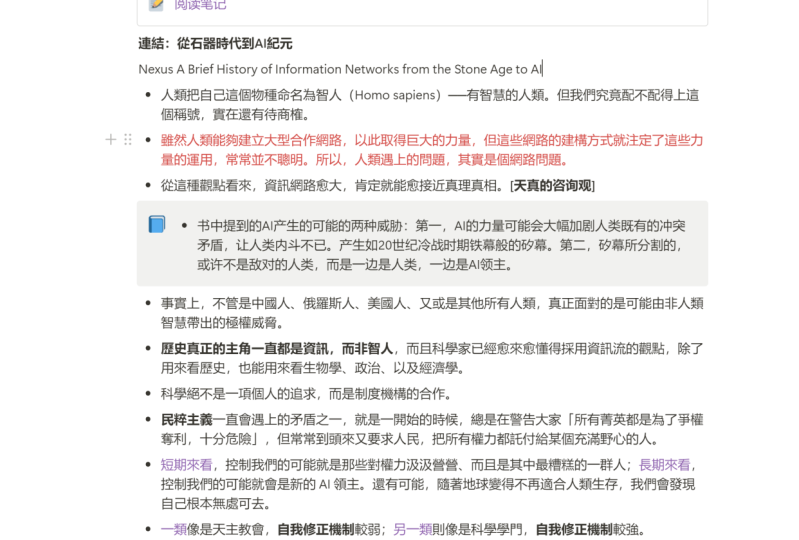
like using OneNote. So this is an example
from this book. Actually, from the ego is the enemy by Ryan
Holiday, great book. And this is what it looks like. So like I said before, this book is divided
into three parts. I haven't finished his money. Particular good is just
to show you an example. So here I have the introduction of the
book on the first part. We have here the first the
first part itself of the book, which is the Aspire session
in here I have all of the different notes about
these particular point. So as you can see, I like to take these notes, use in something that is
called the outline method. So the outline
method is basically using bullets and different
levels for the Booleans. Hey, so you can see here that I have a title and then they have a boolean and
then I start getting, if I need to go
deeper than I start having different levels
for the bullets. That is something that is an
advantage of using one node, but this one is also
something, this, this is something
that you can also do other softwares, right? So this is called
the outline method. Another thing that
I like to do is using different formats
for that I like. So for example, using
colors or using tax is also a great way to highlight important
things within your notes. So when I went to R0, something that I
consider is important, you can use a
color, for example, I use here though,
kolra, yellow. And I also use a
tag for this one. And it says right
here, important. Well sometimes I
have something like an important concept that I want to remember it like
this one for example. This is a concept
of the book offers, which is something called
a canvas strategy. So I want to remember
that this is a concept, this is a definition, so I use a different
color, I use green. And another theme
that I told you in the beginning that is
important is air quotes. When I have a quote, I
like to do it like this. I like to use italics and
I also use one of the tax. So these tags available
in OneNote, like I said, if you want to know more about the 10 legal fees on one note, you don't find tons of
tutorials on YouTube. And even if you don't go to the tutorials is
very easy to use. And there is another
thing that I really like to do here sometimes. And now, uh, well, I usually go to the MOOC, take the information
from the book and put it here in one node using
the outline method, there are times in which I feel like I want to have
something to say about, about the idea from the book
or a quote or something. So what I will do in, in my notes is I will write
their idea from the book. Maybe just it appear in
the book or paraphrase it, but then I will add
my own point of view. And when I do that, I like to differentiate it
by using italics. Okay? So that's another
thing you can do. So if I say something anytime
x it is because maybe is a quote or maybe my point
of view on the family. Now, I don't want to
tell you one thing here. And he said This
is just a system and what I want you to do, get started on this, okay? Of course this is
not a perfect system and have been changing and
improvement is always lack. Probably in a couple of months I will change a couple of themes. We move some and add some other end is going
to be the same for you. I just want to show
you like what you can do to start getting the most out of your
books, like I said. So it doesn't have
to be perfect and don't let that stop
you from beginning. You have to begin and
start trying things, trying things out so that
you can understand what is it that you need and wasted
that you have to modify. One last thing, I
recommend that you use OneNote or sum all your
note-taking software. Like probably every node
you heard about my Notion, or it's some old yourself for. I do not recommend that you use Microsoft Word, for example. Because if you use some type
of word processor like that, even though it is, it has most of the same
formatting options, like one node is not going to be easy for you to
reach information, to search for the information, because you're going
to have a lot of different documents and you're
going to have to manually browse all of those documents
to find the fin or you need to have a gigantic document and that's going to be like
too much in parolees, going to get your computer
is slow or something. So I don't think that
is the best idea to use our regular word processor,
like Microsoft Word. So I will suggest
you go with one of these note-taking software like OneNote or Evernote or notion, they are more or less
the same in terms of the way they help you organize the information
and reach it. They all have serifs, boxes that you can use just to find the specific
thing that you need.
6. Using a Note-Taking System: Now we understand
the importance of taking notes when we read something and we want to
truly learn about reading. And we also know what a commonplace book
Gays and how to start creating our own. Now let's talk about
the actual process, step-by-step process that
we need to follow in order to get that deeper
understanding from the books. So it's a simple process only that you need to keep in
mind if you want to do is. So first of all,
you need to read. We need to take our time saved
down and do some reading. Now, you don't have to
spend hours doing this. Even if you do only
15 to 10 meters, is going to be more or less a book or something every month. Okay? So please make sure that the time that you are
going to take for reading, you can give your full
attention to what you're doing. Don't worry so much about finishing x number of books
in a month or a year. That is not the point. The point is that you can
read truly understand this. So this is not about
speed reading. You will need to read at
a level at a speed that, that doesn't offend your
comprehension, okay? You cannot do it
too slow, too fast. You have to do it in the
appropriate level for you. And this is going
to depend also on the kind of books that
you're reading that are going to be
books will be easy for you to read and you
may finish them in. Even if they are, there are other moves
that you will need to do. So more processing that, so don't worry about add them. Pay attention to all of
that speed radian thing. Just make sure that
you sit down and read at a level in a speed that you can truly
understand what you are doing. Okay, so that's the first step. Gradient, the point. The second thing you want to do, and this is something
that you actually do while you are reading
is highlighted. You can do it while
you're reading, or you can just go
back to what you read. Let's say that you are
reading a chapter today. They say that some
books may have chapters of 45 pages and then you'd read the
45 pages and then you go back and do highlight the point that
this doesn't gain, doesn't really matter
how you do it. You can do a wider
reading or when you finish your reading session
of the day, doesn't matter. So what you wanna do is
just like we said before, use, you can use a simple
pen or you can use colors. Now, if you're gonna
be using color is whether it's a
highlighter or am I care, or you are going to be
used in a stickers. I have a suggestion for you. You can start developing
your own color codes, but I'll give you mine that, I start with that. So for a general highlights, general themes and you want to, that you can see they're
important to remember. I suggest you use
the color yellow and which is the most
common highlighter you're going to find in markets. A yellow, a yellow
sticker or Island. If you find a concept
user cleaner, green. If you find an example that you think is timely and relevant for you to
understand the concept. You can use the color
blue, for example. And finally, if you find a quote that you
want to remember, you can use a portfolio. So I've seen, in my experience, I've seen that these
are the some of the corners are usually appear in stickers and in
highlighters and even in the different greening apps that you can
find in the market. So that's why I
chose those colors. So yellow for
general highlights, dream for concepts
or a definition. Blue for example, and the
portfolio for quotes. Now, this is going to help you categorize the things
that you highlights. So when you go to the computer to your
note-taking software, you can easily find
and differentiate the things that you are
getting from the book. And this is the third
and final step, which is we coordinate. All right, so what you wanna
do is just take your book, open your computer, sit down and start
reviewing everything. So you're going to find out, you're going to realize that most of the things
that you highlight, maybe you have, you have a
different point of view. You have, like I said before, like a deeper understanding
the moment that you are trying to pull that
from the book, you want to move it from
the book to the computer. For example, that's
going to give you another chance to
process information, like I said at the beginning. So another suggestion
I would give you for this is that
tried to take your time. Remember that this is
your learning time. This is time the
US sperm is, is, is for you is like
taking care of yourself. So dawn, russia,
don't worry about it. Don't try to do it, to do it
all in ten or 15 minutes. Not the case. Try to enjoy it. Try to get something
that you some snack that you
like something and you see down there for 30, 40 minutes or one hour, whatever you like,
and do your thing. This is your time and this is what you are doing
to improve yourself, whether it is professionally
or personally. So enjoy it. You don't get dosing have to be dreadful time, not at all. So it just try to enjoy it, sit down and try to get those fans into
your second brain. And believe me that
by doing that, they are going to get in your, in your brain as well.
7. Project: Start your own Commonplace Book: Let's recap some of the
most important things we have discussed in this class. The objective is a weekend, get the most out of the
fields and we'd read. And I was just telling you about how much we forget
about this stuff, about this stanza we read and how important it
is that we started developing a system in
which we can take notes of the most important
lessons and concepts and examples, quotes, et cetera. So taking notes is
going to be our, our way to remember and to10 get the most out of the
books that we're reading. We also talk about
the importance of the commonplace book. Commonplace will be in one
place in which you can find all of the most
important things that you have learned from the
books that you've read. My suggestion is that you use a software like every node
or Notion or one node, which is the one I'm
currently using. If you use this
type of software, you can easily find
information using search bar. You can also use tax. Fine. Maybe if you want to find
gives your quotes or maybe just your concept, you can also do that
and you can use different colors, organize
your information. Let's talk now
about the project. What are you going
to do with all of these things that
I just told you? Well, this is what
you're gonna do. Basically just find a book
that you're interested in. Any book that you like. Well, non-fiction books,
some type of book that you can see there
is important for you. And you're going to start
at USU in assist them. It doesn't have to be a cycle. It I do want to use
it if you want to do some type of tweaks
to it even better. So try to start using system
and start taking notes. So you're going to take
notes from one chapter of book and you're going to show us an example of what you need. Okay, So you can just go to your OneNote or every
node or an ocean, whatever software
you prefer to use. Star taking your notes for at least one chapter
and then share a screenshot of what you need here with the rest of
the community so that we can see how you are using what
we have here in this list.
 Breyner Jimenez-Noya, UX/UI Web Designer & Content Strategist