Transcripts
1. Introduction: You can learn how to sit
in the library and in programming theory
is essentially the practical work is
equally important. And this is exactly why
I created this class. So we've got already to get
your hands dirty at creating. Everyone I've seen
in this class, we're going to create
three luxury projects to boost your
programming skills. We're going to learn how and
when to use what you know, how to add a little
bit different that will be that
you might face. So here's how things
are going to work. I want you to get a pen and antique piece of
paper right now. This is going to
be our checklist. We're going to add four items. Let's begin by just leave
those and get to do. Our tasks are going to be the projects he
created this course. So exercise one, exercise to exercise three and get the
certificate of completion. Just like that. As we go, we're
going to be crossing out the projects together. And finally, you can do
your own class project. You'll get your
certificate of completion and cross the last item list. This class mainly focuses on growing your
practical experience. So you might need
some prior knowledge. Make sure you're familiar
with how many texts, numbers, variables, and then you know how to use if
else statements, while loops, the functions. You're still absolute beginner or need some help
him to work on sets. I encourage you to go and check my previous course
on one-on-one, a programming journey for
absolute beginners to try to get you up and
running Python in February, everything you need to know to create the projects
in this class. If you already
have what it takes and buster Friday to it.
2. Exercise: Odd Or Even?: If I give you these numbers
and ask you to sort them into odd and
even, easy, right? What if I asked you to
sort these numbers? It's nice. Not too far from your sparks. The idea for our first project, we're going to
create a program to determine if a number
is odd or even. Let's see how this is done. Now this is what the
program is gonna look like. First, it's going to ask
us to enter a number. Let's type in
seven, for example. Seven is odd. Do you want
to use this program again, let's try an even number. So yes, enter a number
to two is even. You want to use
the program again, we've already seen
odd and even numbers, so let's say No. That says thank you. Let's see how we
can create this. So file, new file. Let's try our
program right here. So the first thing we have to do is we're going to have to ask the user to enter a
number and to do this, are we going to have an input? So we're going to create
a variable called num. And it's going to be equal
to an integer input. And we're going to prompt
the user to enter a number. Just like that. Then we're going to have
to make a decision whether this number right
here is odd or even. And to do this, we have one key features
that differentiates between odd and even numbers in this is that even numbers are
divisible by two. This means that if you take an even number and
divide it by two, the remainder will be 0. And the operation we use to
determine the remainder of a division operation is the modulus or the
percentage sign right there. So let's start with
our if statement to create a condition
and make a decision. So if num mod two is equal to 0, this means that when we divide this number by two and
we got a remainder of 0, then we're going to print
that this number is even. So print is even. And then right
here, I'm going to have num so that it prints
the number is even. Great. Then if it's not
even, it's gotta be odd. So we can use the
else statement. Else. Print. Num is odd. Now this is the
basics of the code. Now let's take our program
to the next level, where we're going
to ask the user if they want to use
the program again. And to do that, we're
going to use the wild. Now remember, in a while
loop you have to have a condition initially
set to be true. And to do that, I'm going
to have a variable. Let's call it again. So again equals yes. Then right here, we can
have our while loop. So while again is equal to yes. We're going to execute
the following code. And now here we have to
indent everything we want to be executed
inside the while loop. So condense everything one
level, just like that. Then finally, we're going to
have a new value for again, which the user is
going to determine. Again, is equal to input. Do you want The use the program? Again? Question mark. And this is basically what happens when the
user types in yes, this condition is
going to be true. So we're going to have
this code executed again. And if the user types and know, then we're just going to skip the while loop and
continue with the code. And let's continue with a very
simple thank you message. So print. Thank you. Exclamation mark, right there is your code for determining
if a number is odd or even. Congratulations, Let's
see how this works. So run, run module, okay. Enter a number. 88 is
even, let's say yes. And two or number
three, for example. Three is odd. You want to use the
program again? No. And thank you. Wonderful job. Let's check that
off your list now, your 1 fourth of
the way through. So jump to the next lesson
to continue your journey.
3. Exercise: Build A Calculator: In this project,
you're going to build your own calculator and
make dealing with numbers. But let's see how it's done. Now let's see how this
program is going to work. First. It's going to
welcome us to the program. And it's going to tell
us that it's going to perform a calculation. Then it's going to ask
us to enter a number. Let's go with nine. Then asks us to
enter an operator. We have addition, subtraction, multiplication, and division. Let's try multiplication. Then we're going to have
to enter another number. So let's go with seven. We get 63. So nine
times seven is 63. Do you want to carry out
another calculation? Yes, sure. So enter a
number, Let's go with 23. Enter an operator. Let's have the subtraction. There, another number,
Let's go with seven. We have 16, so 23
minus seven is 16. You want to carry out
another calculation now you can just do hundreds and
hundreds of calculations. And you can try all of these. But it's enough for now. So let's type in dough. And
we get a thank you message. Now, let's see how we can
create this great new file. And this is where we're
going to write the program. Now let's start very simple by just printing a
welcome message. So print. Then I have this welcome
message right here. You can choose your
own, of course. Then we're going to ask the
user to enter a number. And to do this, we're
going to use input. So let me just create
a variable called num. One is going to be equal
to a float just in case the user wants to input a decimal point with
this number. So float. Then input. Then let's tell the
user to enter a number. Just like that. Once they've entered
their number, we're going to ask them
to enter an operator. And to do this, I'm just going to create
another variable. So operator, it's going to
be equal to input and enter. An operator. Just like that, We're
gonna give them a hint as to which operators
they can use. So we're going to have plus, minus, multiply and divide. Then we're going to give
them a space right there. Finally, we're going to ask
them to enter another number. So num two is going to be equal and I'm just going
to copy this right there. Enter another number.
Just like that. Now it's time to
make some decisions. Now, depending on what
operator the user chooses, we're going to decide what
to do with num one, num two. And so to make this decision, we're going to use
the if statement. So if an operator is equal, Let's start with a
plus sign colon. We're going to print the
result of num1 plus num2. And now notice here how this plus sign was
used as a string, because the input right
here is a string. So be sure to match these up. Then we have other options. We have division and multiplication, you
have subtraction. So we're going to use an else if statements and
elif statement. So ELF, all creator was
equal to the minus sign. Then we're going to print
num one minus num two. Just like that. Let's do the same for
the other operators. So you'll, IF operator is equal to, let's do
multiplication. Then we're going to print num
one multiplied by num two. For the last operator. I'm going to have operator
is equal to a forward slash, forward slash, and a colon
rather than a print. Num one divided by num two. Wonderful. Now let's say that the
user made a mistake and did not choose one
of these operators. If they chose anything
other than these, we're going to have an
else statement to tell them that they chose
an invalid operators. So invalid operator,
just like that. Wonderful. Now let's see our
progress and run this. Let's see what our program
looks like so far. Welcome on board. Let's
perform a calculation. Entry number, Let's tap five. Then let's have
the division sign. A number. Let's have nine, for example. We've got a fraction, wonderful. Now, we only have one
thing left to do. This is going to
be to ask the user if they want to perform
another calculation, they want to use
the program again. And to do this,
we're going to use the while loop and
it's gonna be very similar to the one we used
in the previous exercise. So let's start by just having
a variable called again. It's going to be equal
to yes, just like that. And I'm going to have the
while loops are right here. While sorry. Again, is equal to yes. That I'm going to indent
this whole thing. You can just highlight and press the Tab button and
indents everything. Okay? And then finally we're going
to set a new value to, again, which the user
is going to decide. So again, this is
going to be equal to the input of the user. Do you want to perform
another calculation? And a question mark? Wonderful. Then, depending
on what they answer, if they choose yes,
then again will be yes, this condition is true. And then we're going to
run this whole code. If it's now, we can
just print a thank you message outside the
while loop, not indented. So print. Thank you. There you go. You have your code. Run module. This should be a fully
functioning calculator. Let's have 67. Subtract 360 for sure. Yes. Enter a number. Let's have nine then
multiplied by 654. Sure, why not? Yes, enter a number. Let's try ten. And let's try
division this time. Enter a number. Let's go with 8.251. Okay. I think that's
enough. Let's go with NO. And we get Thank you. There you go.
Congratulations on creating your first calculator. Amazing. Let's got off your list. You're already halfway through. It looks like you only
need this anymore.
4. Exercise: Build a Guessing Game: When I was a kid, I would argue
a lot to my siblings over who gets to choose a movie we watched the last piece of cake. These arguments were usually
settled by guessing game. Now the winner, of course, would enjoy the
benefits of guessing the correct number or word, color, or whatever
it was guessing. And I'm sure you've all played
a guessing game before, whether it's
eyesight, dictionary, but just the normal number
guessing game we all know. And now it's time to recreate those childhood games with
FIFA. Lets the outset. Now let's begin by seeing how
this guessing game works. First, it asks us to try to guess the secret number
from one to ten, and it tells us that
we have three guesses. So let's try to enter
nine, for example. It tells us this. Try again, three. Try again. What about six? Know, we're out of
guesses, so we lost. Now I'm going to run the program again and try to win the game. So let's try eight. Let's try again. How about
for NO plus try five? Correct, we win.
Looks wonderful. Now let's see how
we can create this. So let's go ahead
and open a new file. And let's write our
code right here. Now, creating this game
is actually very easy. All you have to do is to
decide on a secret number. Then we're going to ask
the user to enter a guess. Then we're going to
compare these two values. If they're the same,
then the user wins. If they're not,
then we're going to ask the user to try again, of course, until they
run out of guesses. Now we're going to start
building the game step-by-step. We're going to start real simple then built on from there. So let's start by just
deciding on a secret number. So let's create a
variable called secret, num and rain have
that equal to five, you can have it equal
to whatever you want. Then we're going to ask the
user to enter their guests. To do this, we're
going to use inputs. So let's create a variable
called guests is gonna be equal to I and t is gonna be an integer because the
secret number is an integer. Then input. And then just some brief
instructions, enter a guess. The secret number
lies between 110. I'm not going to mention
the three guesses rule because we're going
to start with a very simple version of the game that gives
you infinite guesses. From there, we're
going to build on an ad, the guesses feature. Now, let's create a while
loop that works like this, as long as the guest does
not match the secret number, then we're going to ask them
to enter another guess, another guess, and
another guess. They eventually get it
when they do get a ruin of print you when this
is very simple, let's create the while loop. So while guess does not equal the secret number indent, We're gonna give
them another guess. So I guess equals
I and T inputs. Then try again. Just like that. So they're going to
keep trying again until eventually the gas
equals the secret number. We're going to escape the
while loop and print you. Oops, you when exclamation mark. And let's run to see
how the code works. So let's try nine,
try again, four, try again to try again, 75, Let's try and you win. It looks wonderful,
but it's all very logical to give the
user infinite guesses. And this is why we're
going to create a system that sets a limit. We're going to give the user
a certain number of guesses. If they run out of
guesses, then they lose. To do this, it's
actually very simple. We just have to
create two variables. So the first one is going
to be the guest count. The number of guesses
the user has used. We're going to set that
equal to one because we already have a guess
submitted right here. So it starts at one because the user already guesses
the first guess, then we're going
to have a limit. So limit, which is the
maximum number of guesses. This is going to
be equal to three. I'm gonna give my
users three guesses. You can give yours 578
as many as you want. Then we're going to add
something to the while loop. So right here, I'm going
to increase the guests count by one every time the
user submits the guests. So let's have guests
count plus equals one. Then we want to stop this while loop when the
user has run out of guesses, which means that we're going to have to stop the while loop when the guest count
becomes equal to three. So to do this, the
while loop will only work as long as the
guess is not equal to the secret number and the guest count is
less than the limit. Just like that. Now, all that's left is to tell the user if they've won or lost. So let's remove this. Now let's see what happens
if the while loop stops because the user gets the
number, then they win. They lost because
they're out of guesses. It means that they did not guess the number and they lost. Now this is effectively
a decision. So we're going to use
the if statement. Let's start by if. Guess is
equal to the secret number. You're going to print. Correct. You when. That else, if the while loop stopped for any other reason, which is basically that they
exceeded the guesstimate. Then we're going to
print out of guesses. You lose. There you go. This is the
code for a guessing game. Let's run to see how this works. Enter a guess. Let's have eight. I'm going to lose
this game on purpose. To than 00 is not
even an option. So four out of guesses we lose. We've already used
three guesses. Now let's try to win the game. Let's have 975, correct? We win. And don't forget to
check that off your list. Wow, We're only one step away. Jump to the next lesson
to continue your journey.
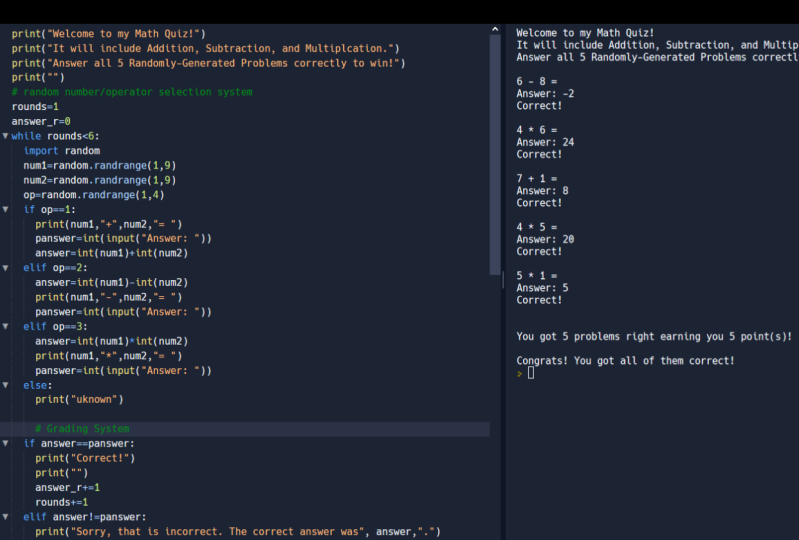
5. Class Project: It's finally time to try
crafting your own project. I created a very simple
and quick exercise for you to complete until it's your
programming skills shine. Get ready to build your
own interactive quiz. First, think about
your favorite program, whether it's math,
science, geography, or whatever you're into really, then you're going
to come up with at least three questions
regarding the subject. Now it's sines write the code. You can begin by just printing a welcome message at the top. Then you're going
to ask the user the questions you
came up with earlier. You're going to tell
them if they got each question correct
or incorrect, then you're going
to award them 1 for each question to
answer correctly. On the end, are going to
display their score and remember to keep your
code clean and organized. For more details,
go ahead and check the projects and resources
section down below. There you'll also find
a sample solution, which is my own attentive
completing the class project. When you're done, I want
you to upload your project to the project gallery
to get like feedback. You should upload
a screenshot of your program file and a screenshot of the
results of Michelle. It's a claim your certificate of completion just provide
me with your full name, the digit completion
of the course, and your e-mail address so
you can mail it to you. And Judy, you need
any assistance? I'm always available to help. So just drop your question
discussion section down below. You've got this. Good luck.
6. Recap: Conclusion: If you've made it this far along in the course, congratulations, you can now grab
your pen and check that last item off
your checklist. It was a real
pleasure of sharing my skills with you and I
hope you enjoyed creating these projects just
as much as I did in case you face any challenges
anywhere along the course. Don't hesitate to
ask for help in the discussion
section down below, I'll be more than happy to help. If you feel like you've
walked away with something valuable
from this class, leave a good review to help the other students navigate
through the same experience. I recommend you check
my profile to engage in classes and discussions
and hit that ball. But it's a sale data. As this class comes to an end, I'd like to thank each and every one of you for your dedication. Keep up the good
work and unleash your creativity into the
world of programming. And remember, keep
learning and stay curious.
 Basil, Award-Winning Educator