Transcripts
1. PM Master Class Intro: As per PMI, the Project
Management Institute, by 2027, employer's good need 87.7 million individuals working in the project management
oriented roles. These job extensions are led by following sectors,
manufacturing and construction, information services
and healthcare, oil and gas industry, finance, insurance,
jobs, and many more. There are many paths to
became a project manager and there is no right
or wrong approach. On an annual basis, employers would need 2.2 million
professionals working in project management industry between now and the
next seven years. So there is plenty
of opportunity for you to excel in the
project management career. On an average, a project
manager makes somewhere between $65 to $220 per hour, which equates to about a 100 thousand to 200
thousand per year. Hey, I'm Nikhil. If PMP and CSM 75 Project
Management Professional. I'm glad you have checked this online course and
I can't wait to start. The class is packed with
lots of information. And I'm currently
working in one of the Fortune 100 company
in the United States. And I have mentored and coached a lot of project managers
throughout my career. And this is the first time I'm sharing my industry
inside knowledge, my experience as project and program manager here in
the online community, I'm happy that you are here to gain those knowledge that I have gained to my tenure as project manager
over the past decade, over multiple failures
and successes. I have tailored this online
course in a way that even if you are an experienced project
manager or a beginner, irrespective of where you are in your current
professional path, you would gain the
knowledge that you would be able to apply in your
project management career. Immediately after
completing this course, you will be able to
fully understand the fundamentals of
project management, project management
processes, tools, techniques, and how to
successfully manage. You will gain a good
understanding of how to use the project
management tool, such as JIRA and MS project. You can use the right
tool for your project. You will be able to use these tools with
confidence and you will be able to impress
your stakeholders and team. We can knowledge and expertise. It will also learn about the soft skills that you
need as a project manager. How to track and
prepare status report, how to create an
awesome presentations when you have to press into your higher management and status and
timelines and more. You will also learn about the industry standard project
management certificates that add value to your assuming and how you can
prepare for those exams. I'll also share tips on
getting you prepared for your next project
management job interview. What questions to expect
and how to answer them. Well, if all this sounds
interesting to you, then take control of your
career and the course. I'll see you inside.
2. What is a Project: Hi, In this lesson we will take a look at the
project definition. What a project is. A project is
temporary in nature, meaning it has a definite
start and end date. A project creates a
unique result or service. So if you look at something
that is getting manufactured, that they factory line, that's not a project
because it's continuously repeating the steps to produce the same thing. So if project never produces the same
thing again and again, it's going to produce
something unique and it can be
service or product. Now, project is going to complete the work at
some point of time. Completing the word doesn't mean that the
project is complete. We could complete the project because we ran out of money
time or something else. It could be that the scope
of the project is no longer valid and we have
to shut down the project. So at any point, project is definitely going to end irrespective of the service, whether it's delivered or not, all the product is
created or not. Remember these three points. And now let's take a look
at the definition by PMI. The Project
Management Institute. Project is a temporary
endeavor undertaken to create a unique product,
service, or result. So now let's look
at an example of a call center operations
by the word itself. It reveals that it's an
operation and not a project. The reason a call center
is an operation and not a project is because it
doesn't have a start and end. It's going to set up
once and customers are gonna call into that call
center day after day. So there is no end
to that process. So that's an operation. Now let's take a look
at another example. Painting a room. Is this a project or
a set operations? So the answer is,
this is a project because that is a
definite scope, which is defined as
painting your home. So it's going to end once
the painting is completed, it has a definite
timeline where they can complete the painting
in one week or one month. There is a start and an
end to painting a home. For those reasons, it is a project that you can
take anything that you see on a day-to-day
basis and analyze whether it's a project
or operations. Just remember the three
bullet points that they project definitely
is short-term, meaning it has a
start and end date. Short-term doesn't
mean that six months, it could be maybe ten years, but definitely
there is a starting of year one and
ending an ear ten. So for that reason it's
gonna be a project. If, if that project produces
a unique result or service, then fluid that releasing
its a project and it is definitely gonna be completed at some point of time. It's not gonna be
ongoing and repetitive. That's a good
definition of a project and how you can
identify a project.
3. What is Project Management: In this lesson, we're
going to focus on project management
may learned about what a project is
in the prior class. So today let's take a look at what a project management is. So I'm gonna switch
to the slide mode and I will put myself
on the corner. So let's take a look
at the definition. Project management
is the process of leading the work of a team to achieve project goals
within the given constraints. So we will talk about the
constraints in a minute. But the first section is
pretty straightforward. It is the process of
leading the work of a team. So obviously as a
project manager, you have a team who would
be doing the actual work. And as a project
management leader or a PM, you would be leading
that effort to make sure that the project
goals are achieved. But let's take a
look at what are the constraints that
we are talking about. The first one is
obviously the scope. Meaning, Let's take a look at the project that we discussed
in the previous class, which is painting your home. What is the scope
of the project? If someone ask, the scope is to paint the interior and
exterior of the home. You can even go in detail in the scope and
ideally your ****, because interior and exterior is a very vague,
high-level scope. But you want to dive deep
into repainting the walls, are repainting the door. Are we painting the ceiling so that can increase or
decrease the scope. If you want to always
lock your scope, but you have an option
to update it later. But these are the constraints that we are talking here that would impact the project if not maintained well,
are managed well. Let's take a look at the next
constraint, which is cost. So what is the budget
to do this painting? Do you have $5 thousand or
do you have $10 thousand? So what is the cost to
complete this project? So it completely depends
on the customer, or let's say you are the
customer and you are looking out for
painters to do the job, you would have a fixed amount of money that you've set aside
to complete the work. It could be $1000.100000000000. Once you start
getting the courts, then you might revisit
the scope and say, I have only 1 $1000. So let's not paint the exterior. Let's cut it down to interior. That's why these constraints
are dependent on each other. So we will take a look with
an example in a minute here. But let's look at the next
one which is schedule. The schedule is nothing
but the timeline. So how long do you have
to complete this work? Ben, do you need this painting
job to be done by two? You need it before next week or do you need
it by end of day today? Because if the schedule
or timeline is not flexible than
the cost can go up. Let us say you want someone to complete the painting today, then it may be possible. It may not be possible. Maybe someone has 20 people come and complete
everything in a day. It is quite possible, but then you're paying
for 20 people rather than if you have one month
to complete the project. And maybe you can just pay
one person and have him do in 20 days or so. Obviously these are
dependent on each other. And if any one of these changes, it can impact the
project quality. So you have to maintain or manage your scope,
cost, and schedule. And in project management world, you would hear this as triple constraint, a
project constraints. So this is very basic
and you will always hear in the project
management world as the triple constraints. So you have to
understand that they are talking about either scope, cost, and timeline or
all three of them. Because if any of them changes during the
duration of the project, it will definitely impact
the quality of the project. Because if you want to paint your home and let us say
you have only 1000 bucks. So maybe someone
that likes qualified or less experience can
come and do the job, but maybe they won't be
as neat as you're paying someone to get to home
painted professionally. So that's fair. You can relate
these examples are caused score bend schedule
to painting your home. As an easy example to remember, we will look at in detail in an example
here on the blackboard. So let me jump onto
the Blackboard here. Let's say I have to
paint just one room. You have four walls. So your school is four walls. The room has a door. Then do you want to paint
the door plus the ceiling? So when you have
this as your scope, let's say you got
only budget as 500. And you need to get
this done in one week. Let's say the first quote
that you received is, okay, I can't do this $400 wall. Just for the wall. Then it becomes
400 for the wall, plus 100 for the door, plus 50 for the ceiling. So obviously 400 plus one
hundred and five hundred. So this cost is 550, which is above your
budget of 500. Then you cut down on
the cost and say, hey, I don't need the
ceiling to be done. This now impacted the quality. So you have a neat
room, dirty ceiling. Does that makes sense? So that's how you can look at project management and
the triple constraint as an example here, any of the constraints
changes like the cost, a schedule or scope, then it's going to impact the project in one
way or another. So as a class exercise, I want you to look
at and think about some other project that
you have in your household and see how you would
manage your school cost and timeline to manage that
particular project or I guys, so that's all for this class. We will catch in the next class, which is going to be project
management methodologies. We will talk about the different
methodologies available are practiced in
common these days. And we will take a look
at what those are. Alright, so let's wrap up this class and I'll see
you in the next one.
4. PMO: A PMO is project
management office. Some organization might have
PMO and some may not be. Overall idea of your
project management office is to set up guidelines and provide project managers to execute a project or
multiple projects. If you have a project
management office in your organization. So the PMO would provide
that guidelines as to what the KPIs and how
it should be measured, the key performance indicators. They would also have a process
in place to request for project managers for different projects within
your organization. And those project
managers will be part of the PMO project
management office. They will be assigned to the project to carry
out that project. And once they had done,
they come back to PMO and then they
repeat that cycle. If your organization has a
project management office, typically that's where majority
of the processes are set, how the KPIs and how the
project got tracked. All the guidelines
and training will be provided by the PMO office. And as a project manager, those who report to
PMO should follow the guidelines of the project management office set forth.
5. Project Management Methodologies: Guys, welcome back to the class. Let's take a look at project
management methodologies. So primarily there are two
major methodologies in news, especially in
software, is agile. Agile can be used
in all industries, but it is getting a lot of traction in the software
development side. Agile and Waterfall are the two primary methodologies
that are in place today. We will take a look
at both of those. The two main methodologies that we are gonna cover today are waterfall project
management methodology and Agile project
management methodology. So let's talk about
waterfall first. You might be familiar
with this chart. It is been in the industry for so many years and so many projects have been
completed using waterfall. There are still organizations
that are running agile still follows waterfall
methodologies for certain kind of project. And we're gonna take a look at each of those in
today's session. So as you can see from the
name and the diagram here, waterfall is very sequential. You cannot jump from
one step into another. Like nearly really. You have to complete the first phase and then
move on to the second phase, as you can see in
the chart here. So it starts with project
planning at the top. That's where everything starts. So the planning is
done upfront and there is always a way
to adjust the plan. And as we know more, we can always tweak the plan. But in waterfall
methodologies that is considered As a huge headache because there is
lot of paperwork involved in changing
the scope plan, things like that in waterfall. If you have a predefined scope and it's not going to change, then waterfall is ideal. But if you're not sure about what this
project is gonna be, how much is the effort? And you can only
know more as you do more things than what the
fall may not be the option. And that's where the
Agile comes into play. But we'll talk about
the agile in a minute. Let's go through the different
phases in waterfall model. So the first one on top, as you can see here, is the project planning phase. That is the phase where we look at the
project requirements, what needs to be done, how much it's gonna
cost at the high level, what resources are required? So we will take a
look at all those in the project planning then
comes the requirement phase. So in requirement, we look at a detailed requirement
from the sponsor or the customer and will
review it and ask questions and refine it before we jump onto
the next phases, we want to make sure in the waterfall model
that the requirement is gathered as much as we can before proceeding
into the next steps. Because once we
start the project, then typically it
involves getting the resources booked or blocked for certain
amount of time. So it's very hard to change. It's always a more
painful effort in waterfall methodology to change the resource or changed the scope and cost
and things like that. That's why it's very
critical to gather as much information
as we can during the requirement phase so
that we don't have to change much in the faces that
you see at to follow. Once the requirement is done, then we move on to analysis. It'll be engaged this subject matter
experts in this phase. And take a look at
the requirement to see how we can come
up with a solution. So that requirement
could be that I need to build a bridge across
this river and it's two miles in length and you have a four-bit Carlin or
whatever the requirement. Depending on the requirement, the subject matter
expert would do the analysis and come
up with what is the best that we can do for this set of requirements once
the requirement is done. So typically analysis and design is combined
into a single stage. It is just documenting what's
the approach that we're going to take to deliver
this requirement, to deliver the final product
based on the requirement, this is our analysis and
this is how we would design the solution to
deliver the products. So that's where the analysis and design stages combined together, typically in the project. And it is very crucial for the design team or
the development team, which is demonstrated
as coding here. If it is not a software project, then it could be the
actual development, whatever we are building,
that building phase. That's where the
design and analysis is key because the product is
built based on the design. So if you've got the
design wrong, then. And nothing can go wrong at the development according phase. Once the development is done, then the developer or whoever it is building
that product, they would do the unit testing, meaning they would do the
basic testing to see if it meets that requirement
mentioned in the phase two. And it also complies with
the design documents. So once that is done, they would hand it
over to testing, which would be an
independent group of people because they are so focused on the solution and the result and not looking
through the loopholes. So that's where the
testing team would come in and they will do an
end-to-end testing. Whether it'd be
functional testing, integration testing, and all kinds of different
testing that we have. So that will be done
in the testing phase. Once the testing is done, the customer is satisfied
with the result, then we deployed in production
or live environment. If we have to take an
example of a website. So the project planning
would include, okay, what, what should
the website serve? Does it need a login and what kind of customers are going to come into this website. So that's all done in the project planning and the
requirements session would detail it out about what method to use
to verify the login. What should be the credentials? Should they use
username and password? Do we need any other information from the user, things like that. Once that is defined
during the analysis and design phase is where the
design of the website, including the functionality
would take place. And based on that design,
then the developer, web developer would develop a website and it would
be ready for testing. We will give that
product to the customer to do some additional testing, including the alpha
and beta testing. And once everything looks good, it's ready to go for prediction. Then they would sign
off and we would deploy the production
live environment. But that is typically how a
waterfall methodology works. And these steps are
followed one after another. All right, so now let's take
a look at the Agile process. So let me move myself from right to the left so
you can see the screen. Alright, I think
that's much better. Agile is typically
an iterative process that is Scrum and
Kanban in both cases, it is continuous improvement. That is primary motto of Agile. So the reason agile
came into effect is, as you see in waterfall, we have a limitation that if the design analysis
phase goes wrong, then obviously the rest of the face is going to fall apart. And it's a very
time-consuming process to go back and fix things. In Agile, the idea is that we deliver early or fail early, meaning at the beginning
of the project, we would have
limited information, so we will start the project
with that information. And as we learn more, we have an option to improve and iterate and build
better products. So that's the whole
concept of Agile. If you look at the circle 12345, you would see that all
the different phases that we have in waterfall, it is actually done in Agile, but in smaller pieces. So the first one is planning
and prioritization. Second is requirement. Third is design and analysis,
implementation to review. So all these five steps are exactly the same
as the waterfall. But that five steps are the core process is done for the very small
piece of the puzzle. Meaning let's say if
you're building a website, so first we will
build a blank page. And that's it. The applied the blank
page and see if it renders and have the colors
right, and things like that. So basically the
planning would be, I want a blank page with
a white background. So can it be done? It will go through the
planning requirements, development and testing,
and if it is done, so that business done. Next, we will look at the
login page and say, Okay, now I want to enter username
and a password and then see if it validates the credentials and the
user be able to log in. That would again go
through the requirements, analysis, design
testing, and deployment. So the cycle continues until all the small pieces
are put in place, we deliver a smaller value rather than the entire project
as a big bang deployment. So that's where Agile
is more effective. Because if something is wrong, then we can identify
that upfront. And that is an opportunity
for the team to rectify that before we
release the Big Bang. So those are the two project
management methodologies, waterfall and agile. Board has its own place in
the project management world. But these days, more
and more industries and organization
preferred to have agile because IT agile is very nimble fast and
the team can adapt very early and often deliver better results than waterfall
in waterfall methodology, by the time you realize
something is wrong, it will be too late. Whereas in Agile, because we are delivering
smaller components, Minimum Viable
Product or whichever is the best value that
the user can get. In a very early stage, then the customers are satisfied
as well as the team get feedback that can be incorporated into subsequent
built and release. So that's the two prominent project management
methodologies. And in the next lesson, we will take a look at
the leaderships die and the project management style for each of this methodology. Because as a project manager, you would lead the
project completely different in Waterfall
versus Agile. And Waterfall, It's a
very commanding rule versus an agile. It's more is servant leadership. We will take a look
at the commanding or leadership style in the next
lesson or the next chapter. And we look at the
leadership authority for waterfall and agile. So that will conclude this
lesson and we will jump onto the next lesson to look at leadership style and authority.
6. Project Management Ceremonies: In the previous class, we looked at the
leadership styles and today we're
going to take a look at the ceremonies in both
waterfall and agile. This should give you an example, an idea of why certain leadership
authorities are exercised in Waterfall
versus Agile. So let me show you
this slideshow here. In waterfall, as we looked
at in the previous class, we have a authoritative
commanding project manager who is explaining
the team what to do, not necessarily how, but when to do it and to
understand that reason, you have to look
at the ceremonies. So in a typical
waterfall project, you would have large
meetings where you would have multiple participants
attending the status meeting. If you look at the details
of the team in a waterfall, you would have sometimes
customers joining the meeting. You have your product
team, your project team. Sometimes there should be a project sponsor attending
the call or a client. So there are
multiple large group of people joining a call. They might have interest in smaller pieces
within the project, but not as an overall project. Of course, your client
and sponsor has the idea to complete the project or the scope that they
asked you to complete. But there could be other
cross-functional team within the larger team where they are participating to do certain
tasks in the project. So they might not be
completely aware of your project or not interested
in the full project. So that's why the project
manager has to be in a commanding position
to control the meeting, to make sure that
things are discussed and only things that are
relevant are discussed. So he has to take control. He has to be in charge
to make sure that the outcome that the
project team and I say PM, what he or she is looking that is achieved
from the meeting. Typical ceremonies
in waterfall include the weekly status meeting where the project team would
discuss the status. The project manager would
look at the risk and issues and see if
any risk or issues need to be handled
at this time in decisions discuss
will be logged in, and if there are any other things that
need to be communicated, those things will come up
during the status meeting. D controls a status
meeting from end-to-end. So that's why he has
to be authoritative. Now let's take a look
at the next ceremony, which is an agile. And typically, as we have
seen in the prior class, Agile Scrum Masters
are servant leaders, meaning they are more
like a facilitator. So why is that the case? Because in agile, more
than status meeting, it is daily stand-up
where the team comes collaboratively and
manage themselves on the tasks that
they're working. They don't need any much
input from the Scrum master because it's self-managed team and they know what to
do and how to do it. So if you look at
this cram team, you have Product Owner, Development Team,
and Scrum Master. So it's a core team
who is focused on a single motive
that is the scope of the project to
complete that project, so there is no
disruption as such. So Scrum Master doesn't
have to be that authoritative or
commanding to take care of anything because
it's your core team. You don't have to worry about
controlling the main thing. It's just coaching the team to make sure that they
are self-managed. So that in a nutshell, is the reason why
the project manager versus combusted
all has to exercise their commanding
authoritative power in a different way because of the nature of the
methodology that is in use in project management, that is something you
have to keep in mind when executing Waterfall
versus Agile. Now, in next class we
will take a look at the different frameworks
within Agile, the two most used once
or Scrum and Kanban. And we will see how those two are used and
what's the difference.
7. Project Governance: Alright, so now
let's take a look at the project governance
by definition, project governance is
the management framework within which the project
decisions are made. I would like to add that
project covenants is the framework and the
structure on which how this particular
project is gonna be executed so that everybody in
the team have a same idea, same understanding of what
to do when by definition, project governance is
the management framework within which the project
decisions are made. What that means is how this
project will be executed. What is the overall structure? What does the team look like? How do we communicate
with each other? What happens when
we have an issue? How do we escalate an issue? What happens when
decisions are to be made? Who should be approached
for decisions? Who is the authority to make those decisions
for the project? How do we get approvals? What happens if there is a
change in project artists change management work who
is accountable for what? So it's basically setting a big guideline for the
entire project team. So everybody is very clear on what their responsibility
and accountability is. And some of the things
that you do as part of the project governance
is RACI matrix. The RACI is nothing but a
chart where you list out each individual team member and mark them as either responsible, accountable, consulted,
or informed. So if anybody has to
do the actual job, they would be
responsible for it. So he never example of
the website project, the people who are
responsible to design the webpage or the
friend end developers. So when you have a
project task and the plan that says design
the front end web page. So then you would assign that web developer as
the responsible party. As a project manager, you will mark yourself as
accountable for that same task. And then you would have
the design team who handed over the design
to that developer. They would be marked
as consulted and all the other
projects stakeholders would be marked as in PharmD. So at any given point of time, each line item in
your project plan, it is good to have a RACI
responsible, accountable, consulted, and informed so that every party in the project know what they're
responsible for, who is accountable for it, and who should be consulted
if they have questions, and who should be kept in font. That is really
critical to define as a team and understand and get an agreement that these are
the project responsibilities and this is how we're going to manage the team and
execute the project. Next is approvals. So let's say you have a budget over and you plan for a
$100 thousand to spend, but now you have to
have a 150 thousand. How would I set approval works? Who approves that extra budget and when the project
hit those things, then you know exactly how to get the approvals
and move forward. Rather than finding out
at the time of execution, then you have communication
which is very critical. How do you communicate
between team, inside and outside
project and all that. So in the subsequent lesson, we will take a look at collaboration sites and how
you set those up before the project it off so
that the team member have a place where they
can store documents, they can communicate
and all that. Then you have to also define
the stakeholder engagement, how the project status
would be reported, how many meetings to attend? What are the critical meetings? Who should attend
those meetings? How decisions are made? Who should be involved
in making decisions? All that combined together, that is the project governance. So once you develop
this linear project is off to a good start because now you have a
proper guidelines. So think of it as you and your friends going
for a movie night. So having a good plan upfront that we're
going to call Uber, we are going to arrive
at displays and then from there we
will get the tickets. They will have dinner outside, all that different things. So everybody is
kind of aligned on what needs to happen when
that movie night, day comes. You can think of the
governance as similar to that, to put it in a easy way
here in some cases, if you don't have a PMO, the project management office, then you might have to
set this up for yourself. Our friend in
certain organization there are PMO project
management office. They would have
standard templates for each of the items
discussed here, such as racy approvals, Meeting, templates, and format. So you can ask the PMO team to provide you all the templates
and you can reuse it. But even if you don't have it, it's just defining how
these things will happen, documenting it and
sharing it with the team so that everybody's aligned
before the project starts. Sometimes they could be requirements from the
steering committee. Steering Committee could be the leaders who are
interested in your project. They might have a
portfolio of projects. Let us say they are working on a larger digital implementation
of the organization. And your website project is
just one of the projects. So in general, they want to know about all the
portfolio under the digital implementation and the website project
being one of them. They might have specific
requirement that you press in the project status
and the end of the month. Such things will also need
to be defined so that everything is wrapped around
the project governance. And it is defined upfront
before the project is started, you can download the
templates for each of these items listed
here so you get a better understanding
of what it means and how does it look like in
a real-world project?
8. Common Project Management Tools: Now that we have a
good understanding of the waterfall and agile
project management, now let's take a look at
the different tools used by the project manager
or scrum master for waterfall and
agile projects. So let me jump on to
the slideshow here. So managing a waterfall project, the project manager is
primarily using tools that help him to plan and
create status report, as well as show
dependencies and workflow. So let's start from the top. So the first one is
Microsoft Visio. Visio is a tool used by
project managers and designers to show the dependency
in a swim lane format. You can show flowchart and different things
in physios and that is very handy to show what the project
dependencies are, how the workflow look like. Those who are external
to the project. They understand a very
high-level picture. And vizio is a powerful
tool to demonstrate that the second most used IT
on the top left dendrite, which is PowerPoint and Excel. In most of the cases, project managers preferred to
create plan and MS project, but it's such a complex
tool that once you develop the plan when he makes
some subtle changes, it's hard to
maintain that plant, so people prefer to go with excellent stead and it's also easy to share
the Excel then MS Project because if the
other person doesn't have licensed and they cannot
open and understand it. As a PM, you have a good
handle on the MS project, but for others within the team, a better way to look at the plan and a timeline
would be Excel. Excel is also used
to manipulate data, create pivot tables, and
analyze data, things like that. So Excel is very much used
in a waterfall project. If you look at the
status report and other things that you have to present as a project manager. That's where PPT and
Word documents are used. If you have to
document the workflow or write down the process, that's where the word comes in. But you have to do
a status report or do presentation
to leadership. That's where the Microsoft
PowerPoint is used. Other than that to store
all these documents, it used to be
SharePoint in the past. Now most of the organisation has moved to Microsoft in 18. And in some cases they
could be Google, OneDrive, and many other things where all this project
artifacts are stored. And these are the
main used tools for waterfall as a
project manager. In some cases for detailed database analysis
and things like that. Microsoft Access is
also used as a tool, but in very rare cases. Now let's take a
look at the Agile. In Agile, the two primary
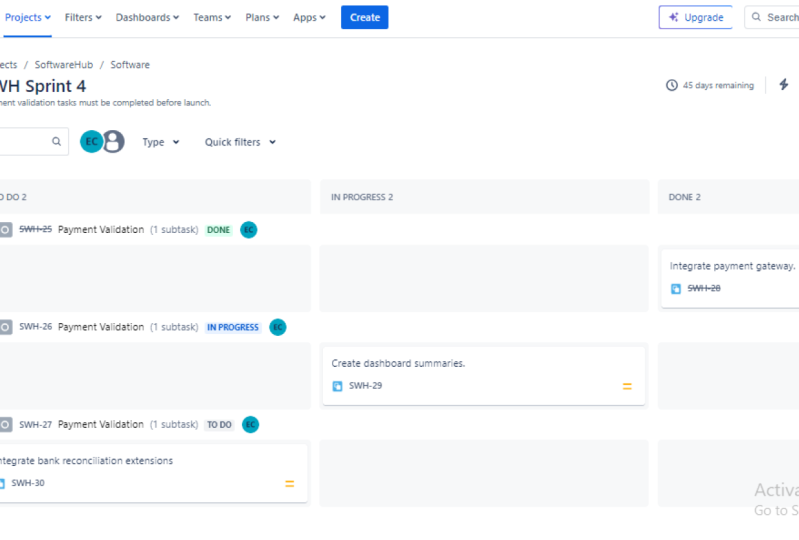
tools commonly used, our Jira and Confluence. Jira is your board
where the sticky notes and sprints and product
backlog are maintained. And Confluence is similar
to SharePoint where all the documentation related to that Jira board
is maintained. Other than GLN confluence, the team or the Scrum Master
also use any tools that is good for retrospective planning
and also for estimation. The tool that is commonly used for story pointing
is poker planning. We will take a look at
those later in the class. But these are at the high level, the general tools used
by project manager or scrum master for managing
and executing projects.
9. Project Manager VS Scrum Master Leadership: All right, so in today's class, we are going to talk about the leadership styles
in project management. There are primarily ten
different leadership styles, but today's class we are
going to base it off the project manager
versus Scrum master role. So you can understand better when you're managing
a waterfall project, what kind of leadership
authority you inherit versus when you're
doing a Scrum master role, what type of leadership
role should you assume or what type of leadership
role should you exercise? So let's take a look at the
project manager role and the Scrum master
role and see how the leadership differs
in both roles. So I am a firm believer that a picture represents
more than words. So for project manager, this is how typically a
project manager behaves. It's that he has full authority and
control over the team. He communicates his that
center falls between the team, customer, stakeholder's
sponsor and everybody, right? So he becomes the single forced to direct everybody to
achieve the project goals. So that's what you see
in the picture where the project manager is on top. He's announcing the mic, what needs to be done? Not necessarily how, but he
sets the stage for the team. So team has the
higher responsibility to execute on the task. But as a project manager, he has more commanding power, he has more authority
if he's not getting anything done from the team
or cross-functional team. He has the ability to
escalate and get help. He's more in the control
rather than the team. Now let's take a look at the
picture for ScrumMaster. Here. The ScrumMaster is more
like a servant leader. He is a coach and
facilitator rather than the commanding power
that the project manager has tear the ScrumMaster
is more like a coach and he's guiding the team on how and what to do and the team has to control. So as you can see, the scrum master is carrying
the burden to make sure that the team can progress well
and removing impediments. So now we will also talk
about the ceremonies that we have in project
management in waterfall. Let's take a look
at the left where the project manager has
status meetings where he will go through
the status and he's not necessarily
solving the problem, But he is more collecting the status and understanding
what the issue is. You can always try to
resolve the issue. But in most cases in waterfall, he or she from the team
need to communicate to the project manager on
what help is required. And project manager has the command and
control over the team. And if somebody is
not doing the work, he can escalate it or he can resolve it because of
its commanding power. On the other hand, it's
something similar, but ScrumMaster is more like a facilitator in
a daily standup, his not collecting status. Our master is more
trying to facilitate the main things for the team can self and manage the task. And the Scrum Master is there to understand if the team is making good progress and if they have an
impediments Bell, they need masters help to
resolve it for them primarily, I would say the project
manager role in waterfall is more like watching the team and continuously
asking for status and his following up
at a system master. It's up to the team on how
to do it and what to do it. Grandmaster is trying to facilitate the overall
project progress. And he helps the team to understand if there
is anything that is stopping from making
that progress and he can help to
solve those issues. So both the intention alright, to make the team do the job
and elevate any issues. But the ScrumMaster is
more like a servant leader versus the project
manager is more like, Hey, commanding authority. If you look at another
example how this meeting goes in the waterfall,
project management, the project manager decides which task priority and he will assign the project
manager would assign the team. Okay, these are prioritized
and knew how to walk on it. Whereas in the Agile, the team comes up with the priority depending on
what the product owner has prioritized based on that priority team can decide
what they want to work on. They would update this
grandmaster that I'm working on this and this is
how it is progressing. So that's the difference
between a servant leader on this grandmasters side versus a commanding and authoritative
project manager. On the waterfalls side, it's just different
way of executing the project to make
progress on the project. So that's a quick shot style of leadership in both waterfall
and agile methodology. In the next class,
we will look in detail on the
ceremony is that each of this project
management methodology has Waterfall versus gram. And what a project manager
typically decimal waterfall and what a ScrumMaster
does for a agile project.
10. Agile SCRUM & KANBAN: Alright, in this class
we will take a look at Scrum and Kanban frameworks
used in agile methodology. How is it different
and when to use what? So first we will take a look
at the Scrum Framework. Scrum framework, if you remember the earlier class we
discussed about initiating, planning, executing, monitoring, and controlling and
closing off project. And in Scrum framework, it is a repeated multiple times. So that's why it's an
iterator approach where the entire project
management phases are repeated multiple
times throughout the Agile Scrum framework, and it is repeated during the timebox in
devil calls print. You can have a one week or
up to four weeks sprint. And typically most of the
project team exercise a two week sprint where it is enough to plan and
get things done. And by end of the strand, you have to do
certain ceremonies. So one week will be to tide
for most of the teams. Typically what we have
seen in the industry is people go for two
to three weeks spring, most of the team
doing three weeks and some team doing in two weeks, if it is prediction support, they might even go
for a monthly sprint, which is a four week sprint. And at the end of the month they can do the release cycle. So whatever product they developed or enhancements
they have done that can be released into production by end of that month. Now let's take a look at
this slide closer and go through each of this
picture and what it means. All right, so we will start from the left and go
towards the right. So first on the left you
can see the product owner. Product owner is the one who
interacts with the client or the customer and collects all the requirements and
put it into the backlog. Backlog has all the wishlist from the product owner
and product owner continuously refines
the backlog to prioritize the items that
need to be delivered first. So any requirement that
the team has to work on, they have product backlog as a reference and usually
the team can pick it up from the top of the
backlog because that's how the product owner should prioritize the requirements
in the Product Backlog. Anything that needs to be
delivered early comes on top, and anything that can
be delayed or delivered later that goes on the
bottom of the backlog. Now let's see if the team
has decided to work on certain things and they pick five items from the top
of the product backlog. That happens during the
sprint planning meeting. The product owner, the team, and the Scrum Master made during this crumb meeting and plan for the items that
they want to work for. Let's say that in this case, a team has a two-week sprint. They will look at what they can work on for the
next two weeks. So they will pick
maybe five items from the product backlog and
agree on working on those. So during that picking, they would estimated how much
diamond is going to take. And that is based on experience. And later in the class
we will discuss about story pointing and how
effective that method is, how to use poker
planning and how the team mature as they go
through multiple sprints. But for time being, just
understand that the team can pick the tasks that they think can finish
in next two weeks. And that goes into
a sprint backlog. If there are 50 items
in the product backlog, they pick the top
five and moving down to something
called sprint backlog. And during the planning meeting, if the team product owner and scrum master
agrees on the school, then they start that sprint
for the next two weeks. Once a sprint is started, then the team made on a daily basis to look
at where they stand, discuss about what
they're doing, what they have done, and any impediments that
they need help with. And that will continue
for the next two weeks throughout the end
of this sprint and at the end of this sprint, the team may take gain
for sprint review and to demo the completed item
to the product owner. That's typically the
Scrum Framework, and this repeats until the end tag product requirements in the Product
Backlog is completed. It could take multiple sprints to complete the
in-depth backlog. At the end of the last sprint
is where the team will have a finished product
that is fully functional. When we look at a practical
hands-on example, you would understand more
about product backlog, sprint, backlog, the sprint itself. And don't worry too much just to understand different
terminologies at this time. And when we do a
hands-on project, then you will have
more understanding of each of these items. And we will also see burn
up and burn down chart. Something that is not mentioned
here is velocity chart. Those are metrics and reports that helps the team to
understand how they perform and what they
need to adjust to deliver consistently
similar story points. Alright, next, moving on
to the Kanban framework. In the Kanban framework we have a board which is
similar to scrambled, but there is no spring
backlog assets. It's a continuous board, so we have a product backlog
at the very left and then team decides what they need to work on and put it in ToDo. Once they have certain items
for that particular month, they would start
picking one from the to-do list and
start making progress. And at that time
they will move to in progress or ongoing
warrants that task is done. They will move to done. And once it is completely done, they'll move to archive or
just cross out as complete. So in this case,
team has a limit. They can only work on certain number of story
points in a month. You can think of Kanban
as say, ticketing system. So let's say you
have a local park. If somebody has to
enter the park, they need to get a ticket. And when they exit the bug, they will handout that ticket
back to the security guard. In this case, let's say the
park capacity is ten people. At the entry gate, the security guard
would have ten tickets, meaning there is nobody
inside the park and the park and allow up
to ten people to go in. So think of the people entering
the park, asked the task, entering the board once the entry tickets for ten
people are handed over, that means he, the god, doesn't have any more
ticket to handover. So anybody waiting in line
has to wait until one of the ten people who
are inside the park come out so that when
one person come out, that ticket is collected back and it can be given
to the next person. Any point of time. There could be only ten
people inside the part. That is the capacity or limit of the park in Kanban
is the same concept. You acid team has a capacity that you can deliver
for that time period. Let us say your time period
is four weeks or one month. In a month, you can let say, manage ten story points
from the backlog, you can pick up to ten items or ten story points that can
be put into to-do list. And once it reaches ten, then you should not be picking
anymore from the backlog because that's your capacity
for that month for the team. So once you have the capacity, then you start doing that work. And that goes into ongoing. And Dan, after you have
completed your first task, then you have freed up
some more capacity so that time you can go
and pick from to-do and move into ongoing and
keep doing this stuff until there is nothing left
in to do at that time, you can go back to the backlog and pick more items that can be completed in the same spring or plan for the next sprint. So that's the difference
between Scrum and Kanban, where kanban is based on limit, whereas com is based
on that is no limit. Or the team perform
sprint after Sprint, they can improve upon and deliver more story
points if needed.
11. Scope Management Plan: Alright, so in this
lesson we will talk about scope
management plan. But before we jump into
scope management plan, it is important to know that we have overall project
management plan. Typically you might have seen MS project timeline and most of the time that is
just a schedule. Typically, we don't
put the scope and other project
management plans in Gantt chart because it's primarily used for
scheduled purpose. So let me talk about the
different plans that we have in the overall
project management plan. And then we will jump onto
the scope management plan. If I share my screen here, you would say there are nine different project plans available in the
overall project plan. Starting with scope,
schedule, cost, quality, resource, communication, risk, procurement, and
stakeholder management. All these plans
combined together is called the overall
project management plan. But 99% of the organization when they are talking
about project plan, they are referring to most likely the schedule
management plan. We will take a look
at the schedule management plan
when we get there. So in this lesson, we
will first look at the scope management plan in
the project planning phase. Let's see where it belongs
in the project planning. It's innovative part
of the planning phase. And what it entails is
overall the requirements. If you think about a
project that is obviously a requirements from sponsor
or the stakeholders, even before the project
manager is on-boarded, they have a high level
idea what they wanted to. Let's say they want to launch a website where they can
sell their products online. So if that is the high
level requirement, then in the scope
management plan, once you engage the
PM or usaid PM, you would have to
dig deeper into those requirements because when a business cases put together, It's not at the detailed level, it is at a higher level
what business needs are and based on the strategy
that the organization wants, the business case is put
together at that level. When you get into project
planning phase is when you take that business case and then do a deep dive
into requirements. In a waterfall, you would
have a business analyst or an enterprise architect or someone else to help
you with this process. If not, you have to
engage them to get this requirements
from the business in a very detailed way. This is the document
or the output from the scope management
plan would be the one that you can share
with your developers are whoever is working on
developing that product. So it is very critical that you understand what is the
scope of the project and at what level we need to go deep dive into the
school to meet the project or the stakeholder or the sponsors requirement. First year is the requirement. Obviously, you need to find a way to collect
the requirements. You would meet with the experts
from the business side. Let us say the idea
here is to launch a website for selling
that product online. So you would go with the
marketing team, sales team, and collect the requirements from each of those functions. You would also have to
meet with the finance how the payment should
be processed, all that. You have to think about the complete end-to-end process and define the scope
for each function. That's the second
bullet point here that once you identify
the requirement, then you define the
scope for sales. These are the things you are
going to do for marketing. These are five things that
you would do or that would be available in the
website or in the product. Then you break down that
things into smaller, manageable components so
that the team can work on. So typically if it's
an Agile project, all this will go into the
product backlog and then you can break down into smaller,
manageable stories. That's all. This section is. Once you have done that, then you had to baseline it, meaning that is your
starting point. So everybody has to agree
on that starting point. And then you would develop a requirements
traceability matrix that is only needed if you're running a waterfall project. Typically you don't do this
on an Agile project because everything you have is put
into the product backlog. And if there is new
things that comes on, then you would work
with the product owner to add that into the product backlog at the end before I jump onto
the scope, approvals, requirements, traceability, if I have to give you
at the higher level, what it means is just mapping the requirements
that you have collected in the first step and mapping it to your solution, how that requirement will be met in the design
and development. So that's what requirements
traceability is. It's just your Word
document or an Excel to show the stakeholders
or the sponsor that we have taken care of all these requirements and
this is how it will be met. So it says straight document, you can even do in a
PowerPoint, not a problem. Scope approvals is something
that once you have the requirement baseline
or the scope baseline and all the requirements
are mapped to appropriate design documents and how we will deliver those new. Present that back
to the sponsor or the stakeholder and say Here's
how we're going to do it. Do you prove this is the stage where you would also mention
about change request. Meaning if there is any change
into what we have defined here or what we have provided
as it's called baseline, then we have to do
a change request, meaning any additional change to the baseline would incur
cost, time and effort. So it's better to lay that
out what that processes. So at a very high level, scope management plan deals
with collecting requirements, breaking it down into smaller
manageable components, and baselining it
as a starting point and get the approvals
and align everybody to agree that this is what
they're gonna do because it will help in the next phases
of project management. All right, so that's how the project scope management
plan is developed. Just make sure that you have identified all areas
and all functions have included them in the
requirement collection process so that you are not missing out on any particular functions. As long as you do that, it will be very smooth in the
subsequent execution phase. When we have to
deliver the product.
12. Requirement Gathering: Alright, welcome back. In today's lesson, we
will take a look at the business
requirement gathering. This is not
necessarily a function that you should do as
a project manager, but somebody from your
team should do it. If it's an Agile project, then typically it's done by the product owner working with the customer to understand what the business
requirements are. If it is a traditional
waterfall methodology, then you would have business sponsor and the
business analyst from your team working
closely to understand the business requirement and
documented for the project. So in this lesson
we will cover what are different types
of requirements? What are the different
techniques that you can use to collect
the requirements? And also how the
requirements will break down into smaller
components so that you can plan in your
project plan to achieve those business requirements in both waterfall and
agile methodology. So let's get started with the different
business requirements that we need to look at. All right, So when we look at the business requirement
gathering sessions, you always have to keep in
mind what the project goal is. Otherwise, there
could be scope creep, which is just the additional
scope that can come into as part of this
requirement gathering. If any project stakeholders has additional requirements
and if you're not sure if it is aligned to the project goal or
the deliverables, then you should table it and
then come back to it later, collect all the
requirements that you can. But you should only
focus on the ones that is directly related
to the project goals. So to give you an example, let's say you are migrating in old legacy platform
into a modern platform. Let's say you have
all your banking or financial applications in a
legacy mainframe systems. And you want to migrate that into a modern
web-based interface. There could be
limitation for the user using the mainframe
system to do something. Let's say they wanted to draw
something on the screen, which is not possible in the mainframe
system because that is an antiquated system. And in the modern
web-based solution, possibly you can do
that in iPad or iPhone. But that is not a
requirement that is aligned to the project
called the project goal is to move the requirement
or the business functions from mainframe legacy systems onto the modern
web-based systems. So if that is the requirement, then all these additional
features that the users want, those can be tabled for further release as not
to combine it with the project requirements
because it will increase the scope of the
project and you would be not able to deliver it on time and within
the budget that you have for the project
being said that let's jump onto
different requirements. One is the business requirement. This is the core requirements
from the business function. Whether it'd be a sponsor or whoever is benefiting
from the project, they would state
this requirement in the project charter business
idea, a business case. And here what we're
doing is breaking down into more detail
so that we can plan. I did detailed level. The business requirement
example could be as a insurance company, I want to migrate all my legacy application into a modern
web-based platform. That requirement
there is stating that what we're currently
using is working, but we would want to have
more features and we want to be able to integrate
with other things. So append the business
States that requirement as it has to be a
web-based solution, there is no technical
requirement that it has to be developed in dotnet or
Java or something else. That's where the technical
requirements comes in. The technical requirement
could be that since our current office supports
only darkening solution, so we can do this
in dark net, right? So you would then confine or take that business
requirement and say, on the technical side, we would utilize
dotnet framework to develop this process. So if you have to think
about technical requirement, one more step deeper than technical requirement might
say that when the user login, then he should enter
their credentials, the username, and password
to log into the system. But the technical or the functional
requirement behind that could be in that page, a user should have an option
to reset the password, set security
questionnaires, and then get a secondary
authentication like a message or something
onto their phone. Those are purely technical or functional requirement
that relates to that overall business
requirement of the user being able to log
in eosin some credentials. So that's how you break down the business requirement
versus technical requirements. They could also be some legal requirements
that you have to look at. For example, certain European
countries might have restriction on sharing the personal information
outside of Europe. So you have to understand
when you define the solution. Is there any particular
requirement that pertaining to a local country or a region
that needs to be considered. So those requirements also
needs to be thought about. And this is where you would
engage with the stakeholders, sponsor, and others to understand what those
requirements are. So now that we
understand what are the different types of
business, technical, or legal requirements, let's look at how can we collect
these requirements? What are the different
techniques that we can use to collect any
such requirements, whether it'd be business, technical, or legal, primarily, I would say that in three
different ways to do it, but there are multiple ways. So let's take a look
at the primary ones. First one is brainstorming. You facilitate a meeting with all the important people who are using the system or who are the users of the
system and brainstorm the idea is what they want
in the system they're using. Let's say in the example
of migrating from old mainframe system to
modern web-based system, then you can brainstorm to understand what are the
features and functions that the users are utilizing today in the legacy platform. And if they need to be migrated
onto the modern platform, or it's just that they're
doing something because of the constraint that they have
with the legacy systems. So you can have brainstorming sessions to further breakdown
the requirements. The next one is one-on-one
meeting or interview. You can have one-on-one meeting with the functional leaders, whether it be finance,
logistics, marketing, sales. Each one of them would have their own requirements or their own features and functions that they're currently
using and would like to add in the new application
that is being developed. Those things come out when you
meet with them one-on-one. So to understand what are the specific needs when
it comes to requirements. And the third one is a one
day workshop where you can have one or
two-day workshop to bring all the relevant
parties and users into one room and then
gather all the requirements. So when they interact
with each other, they would understand what the dependencies
are and there could be additional requirements
that come out of that session. That is another way to look at. There are several
other methods other than these three primary ones. So let's quickly jump
through what those are. Some of the other
options that you have, a sending a survey, you can send out a question or list of things that
you want to understand as a questionnaire or survey to the people who are
using this application or who would be
using in the future to understand what their
requirements would be, what they would like to see
in the new system that we can collect all that feedback and see if it aligns to
the project goal. And you can incorporate that
as a business requirement. Other type of
requirement gathering is shadowing or
user observation. You would simply
Shadow IT person who's using the
system currently, let's say in this case the
legacy mainframe system, to understand what they're
doing today and what is the output or the outcome
by doing that task, once you understand
what they do and what the outcome
of that task is, then you can have a solution. The modern platform, how to do the same thing,
maybe differently, or even you can automate that completely so that the user
doesn't have to do much. That it is automatically
done in the new system. So for example, let's say in
the legacy system they have ten jobs that need to
be submitted manually, let's say to process
certain artists. So they had to do one at a time. So the first job is submitted, then the user wait for it, and then once that is completed, then he or she submits
the second job. So by shadowing or
observing the user, you can take that note down what they do
and why they do it. And then maybe in
the modern platform, you don't have to do any
such manual intervention. Maybe you can
automate or schedule the jobs in a way
that at certain point of time when the trigger is met and the job kicks
in automatically. And then after
completion of the job, it will trigger the
subsequent jobs. So you can automate
the entire process by understanding what the user desk today and what the outcome
of those task are. Another way of capturing the requirement is
document analysis. Let's say in the current system they have some kind
of document as to why certain things
are designed or what certain things
does as a function. Then you'll go through
those document and see and understand what
the current system does. And that can be your input to understand and define in the new system how it
should be handled. So that is another way of gathering requirements and
designing in the new system. Another way of requirement gathering is interface analysis. Interface analysis is
looking at all the jobs and batches and other
things that are interfaced with the
current system, but either input or output. And understand what
those are doing. And then you can evaluate
if those interfaces are. Downstream or upstream
systems need to be updated or the modern system can deliver something differently
for those interfaces. So by looking at the
interface that exists today, you might be able to understand what those
interfaces desk today. And then that becomes a business requirement
that needs to be designed in the new system. Alright, so there is plenty
of other ways that you can do requirements
such as prototyping, use-case analysis, and
what if scenarios, whatever technique you used, that doesn't matter
as long as you can collect the requirements
and understand what the project
stakeholders needs from this new system or from the project that
you're working on. Then that is what we collect in the requirement
gathering session, documented and then get
sign off from the users that this is what we're going to do as part of the project. So now let's take a look at
in waterfall and agile how we would break down those high-level
requirements into smaller, manageable tasks so we can assign the duration
and the effort. So once you have a high
level requirement, then you can meet with the
team to analyze further. So if it is a waterfall, then what you would
do is document all that into
something called BRD, which is the business
requirement document where you have all
the inputs from the different sessions
that you had with the business and document
what the business needs, what should be the outcome, and what the user
expectation is. Once the business
requirement is documented, then you can hand that
over to the technical team so they can develop the
technical solution for it. So typically the technical team would review the
BRD and they would create the software requirements specification document bridges, just mapping the business requirement and at
the high level, defining in the SRS how those business requirement
will be delivered technically within this hour, as you could have high
level diagrams to show how the high-level
business requirement is mapped and how it
will be delivered. You could also have low-level design
further breaking down those high level components from the SLD into smaller
level components. And then finally, based on LLDP, you would have work
breakdown structure, which is the actual
task and activity to perform and deliver that
business requirement. Once you have the WBS, then it is easier as a
project manager to meet with the team and
understand the effort involved in completing
that particular task. Because looking at overall
business requirement, it is tough for the
team to estimate it. But if the team has done
a great job in breaking down the requirements into
smaller manageable components, then it would be much
more manageable and easier for the team to
estimate it accurately. So now let's take a look at how this will be done in Agile. In Agile methodology, all these requirements will
be captured as user stories. The user story template we have discussed in the
previous lessons, we would document
on the product or Nobu document what
the user stories are for the business
requirement, whatever persona that user is, you can say as a finance
person or asset project lead, I want to do this so
that I can achieve that. So that is the template
that is typically mapped or created
in user stories to understand who the persona is and what they're trying to
do to achieve what outcome. Once you have the user stories, then you can define men. Those user stories
will be delivered. Is it going to be in the version one release, version to release? So you would come back
to that once you have all the user stories are identified in the
product backlog, the versions can be further
broken down into epochs. And from epoch you can define
task and then sub-task, which is equivalent to the work breakdown structure and the waterfall methodology. Once you have a DNA
epic and task level, then it is easier
for the team to storypoint it because now
it's more manageable. And you can define which task and uses stories goes
in which sprint. And then according to that, you can map it to the
version of released that you want to release those
user stories to the user. So this is at a
very high level how requirement gathering
sessions are done. Again, as a project manager, you are more of a
facilitator here than actually doing the requirement
gathering by yourself. If you have an Agile team then worked with
the product owner to get the requirement gathering done and define
the user stories. And if you have a
waterfall project, then you would have business or your business analyst
or somebody from the functional team who will be helping with the
business requirements. And as a project manager, you would map those
business requirement to further smaller components like the work breakdown structure. So you can include in your
project plan and then plan accordingly for the delivery
of Ted business requirement. That's the lesson for gathering
business requirement. So now we will move on
to the next lesson.
13. Business Case and Charter: In this lesson, we will talk
about the business case and the project charter that happens in the
project idea phase. Before even the
project initiates, the sponsor has to create a
business case to based on the project needs and the organization's
strategy and vision, the project sponsor
would have to create a business plan that lays out the project at
the high level, works that are turned on
investment and all that detail. So you have to get the project business case and the charter
from the sponsor. But in some cases, these fonts that would
engage the PM in advance. So when he has the
business case, he would consult with the project manager
to tweak anything. And he would also ask help to get the project charter
going so it could be possible that you wouldn't
be tapped into to help the sponsor to create
the project charter. But ideally it
should be created by the project sponsor along
with the business case. All right, so now
let's take a look at what the project
charter should have. It should definitely have
at the very high level, the school and the
business needs. What is in an outer
scope for the project. For example, let's say
you're building a website, you have to have
that requirement clearly stated in the
project charter and in the business case that
the requirement is to create a website where
you can sell products. So when you see the charter, it should go in
further into detail on what is in scope and
what is out of scope. Is this website catered
towards just US or Europe or any other region
or as an international. So those should be in school. And anything that
is not in scope, let us say your product
is not allowed to sell in European region due to lead
to a detailed regulation. So then Europe is out of scope, so you have to have those laid out in
the project charter. If you're helping us CAPM, then you should put that in. Otherwise the sponsor
should clarify for you, the project charter
should always have a high level timeline
so that you understand before the project
starts and awards the timeframe that you have
to deliver this project. Obviously during
the planning phase, it's going to change and maybe we have to
adjust the timeline. But you should always start with the timeline when the
project should be delivered. It should also have the budget because as part of
the business case, sponsor already had
an approved budget for this project along
with the contingency. So contingencies, anything
if the project goes wrong, you have a buffer to take
some cost from that. So you should always look for the project budget in the business case and
put that in the charter. Charter should all
base have constraints. If there is any
project dependency or constraints that has to be
put in the project charter. So for example, you can
strain would be that maybe your organization have
Microsoft sequel. But for this website
you need article. It's a constraint that you
need to get Oracle for the database in order
to be successful. And assumptions could
be that you are allowed to go live
with certain things. And maybe during the project
execution or planning, you would validate
those assumptions if it is true or not. Then you would also have to highlight the risk that
you think that you might end up when
executing the project in the project charter
at a very high level, obviously, the risk
and issues will get larger and better once you
start planning and execution. But you should always
have some high level of risk identified as
part of the charter. And finally, the project
charter should always give you an idea about who
the stakeholders are, who are we creating
this product for? Direct and indirect
stakeholders. So all those should be part
of the project charter. And just remember
that it should have been documented by the sponsor
and hand it over to you. So that's a quick
tip to remember, but in some organizations
the sponsor would approach you to help
with the charter. Sometimes the project
manager has to help them or create the
charter for the sponsor. And this happens in
the idea of phase. Before even you start
the planning phase. Project charter is
a starting point which takes input from
the business case.
14. Risk Assessment in Project Planning: Alright, so now we have
done the planning, now it's time to do
a risk evaluation. Look at all the projects, can see how we can
mitigate the risk. What we identified as risk, is it going to
impact the project? All that good discussions
before we jump into, let's take a look at
the definition of risk. The definition of a risk is
that it's an uncertain event. You're not sure if that risk
is going to occur or not. It's simple example could
be your car insurance. You don't know
whether you're going to meet with an accident or not when you drive a car or
your motor vehicle or a bike. But you know that there is potential chance that
something could happen. And if that happens, then it needs to be either accepted, migrated,
or transport. So when we take a car insurance, all we're doing is transferring
the risk or the impact of the risk to the
insurance company by paying a monthly premium. So let's say you met with an accident and if you
do not have insurance and let's say the
damage is $20 thousand. So that's a risk that
you're willing to accept, then that's absolutely fine. You can just take the
minimum insurance policy that is required by the state. But if you're willing
to accept that risk, that if something happens, I'm willing to pay 20 thousand or scrap the car
and buy a new one. It's up to you in projects
is the same thing. When you identify those risks, you have to decide whether
you want to accept the risk or if you want to mitigate and reduce the impact of the list, or you want to completely transfer the risk
to someone else. So those are the considerations
that you want to do when looking at risk and
mitigation plan. So typically the easiest
way to do is if anything, which are low in the
spectrum of risk, which is the lower
bottom here in green, those risks can be accepted, meaning it could be that
the impact is low or the probability of that
event happening is very low. And there is no point in brainstorming and
spending lot of time evaluating that risk if the chances of
occurring that is too low. On the other hand, if
the risk is too high, then you should have a plan B. The high risk is
because they impact, if it happens, is costly. It could impact your project, your project timeline or cost. It could be both, or many other things. So at the end of the day, if you're not sure that you
want to impact the project, then those risk has
to be mitigated. So this is at the high level, how you look at the
risk of this spectrum. And if it is medium, then you can have
transfer mitigation plan. The typically all
this is toward and evaluated in a risk register. You can create a risk
register in Excel format. So let's take a look at the Excel and see
how it looks like. Alright, so as you
can see here, here, I have created an Excel with basic columns that are typically used in
the risk register. So first we have serial number, which is just the number, risk number one too. As we identify more risk, we will add that in order
to start with the risk, What do you identify
from the project team? The first place to look at
is the business charter. So the sponsor, when he was proposing the idea to
convert into project, he or she might have already
identified certain risk that they have identified
during their discovery. So import those risks first. And then as you
develop the team, makes sure that you
brainstorm with the team and see if there
is additional risk. Let's take an example. In our case, we are developing a website to sell templates,
project templates. So let's say in this
case you want to sell the template for someone
in Europe to buy. So there are laws in
Europe that prevents their privacy and what kind of data that you can
store in the backend. So you have to evaluate the global data
privacy requirements. So you can add that as GDPR impact to project
in risk details, you can add more details such as when selling template in Europe, evaluate the requirement
of storing personal data. Alright, so when
selling in Europe, you may have to consider any privacy impact
of storing data, personal data into the back-end in US or things like that. So if something goes wrong, then you might not be able to sell or you may
have impact are fine. You want to evaluate all the global data
privacy requirements and see if there is any impact. And if you have
identified something, then you can add it to
the risk register until you complete the evaluation to ensure that there is no risk. So here it is, technology or data privacy. So I would say data. As the risk type. And probability is that, that is a high
probability that it could impact in Europe. So probabilities on a
scale of one to five. So I can add that in the
headings so it's very clear. And impact is also in a
scale of one to five. And the reason why these are in that scale is because
of those two, the probability and impact, we would determine
the risk ranking. So in this case, let's say the probability
of any issue with GDPR is probably medium. There could be remediation. So we would say three, if it has an impact and
it's a high-impact, because if you are planning
to sell in Europe, you might incur fine and
something like that. So the impact is four. So you can see the risk rank is calculated just by multiplying
those two columns. Now, you need a risk owner who can follow up and see
if that has an impact, if we need to mitigate
it and all that thing. So risk owner, let's say we have somebody in
the team called Jim. So you always need to have a risk owner who is responsible for monitoring that risk and evaluating what
needs to be done. The risk mitigation is
whether you are going to accept the risk and do nothing or transfer the risk
that if it impacts you do certain things or you're
going to mitigate it. So if you are gonna mitigate it, you need a mitigation plan
will say this as risk. We can call this column
as risk approach. Whether you want to mitigate
or transfer or accept. You can go ahead and
do a data in here. And let's call it
as Data Validation. And it's a list whether
you can accept the risk, mitigate the risk, willing
to transfer the risk. So you add those three options. So when we select an
option in this case, we want to mitigate it. And then if you're
planning to mitigate, it is better to add another column called
mitigation plan. We will have that if it impacts, then we can get an
export control license. And the due date to evaluate
all this is let's say March first before we launch and
the status as of now is open. That's at a high level how
you prepare the risk log. And you can always filter
by the status here and review those risks during
your project status meeting. Or you can have a weekly
risk review meeting to go through all the open items and see if you need to
take any action, if anything is
coming up, do that, we should have ideally
closed and all that. So this is at the high level how you
would create a risk log. Alright, so now let's
say that we have a developer who may go out the project
team soon because of maybe health
reasons or whatever. So you can see unavailability of resource database
resource post Q1. This is just showing
you an example, what could be different
types and how you would add those details and what mitigation approach
you would take. The risk details here is still working on
the database may be maybe not available post Q1
due to personal reasons. He might have given
you some hint or to the project team that have
to Q1, he's not available. So that's what we're
capturing here as a risk. So the risk type
here is resource and the probability is
five because he already told you that
that's gonna happen. And if it happens,
what's the impact? Do you have other team
members who can do that work? If not, then this
is a high-impact. So this one you definitely
need to transfer. So you would assign it to as a project manager to yourself. And you want to have
a mitigation plan. So you would type in mitigate. And the mitigation
plan is interview, database applica applicant's and select a resource
to replace Joe. And this needs to happen
before the end of Q1. And you need to have some time for Joe to do some transitions. So we can say that by March MID, you have enough time for Joe to do the
transition and all that. So as you can see here, the risk log is getting
built up there, as you noticed in
the previous slide, anything that is
at the high-risk, you want to take care of that. That's what you would do
with that resource risk, because that is going to be high probability that
it is going to happen. And the high impact it
would be if it happens. So you want to take
some action film, makes sure that the risk
always have a mitigation plan. If it happens, what
you're gonna do. Alright? So risk and issues
are tied together in the sense eras can potentially become an
issue in the sense, let's say, when this risk eventually happened
and you don't have identified a replacement
resource for Joe, then at that point, it becomes an issue because now it really happened and it's, it has impacted the project. So just remember how is that the relation between
the risk and issues? Always a risk can become an issue by issue will
not become errors because issue is an issue
it happened or it's currently a problem
for your project. Verisk has not happened. It may or may not happen. So that's the
critical difference between Aristotle and an issue. So any of the items that you identified in the risk register, it may or may not become a
potential issue in the future. So That's something that we'll take a look
at the issue log, which would be similar
to the risk glove, but there'll be
different columns, but that's something you would manage during the
project execution. So during the planning phase, you are evaluating all
the potential risks that has a chance to become
an issue during execution. So that's what all
this risk register is supporting you to do
that the best way to do is meet with the team and
evaluate all the risks that asset team collectively
what you guys think, and then start documenting it, assign an owner and a due date, and always look at what are the mitigation options you
have available if it happens. That concludes the
project planning phase. Now we will move on to the
exciting project execution. We will use all the documents that we created in
the planning phase, suggests the project plan, the GW, or the risk
register and all that. And we will closely
monitor and control all of this documentation
during the execution phase. All right, so you have successfully completed
the planning phase. Now let's jump on to
project execution, which is the exciting part.
15. Procurement Workflow Overview: Alright, so today's
topic is somewhat exciting and sometimes
you have to do it. Not always, but it is
good to understand the process that is
procuring your resources. Resources can be hardware,
software, or human. Doesn't matter. Anything that you
have to buy from outside engaging
third-party or a vendor. That's where you would engage your procurement team
from your organization. Or if you're part of a
smaller organization, then you would have to do
it with a smaller team. But typically any organization will have a sourcing
or procurement team who would engage with the negotiation
and final pricing. But as a project manager, you have to tell them the
requirement for the project. And they would engage with
you and negotiate and deal with the vendor
to get the best rates. Let's take a look at what the standard procurement
workflow is. Before we get into what procurement is and
all the details, let's understand the contextual. Let's say you're building a website project and you
need Amazon Web Services. And let's say your
organization doesn't have Amazon Web Services. You have to have a
master agreement between Amazon and your company. That is called Master
Services Agreement. And that would have
all the terms and conditions on how you
would engage with Amazon. Once you have that in place, then you can engage with
Amazon to come and give some proof-of-concept
or whatever you're looking for the project, they can come and show you
what they have to offer. Then you can decide if you want to go with
that or if you have some other alternative or other vendors who can
offer the same service. Let's say in this
example you have only one service that you need and you need
it from Amazon. So you would typically asked the procurement or your
sourcing team to see if they already have a
negotiated deal or a master service
agreement with Amazon. And if they do, then you have
to proceed to the next step where you can refer back to
the MSA to write an SOW. Sow is the statement of work. In that document, you would just list out your project
requirements for this project, this is the specific requirement I need from Amazon to deliver. That's what SOW
it's just a subset of the master contract
agreement or the MSE. So once you have that, then you can engage Amazon. So that's the context. Typically, whether
it's Amazon or a third-party vendor or any other services or
people you're hiring. There could be a supplier
that your organization has engaged with and they
can go through that process. And in order to get
that workflow approved, you have to work with
your finance to make sure that your project has enough
funding to support that. So you have to work
closely with the finance and the procurement team
to meet that project need. Let's say if you have to purchase something
completely new and you don't have any idea which company or vendor
you want to go to. Let's say you're opening up a brand new company or a
part from your organization. And you need to set
up email services. You have Microsoft Exchange, you have Google Suite and other different varieties where you can get e-mail services. So how do you go by
getting that service? So the first thing
that you would do is request for proposal. It is basically asking the
vendor to bid and see who can offer you the lowest price for the things that you want
to have in your project. In this example, if you're
looking for e-mail services, you would say I want to
have e-mail services provided for a 100 people
in my organization. So what's the best
price you can give? They will receive that as an
RFP request for proposal, and they will submit their offer and then it can evaluate. Once you evaluate it, you have to do
proof-of-concept to see, let's say both offered e-mail services for a $100
a month for 100 people. Then you want to see which one fits your
criteria the best. Maybe they have, Google has some features that you like or Microsoft has
some other features. So you want to try it out. And if you're confident
that you're going to go with one or another. If you don't want to
test anything out, then you can skip this step. But I'm just laying
it out here so that typically you know
how that workflow is. You would initiate
data, be followed by, you will receive all the
requests or the price. And then you would do a POC, then you can determine
which one to go with. Once you have determined that
you want to go with one, Microsoft or to Google, then you would engage
the procurement team back again to do the
final negotiation. So maybe they have
better terms and conditions in place
where they can further negotiate and tie out on the legal terms on cancellation,
termination, everything. Once that is done,
then procurement, since if it is a new
window coming in, they would first write up the
master services agreement. Once you have that in place, then you can create an SOW
specifically for the project. And then say, this is the project budget and this
is the project requirement, timeline, assumptions,
dependencies and all that. So that's how you would
procure resources, whether it be hardware,
software, or people. These are generic
at a high level. And we wouldn't go
into the detail, but just understand that if
you have already NMAC or an existing connection between your organization and
the service provider, then you can start with the SOW. But if you are establishing
a brand new relationship, then you would go through
the steps and then establish the MSA SOW to initiate your project
requirements with that vendor. That is something that
you would have to do in your project
management career. Not much often, but
most of the time, procurement and finances
your friends and they'll have to be on
you're helping site. All right, so that's
all for this lesson. So we will move on
to the next one.
16. MVP in Agile vs POC in Waterfall : In today's class, we will take
a look at MVP enantiomer. You must have heard
the word MVP. And let's see why that is
such an important keyword and what is the significance
of it in Azure? So let me switch it
over to the slideshow. And you can see here that
we have early versus late delivery depending on
Waterfall versus Agile. In Agile, you'll see
a keyword MVP there, that is minimum viable product. And on the waterfall on left we have something similar
called proof of concept, but not really close as MVP. Let's say a customer has a
requirement that he need something to commute
from point a to find B in two wheels. So as you can see on the
left when we do POC, maybe step one through four are just design on how that
product will look like. And even after that, you can only deliver
the actual product once it is completely
manufactured and delivered, which comes out at
step number six. And at that time the
customer would have a pretty nice motorcycle to commute from
point a to point B. And this process
could take somewhere from in one month to one year or ten year depending
on how complex and how customized that
motorcycle should be. But let's say the customer
was just looking for a two-wheeler to commute
from point a to point B. And he was not
really just thinking about motorcycle right
from the beginning. So that's where the
minimum viable product in Agile comes in handy. If you look at before
the motorcycle is built at the end,
state the customer, it always has an option to go back and get a skateboard from us so that they can still commune from point a to point B. So it's delivering a value, the minimum viable thing that he can do with the product
that we deliver. So that's why Agile is very powerful because
what customer wants, he gets it at the very
beginning stages. He doesn't have to
wait till the project completes to get his
requirement, Dan, yes, he might not have the speed
and agility of a motorcycle, but he's still can commute from point a to point B using the
skateboard or a scooter, or a bike or a motor cycle. So that's the key concept of
early versus late delivery. In Agile, we always
deliver early, whereas in waterfall, it's
always delivered late. And sometimes it's too late that when you tell me where
the motorcycle may be, the customer doesn't want
that color or that's not the shape and style
that he was looking for and he'll be
completely unhappy. So that's why Agile is such a powerful tool
that we can always get the customer feedback
as we continue to deliver at the early
stages of the project.
17. Get JIRA for Free: In the previous lesson, we looked at how to get the Microsoft Project
for 30 days for free. Today I'll show you how to
get the Jira and Confluence, which is critical for
managing Agile projects. For this course, I
highly recommend that you go to a
class ends website. I'm going to walk
you through here and sign up for Jira and Confluence. This is gonna be
very handy when we move on to the other sections
of this class because you can hands-on learn
Jira and Confluence with the project
that we are going to discuss in the upcoming classes. So all you have to do is search
in Google for Atlassian. And it should take you to
a Class C and.com website. And there you have
an option to try. Now, when you click on that, you have option for different
plan and track section where you can try
the Jira software and the confluence software. You don't have to download it. It's in the Cloud, so you just have
to sign up using your email and then
that's all it needed. So as you can see in
the website for Jira, it is completely free for
up to ten years or so. It's unlimited. You can sign up using your
email and you can use it for however long you want because Atlassian doesn't charge
for up to ten USA, so on terrorist no costs. So I would highly
recommend you sign up for this and start
playing with it. And throughout the
lessons in this course, we will do hands-on project using both Jira and
Microsoft project. So it is good to have
a local Jira icon for you so you can
play with the project, create boards and do much more activities as we learn more about
JIRA in this course.
18. JIRA Tool Overview and Walkthrough: Hi. In this lesson we
will take a look at the Atlassian JIRA tool, which is used for Agile
Project Management. In the previous video, we looked at how to get JIRA
for free for up to ten uses. All you need to get access
to free Jira account is to sign up using your email account in the Atlassian website. Once you have done that, then the Gita basic homepage would look something like this. Here I have a few projects
that is going on, but when you get
your data first, you may want to go to the
settings and set up a project. If you are part of
an organization than the IT system admin will already set up a project for
you so you wouldn't have to do this by yourself. But I'm just showing you
so that at home you can create this project and start
from the very beginning. Typically in an organization, the admin access is not
provided to project managers, so you wouldn't have
access to these details. You will be able to see
projects and access and different projects
that you have access to. You wouldn't see that
option called Create Project if you don't
have admin access. One way to create project is
click on the project from the top menu and you can
create a project from here. But in general, you want
to do that by going into the settings page
and then click on the Projects section here. That will give you an
option to create a project. So click on the blue button on the top right corner
called Create project. When you click on the
Create Project button, you will be presented with
different templates available. By default, Java has this
software development, service management,
work management, and all other options
that you see on the left. In our case, let's go with this software development
platform or the template. But because we already
are planning to use web design as a project
throughout this course, which belongs in the
software development. So in this case you
have Kanban and Scrum and then bug tracking. This is for quality
assurance team. But between Kanban and Scrum, remember that if
it is a project, then you want to go with
the Chrome template. Kanban is typically
four operations where there is no end date, it's a continuous operation. So since this is a project, we will start with Scrum and you can click
on Use Template. Now you have a project
template by default, and you can now decide whether it's managed by you
or your company. So I'm gonna say
select a team managed project and we're going
to add a team name. So the development test. And then by default
it creates a keyword. And you will see this when
task and stories are created. Now click on Create Project. Once you create the
project by default, it has created a board. That's why when you click on
the board on the left side, you'll see this
page now where we start in JIRA is
always with backlog. This is where you would
create your user stories, task, and anything else that has to go as part of the
product development. I'm gonna skip the
instructions here. If you are new, you
can follow that. So that will give some insights as to how to use this tool. Now let's start from the top. These parts are different. Atlassian Software is available. So typically we have
installed JIRA for project management to use the user stories task,
things like that. Confluence is your document
repository where you would store all your documents associated to this project. We will come to that in a bit. Let's start with
the Jira software, which is what we're
using right now since we created the project, you can see other projects here. The one that we just created
is web development test. Once you click on that, you are back to the
default board page. Now, we can go ahead
and create tasks. But before we do that, let's see what other
options we have here. You can filter here to look
at any task assigned to you. But this is not
yet ready for us. So let's go back to projects. These are different
projects that I have created in the past. The current one is web development test
filters are queries. You have large number
of tasks you can run query to filter out the ones
that you're looking for. You can use the default filter suggests the open
issues to look at all the issues that
are still open so that anything closed is filtered out. Let's take a look
at the dashboard. So this is the sample
dashboard that I have access from
previous project. But if you have not
created a dashboard, you wouldn't see anything here. We will come back to
create a dashboard later. Now let's look at people. You can invite others into this Jira board if you
are running a project. Here is where you would invite your team members to be
part of this project board. Apps are other things that you can integrate with the Gita. So for time being, we're not gonna do that. So that's the basic on the top. And again here on
the right under settings is where you would
manage your workflow, your project settings,
things like that. For time being, we will leave
it as default and as we go, we will take a look at. If you need to change
anything on the right hand, you would see that you have options to change your
profile settings, your login settings, and change password,
things like that. All right, now let's take a
look at the left side here. We would always start
with the backlog because that's where you would
create any user stories, tasks, and things like that. And you click on
that Create button, this window pops up and you would see different
options available here. Before we create anything, Let's look at what is a Roadmap. Roadmap at a higher
level is the summary of how epics are moving
forward in the calendar. We will come back to what
an epic is when we create our first task for
time being for project management,
ignore the code. Those who are part of
the development team, they would need access to this and they would
play with this. Typically the DevOps team
would use Bitbucket or GitHub or GitLab to
manage their code. Here, project pages are tied to confluence and here
is where you can tie a JIRA confluence
and then create your project repository is stored under the
Confluence page. Let's connect confluence. Now we can create a new space that has the same
name as the giga project, where we will call it as web development,
test and Create. Now we have connected
Jira and Confluence. So if I switch back from
here back to Confluence, you would see that a web
development test home has been created. This you can think
similar to a website, you can create blog, you can create pages. And this is where you would
store different things. So for time being,
I have no pages. This is the homepage, so you can click and add
a page for the team. Let's call it as welcome team. Welcome to web
development test page. Then once you publish it, then anybody who are
added to the project, they would have access to that. And you would see those pages under the page section here. So now let's switch back
to Jira for a minute. Go to a project. And when you click on
the project pages, you would see whatever we
created on Confluence. It is shown here too. So that's how it is tightly integrated between
JIRA and Confluence. Then you can change the
project settings directly from here instead of going through the setting
page on the top right. So that's all here. So typically what you do
when you have access to JIRA is you straight go
ahead to a backlog. This is where you would create all your task and then create this sprint and move the task
from a backlog to spread. So let's do that now. Click on the Create. Once you create the
different tissue types as user stories, task, bug, and epic. The first level is always EPEC. To make it easy for
you to understand. Let's say we have a user story. I'm going to create one
and say login page. Here, your product owner would define what this requirement is. As a user, I need to access log-in page
to go to my account. In the website. This is a user
story format and in other lessons we have captured what a user
story should be, what the format is, and why it is important to have the user story in a particular
format for time being, we would go ahead and create it. Now you'll see in
the backlog we have a login page issue created. And on the left it has an icon that
represents user story. Now let's create another
one you can create from the top or you can
create from bottom here. When you create from here, whatever you created last, it defaults to that. And you can always change
the type to a task. So here we would say design login page for this
user requirement. Now the technical team
is creating a task. To design the login
page, click Enter. Now let's go ahead
and create an EPEC. If they type should be webpages. Epic is just a collection of user stories and tasks
associated to that epic. You can think of an epic acid
big basket where you would consolidate and put similar
items into that basket. In this case, we're
going to call that page designs
and click Create. Alright, now you would see
that you don't have an epic created here because it picks
are created on the top. So if you look at here, you would see the epic, the epoch that we just created. It's not gonna sit
under the backlog, is gonna be sitting on the left. In some cases, or on the top. In this case we have
the Epic on the top. We have to enable it so that now you see
the epoch on the left. This is the epic that
we just created. You can see under
this epoch we don't have any other issues
created because we have not associated
the user story to correspond to this epoch. I'll click on click out of it so that I can see everything. And let's say we called all the webpage related items
to be part of this epoch. Since these two are
webpage related, I'm just gonna simply drag
and drop into that epic. It will still remain
in the backlog, but it is just a way of easily assigning a task or
a story to an epic. We're just linking it
so that it knows which. We're just linking the
issue type to an epic. So it's easy to sort
different things. It will make sense if I
give you one more example, if I create another
epoch and let's call this as database. Database, okay? Now when I click on this
epic and create anything, it automatically assigns
that task to that epic. In this case, we are going to
change it back to a story. And maybe I will change
it back to a task and say user authentication
via a database connection. So we're just simply saying
that user credentials should be stored and authenticate
it from the database. Let's create it. And it might have created
outside of the apex. So let me click out of it. And so you can see
it just created without linking into an epic. At this point, I can just click and drag it into
the database epic. But if you want to see
how to do other way, then you can click on the
top three button to edit it. So probably, maybe this tree
and let's say add a pattern. And in this case we're
gonna say database. So for any task and stories, the parent is always an epic. So that's why you're seeing only those two epics
that we created. So now we can close this out. You can see now it is
associated to that epic. Now you might be able to see the importance of an
epic because you can see it's similar things are grouped
by clicking on the epic as the project grows with
multiple tasks and epochs, it's easy to look at
one particular session and look at only the task
associated to that apec. That's why they picked
that important. You can again think
of epigastric, large item where multiple uses, stories and task
a group together. All right, so that's
the product backlog and that's where you would
create all types of issues. And once you are done with grooming the backlog
with the product owner, next thing you would do is
you would create a sprint. In order to do that, let's click on the backlog and close the epic
for time being. You would see that a sprint is already
created in this case. But if it is not, you would have an option
somewhere here on the top or at the bottom that
says Create Sprint. In this case we have
the option here. So all you do for a sprint is pick one of the
item that you want to be part of the sprint to move the issue from the
backlog to the sprint, you can always drag and drop. So let me do that
for time being. Now I'm moving the first item
from backlog into sprint. Alright, so now that we
have created the issues and understood how to move it from
the backlog to the sprint. Next thing we want to look at is different fields
available for that issue. You can always have
a user description what the tissue is. You can assign somebody
from the team. So in this case I will
assign to myself, you can add other labels. So in this case I'm gonna say design just to
categorize things and just to categorize things
for AAC finding later once the backlog
grows tremendously, now let us see what other
items that we have to do here other than
assigning labels sprint. The other important
thing that you want to update is the story point for time being just put three in the other lesson later
during sprint planning, we have touched upon how to
come up with story points, how we estimate and
all that details for time being just understand
this is the effort. So for this particular
user story, the effort involved
is three-story point. Now that's all. You can update any other
details for that task. And you can click
on the Configure to add additional
fields if required, you can have drop-down checkbox
and other things added. That particular task item, that's how you add a task from
the backlog to the sprint. Now let's add this also to the sprint and do
the same thing, come back and assign
it to a team member, and then also storypoint it. So you can have maybe five
story points for that. And once you have this
story point here, if you look at this friend
would see the sprint has now eight story points
because jira will automatically add
the story points for you later once you create
more and more sprints, and once you identify
what's your team velocity, then you would know that
how much items you can add from backlog to
the current sprint before starting the sprint. Let's say your team capacity
is only ten story points. Then, you know, by
putting these two, you'll have almost reached
to that threshold of ten. So you have room for
adding one more task, which is less than or
equal to two story points. So that's something
to keep an eye on as you add more
items to the splint, once you reach your
threshold for the team, you should not add furthermore, and you should call it
out and start the sprint. That's the walk-through off in JIRA and how to create story, task and epic, and
how to add a sprint. So now we have added a sprint. We can start the sprint. Sprints are time-boxed and it should have a
particular cadence, meaning if your friend
is one week long. So every sprint should start
and end within that big. If your sprint is, let's say three
weeks in duration. So each sprint that you
create from here on should have that
three week period for start and end date. So in this case, let's
say our sprint is gonna start on a Monday and
it's a one week sprint. So it should end on
the Friday so that the next sprint can start
on the next Monday. So we will have the
end date as third and Sprint goal is complete. The design elements. Always think of what do you want to achieve
from this sprint. If any task doesn't align
to the sprint goal, then you know that
that task should be removed from the sprint
before you start the split. Now you have created
the sprint goal. Now you can start the sprint. The sprint is live. So when you click on
the backlog here, you would see that you have a
sprint that is in progress. And you have the backlog. Once a sprint is started, you don't want to add any more tasks because
it's already in progress. If there is new things
that comes up now, it goes into the backlog
and based on priority, it can be placed on
top of the backlog. Once this print is over, you can put that in
the next sprint. And let's say once
you are done with Friday and you have
completed all these tasks, that's when you would go and do the complete sprint activity. But before we do that, let's take a look at the board. Once you have the sprint. Now you should have
a board that should have these columns that says to-do in progress and done once you
start the sprint, everything by default
sits in the to-do list. And then on Monday when the
team picks up the task, they would start working on
it and move to in-progress. And once they're done with that, then they will move to done. So that's how the
sprint progress work. And you can always see
the result of the sprint. Using the insights here, you can see nothing
is completed. And once this task move to done, then it will show that
you have 50% done because we have only
two items here. Only other thing that
I wanted to show here is once a sprint started, then you should be able to
see the burndown chart. So let's see if I
can show it for other projects which is
already in progress or I. So now for this project, if you look at here, you have an option
called reports. And the report I have
is burndown chart. Right now, there is this trend which I should have
closed long back, but this shows the
burndown chart because I haven't
closed this brand. That's why it's
showing differently, but otherwise it burndown chart looks something like this, where you have this
gray line that shows how each task
should complete. And as you move the task along, the red line comes up. And that shows if you're
ahead or behind schedule, anything on the right to this gray line that shows
that you are ahead of time. And anything on the left or underneath this gray line
that shows you a behind. So that's how you would read a burndown chart and other reports is Sprint
and velocity chart. Sprint report is for any
sprint that is completed. Let me go back to sprint
one for the other project. You can see how it progressed
during that sprint. And last, but not the
least in velocity chart, velocity chart is the one that
shows your team velocity. In this case, what it is
telling me is that we have committed for six
story points to be completed when we
did the planning. And actually the completed six. And again in spring two, then we increase the velocity to eight and then we
completed eight. In real-world
situation, it won't be like this because let's
say on sprint one, you plan for six and
you completed eight, then the next Sprint,
Do you know that the team can do
eight story points? Then you would plan for it and the team would only
complete four. Then at that point you
would take an average of 64 what the team completed
in the previous two sprints, and then taken median
of that and use that as your guidance for Teams
Capacity for that sprint. So as you do three
to four strands, then you would
have a better idea of how much the team can take, how many story points
they can deliver, and then plan only
to deliver that. And that's how velocity
chart is critical in understanding what the team can take up during a one
week or two weeks plant. These are the different types
of report that you take a look during and after
the sprint completion, that security walk-through of what we have in the JIRA tool. As we do more project at ASPE, do more hands-on project, it will be more easy to
understand right now. You just have to understand where different
things are buried in that Jira homepage and
how to access that, how to create a task,
issues and story, and how to start
and stop a sprint later once we have
a dummy project, we will go through
and run through actual sprint and close out the sprint so you get more idea.
19. Project Charter: Welcome back. In today's class, we will take a look at
what a project charter is, why is it used and the
importance of it in project management and in which phase of the project
management it is used. So let's dive into the
presentation here. So the project charter is used at the beginning
to document the business case or
the business needs along with this strategy,
return on investment, or the assumptions
that they made during the development
of the business case, any organization has his
strategy and in order to achieve that strategy might be the reason that they
are doing this project. When you do your project, obviously you have
to think or not SAP, but the sponsor has to think
of return on investment. You need to do a project
so that your business can grow or business
can support something, or it's illegal requirement for your business to exist,
whatever the case. Always remember, the
project charter is not project manager's
responsibility. I delay in real-world situation, it should be handed over to the project manager
so he can develop a detailed planning
and scope document based on the project charter. So let's see what content we
have in the project charter. Typically it will have a high level project goals that the project has to meet and
the high-level timeline. The timeline is created based
on the knowledge sponsor has or by discussing at the
high level with other people. So when you initiate
the project, you take that as an input and see if he
can meet the timeline. Or in order to
meet the timeline, what resource and other help you would need to achieve
that timeline. Sometimes it may
not be possible, but if it's a hard deadline, then you would plan and get
back to the sponsor and say these are the requirements in order to achieve
the timeline. Are they willing to do that? So sometimes when the sponsor
thought about the cost, he might not have thought about the cost of achieving
that timeline. So that's where the
project charter lies. It has the high level goals
and a timeline that either the sponsor want or towards the things that it
can be achieved. So the next point here is to provide you a guideline
that as a project manager, you can always ask
the sponsor if he has a project charter
that you can start with. Sometimes the sponsor engages the project manager early in the project management life
to create the charter, or at least a system
in creating a charter. So you can always ask
for a project charter to the sponsor if you're
already has it or not. If not, you can always help
him or her to create one. But the idea of the
project charter is to get the business case, business requirements
strategy, project goal, and the timeline before you can get into the
detailed planning. And you can use the
project charter as a guiding principle
throughout the project. So when the project is
getting deviated with scope, timeline, cost, and
things like that, you can always go back and
look at the project charter to see why did we even started this project
in the first place. And if your current
project goals is still aligning to the project
or the business case. So it's a good idea
to always keep the project charter handy
so you can refer back and make sure that team and you as a PM are still aligned to the business case strategy and the project goals defined
in the project charter. As per the Project
Management Institute, you have a method to create
the project charter. You can use the input such as business documents
in the agreements, any existing organizational
process assets to create the project charter using the tools and
techniques listed here, such as expert judgement,
data gathering, interview, or asking others who are
expert in the field, conducting meetings and
interviewing people. You can try to gather more information and you can
create the project charter. So most of the time that's
how the sponsor might have created if he or she
has already done the work, That's how they might have arrived at the project charter. If not, when the sponsor, project managers
assistance to create one, you can use these inputs and tools and techniques
to create one. That's the project charter
and why it is used, how it is used, in which phase it is used, and how to create one. All right, see you
in the next class.
20. Identify and manage Stakeholders: All right, so now
we have completed the introduction and the fundamentals of
project management. So we are now actually jumping into the
meat of the course. And these sections are aligned according to the Project
Management Institute. If you are planning and
preparing for the PMP exam, then all these
classes from here on would definitely benefit
you to understand. Read the book, which is the Project Management
Body of Knowledge book that you need to
study for PMP exam. So it is completely
aligned to that. So it would be
pretty easy to read that book once you go through these lessons
in this order, the project phase, the
first phases initiation. In this section, we will
go through all the things that happens as
part of initiation. So the first thing is identifying and
managing stakeholders. Let's take a look at
what to do in this area. So identifying a stakeholder is easy because when a
project is started, the sponsor or whoever funded, obviously they are
going to be the key. And you can ask them, who is the customer? Who am I providing this value or product delivered to us
so they become the customer. Sometimes it could be
the sponsor itself, but sometimes it
could be external, where sponsor is
interested to complete the project to deliver the
product to the customer. So that's how you
identify the stakeholders and anyone who is
interested in your project, they all become some form
or shape your stakeholder, including the project team. Alright, so now let's say that once you identify
the stakeholder, how do you manage them? That's where we have two
sections in x and y-axis, which is the power
and interest grid. So you have to categorize
the stakeholders into these four
quadrants of this grid. So let's say we have
on the bottom left. So they are the stakeholders who has low interest and low power. What does interest
date is that they have some kind of
interest in your project, but not that high, whether you complete it or not, it's not going to
affect them that much. They have minimum interest, but they have some interests, so you have to keep
monitoring them so that they don't create any
payoffs for your project. And even if they do, make sure that as long
as they don't have power to do any havoc
on your project. So the next group of
people are people with high interest but
doesn't have much power. They may not be directly able to stop or
start the project. They can be highly motivated
by completing this project, or they are in some form or shape benefited out
of this project. So they have high
interest in this project. So such groups, you
have to keep them in PharmD because they have
some level of interest. And maybe they have
some dependency once your project is complete, they have to do something else. So it's always good to
have communication open with them and keep them informed
throughout the project. The next set of stakeholders
are the ones those who have high power and
somewhat good interests. So as long as they
have high power, it can cause some negative
impact to the project. So you have to make sure that
you keep them satisfied. So it could be your
project management office or it could be the sponsor, somebody who has high power. You have to make sure
that you satisfy them. And then the next
set of stakeholders, those who have hyperaware as well as high-interest
on the car trend. We need to make sure that
you manage them very closely in the sense you have to pamper them with information. You had to listen to them, you have to provide
them updates. What do you have to do to
make sure that they are managed closely so that they don't create any
problem for your project. That's why those group has to be closely managed
and monitored. But this is at a high level, how you identify
your stakeholder from the sponsor and
then building throughout the project the list
of stakeholders and assigning or classifying them into one of these quadrants. So you know how to
manage them throughout the project so that you are
not impacted by the behavior.
21. Project Kickoff: So now in this lesson we will take a look at
project kick-off, and this is the final stage in the project initiation phase. After the kickoff, we will move right into the project
planning phase. So what is required
for project kickoff? What a project kickoff is? Let's take a look at it. Let me switch over to
the presentation mode. And here you can see that
in project kickoff we have to think about
who should be invited. So basically you have
to think about in the stakeholders stakeholder
we have defined earlier. It is anybody who is directly or indirectly impacted with
the project changes. So definitely you have to include your sponsor, your team, your business uses,
and whoever is related to whoever is
associated with this project, you have to involve
them or invite them, at least in the
project kickoff in the future meetings who can be selective about participants, who should be taking
part in those meetings. But for the kickoff, it's better to
invite anybody who is directly or
indirectly involved. And if it is higher leadership, just keep them as optional and they can join
effort required. You have to refer to as
stakeholder list and see who you should invite
to the project kickoff, the best practices to invite the project team and
the sponsor for sure, at the very minimum, because they are the ones or the project team are the
ones who has to do the work. So they have to know what
this project is about. This is just setting the stage. You are inviting the world and you're letting them know
that the project is coming. You have to make sure that they understand the project
score and everything. So let's take a
look at the agenda. So typically in the
project kickoff, you want to start with the team introduction
because this is the first time you are
coming together asset team, asset project manager, you might have interacted
with the sponsor, but this is the first meeting
where you are bringing a larger group of people altogether who are
part of this project. So it's always a good idea to
have a team introductions. There could be multiple
functional team and the team members
from each function, they may or may not
know each other. So this is the first time you want to have a introduction. You want to also put in the presentation
that team structure, how the project
team is gonna look like and what their
responsibilities are. Raci some metrics that we will take a look in the later class. But what Erase he does is it
will list out the name of the function or the team member and assign them to the tasks, whether they are responsible, expandable, or if they're
consulted or informed. Because depending on the RACI, they can understand what their role is gonna
be in the project. So if possible, put together
a racy and you can always collect feedback and edges debt during the kickoff or
after the kickoff. The next things that you
have to think about to present the kickoff is
obviously the timeline. So you might not have a
full detailed timeline, but you should have in
Milestone plan when you have to hit certain
dates and you can get down from the
project charter. So you should always have
the milestone plan and the key dates so that
everybody's on the same page. You should also share
the project scope, the official start date, and any tools and things that you're planning
to share with the team. Like we discussed earlier,
the collaboration side, how they can access
if they are added and all those details can be presented and shared
during the kickoff. And also if there are any sub-projects that are
part of this main project, but those also can be kicked off during
this project kickoff. The idea here is making a large and arms men and making sure that everybody's
on the same page. So maybe during kickoff, you may get feedback
that you should involve some other parties
or some other team members. So collect that feedback
and if required, add them as necessary. So this is the final stage
of project initiation phase. And after this, you are
going to straight jump into the planning because now
you have a project team, you have shared the team
structure and everybody understand what they have to do as part of the RACI chart. So then you all come together as a team and plan
in the next phase, which will be the foundation
for the execution. So that concludes the
project initiation phase. So we will jump onto the project planning
phase in the next class.
22. Agile planning with Jira: So now it's the easy part. We have done the planning
with the team on the wall. So we have at least identified the user stories and
associated task on the wall. Now it is just the process of transferring it into a tool. Whether you use jira Atlassian
tool or some other tool, it is all the same. Basically if you're doing scrum, then you will have
a product backlog. And then you put all the items set that was identified during the sprint planning and the product backlog
planning into the tool. I'm using Gita and most of
the organization has JIRA or some versions of other software that will look
exactly like Jira, where we have backlog, sprint and other things. So for this approach, we will go with three options. Number one is to transfer
the user stories from the wall into gyrus
product backlog. So in order to do that, we have to first
create a project. When creating a project, it can be a Scrum project or a kanban project
depending on what you're using for your organization. And if you're using
waterfall method, then most likely the planning may not be like a wall planning, but it's a similar activity where you call all your
project team members and then ask them what
are the activities they have to do in order to
achieve the project goals? In the subsequent lesson, I will show you
how to break down those activities and put
it into Microsoft Project, which is the most
commonly used tool for waterfall methodology. So let's jump into JIRA first and see how it
is done for a scrum. And we will also take a
look at how to create a Kanban board and how
it is done in Kanban. I have all the user stories
on the wall here behind me. I'm going to quickly
grab one and then do my screen-share
so you can see how to create a project and how to put that into a backlog. Alright, I'm going to
take the first one here, which is this one. This is a user story. The persona is as
a project manager, I wanted to download project plan template so I
can use it in my project. So the project that we
have here is to create a e-commerce website
where we have all the project management
related templates. And as a user, who is a PM, he or she wanted to
download that or purchased that template
and how to do it. So that's basically
this user story is. So we can break this down
into further smaller task, or the team would
have broken down into smaller tasks during
the wall planning. Now it's just matter of transferring this
into JIRA board. All right, now let me jump onto the screen here
as you can see, I have a project which
already has backlog. In this case, what
I'll do is I'll go ahead and create a
brand new project. If you are in an organization
where the Jira is managed by your software or IT
team outside the project. Then typically you would raise a request and ask them to create a Jira Scrum project or a
kanban project for you. So what the world
workflow they have, They would typically create the project and give it to you. So your starting point
would look something like a backlog and that's
where you would create. But just for the sake
of showing you the behind the scene on how
to create the project. I'm gonna go ahead
and create a project. In order to do that, on the top right corner, you click the settings bar
and then go to Project. You will have an option
called Create Project. As you see here, I have created
multiple projects. So in this case I'm going
to create a new project. And at that time, it gives me an option whether I want to create a kanban
project or Ashcan project. So let's first create a Scrum project and see
how that looks like. So whatever default template I have or the Jira is offering me, I'm going to use that. You have different options
here for project templates, I'm going to use
software development because that's what we're using. So I'm going to
use that template. And it gives me
an option whether this project is
gonna be managed by the team or by the company. Typically the project
will be managed at the project level by the company IT administrator
or the Jira admin. You can, you wouldn't
see all these options when you are in at the project
level managing projects. So I'm just going to create company managed
project because I own this GTR platform for
this particular project. So I'm going to
name it as project. Template website. Alright, so we're using
Scrum and create project. Jira has created the
project and it has come back with the basic
tools that you need, which is backlog and sprints. So as of now you don't have
anything because we have not created any user
stories in the tool. What we have done is did
the planning on the wall. So this is what you will get when you start the project
from your Jira admin. Basically you wouldn't
have to create a project because that will
be done by the IT admins. Let's see. Now we have a project created. You can click Create and
start creating the stories. So just checking if we have all the information
required here. So project settings,
as you can see, it has to do in progress and done that is in
the active sprint. Backlog, everything
will be here. You will have epic. And version. Version
is the higher level. If you're releasing your
product in multiple versions, then you would create
version one, version two. Sometimes projects are released during the different
seasons of the year. So it would be spring season
falses and things like that. Whatever version you're planning to do, you can create it. Or if you don't create
any version, that's fine. You can start at epic level. So what we'll do here is we will start creating the
actual user stories, and then we will
decide how we want to group them into an epic. Epic is a larger set of
activities or a group of user stories and tasks grouped together to maintain
that organization. And epic can be
friend and design. And another epic
could be database. Another epic could be something
related to architecture. So you can organize, it's just a way
of organizing it. So you're breaking
down from larger epic, the smallest stories
and things like that. What do you want to
do when you transfer the user stories is you want to go to backlog from the left. And you want to
create everything in the backlog because your
sprint is not started yet. You are in the
planning phase and you're building all
the users stories, project requirements
into the backlog. So let's create a
story you can type in, start typing in here, or you can click on create. By default, you have options, whether it's a story, tasks bug or epoch. So let's create a story because what we have in
the sticky note here, you say user stories. So I'm going to say
download project templates. So here I'm going to write the user story as
a project manager, which is the persona. So in this case, just to remind the background is we're
creating a website where the users can come in and download respective
template for the project. The persona is obviously
project manager or project leader or somebody from the team who
needs a template. So in this case, the persona
is a project manager. So I'm saying as a
project manager, I want to download project plan template file and we just have to provide
the reason why he needs it. So when you look at
the requirement, it's very clear to
the team so that I can use it in my project. So this is a very
simple user story, and typically these
need to be provided by the product owner and that we have discussed in
the wall planning. Now at this stage,
as a ScrumMaster, you are just taking
all these nodes and user stories from the wall and
putting into the software. So let's go ahead and look at anything
else to be added here. So at this time,
if you want to add an assignee from your
project, you can do that. If you want to
further classify this as any labels, you can do that. So I'm going to create a
label called template. And if there is an epic created, then you can link the epoch. But as of now we have
not created an epoch. So go ahead and just create, as you can see now
in the backlog, it should be one user story. And let me click on it
and see it has come up. So as you can see here, it is created as a task
instead of a story. Maybe by mistake, I might
have selected that. You have an option
always to change that. So all you have to
do is click on Move. And then from the
current project, moving into as a
story and say Next, give some storylines just for the sake of
putting something, let's say five story points. And then basically it's
converting the task into a story. We confirm that. All right, Perfect. Now we go back to
the bank log with the iconic and see that
now it's a user story. So that's a good
mistake that we did because now you know how to
convert from task two story, your story to task or
Task two sub-task. You can do that with the
option of moving that. So if you want to see
that you can click on the item and click on the
three dots here and do move. And that is a shortcut
if you ever wonder, so click on the Task and
type a period or dot on it. Didn't give you all the
actions that you can do against that particular
task or user stories. So that's always a shortcut
that I use to create a subtask or log work or assign it to me
or a story point, I can do all that rather than going into here and
looking for options. So remember that click
on the particular story and type dot and it will list
all options that you have. All right, so now
we have transferred the first user story
into the backlog. So let's take a look
at this second. Use a story. So I'm gonna reach
out to the wall. This is the second user stories, which is acid business analyst. I wanted to download a
requirement matrix template so I can ensure that all the
requirements are complete. So the template requirements, so you can go ahead
and create an issue. When you create in
the Backlog directly, whatever is the previous issue, it will create the same type. So if the previous
issue was a task, then it will create
next tissue as a task. And you can always change it, but that's something
to be aware of. Now we have another
user story which is download requirement
matrix template. Alright, so once
you click on that, it has created a desk. No story points here. Now let's create a dot and say, I don't see an
option to edit here. So maybe I had to
go here and edit on the side window here,
add a description. I'm going to start typing
in the same format, the user story format as a business analyst who
is the persona here, I want to download quiet
moment matrix template so that I can ensure our requirements
are mapped and complete. Click on save, that
the description is saved and you can assign
it to somebody as of now, there is no one on this
project apart from me. So once you assign a dual, see it on the
backlog development. If you have development team, they can integrate with
bitbucket dot Jenkins, and you can create branch and
commit and all that stuff. Again, labels, it's a template. So once you start
typing integer, it'll show up what
we have already created those story points. Let us say this is three. We'll talk about story points
in a minute and priority. Alright, I think
we are good here. So now we have created two users stories,
both our templates, and now I think we will create another user story which
is related to database. So I'm gonna create
an issue here, Story, database environment. Here. This is required for
the more than the user. This is required for the admin. So assay IT. Admin the project. I need to create a
database so that I can store all the project templates,
user credentials, etc. All right, so I'm not assigning any story
points and assigning any resources to it
I just created so I can show you what is
the importance of apec. So if I click on EPEC and we'll say Create
EPEC from here. Let's say they pick name is technical stories and task
related to technical work. To complete. The project. Now we have an epoch here. Now let's create another epoch where it is related to template. All picked name is called
template downloads. All users stories
and tasks related to only if I can spell
related to template, downloading user
requesting templates. Alright, so now you have
two epochs created here. So if you ever have to
look in the backlog, you would see the epics are on the left and you
have to click on it. And as of now, none of the issues are mapped. So the easiest way to
map is either you can click on it and go
to the link here. So a bit link and you can
search for a particular one. And in this case
this is technical. It can assign that. But if you have large number of stories and tasks
in the backlog, the easiest ways to minimize
the epic names here. And you can select
multiple stories and task, but you can then drag
and drop into an epoch. So you can select
multiple stories or task and then drag and
drop onto the apec where you want to
map it same as going into the story and then clicking on the link and
linking it that way, I find it much easier
to do a drag and drop. So now that's that. So now let's say we want
to create a version. So we'll a, this is release one or user stories or
release one they create. Now it is created. And what you can do is
you can map the epic. I think it only allows to
map the stories and tasks. You can select. Command click all the
way to the bottom, and then drag and
drop to release one. So now you have two issues. Maybe I did not select this, so I have to drag and drop that. Alright, so three issues is now assigned to the first release. So we have now
covered the versions, epic and stories version and
they pick out on the sides. So if you want to
see the details, you would see that
why it is important is once you start your roadmap, then you can see
how the epics are mapped and then those
are getting delivered. That's one advantage. And then you can look
at only washing one. If you have multiple releases, then you can pick and choose only the releases that
you are interested in. When it comes to road map, It's pretty handy to have
those categorization of version and epic associated
to use stories and tasks. Alright, so now the
planning is done. We have moved our
user stories and task from the wall
onto the Gita. And now it's time to think about how we
want a story point. Story point is always relative. So if I have to give
you an example, I'm going to take two pieces
that I have on the table. This is something which is quire and this is
something small. And if I say this item here, if I just say this is
in a two-story point, and if I ask you if this is two, how much is this one right? Because It's all relative. So as you can see,
this is almost three times taller and length
twice, maybe 1.5 times. So obviously, if I say this is two-story points in your
natural intuition is that this would be six story points because
three times the size of this. So ideally, you want to
get to a point where you can size the task and
tourist relatively, relatively compared two
different stories rather than story pointing it based
on number of days and hours. So as you mature as a team, as a Scrum team, it will come naturally too. Do that story point
estimation relative to one another rather
than looking at hours. So that's that. And now you have everything transferred into the backlog
as part of planning. When we start the
project execution phase, that's when we'll
create the sprint and decide which
uses stories need to be transferred from the backlog to the sprint and start executing this pencil. We will come back to that
during project execution. Right now for the
planning purpose, all you're doing is transferring all the items from the wall or during the
planning session what you have identified into the JIRA tool or any tool
that you're using for managing a project
and estimating it by putting or assigning story points,
assigning resources. And then you had to work
with the product manager or the product owner to
prioritize, right? Anything that is
on high priority, you can put it under
versions or you can drag and drop and say anything on top of the backlog that
the highest priority. So you can do all that stuff with the team and
the product owner. And that completes the
planning using the tool. And again, remember that
this is just a tool, the planning that
you have done with the team in the room. That's the real planning. And now we're using
the tool to organize that in a way that we
started the sprint. It's easy to see what
is getting completed. And I know how the team is
performing and all that. All right, so now
we will take a look at the same with even if
you have Kanban board, the backlog concept
remains same. It's just that you wouldn't have active springs and Kanban, but the process of
transferring it into a tool and creating
a project remains same. So during project
execution phase, we will go in depth on the difference
between Scrum and Kanban execution and charts and reports that we typically look at
during Scrum and Kanban. Alright, so that
covers this lesson. And in the subsequent lessons we will take a look
at how we would do these task on user stories
into Microsoft Project. If you have to do waterfall
project management.
23. Project Planning In Microsoft Project: All right, So now as the
exciting things we're going to do a simple project,
hands-on project. And we will see
how to break down the project requirements
into smaller tasks. And before we jump into
the actual tool in MS Project or Jira
to do the planning. Let's look at an a blackboard. How the project
planning looks like are typically how a
project evolved from an idea stage to an
actual project and different planning
and different task and milestones and
stuff like that. So let me switch
back to the board here and hopefully
you guys can see me. We will call this
a project to paint a room and it has four walls. Typical standard room. So let us say you have a room here that
needs to be painted. So let's say that's the scope. Now in order to do
this painting, first, we have to have resources
to do the work. You need a painter. You obviously need paint. You need brash and accessories, maybe to cover up your floor or two there so that you
won't spill paint on you, then you might need gloves
and cleaning products. Alright, So let's say these
are things that you need. You need a painter, you need a paint, brush and accessories, you need gloves and
cleaning materials. So let's say if you are
doing all these by yourself, then you might have to worry
about all these things. But if you're doing this with a painter than he would
bring all these items, you just have to get
a quote from him. Let's say you're
doing it by yourself just for the sake of managing
a project by yourself. So let's say you
don't have to paint or you don't have to pay for the paint there because
you are doing yourself. But you have to accommodate
for the cost of paint. You have to accommodate
for cost of accessories. It could be brush
cleaning materials, a pan to do the
painting are mixed the painting in anything
that you can think of. And then u at time, just for the sake of to see if it is a good idea
to do it yourself, or is it better to
outsource? Is the painter. So let's say in this case, you are doing by yourself
or one or two cans of paint to brownish
tan to mix gloves. And then your time, let us say it takes
one hour per wall. If you are looking
about schedule, you have the cost here. Now this is your schedule. This is your cost. And if you remember
the triple constraint, we have the scope, time, and cost to which will
impact the quality. So we have discussed about
the cost and schedule, and we already have
the scope here. But just to paint one rule, this is how a small
project will look like. You want to break it down $1 per wall into
more minute task. So then it would say 13 minutes
to remove old painting, then in 20 minutes
to apply primer, then enter the ten minute
paint, that particular wall. You need one hour per wall. You have four walls here. That means in a four hour
to complete the room. This is a very simple
example of how you would plan for a project where you
have to look at this school. And depending on the school, you have to look at
the cost and schedule. You can break down that schedule or painting a room into
painting for walls. And within that four walls, how much you can break it down, removing the pain,
applying primer and applying the first code
and the second code. So that's how you
break down the task. Now let's see how if you have to enter this in a MS
Project or Jira, how does that look like so that you have a good
understanding of how to use the tool to
do the same thing that we have discussed
on the Blackboard. Alright, so let me jump
on to the MS Project. All right, so we have
a blank project here. And what we're gonna do here is, let's say the project
name is painting a room. So when you open the project, this is the default
view you would get. We have the next lesson to walk you through the different
sections of project. And to understand in detail. But for time being just what
we had in the Blackboard, we will translate that into here and see how
that looks like. So we had our project
spending your room. And then we have wall 1234. So we have put that in
order to complete the room, we have to complete these four. And you can go to the task and do an intense so that you
know that all these tasks belong under painting
a room and within a wall one you can
just right-click and say Insert Task and you can continuously insert it
as long as you need it. So in this case, I'm going
to insert three tasks here, as we discussed, 123. So we said in order to
paint the first wall, you would need to
remove old paint. So remove paint, then
you have to prime the wall and then
apply new paint. These are the three
activities for Baldwin. You can select all
those three and then intended that
when you do that, do you know those are items that belongs to Wall number one, you can repeat the
same thing or you can just Control C in Windows, and it can just apply
control V here for wall to, after wall three,
do we control V? And afterward for control V. Again, for each wall, you had to do an intense so that those are separate
task under that, you would do the same
thing here, have it. Now when you look at this, you have laid down the different tasks
for painting a room. You have broken down to each
wall and within wall you have variegated even
minute sub-level task. We have broken down. This is called Work
Breakdown Structure, have broken down into details. And if you right-click
and insert a column here and look for WBS, all it is doing is it's assigning subsections
for each of these items. So one is the
higher-level project, 1.11.21.31 for the task. And then it is doing more and more
intimidation to create the work breakdown or
minute level tasks. So the next thing,
what do you do in the tool in MS Project or Excel? What do we are using is
create a dependency for, let's say wall one and
wall to wall three, wall falls since it's only
you who is doing the work, you might not have. You can't do multitasking. You had to finish one
to move on to next. So you would say
in order to start wall to I need to complete
while one, right? So if you look at the left here, you would see a number two. So that's the serial number
or the task numbers. So you would say, okay, I have a dependency and that
is set in predecessors. So if you look at prejudices, say you can say I
have a dependency of task number to completion. So what project does is it automatically takes the end date and off the dependent task and then assigns the next
day as the start date. So here we have a problem. Let's say in the Blackboard we said it's gonna take 20 minutes, one hour to do this, so it will eventually
complete in the same day. But for the sake of good, easy way to understand, let's assume that all of these takes one day H
removing the paint, priming a wall and applying new paint would
take one day age. So this wall one would
take three days. So I'm going to add 111. It's going to take
one day H. And again, it has to be done sequentially
one after another. In order to do that, you can manually set the
dependency like how I said, well, priming a wall, you would say, okay, my predecessor is three. But if, if it is
very sequential, you can just click here
called link the task. And that will automatically
set the predecessor. Do the same thing for these
and say link the task. And we will do the same thing
for these, link that task. So it's just making sure that it's dependent
on each other. So in order to start the 16, you had to complete the
15th and in order to start 17 years to complete 16. So that's the project
plan is developed. So again, you have to add
all these so you can select these and press control
and select this, all this. And there is an easy way to update if there's
the same amount of hours or days we have to
update in the project plan. You can go to
information and you can do a group update of one day. It will apply that for all the selected projects so that you don't
have to manually. Save one day for each of that. Now that we have, that day's defined
for each of that, anything that is missing a
predecessors so it can remove the paint on val2 only after
you complete the wall one, which is number five. So I'm going to add that here. Same with the wall Number three. You can only start once you are done with task number nine here. So I'm going to add that here. And in this case, as you know, it is 13, which needs to read completed before
you can start this task. Now, once you have set
the dependencies, right, you have a it all day project. Just by creating a project plan, you would know that to
complete that one room, it takes two days. Then the next thing that you
want to assign is resources. In this case, the entire
thing is done by yourself. You can say it's all
done by one resource. Otherwise, if each of these are done by
different resources, you can and add
that as a resource. In this case, it shows
us the red because it thinks in a damask
project things that Nick is doing this work, but he's also doing them dead projects so
he doesn't have time. So that kind of heads, let us say tell you that if that resources
overloaded or not, let us say that is
a random task here. Random task, but she
needed to be completed, let us say on the same day. So it has a dependency on it is a one-day way but has
no dependency on anything. And I thought, Okay, I can do this and I
assign a resource here. Then it will tell you that, Hey, there you can do this task. All you can do this task because Buddha
starting and ending on a same time and you have completely taken that
resource for that day. You don't have the bandwidth. So that's one way of project telling you that any
resources overloaded, this is called
resource leveling. So anytime you see
resource overloaded, you have to level
the resource or assign it to someone
else, let's say Sam, then in that case, you have
to hire one more resource to do that random tasks
because Nick is not available. All right, so now you have a good project plan on the side, and this is called
the Gantt chart, where you can see the
visual reference of how different task flows through
and the start and end. And on top you have
a timeline view. And if you want to add
any item to the timeline, you can right-click and
say Add to timeline. So it'll tell while one would
take from 1011 to 1013. And while to, you can similarly
add it to the timeline. And that's a good thing to add so that you can show
it to your sponsor. Just this view. They get the full picture of when each of the wall
will be completed. Now you have a
complete project plan. Based on that simple project of painting everyone bad salt, you would develop your
project plan from scratch, assign the duration, split the task into further
smaller components. Non S book breakdown structure, assigned time duration
and resources, and manage the
project that we have. That is a good
small example where you have now a good
understanding of how your basic project that we
discussed on Blackboard can be put into the
tool in MS project. Alright, so next
class we will see how the same project is done in Agile and how it is developed
for planning in GDI tool.
24. How to add holidays and time off in MS Project: Hey there, welcome back. In today's video, I'll
show you how to add holidays in your MS
project this way, when you calculate the number
of days or the duration, the holidays are excluded. You can also add resource
calendar similar to holidays. This way, if you have
resources or group of resources working
in different regions, let's say in US and Asia. And if they have
different holidays, then you can add all that. So when the project
calculates the time duration, it excludes all those
holidays and time off. And it is a pretty quick
and easy way to do this. So you just shout
to set it up once. You can always copy
calendars between resources and between
the standard plan are, you can set it up
for each region. So let's jump right into MS Project and walk you
through how to do it. Before that, if you're
new here, I'm Nikhil, a PNP and CSM certified
project manager. I'm here to help you advance your project
management career. So that is something
interesting. So consider subscribing to this channel and stay
tuned for more videos. Alright, so let's dive
into the MS Project here. When you open the project, this is what you have. So I'm going to create a
test project here and we will call it as project holiday. Let's say I have for time being, let me change all
to auto schedule that we automatically
calculates. Let's take a look at
the project here. So the project information. So project is going to start, let's say Tuesday, Jan 11th. And in the United States, Jan 17th is a holiday. So we're gonna add that. We'll say, okay, let's
say my week one task. For example, it's
a five-day task. And this falls under, you can press Alt
Shift and arrow to intend it so that it
falls under the project. So as you can see, if I start on Tuesday, it ends on 17th because the project doesn't
know that it is a holiday. So how do we overcome that? Is you have to change the
working time so there is no calendar or any anything
else you have to change. Go under the Project tab on top and click on change
working time here. You can add all the exceptions. So by default, we have
standard project calendar. And if you use that, then the default
and day and time is eight to 121 to five. If you want to change that, you can change by going
into File and Options. That is an option to
change the schedule. So here you can change that eight to five options are if your week starts on
a different day. So this is where you change it. And if you have more than a dollar a day or
40 hours per week, you can change all that
under the project options. But what we're going to do
today is not to change those. I'm okay with the standard. Go into Project tab, click on change working time. And I wanted ad and I
want to add a holiday. So let's say 17th
is MLK Day holiday. So click on that particular date and just you can give any name. So it's better to give the actual holiday
name and press Enter. So now if I click Okay, you'll notice that instead of ending the project on the 17th, project now knows that
17th is a holiday and hence it pushed the
date to one more day. So this way, you can incorporate all the
holidays up friend, let's say, you know that
fed by March AC holiday. So you go to FEB, March and add those holidays. So next holiday for us in
US is Memorial Day on 25th. So I can click on the 25th
and add that Memorial Day. So now that is added. So anytime project calculates any duration between
these two days, it will skip that days where
we mark them as holiday. So that's great. So that is general holidays. And how do we add a
resource calendar? So at anytime, let's say if I add a task and assign
a resource to it, the project automatically
assign a resource calendar. So if I go to resource and
look at my resource sheet, so let me check here
and see resource sheet. I don't have any resources right now because I have not
assigned anything. So if I go back to Gantt chart, let's say Week two tasks
has to be done by Nick. Sorry, wrong column. Had to add it under resources, so I'm gonna add nick here. And since week two
proceeds after week one, you can add a predecessor here by typing in the number two there that we after completion
of this two tasks starts. So now if I go to the team resource sheet
and look at that, you have a standard
resource here. Now the calendar for this
resources standard calendar. So if you want to change that, so all you can do is go back to project, change working time. Now you'll see that it's
a calendar for Nick. By default, whatever we added to the calendar in the standard
calendar, for example, we added MLK Day that false in because we are using
that as the base calendar. Now let us say Nick
is taking vacation on 18th in 19th and
throughout that week, let's say 18 through 21. You can say PTO. Now, if you assign
any tasks to neck, and if we go back
to the project, Let's go back to and Gan Chad, you can see that even though
this first task ends on 18, nothing starts until 24th. Because now we are using a resource calendar
for neck and it automatically knows that Nick is on holiday during that week. And hence it pushes out. That's that. And let's say on week two we
have someone else working on the same new resource. Let's say he also working on to two days and
same predecessor. And let's say his name is Sam. For him, it starts on 19 because if you look at the
Sands calendar and go to Project and
click on change working time and look
at sands calendar. Sam doesn't have 18
through 21 as holiday. Hence, whatever we added for Nick only impacts
Nick and not Sam. So that's the advantage of
using a resource calendar and how we can add holidays
and time off into MS project. This way, when you're
planning the number of days or the duration
is more accurate. Hope this helps. And if
you liked this video, give it a like, and I'll
see you in the next one. Take care. Bye.
25. Project Tracking and Execution : All right, so now we have completed all the
planning and now it's the exciting phase where we are executing the project. It is exciting because most
of the time nothing that we planned in the planning
phase is go as per the plan. If you have ever planned
a movie night with your friends or if you have
a doctor's appointment. Sometimes you'll run late because things did not work out, are things did not
go as planned. In large or small project. It is going to happen
at some point. As a project manager, that is when you are
strength comes into play, when things get derailed. That's when you have to organize and rethink and
restrategize everything. If it goes everything
as planned, then you don't need
a project manager. You can easily give it to someone else and
execute the plan. That's why it's extremely
important to understand that things are not going to
work exactly as planned. You may always have to
tweak and edges as ego. And in this section
we will look at Waterfall and Agile methodology. And within Agile
Scrum and Kanban to see what we need to track, how we track it, and how would we adjust if something doesn't go as planned? Now let's dive into
the details CSO, we will talk first about the waterfall before
jumping into agile. And then within the Agile, we will take a look at both Scrum and
Kanban framework and see how we track and
edges in those areas. The one important thing to
remember when we talked about executing the
project plan is that what we created
previously in the planning is a
detailed schedule plants. So that is not everything. When you think about plants, there are multiple
plants that exist. Most emphasizes given to
the schedule and cost. Because if you remember
in the initial chapters, those are the triple
constraints of a project. If the scope, cost,
or schedule changes, then it's going to
impact the project first before anything
else goes wrong. So if you look at the plants here we have change
control plan, communication management
plan, cost iteration, procurement, project
management plan as an overall quality plan, release plan, requirement plan, resource plan, and risk plans. So all of these are part of planning when we
planned previously, we looked at the
risk assessment. So based on that risk, what is the plan to mitigate
except or transferred that you have to think about all these plan in the
back of your mind. But 99% of the time, as a project manager, we only look at the schedule, which is the project plan
that we built for waterfall. Or if you're looking
at agile than the backlog and how we can
complete those backlog items. That is purely the
scope and timeline. But remember that there
is always a cost, scope, human resource, and
all other things listed here that you need
to pay attention to. If you have to send
communication at certain interval to stakeholders and other dependent teams. If you don't have a plan, then you're gonna
miss out on that. That's why all these
plants are very critical. You may not have a detailed MS Project Plan
or in the Agile board, but you definitely have
to have somewhere where you can log in the
different action items that you need to take to
complete change control or communication or
procurement, all of that. Let me give you an example of communication
management plan. If you are planning to
implement something in prediction or QA
environment, think about it. The organization may
have a larger Q&A. If you want to do some testing, you might want to refresh that QA environment with
the latest prediction data. If you don't plan that
communication up friend, then you might not get the
QA and Wyman for yourself because there might be other projects doing some
testing and all that. So that's why it's important to Sunday Communication
ahead of time and say, okay, at this time we're
going to have a QA refresh. We need to have QA refresh done from prediction
based on this state. And we need to do the testing, and we will complete the testing in that one or two month window. And then you can
refresh the Q&A back. Or if you want a new
environment altogether, then you have to plan for it. Then you may have to procure
additional resources, space, or another environment, which includes procurement
management planning. You need to just, it cannot just go out
and start using it. It may have to request for a new environment to be
built out completely. Remember all these
things asked to be taken care of somewhere
in your planning or the execution phase because
it's not going to be in the scope or the
schedule management plan which we built in MS Project. So let's say you have all these and let's focus on the
schedule for a time being because
scheduling cost are the key things that if
it doesn't go on track, then your project
is going to derail. So how do we track all these activities you
have to use how to measure. So they could be key
performance indicators. They could be delivery metrics, resource business
value forecast, all of these combined together, you can think of as something that you committed to or
from the project plan. You think that by end
of the month one, you can deliver this thing. And if it's not happening
by mid of the month, if the 50% of that delivery or that
component is not complete, then you can kind of get
a sense that it's gonna miss the target by completing
by end of the month. That's how you track
for each of the item, whether it's schedule
cost or scope, you look at the progress and see if you can meet the target. Let's say your window is one
month to deliver something. At the 10th of the month, you should at least complete
1 third of that delivery. If if the team has not
completed 1 third, then you can see that the
things are slightly gonna slip. Sometimes team may make
up during the execution, but again, you do a
checkpoint at the 15th. So at that time, at least 50% of the things
should be completed. And if the team
has not completed, then you may have to
re-evaluate and see if you can really meet the timeline of delivering that
by end of the month. And the important
thing here is again, communication and
keeping the team and stakeholders engaged
throughout the process. You would have to send status
report every week to share the status and lead the
stakeholders know where we are. If you think we are behind
schedule and we are going to make up and be
on track by the 20th. Then communicate
that you have to keep them abreast with
all the communication. Because the last thing as a project manager you
want is on the 30th, you come and say that,
Hey, by the way, we missed a delivery, that is not acceptable. The only option is
you have to keep as things starting to slip, you have to communicate
that and see if you need to escalate
and get additional help. For me leadership about you. They're looking you as a
project manager to communicate to them what help you need or
what help your team needs. Make sure that
you're tracking it and whatever these date
of the project is, you're communicating that
transparently so that everybody is aware of the
current status of the project. So keep that in mind when
you are communicating. And how do we gather, how do we collect the data? We said that we're
gonna look at on the 10th of the month and
see where we are doing. So there are multiple ways
to collect all this data, but primarily these
things will come up either in the Daily Standard or during the status meetings. So those are the two up here, which is the daily stand-up
and the status meeting. That's where you're
collecting and understanding the project performance and see if anything needs
to be adjusted. So also remember that during
the project execution phase, it's not about just collecting
and reporting status. That is also continuous. Other improvement
areas that we do as project progress ahead,
backlog refinement. So when we did the
planning initially, we might have put
in all the things that we were aware at the time. But as the team start doing are making
progress in the project, there could be additional things that we uncover and we need to re-prioritize and add
those into the backlog. So that's the backlog refinement meetings
if anything needs to be re-prioritized or added back to backlog or take it
out from the backlog. You have to make sure that
those discussions happened in the backlog refinement or
backlog prioritization meeting. Next one is video conference. So beta conferences that if you have to purchase a product, for example, you have a software that you need as part
of the project Testing. And there are multiple vendors who are providing this tool. And you don't know which
one you have to purchase. So if it is waterfall or agile, you would do a proof
of concept or you do bidder conference
to understand what is the pricing
Kenny afford that in your project budget
and a demo and all that things to understand which vendor you should go
with and purchase the product. Then there is change
control board. So most of the time as
the project progress, things may not go as planned. Sometimes you might be running
out of budget or time. And most of the
organization would have a threshold of ten to 15%. So let's say you have a ten
month project and you are planning to spend a 100
thousand for your project. And on the month
one then ideally you should have
spend 10 thousand. And on the MnO2 next 10 thousand
if the schedule is such that all the deliveries happening
on every month equally. In that example, Let's say
at the end of month one, instead of spending 10 thousand, you already spent 20 thousand. You are over budget
by additional 10% most of the time that would trigger the
change control board. And you have to. Requests for additional budget
or provide an explanation to the change control
board while you're over budget or under budget. So that's an example. Daily standard if you're
running agile project, then obviously daily
standup is a must. So that's when they
would come together and discuss what they are
planning to do for the day, what they have done yesterday, and if there is any impediment
that they need help from you as a project
manager, ScrumMaster, other options, Iteration,
Planning, iteration review, those might be optional, it may not be happening. The another key important
one is the kickoff meeting, and that happens all the time. So whenever a project starts, then you have to have a
kickoff meeting to establish the team and announced
to the world at heavier going ahead with this. And we have committed to this. This is our plan and this is where we're going
to get delivered. If you have additional
things, let us know now, once we start, then it will be prioritized
accordingly later. On the right-hand side, there are things that happens
at the end of the project, that is lessons learned. But if you are running
waterfall project or agile project, the timing can be different. For waterfall, the
lessons learned happened at the very
end of the project. And for Agile projects, the lessons learned is the retrospective meeting
after each sprint. So at the end of the sprint
or end of the month, if you are running Kanban, you would gather
and discuss with the team to understand
what went well, what did not go well, and what changes the team has to make to make some
improvements and update the project progress and
other things that we have listed here is the
project close-out phase. Obviously at the
end of the project, you wouldn't do it is
towards the closing phase. It is considered as
a project execution. And then other things are status meeting and steering
committee meeting. So there could be some
projects that are top five important project
for the organization. And for such projects
they will be steering committee
and your project needs to be presented on a monthly basis to that
steering committee, whoever is the body of that, it will be stakeholders
outside of a project, those who are interested in
completion of your project. So they're larger
agenda can be met or their larger program
goals can be met. So those are the other
meetings that you have to pay attention during the
project execution. And the other items that
you have to closely manage apart from the project plan
is your logs and registered. There are different logs in the project execution phase that you need to keep track of. Those are listed here. So the important one
here is changed log. So whenever a change management or a change request happens, then you have to
log that change. For an example, let's
say you started with a website project in our
case, to sell templates. And now let's say
the stakeholder came back and said,
okay, by the way, we need to add, in
addition to template, we also need to add
maybe a training module. So that's a new product that
you need to think about. Then that means
there is a change in scope and that's
a change request. So you need to fill out
the change request form to request for additional
resource change in timeline, additional budget if
required, all that. So when that change happened, then you have to
register that change in the change log so
that you have a track of all the changes that happened after we have
set the baseline. The next important one is
obviously the issue log. As we progress in the
project execution, there will be always issues. Sometimes in new user
has to be joined and then we don't have licenses
or things like that. So after he joins, he's not able to do the work, then that becomes an issue. Or in some cases, we need to send a file to FTP location and we don't
have the credentials, so we have to work with
that to SFTP team, secure FTP team to get the credentials and set
that up for the project. So anything that we
have not planned or not thought about during
the planning phase, those things we will
come back and bite us during the executions
and most of the time it becomes an issue for the project team until
it is resolved in it. To keep that in the issue logs and track and assign an owner. We will take a look
at the issue log and how we collect the issue, how we track it, how we monitor the
progress and all that. In the next lesson when
we talk about status car, then the other registers
that are commonly used in project is
the risk register. In the initial planning phase, we have looked at the
risk assessment so you can reuse that
risk log here. And now we have more tracking the risk and see if the action item assigned to the owner that has been completed or not. All the other logs here are
general logs you may or may not use in a project management when you
are managing your project. But these are here
for your reference. And of course, if you are
running agile project, you are going to use the
backlog because that, that is kind of your
scope or requirement. Whereas in the
waterfall project, there is no backlog. It's more the business
requirement document and the scope and things are
tracked and captured in that. Then the last one is
stakeholder registry that depends on the kind of project it may or
may not be relevant. But most of the time what we
do is we create an array C, where we list out all the
different stakeholders and understand what is
their role in the project. Racy stands for responsible, accountable, consulted,
and informed. Raci is where we would know who is accountable
and who is responsible. For example, if you're doing a development website
development project as a project manager,
I'm accountable, but to do the actual work
of designing the webpage, the developer, the
web page designer would be responsible. So RACI is a place where we clearly layout
who is accountable, who is responsible,
and who should be consulted and informed during
the project execution. So that can be achieved through
the stakeholder registry. I'll put a link in
the description below where you can
download a template for stakeholder register and
all these different logs here and also the RACI matrix
and how it looks like. That's the project
execution phase. So again, remember that
you have to make sure in the execution
phase that what we planned is progressing
as planned. And if not, how do we track it and how do we report
it out to stakeholders? And if required, invoke, change requests to get additional budget and extend the timeline and
things like that. Alright, so that summarizes
the project execution. This will make more sense when we do the
hands-on and look at the project plan and the issue and risk log in
this status meeting. So typically, when you run the status meeting is
when you have the team, you will go ahead and start
updating the project plan, the percentage of completion, update the issue and
risk and all that thing. We will talk about all these in detail where you'll
get more understanding of how to track and how
do you identify issues and delays during the status
call or daily stand-up? Alright, see you
in the next class.
26. Status Call and Reporting: Alright, so in this lesson
we will take a look at how to track your
project progress. And most of the time it is done either in the daily
stand up if you're running agile projects or in a weekly or bi-weekly
status call when you're running
agile projects. One of the tool that I come
to love recently is OneNote. If you're using Microsoft
products in your organization. So you would have
one node for sure. And the reason is it is very simple and yet very powerful. And you can organize stuff, especially if you're
running multiple projects. So let me share my screen
and show you what I love about this OneNote and
how you can organize it. And then we will take a
look at how typically a status report is run and what's the benefit
of running this way? So as you can see
here, by default, it automatically has
sections and pages. So you can organize
things in a better way. So if you have one-on-one with your stakeholders
and managers, again, add that as a section and
say one-on-one Meetings. And anything related to that, you can add those pages here. So sometimes you may want
to meet with just the team. And let's say in this case, you're meeting with Sam
to understand if there is any difficulty in
what he is doing. Sometimes you have
to meet with the CIO or someone else to understand what they
need from the project. So it doesn't then get into other things that
you have other sections. So it stays within that
one-on-one meeting. What we're gonna do is here
we have project towards, we have here is we
are going to add a section for project
template website. So that way that is our project. And what we can
do is we can have a page here and by default
there is an untitled page. So I'm gonna make use
of that and we'll call it as weekly status. And you can use any David that it's going to happen every
Friday or every Monday, whatever days you
can pick that day. So in this case, it's going to happen
every Monday. So I'm gonna say this happens on Jan third if
you have meetings, so you can always insert
a meeting details here. So if there are
calendar that goes out to the team when you
instead the meeting details. Right now I don't
have any meetings, so that's why you won't see it. Otherwise, whatever
the participants that we have in that
meeting invite those. We'll come up here
automatically. If it doesn't, then
there is always a way. If that is not the case, then you can always add
some checkboxes here. So the best way to do that
is instead of bullets, it can just say to do. And you can add neck San Joe, whoever is part of a team, we can just add that. And when they Jain
then you can do it. Checkmark here. That's the participant list. So you can call that
as participant. Go up and delete it, and let us say participants. And if you want,
you can just bold it so that you know
that it's a section. And the next one is agenda. You want to review
risk and issues, review any change
change request. And the first thing that
I always do when I have status is the
communication flow, our communications from
upstream or downstream. So that's the agenda. And then next we
will do is issues, action items,
general discussions. I will let you know why these
sections are important. Because you just have
to create the ones and then you can
reuse it every week. In issues I always
insert a table. Then you can copy paste into the excel or things like
that pretty easily. So you'll have serial
number, issue, name, issue details,
owner, due date. And probably the other thing is you want to add the status. So if it is open
status, that's issues. Risk. You can again have
the same thing here. Now I have filled
the entire thing, so this is gonna be my template. Every time. What happens is I just keep this as a template so I can just copy and say copy
this and add a page. And I can call it S
status template that we, every time we have been
meeting every week, you can just update or copy this template and then
rename it to something else. So I have a status
template here, so that goes on top. Then I have a weekly meeting on. Third, I have a weekly
meeting on pen. Let's say I am on the Jan third meeting I have to do is when I do
the screen-share, I'll make this as
fullscreen. And then. It is not distracted by any other sections or
any other project. All the participants
see here is this page. And the best thing here is as people joined then I can say, Okay, Hi Nick giant, Sam Jain. And as people join, I can update that in the agenda. This is how I structured
it because once people start joining and
as a project manager, you might have more information that the team member did not. So you have to communicate
that flow downstream from whatever you had from your leadership to
the project team. So I would start with that communication flow
and I'll thank everybody for joining the call and then start the
meeting that way. And next item here is
project's status review. Before we get into that, I'll ask if there is any
updates or anything said the team wanted to bring it up before we jump into the details. And if there is anything
that is critical, then I'll add it to the topic discussions
and add the details. So that goes under general discussion and that way you're communicating
everything. And the good part
is because it's in one page and you have a
single-page for each meeting. Throughout the project,
you can always go back and look at what action, what risk, what
decisions were made, and in which meeting. So something that is really easy to track with
the OneNote tool. Now let's take a look at the
project status review here. We are reviewing the status. So the best way to
do is typically, I'll have the
bulleted points are the things that need to
be completed this week. And then I'll ask about
the status in the meeting. I will not bring up
the project plan. I will let you know
how I do typically. So I go to the project that we created during
the planning phase, then anything that is
due for that week. And I need to update that
with the project information. So this is how you track it. This is how you know
whether you are running ahead or
behind schedule. So let's say we have the
meeting is on the OneNote. If I go back here, this is the meeting
for the VQ of 13, which means after
that week is ended, that has been hosting
this meeting. So anything that is pending
for that 13 to the 107, that's where I want to
get the information. Then obviously I'm
going to add a column here and call it
as insert column. And person-days complete. When the team goes through
the project status meeting, I'll ask them about the status and this
is how I track it. Like I'm back and ask, have we finalized the scope, what is spending? Is it done? So D might come back and say, Yeah, it is almost done. We're 90% there. You need to finalize
certain things. So obviously then I
can come here and say, okay, we're 90% done. So how do we know that
this 90% is good or bad? Let's say we are in the Friday and I delivery
should have 100%. So that's where
tracking comes in. So you can add a column
here called status. You will see status indicators. So anything that is in the red, those are the ones
that are running behind because it's checking
against the current date. So as of now, all these in Jan it is
marking as delayed. This is not completed, says that tick mark is says
that it is on schedule. The project is assuming
that it is on schedule because the end date is
in Fed and not in Jan. So anything in Jan, it is marking it as late. So one way to see
that accurately, It's good to project information and set the current date as, let us say seventh. So if you're looking at
the project as of seventh, then it will only look
at things that are to be completed before seventh and
highlight those as thread. This is an easy way to understand visually because
if it's a large project, it's hard to go
through each date and see are we ahead or
behind schedule? Project will
automatically do that by doing status indicator. This is a built-in status
indicator in MS project. But what I find it difficult is sometimes I want
to even know that some things like here where
it says this is on track because the seventh is not done because we updated the
project data seven. So literally project is
thinking of end of day Friday to complete
this, 90% is good. And if it was 80%, then it still says it's good. There is some threshold here. So when it is 70%
only then it shows me as red or a does not on track. So instead of project determining whether
it's on track or not, I typically have a
built-in manual formula that I can use here. And I can have status indicated columns that I want to do. So for example. If I wanted to
know anything that is upcoming in the
next two weeks, showed all those task as a yellow traffic
light on this column. I can do that. So I
have covered that in a detailed manner in my blog
and my YouTube website. So I'll put that link in
the description on here, because you can just follow that if you ever
want to do that. But this is just an
example of how we track based on what the
project team reports. They said it is 90% complete. And if they are
confident that by end of Friday that they can
complete the remaining 10%. Or by Monday, at least they've taken complete a 100%,
then that's good enough. You don't have to report
that as an issue. But let's save the project team on the status called
ASA that hit, by the way, we have
not completed. It's only 40% completed. And the reason why we
couldn't complete this, because whatever XYZ issue, that's when you come
in here and say, okay, so we have an issue
now because a scope, so that's the issue,
scope undefined. We will say that scope
is undefined and issue details is that the BA is not available to complete the requirement and hence
the scope not finalized. That is an issue that somebody
has to take an action. So in this case, obviously, as a project manager, you should take that action. And you have maybe
two or three days to complete this because otherwise the project is going off track. So you assign a due date off, whatever it is feasible. So I'm going to add maybe 13th. And then we will see
the status is open. So once you have that, then there you had the issue. So that's how you do
the status call or the standard and identify what issues the project
team is facing. And based on what they're
reporting the New understand that there
is an issue or not. Similarly, there is something, let's say, an upcoming
task in the project plan. And let's say it is not now, but there is a risk that
by next week on the 14th, if the BAs not available, then potentially the same thing, good, even further
derail the project. You can add that
as the risk BA may not be available to work
on the project and owner, you can assign that
and you need to do that fairly quickly
before the 14th, before that due date, you have a risk and an issue. This is just a simple
example to show you how these things gets built
during the execution phase. And the action item
would be on you to say that meet
with bonds or to get an additional resources made with the sponsor ahead of time to discuss about this and
then have some resolution. So this is a simple
example just so that you understand how
do you manage track, gathering information,
report a risk and issues to your leadership or
your sponsor and all that. So this is a very effective way. And OneNote really helps it because everybody have
access to one node. And at the end of the call
you can just Control, select and Control C. Put the action items in a table, in an e-mail or you can
send out this entire page. Or if you have team
and things like that, you have an option to
copy link of this. So let me show you
how to do that. Come out of the full-screen. You can just say here shared
and it will generate a link. In this case, I have not
logged into MS Team. That's why it's
giving me an error. But otherwise you would get a
link that you can share it. And then you can
just copy paste just the action items of people who have identified that has an action and
then send that out. When you do the
next week meeting. If there are still
open items from here, then obviously you
can copy paste and put that in the
items are tables here. And you can start asking
about the status on that. So that's a continuous
ongoing process until you close all the
issues or disconnection. So that's all about
the capturing of data. And now we have to
look at how we report out the final status to
your upper management, your sponsor, or others. So for that, it is a simple
one-page PowerPoint. And typically what we do is
be have a PowerPoint created. Okay. Now we have collected
all the details during the status report
standard call if it's an agile wherever and
now it is time to send the status up to the upper management sponsor or other people in the project. So this is not the same example, but just to give you how the status template
looks like on top, it's good to have
a project summary because when you
send out the status, not everybody's asked
close to the project. So project summary is
a quick example or QC way to remind them what
this project is about. Then you list out
all the key people. So in this case, sponsor,
project manager. And if you have to list out
some other stakeholders, you can add a column
and add that. You also add the project
start and end date so that whoever is
receiving this template, they are at a high level what
the project timeline is. And then if there is any project ID assigned by
the organization at that. The overall budget, year-to-date spend and when you are
planning to go live. So these are really
critical information that typically associated
with the project. And if there is something
else that you want to add, you can always customize it. Again, the OneNote
and the PowerPoint. I'll add the link in the description below
so you can download it if you need to refer or
create one for yourself. And typically what we want
to do in a status report is you can think of this as a full blocker which
has four sections. In the first section on the top left-hand corner,
you have accomplishments. So that is where you are saying that what
the team achieved during this week and list out
all those in that section. And in the upcoming milestones, you can list out all the
things that is going to happen in the next two weeks or four weeks depending on what information or how
accurate you can forecast that. You put that in here. And any issues and risks
that you need help with this sponsor or anyone who you're sending
this report out to, then highlight those risks and issues so they know that what risk are issues that
you need help with and how they can help
to resolve that. If there is action items from the project based on
the status meeting, then you add that in
the action items. So when you do that in the
same column format we had in the OneNote to the PowerPoint and becomes really
easy to do that. This one page is good
enough, but if you want, you can always add an additional page as
project milestones. So that way you can list out
the different task and give the sponsor or whoever you're sending this
out to a full picture. And you can maybe add a line
somewhere here and show that SLI today so that way they know that okay,
today via here. And we want to end
in here, right? That's a kick other tool or template that you
have to send out at the end of the beak or a
daily basis or once in a month depending on your
project requirement. So those are the key
things that we have in this status call and
the status reporting. And hope these tools, you can use it exactly like this or you can drive
inspiration from this and develop
your own templates and tools to track
your project progress. The key thing is that
during the execution, you can expect issues
and how you tackle that, how you get the
information about the issue and how
you resolve it, how you brainstorm and
tackle it with the team. That's a key component that
you do as a project manager. And you would be very successful
if you are organized. And you can track the issues and open items in a way
that I showed here. And what we'll do
in the next lesson. We will take a look at the different Excel templates for tracking the action item, issue log and risk clog. That way if you need to
download that and use it for your project,
you can do that. All right, we will see
in the next lesson.
27. Risk Issue Action Decision Log: All right, so in this lesson
we will take a look at all the logs and risk issue action change all the
registers and log that we need to track aspect of
the project execution. So let me jump onto
the screen here. So we have first one action log. So I have combined all the different logs
into multiple tabs. So that way it's easy
for you to download, but if you want to keep it as separate file, you can do that. So we have the action
log, issue log, decision log, change log, and then risk register. A risk register,
if you remember, this is exactly what we used during the project
planning phase, so we can continue to use
it because as we execute, we may have additional risk identified and you can
start capturing that here. Action log again, it's the
same simple tool that we used. And if you remember the previous example or the
previous lesson where we had identified issues and risk during the project
status meeting. This Excel is just
basically copy pasting those identified items
into respective log. Anything that we
identified during the project status meeting as issues that goes under
the issue log here. So if I go to issue Log tab, we have identified an
issue that we have scope not defined
because the ba the business analyst who was not
available to complete it and who has the action and
what is the status in Excel, have the option
to filter it out. So that's advantage
of transferring from one node to excel because you can run reports you can track, and it can have data, data filter and all that. So you can customize in a way that is easy for
you to manage that. So that's the issue log here. If I jump back, we also have
identified a resource risk. So we can add this to our risk register so
I can just copy this. Go back to risk
register and say we have additional list
that we identified. And this is for resource. And you can start typing in all copying in
the details here. So we'd say resource. And the probability
of that happening is maybe for high probability. And the impact may be
medium or low to medium. And the owner that we have
identified here is Nick. And we can add that and we
need to mitigate that and identify someone from team who can complete
the requirement. And the due date that
we have here is 114. So you can add that and
until it is closed, it is still open. So that's how you transfer from a status meeting
into a register. So this is a quick
example why we maintain different
locks in the Excel, because you can add and delete and do a filter and
all that good stuff. Change log here is
now we need to add a training module to the project that is
an additional scope. So the action here is to
get additional funding. So you assign that
to sponsor and you keep it open until
that is resolved. Once the project is done, you can see the change
log to see what was the initial baseline scope and what all changed
during the execution. If there is any decisions
or in this case, the decision was made to add
the training module that is added here and two is confirmed
by sponsors or later. If this bonds that our CEO left the company and somebody
looked at the project charter where this was not mentioned and question you as a
project manager as to, hey, why did you ask
this training module, which is not in the charter
or the business case. So where does this come from? Then? You can show that, hey, we had this decision
made on this day and it was done by
the sponsor and CIO. And we also had initiated a change log and
this is the status. So that's why maintaining all this log and issues are very critical and important because the team may
continuously change. And as a PM, you need to
keep track of things, what changed, at what point? If it is audited or someone
else comes into the picture, then you have the details
behind the changes. Action items is anything that is an open item that somebody has an action and needs
to be completed. And you can review all this during the status
meeting and you can filter by the due date
and also by the open status. And you can review that
with the team and say, These are the open items. Where are we on that? What help you need and when
can we expect it to complete? So that's a good
example of how you manage different logs and
the importance of each log. Hope you understood
the importance of all these different logs. And if you want, you
can download this, the file description below, and you can maintain this as individual files or
you can maintain it as a single file with multiple tabs depending on
how big this is gonna grow. Alright, so that concludes the primary things that
we do in the execution. Now it is time to celebrate
the project go-live. And in the next chapter
we will take a look at Go-live planning cutover
and things like that.
28. GOLIVE CUTOVER PLANNING: Now is the exciting part. We have completed the
project and we are ready to go live into production before we make that
final jump into production and make
your service or project or product available for users to consume and use. You have to make sure you plan your cutover activity
very carefully. Because that's the deal breaker. If you move something into production that's
not gonna work well, then it's gonna be a disaster. So you had to make sure that your cut-over plan is
very well thought out. And if there is any problem, you can always roll back
to a previous state. Let's see what the cutover
Activities looks like and what should we consider
when planning for cutover? So the first thing
is you have to nail down on the exact
time of cutover. When exactly are you planning to complete the migration
into production? For example, if you are planning
to move website changes, you may want to
consider or identify the time when the traffic
to that website is very low so that the impact of the
customers and users are very low because
the cutover is not gonna be just flip of
a switch and done. It's a long our activity
and it could take maybe a couple of hours
or half a day to complete all the
cutover activities. They will be downtime where
the users wouldn't be able to access the website or
whatever project, service, or product that you're
planning to move into prediction if you have
your banking account, you might have seen sometimes
a message popping out that the maintenance
is this Sunday, so expect downtime during
flight to 07:00 PM Eastern or whatever
that timeframe is that is done to make
sure that the system, the production system
is brought down, all the maintenance
and changes up, push back, and then
put them back online. So you have to do the exact
same thing for your project. You have to see when
is the best time to bring the prediction
systems down. Push all your changes, your code, your
configuration files, whatever you need to do
to move into production, do that during the cutover time. And once everything is moved
into production textured, then you bring the prediction
and mom and backup. That is typically
how it is done. So that's why it's very
important for you to plan the cutover
timeline and also ensure that you have
all resources available to do all the work that is
planned for the cutover. Let's say you have assistance required for database moment. And if you have not
planned for the cutover, then that resource might not be available and it could impact your entire cutover
process if there are office locations or site
that are cutting over, for example, we are moving
from one side to a new site. Then you have to make
sure you have access to those sites after the
regular office hours. So you have to make sure that the security and others
informed about it and they are available to make
sure you can enter into the new office when
you do the cutover. And also you have to think
about the rollback plan. What that means is if
something goes terribly wrong, then you should be
able to reinstate to a previous state where
it was working fine. So you have to identify what if something goes wrong
and how can you roll back to a
previous state or to his state where it will work
with some minimal impact. And if there are any legal
or regulatory requirements that you need to
get approval from, those needs to be taken well in advance because most
likely the cutover is going to be during the weekend
when the traffic is low and getting approvals on a weekend is going
to be challenging. So you have to think about all these different aspects
and then plan your cutover. I would say the best analogy
you can think of is when you're moving from one apartment
to enter the apartment, or you're moving your home from, let's say, from one part of the country to
the other part. You cannot just decided one day and move because
you have to make sure that it is packers and more worse and when
they're gonna come to your house and what
time you would complete the moving and then handover
the key to the owner. So there are
different components that happens as part
of this MOOC process. So the cartography
is exactly the same. You have to plan hour by hour or sometimes
minute by minute what actions need
to happen so that the entire cutover
process is done. In this example of moving, you may have to plan ahead maybe two or three
weeks ahead of time to make sure that it's moving service available and give them
a time window that they have to come at nine
AM in the morning and start them moving and be
done with it by five PM. And then at the new location, you have to make sure that at five PM you can move in
and you have electricity, water, all those services
available and things like that. So you have to make
sure you spend enough time to list about
all the things that need to happen during that cut-over window and have a
plan and resources assigned to those
and exact time as to what has to happen
and who will do it. So again, it is very critical that any approvals
that you need, you have to get ahead of time because most likely
in the last minute, you didn't want to run
for any approvals. If there are any communication that needs to go out about the cut-over or any downtime where the systems will
not be accessible. Any prerequisites
such as training the employees on the new
product or project or service. And all those needs to be
planned ahead and communicate when that needs to be completed during or before the cutover. You also have to think
about when do you want to have training sessions
available for users? And you have to make sure that the training is
trapped because if users are not trained on this new system or how
to use this new system, there'll be always
challenge after the cutover complaints
will come in. You have to make
sure that they are equipped to understand
this new process, the new technology or new
product that we are pushing. And they're comfortable
using it because otherwise it will be a challenge during the cutover support time. And last but not the least, you have to also make
sure that you have some bridge called
setup so that people, if they encounter any issue, they can call into
that common bridge. And someone who is
available to answer and clarify and support the user
if they run into any issues. So plan for an open bridge, a telephone line, or
a computer, email, whatever that is, make sure
that someone is monitoring that and provide that
information back to users. So if someone after the cutover enter into some issues and they
want to help it, they know how to reach out
to and whom to reach out to. So it is very critical that
you support the user by providing all these
details ahead of time. So overall, the go-live is a
very nerve-wracking process. But if you plan your
cutover and go-live, well ahead and list out all the things that
you need to take care, then things will go smoothly
and you'll be all right. It it is a team effort. Makes sure you
discuss with the team all the items that
need to be taken care, any rollback plan
that needs to be discussed and document all that so that when
something goes wrong, you would exactly know what needs to be
done at that point. So that is why the
cutover planning is so critical because otherwise it can give you trouble and headache for your project
in the last minute. So in the resource section, you can find some cutover
checklist that you can use for any IT project to verify if you have to do all these things
and you can always tell it the checklist
to your needs. But habits, checklists ready for your cutover to make
sure things go smoother. And in the next
lesson we will take a look at the hyper
case support. This is the warranty support. So after us successfully cutover and you are now
live in production, but everything is
new for the user. So you have to make sure the
project team is available to support the users calling
at least for one week, if not two weeks, and those will be covered
in the next lesson.
29. Hypercare Support: All right, so now we have successfully gone live
and now it's time to support the uses to answer
any questions that may have challenges that they're
facing after the go-live. So HyperCools support this
is your warranty period. After go-live. You need to support the
team and the uses for the next few days or up
to two weeks if possible. Ideally, you can think of this asset 247
supportive possible. So that is someone
to attend the cause depending on where the
users are calling from. If you are a global team, then obviously you
could expect calls from different countries
throughout the clock. So it's a good idea to have somebody support
the bridge bridges. Nothing but an open
line where people can dial in to get the questions
clarified or answered. So that is what
you have to think about Penn setting up
the hyper care bridge. So typically you
might hear it as ballroom or dedicated
open bridge. So anyone can call in. This information would be
something that you would notify the users in advance well ahead of the go-live so that they're aware that there
is a support call or support bridge available
in case if they run into an issue so they
can get the support they need with the
new system after Go-live to make the
Hypercard called somebody's supportive and less
challenging is that you have multiple people in the room
rather than just one person. And as long as you keep the uses with knowledge documents,
training videos, and training sessions
ahead of the Go-live, then your Hypercard
calls would be very less because users already know
how to use the new system, so they wouldn't need much help. But they would be still
uses who have missed the training sessions and
they would still call him. So at that time, you can share
the recorded sessions or any other training resources
that you can give it to them so they can watch what
to do with the new system. And that might solve their problem, why
they're calling in. So these are some of the things that you have to think about when setting up the wall
room or uppercase support, or an open bridge where
people can call in if they have questions
after the Go-live. And depending on the
size and the bandwidth, you can have this to a larger global team or you can just have one or two
people supporting this. This is prior to transitioning the project
over to support team. It is a good idea to
involve one or two people from the support team so
they get an understanding of what type of calls to expect and what answers are you
providing and where the resources are located
so that they know how to support it after the warranty
period, after two weeks. That's all for this lesson. It's a cook short
lesson and just giving an idea what the hyper
case support looks like. What does it mean and
what you need to think about before setting
up a Hypercard call.
30. Project Closure Lessons Learned: All right, now we have
completed the project and it is time to
close out the project, but do not hurry and do not close out as soon as you're
done with the last task, you still have to
do certain things to properly close
out the project. So one of the things that I
highly recommend doing is a Lessons Learned session
with the entire team. While you have the team, this is the perfect opportunity to understand certain things in projects so that you can improve your project execution and
the subsequent projects. So first of all, let's review as a
team what went well. So before you jump into this, what do you want to do
is you want to send out a retrospective
board or any board where they can
think of what went well so they can capture those
things ahead of meeting. If you have one
year long project, it is highly impossible
for everyone to remember. What are the things that
went well to give the team a week or two to think
about what went well. In order to do that,
when they remember something before they come
into lessons learned, they have somewhere
to jot it down. So I use a board called
fund retrospective In.com. I'll put the link in
the description below, but you can use any
other methods such as MS Planner or any
Google product. So what you are looking here is to identify the things that were successful so that you can repeat those things
in your next project, if anything, that
you have done well, so why not utilize in the next projects or any
other projects coming up? Next thing you want to
think about as a team is what things can be improved. Are there any lessons learned
from the project execution? So these are things
where we have done it, but we could have slightly changed something to do
it better next time. So those things has to
be captured and it is good to have the
team's perspective, not from just the project
manager point of view. It is a good time
to document that. And when you send out the link to the
retrospective board, you want to at least
capture what went well, what can be improved? And last but not the least, and this is maybe
the most important. What should be stopped? What is not working well? If something is
not working well, then there is no point
in continuing that in the subsequent projects
or project execution. So those things are critical to understand these three
things at a minimum, you should capture in the
Lessons Learned session, or you can call it as a
retrospective session. This is valuable information
that you can collect from the team before you dismantle the team
and let them loose. So as an example, the board would look
something like this. The three L method
liked, learned, lacked, whichever
way you want to name the board headings,
you can do that. The easiest ways to go
with what went well, what should we improve and
what should we stop doing? So as long as we collect that and improve over next
project execution, you would, as a project
manager and as a team continuously improved your deliverables and
project execution. That's a quick 30 minutes to one hour session that he
can do with the team. And at the end of the
lessons learned session, you can thank everybody
for the input and also for the project work
they have supported so far.
31. Transition to Operations Team: Alright, we have
completed the Go-live, and in this lesson we will take a look at what is the process to hand over to production
support or to the operations. When the project is done now it becomes a part of
the operations team. They are completely new. They have no idea what DO
did as part of the project, what new features you added, and what is the product. So you have to make
them knowledgeable so that they can support when
the customers call them. The first thing is, as part of the project, if there are any documentations
that you can hand over to the support team
or to the operations team, then you'll want to do that. The knowledge base could be any high-level
system architecture, the workflow, or any FAQs that you think might
be useful for them. So when the customer costs them, they can appropriately
handle it. This is very critical
for the operation staff because this is when
they would first stand, say the project and the details and functions
of the product. So any details that
you can provide to the operations team that
would be beneficial for them. Next is if possible, train the operations or
customer support team. So if you're launching
a new product, then obviously once it is live, people are gonna call
not the project team, but the operation and support all the
customer support team. So you have to make sure that you are training
them and they are well-versed in the product
or the new services that you bend live with so that when the
customer is called, they can answer it appropriately because the last
thing you want is you have a successful project and it's a disaster
after go-live, so hard to make sure that the momentum continues
even after you hand off your product service
or anything else that went live as part of the project to the
operations team. And then the last
but not the least, you also have to make
sure that you tell the customer support or
the operations team how to handle and report issues based on the
documentation that you provided. If you know most of the common questions
that they may get, again, provide the answers or
how to tackle those issues. And that way they
operations team don't have to contact
the project team. And obviously once the
project is closed, they may not be a
project team at all. So it becomes operation's
responsibility to tackle the issues. If there is any project
team member that you can transition into operations, that would be better so
that at least there is one knowledgeable
resource moving from project or transition, most of the diamond is not
possible and the project team still continue and move
on to some other project. And then something
critical comes in and the operation staff can contact that person and they can find some timeout
to support them. But ideally, what you
want is that if there is any issues or new
things that is coming up, you want to track that and then handle it as
part of the project because you might have a hyper case support timing
of two weeks or a month, then if it is minor issues or process improvement than you can handle it as part of
the next release. So you want to define
a process where the operations can
support and if there are new features or bugs that
need to be addressed, how you can handle
that as part of the continuing support from the project team or
for the next release. Just remember that
at a high level, what we're trying
to do here is to handover the product
or the service that you worked on and giving it to a team who's going to
support it going forward. You have to make sure
that that team is well equipped to support and serve new product or service
for the customer so that the customers are happy
at the end of the day. In the next lesson, we
will take a look at how to finally close the
project cleanup, perform any decommissioning
activities, and how to archive the
project documents.
32. Archive Project Documents: Alright, so now we are
in the final stage. Now we are ready to
close a project. We have completed the
hyper care support, we have done the
transition to operations. Now, we can dismantle
the project team. So before we do that, we have to make sure that we archive all the
project documents. The first thing is if you have received all the approvals, emails, or in whatever way you receive the approvals, Dave, them because when
you get audited and an audit is going
to happen one way or another if your project gets audited than
the things that they would look for is documentation regarding
your requirements, your approvals, your change management and change request
approvers, all that. So any approvals that you have received from the leadership
to proceed with the project, whether it's school or
budget or schedule changes, whatever the approvals that you had to get during the execution. Now it's time to collect
all that, save it. Ideally, you want to save it
throughout the execution, but if you haven't done, now I say good time
to go through that, find all the required approvals, and get it saved somewhere
so you can always access it. The next thing is
project documentation. This is very critical because once you
dismantle the team, then nobody knows how it was done and you're gonna
lose the experts. So before you
dismantle the team, makes sure that they have
shared all the documentation, how things are done, what was their
approach if there is any architecture or
system flow diagrams, save all that into the folder
where you can access it. And these documents
are already there or saved during the
project execution. Now we're just making
sure that it's all there and you can
access it if required. And once you have the approvals and
project documentation, then you make sure
that you have moved that to a secure location so
you're not gonna lose it. If you have a project specific
side that is going to get closed and you wouldn't have access that you
want to save there, but you also want to save a copy in some way
you can always get access because the audit and any other things
that comes after, it could happen after
six months or one year. So you'll want to access all these project documents even after the
project is closed. Once all that is done, now you are free. You are ready to dismantle
your team and let the world know that your
project is done here, moving over and send them a thank you note
for all the efforts and collaboration that
all the extended team has done for you and
the project team. And then you're all set to
move on to our next project.
 Nikhil Mohan, Project Manager + Youtuber