Introduction to VFX w/ Houdini Series: Making it Rain!
 Chris Rasch
Watch this class and thousands more
Watch this class and thousands more
Lessons in This Class
-
-
1.
Rain_Intro
0:59
-
2.
Lesson 01 - Houdini UI and Networks
5:50
-
3.
Lesson 02 - Creating Collision Geometry
10:25
-
4.
Lesson 03 - Setting Up Initial Particle System
14:31
-
5.
Lesson 04 - Particle Collision Setup
4:50
-
6.
Lesson 05 - Creating Sliding Particles Part 1
11:52
-
7.
Lesson 06 - Creating Sliding Particles Part 2
9:33
-
8.
Lesson 07 - Creating Sticky Particles
6:31
-
9.
Lesson 08 - Meshing Main Rain Part 1
9:00
-
10.
Lesson 09 - Meshing Main Rain Part 2
6:19
-
11.
Lesson 10 - Meshing Sliding and Sticky Rain Part 1
7:45
-
12.
Lesson 11 - Meshing Sliding and Sticky Rain Part 2
5:40
-
13.
Lesson 12 - Setting Up Shader
5:40
-
14.
Lesson 13 - Setting Up Camera and Lights
7:55
-
15.
Lesson 14 - Render Setup
11:25
-
-
- --
- Beginner level
- Intermediate level
- Advanced level
- All levels
Community Generated
The level is determined by a majority opinion of students who have reviewed this class. The teacher's recommendation is shown until at least 5 student responses are collected.
270
Students
2
Projects
About This Class
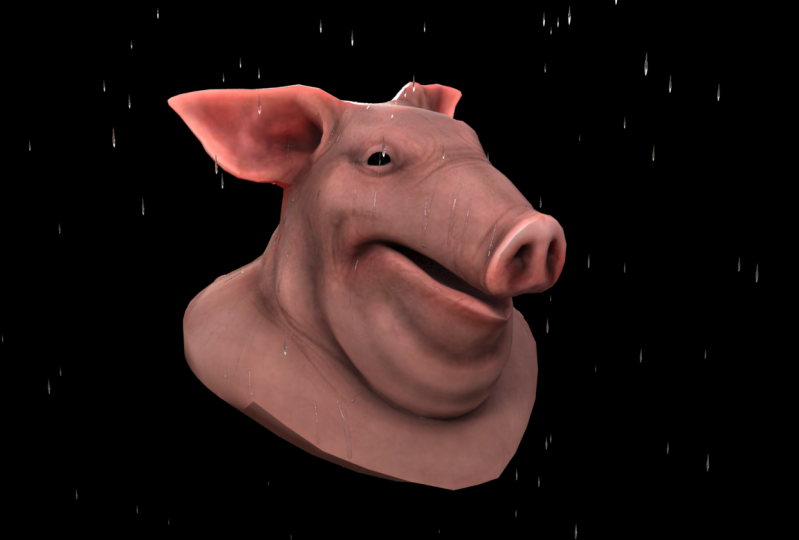
In this class, we will learn how to use Houdini’s powerful procedural workflow to create a high-quality rain system that can be applied to any scenario.
Who is this class for?
This class doesn’t require any previous knowledge of Houdini and is for the artist or hobbyist who wants to learn how to create some of the stunning visual effects that we see in many blockbuster movies and tv shows today!
Why is this class useful?
The skills and techniques that you learn in this class can then be applied to your own personal portfolio or for creating high-quality effects for your YouTube channel, vlog, website, and more!
Material/Resources:
Please refer to the SideFX website for system requirements: https://www.sidefx.com/Support/system-requirements/
Houdini is, of course, required and SideFX offers a free version for learning purposes! You can create a free account and download here:
Meet Your Teacher

Hello, I'm Chris. I'm originally from St. Louis, Missouri but currently reside in Dallas, TX with my beautiful wife and my two little kiddos! I received my Master of Fine Arts in Visual Effects Animation back in 2011 and after I graduated, I was fortunate enough to get a job as a professional visual effects artist for over 6 years working at an animation studio in Dallas, TX. Some of the films I worked on include The Book of Life, Freebirds, Rockdog, and Ice Age: A Mammoth Christmas. I've also had the pleasure to work on attractions such as Universal Studio's Despicable Me: The Ride and Rockettes to the Rescue for the Radio City Rockettes in New York. I'm also a digital illustrator in my free time! I'm curr... See full profile
Hands-on Class Project
Take our existing rain system and create splashes where the rain makes contact with the object.
Requirements:
Create a new particle stream inside the DOP simulation we currently have setup. The new particle stream will create new particles that will imitate splashes coming off our object when the rain makes contact with it.
Once you are finished with the particle network, go into the “source_particles” node and add it to our current setup so that it will also be surfaced. Make sure you add a “delete” sop to only grab your new particle stream and merge it into the others.
Assignment:
Objective:
Take our existing rain system and create splashes where the rain makes contact with the object.
Requirements:
Create a new particle stream inside the DOP simulation we currently have setup. The new particle stream will create new particles that will imitate splashes coming off our object when the rain makes contact with it.
When you are finished with the particle network, go into the “source_particles” node and add it to our current setup so that it will also be surfaced. Make sure you add a “delete” sop to only grab your new particle stream and merge it into the others.
Once you are finished, you can render out a single image or an entire sequence to post to the class project gallery! Please feel free to share progress with the class!
Class Ratings
Why Join Skillshare?
Take award-winning Skillshare Original Classes
Each class has short lessons, hands-on projects
Your membership supports Skillshare teachers
Learn From Anywhere
Take classes on the go with the Skillshare app. Stream or download to watch on the plane, the subway, or wherever you learn best.


Related Classes