Fix Dark iPhone Photos: Brighten Your Images in Minutes (No Apps Needed)
 Rose Nene, Photographer & Videographer
Watch this class and thousands more
Watch this class and thousands more
Lessons in This Class
-
-
1.
Fix Dark iPhone Photos Using Simple Brightness
1:03
-
2.
Project Intro: Take One Dark Photo and Brighten It
1:04
-
3.
Core Concept: Why Photos Look Dark (and the Simple Fix)
0:45
-
4.
Demo 1: Open Your Photo and Find the Brightness Tool
1:06
-
5.
Demo 2: Adjust Brightness Until It Looks Natural
1:05
-
6.
Project Walkthrough: Share Your Before and After
0:42
-
7.
FAQs: Quick Brightness Fixes
0:52
-
8.
Final Thoughts
1:31
-
-
- --
- Beginner level
- Intermediate level
- Advanced level
- All levels
Community Generated
The level is determined by a majority opinion of students who have reviewed this class. The teacher's recommendation is shown until at least 5 student responses are collected.
13
Students
2
Projects
About This Class
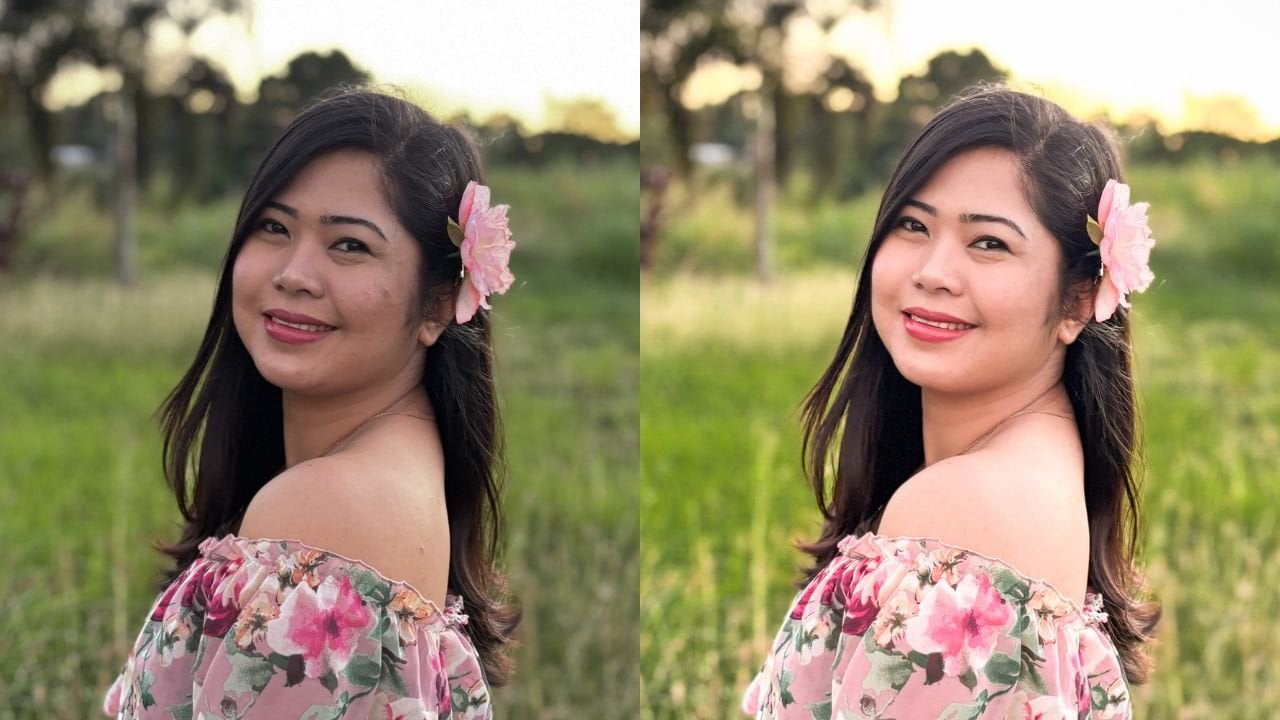
Ever taken a photo that looked perfect in real life… but turned out dark and underwhelming?
In this short and focused class, you’ll learn how to fix that using just one simple adjustment inside your iPhone’s Photos app.
This class is designed for beginners who feel overwhelmed by editing tools and don’t know where to start. Instead of teaching everything at once, we’ll focus on one powerful habit: adjusting brightness (exposure) with intention.
More than just fixing one photo, this is about practice ~ learning how to move a slider, observe your image, and slowly build your eye for what looks clear, natural, and well-balanced. Even with one setting, you’ll start to develop confidence and visual awareness that carries into all your future photos.
By the end of this class, you’ll be able to take any slightly dark image and brighten it in a simple, natural way using only your iPhone.
Meet Your Teacher
Hi! I'm Rose :)
My work focuses on helping creators move away from pressure and toward clarity whether that's through iPhone photography, visual storytelling, or building meaningful online classes.
In my one-on-one sessions, I offer gentle guidance, practical systems, and honest encouragement. Together, we'll simplify what feels overwhelming, refine what already works, and help you create with more confidence and ease.
If you're looking for support that feels calm, human, and genuinely helpful :) I'd love to work with you.
See full profileHands-on Class Project
For your class project, you’ll take one dark photo and turn it into a brighter, clearer version using the brightness (exposure) slider on your iPhone.
You’ll then share a before and after image to show your progress.
This project is meant to be quick and approachable ~ something you can complete in just a few minutes. But more importantly, it’s a chance to practice adjusting your photo with intention.
As you move the slider and observe the changes, you’ll start to train your eye to recognize what looks natural, balanced, and easy to see.
There’s no pressure to be perfect here ~ simple improvements are exactly the goal.
Class Ratings
Why Join Skillshare?
Take award-winning Skillshare Original Classes
Each class has short lessons, hands-on projects
Your membership supports Skillshare teachers
Learn From Anywhere
Take classes on the go with the Skillshare app. Stream or download to watch on the plane, the subway, or wherever you learn best.