Transcripts
1. Introduction to the Course: There and welcome. I'm so glad you've decided to join
me for this course. Whether you are just
stepping into the world of administration or if you've been managing things behind
the scenes for a while, this is your chance to
build on your skills and make the office run
smoothly and efficiently. Administrative office procedures
may not be glamorous, but they are essential to the
success of any enterprise. A well run office reduces miscommunications and helps
to eliminate common errors. By making the administrative
office a priority, you will be able to
create clear policies and procedures that everyone
understands and supports. Helping the office run
more smoothly every day. So let's look at the
objectives of the course. Research has consistently
demonstrated that when clear goals are
associated with learning, it occurs more
easily and rapidly. With that in mind, let's
review our goals for today. At the end of this course, you should be able to
organize a binder that keeps important
information accessible and easy to update. Develop office procedures that create structure and
reduce confusion. Prepare checklists that simplify daily tasks and
improve consistency. Understand the
succession planning, so your team is always
ready for the future. Collect the correct
tools to stay efficient, organized,
and prepared. So are you ready? Let's dive in and build these
essential skills together. I'll see you in the next lesson.
2. Why Your Office Needs Administrative Procedures: Why your office needs
administrative procedures. Administrative procedures are
more than mandane policies. They are put in place to ensure the survival of the
company in any event or situation from catastrophes to change to basic day
to day activities, administrative office
procedures address them all when they
are done correctly. Business continuity,
succession planning, audit requirements, and recovery planning are all included in administrative
procedures. Business continuity. Business continuity is also known as business continuance. It's the plan in place to keep a company running in the
event of a disaster, both during and
after the disaster. Establishing business
continuity requires identifying essential
tasks first. This includes items and services that are critical for the
organization to function. This will vary by organization, but they include technology, employee safety, sound
and structure, et cetera, business continuity steps, determined risks that the
company will likely face, whether IT, sabotage, et cetera. Analyze the effects
of each risk or hazard that you discover on a different aspect
of the company, safety, functions,
assets, et cetera. Determine how long your company
could function if one of these risks came to pass and
what recovery would require. Develop a team and strategy to address the
potential problems. Develop a plan and document each step before sharing it
with the rest of the team. Test the plan using
different methods such as drills walkthroughs and
checklists Succession planning, successful succession
planning develops a pool of talent so that there are more than enough
qualified candidates to fill vacancies in leadership. This strategy requires
recruiting qualified talent, creating a talent pool, and instilling
loyalty in employees. Identify goals and objectives. Common goals include
profitability, employee loyalty, service, and productivity,
identify needs in the company, can see the changes in the responsibility of different positions
that company develops, recognize trends
in the workforce, understand the changes occurring in within and without
your organization, such as an aging workforce, develop the employee pool, determine where to
find employees to fill in the gaps within
recruiting drives, social media, et cetera. Develop a plan to engage
them once they are chosen. Internal and external
audit requirements. Both internal and external
audits are important for identifying risks
that organizations face. The internal audit addresses how effective and reliable
administrative controls are. An internal audit also
addresses record accuracy, legal compliance, and
management action. Internal audits and
external audits as similar the internal auditor is an employee of the company
that he or she audits. The external auditor
is not an employee, and he or she will create a
report based on the finances, operations, and
compliance of companies. Both internal and
external auditors provide recommendations
based on their assessments. The auditor, with
the internal or external is required to be
independent and objective, qualified, provide
adequate testing, provide adequate
documentation and action, of a verification, and review, and give a report that will be reviewed by relevant parties, such as the board of directors. Recovery planning.
Recovery planning goes hand in hand with
business continuity. Recovery planning or disaster
recovery planning is the process that is put
in place to recover data, software, hardware, and manpower that company needs to start
backup after a disaster. Recovery planning
steps, identify critical systems and prioritize them and identify
potential risks. Determine strategies for data, technology, suppliers,
people, and facilities. Create a plan with step by step instructions based on
the strategies discovered, test the recovery plan, and make adjustments
as necessary. Case study, Sharon worked at the same company
for 26 years. She was coming close to
retirement and asked her supervisor if her help was needed training
her replacement. She was surprised to learn that no one was in the running
for her position. And she retired in a month. Her supervisor explained
that they were having trouble finding someone
qualified to replace her.
3. Gathering the Right Tools: Gathering the right tools. Any activity requires the
use of the correct tools, and the administrative
office is no exception. Administrative binders
and other materials are necessary tools that ensure tasks are completed correctly. By gathering the
necessary information and finding these tools, you will eliminate confusion and ensure that your procedures
are done correctly. Binder, administrative
binders contain instructions on administrative
procedures that all employees will
be able to use. Begin by choosing a
binder and collecting the necessary dividers
and sheet protectors. Creating a binder
requires you to keep track of the day
to day operations. You must also develop a list of responsibilities
for different jobs. List should include daily, weekly, monthly
and annual tasks. The binder needs to
include basic procedures. Begin with the job
descriptions and interview different employees
to determine their tasks. We will discuss
what information is needed and how to collect it
in depth in the next lesson. The binder should also include basic resources such
as phone lists, locations, and
planning checklists. This will vary by organization, but technology guides and
other information that is essential to know about company systems should
also be included. Section divider.
Section dividers are used to
physically break down the binder into
different sections so that information
will be easier to find. After collecting all of
the relevant information, organize it and create
a table of contents. The table of contents will
guide you section division. We will specifically address
the table of contents later. The sections and topics
will vary by organization, but they need to be organized in a clear and concise manner. Use taped sheet protectors as section dividers to make it easier to find
specific information. Sheet protectors,
sheet protectors are necessary to keep the binder safe from accidents and spills. Taped sheets protectors should be used for section dividers. Regular untapped
sheet protectors need to be used for the
other pages in the binder. Heavy duty sheet protectors are recommended for pages that
will be used frequently, such as templates, phone
lists, and checklists. It's not necessary to place each page in sheet protectors. Leaving the bulk of pages outside of sheet
protectors will make it easier to make changes to the information
when necessary. Cover to cover binders. Once you have collected all of the items needed to
create a binder, determine what should be included organized
the information. It's time to place
everything in the binder. Choosing the correct
binder is important. The information in
the binder should be completely enclosed so
that it's kept safe. The binders need to
be reviewed cover to cover to ensure that they
are completely enclosed. The size of the binder
typically used for this purpose should be
1.5 inch and 2 " wide. It's important to
choose a binder that is large enough to add
pages to if necessary. Additionally, choosing a binder that is too small can cause the pages to tear and fall out as the binder is
used. Case study. Aaron was told to create a procedures binder with
the tools available to him. He was able to find a 1 " binder and untapped
sheet protectors. As he was putting
the binder together, he realized that it was
going to be a tight fit. To create section dividers, he placed posted notes
between the sections. As he looked through it, pages fell out, and so
did the section dividers.
4. Identifying Procedures to Include: Identifying
procedures to include when creating an
administrative office binder, it's important to choose the procedures that
are necessary. If you put too much
information in a binder, it becomes difficult
to navigate. If however, you do not put enough information in a
binder, it is useless. By keeping track of
different tasks, working with other employees, and staying aware of
daily activities, you will be able to find
the best procedures. Tracking tasks for some days. In order to identify
the procedures, you need to include, it's necessary to track
tasks for a few days. They should help you identify the following information.
Tracking tasks. Determine which operations are executed as part
of the position. Establish the tools that are
used on a regular basis. Discover the information that
is consulted consistently. Determine which events and
meetings are repetitive. Track this information
using apps, organizational tools,
or write notes. Choose the method that
works best for you. Once the information
is discovered, it will help narrow down the procedures that you need
to include in the binder. Reach out to other employees
for feedback ideas. Determining which procedures to include is not a
unilateral decision. It's important to collect feedback from employees
and ask them for their ideas about what
procedures need to be included in the
administrative binder. Take advantage of multiple
methods of feedback to ensure that you gather as much information as possible. Feedback methods,
surveys, focus groups, meetings, questionnaires,
evaluations, suggestion boxes. It's essential to
stress that you need to prepare employees before
asking them for feedback. Give them time to analyze their own tasks and provide the most
relevant information. Write down daily tasks. We have already established that it's important
to note daily, weekly, and annual tasks. Daily tasks should be recorded for a minimum of
five days so that you can determine which tasks you actually complete
on a daily basis. The time that it takes
for you to complete each task needs to be recorded as well as
the task itself. You may write down your tasks at the end of each day or take time breaks to list your tasks periodically
throughout the day. You may also use apps to keep
track of your activities. No matter which
method you choose, it's important that you
complete the record of your daily tasks before
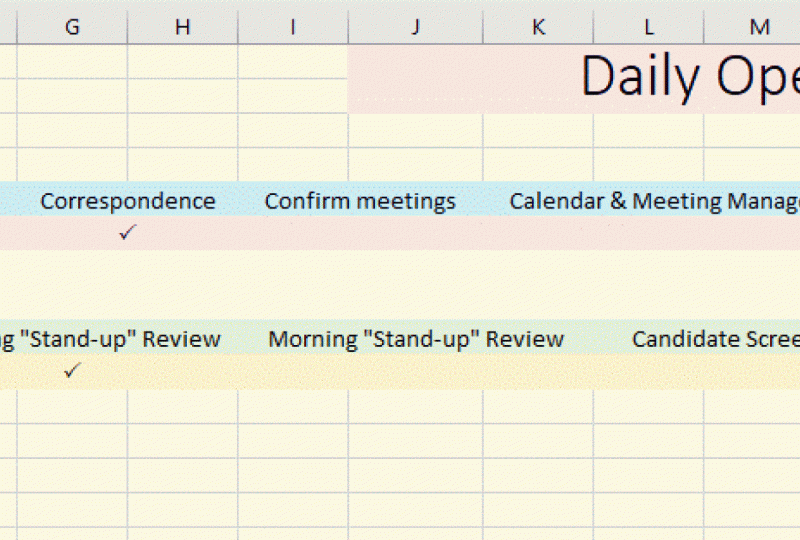
you leave the office. Keep track using a spreadsheet. As you track different tasks to determine which procedures
to include in the binder, it's important to keep
track of which tasks daily, weekly, monthly, and
annually, et cetera. The best way to do this
is with a spreadsheet. Take a look at the table
below as an example. You may need to add
times for your tasks. For example, payroll may be bimonthly and meetings
can be biweekly. Case study, Joanne was trying to keep track
of her activities, but she was extremely busy. She planned on recording the task as soon as
she left the office. But by the time that
she returned home, she was not able to recall everything that
she did that day. To top it off, she
didn't have any idea how long any of the tasks
took her to complete. She decided to list
what she remembered, how long she thought it would
take to complete each one. She did this for a
few days and used the information to
identify her osiors.
5. Top Five Procedures to Record: Top five procedures to record. When creating a binder, it's not possible to address all procedures at the same time. For the best results, it's necessary to limit
yourself to five procedures. Begin by choosing the top
five procedures that you need to record once you identify
the top five procedures, using a template and writing detailed procedures will help ensure that the
record procedures are accurate and effective. Use a template to stay
consistent from track to track. Consistency can be difficult to attain when you are moving
from track to track. Implementing the use
of a template will develop consistency
between tract procedures. There are different
templates available, but you can also create your own template and tailor it to the needs
of your organization. What to include in a
template Department. The department that
procedures falls under. Category, the division that the procedures falls under
accounting, HR, et cetera. Job, the job title of the individual who typically
performs the procedure, purpose, the reason for the
procedures implementation. Statement. The policy
statement outlines the actions and behavior required using
the active voice regulations. List any laws and regulations to which
the policy applies. Related information. List any guidelines, policies, and procedures related
to the new policy. You may also need to include
keywords, definitions, and background
information depending on the scope and complexity
of your procedures. Be as detailed as possible. When recording a procedure, you need to be as
specific as possible. Provide every detail that you can remember that the procedure needs to be recorded so that anyone can complete it
without supervision. Write down the steps to your
process and review them carefully to determine if you need to clarify steps
or add to them. Do not skip steps to
save time or space. On the other hand, avoid using long wordy instructions that will overwhelm and
confuse your readers. The instructions need to
be short commands such as log into the portal at
the following website. An example of an
instruction that is too long and wordy would be, go to the website and use
your password to log into the portal so that you can enter the information
you collected. Use bullet points
instead of paragraphs. The steps that you
provide for procedures need to be clear and easy
for people to follow. This is where formatting
becomes important. Rather than writing the
instructions in paragraph format, use bullet points instead. Bullet points attract the
attention of your readers. They are easy to use and provide basic
concise information. Bullet points also make
it easier for people to keep their place as they are following the steps
that you provide. Each step should have
its own bullet point. Ask someone to execute the procedure before you complete your work
recording a procedure, you need to make sure that
the procedure is effective. This requires the
procedure to be tested, find a friend or colleague to complete the procedure as
you have written it down. It is essential that the
person who completes the procedures does so without any direction or
interference from you. The written procedure must
be able to stand on its own. Once the procedure is executed, ask the individual for feedback. So here are some
questions to ask, were all of the
instructions clear? Did you feel that any
steps were missing? Were any of the
directions confusing? Were you able to
complete the procedure? What would you
change, if anything, about the procedure case study? Matilda recorded the
top five procedures and listed the steps
out carefully. She reviewed the steps and
decided they were effective. She even tested
them by following the instructions herself as
she completed the tasks. She recorded them and
placed them in the binder. She was surprised the next week when her supervisor
told her that she needed to rework some of her procedures because
the steps were not clear.
6. What to Include in Your Binder - Part 1: What to include in
your binder, Part one. When creating an
administrative binder, you must determine what should be included
and what should not. The needs of each
organization will determine which topics you
should include in the binder. There are, however, certain
topics that should be included in the binder
of most organizations. Commonly used topics
include phone etiquette, business writing,
arranging meetings, and time management,
phone etiquette. Each organization needs to have its own set of guidelines
for phone use. The tone of the company will determine the tone
used on the phone. There are, however,
some basic rules of phone etiquette
that most companies can benefit from implementing. Basic etiquette. Answer by the third ring. Have a standard greeting. Use hold appropriately. Transfer calls efficiently. Take messages when necessary, maintain the appropriate
tone. Business writing. Business writing is an
essential skill that each person in your
organization needs to grasp. Poor writing reflects
badly on the company. Implementing a few
procedures will reduce mistakes and
improve writing skills. Your procedures should
be based on the type of writing that your
employees must complete. Some basic techniques should be included in the
different procedures. Use the active voice
instead of the passive. Avoid the use of
buzzwords and jargons. Do not use exclamation points, only use them when appropriate. Use short sentences
and simple vocabulary. We will attend a meeting
at 9:00 A.M. On Wednesday. Not a meeting will be attended by us at 9:00 A.M. On Wednesday. Read writing aloud through freed all written communication. Effective time management. Every organization can benefit from effective time management. When documenting
procedures, it's important to include time
management strategies. Strategies, stay
organized, organize the workspace so that you do not waste time
looking for things. Prioritize tasks, complete important tasks
before the unimportant ones. Stop procrastinating, identify
procrastination unavoid. Make a schedule, delegate, give others their
responsibilities that do not require
your attention. Binders should include tools with strategies to
help manage time. Tools that binders may include are schedules,
timesheets, checklists, estimated timing per
task to help employees keep track of their work and make adjustments
as necessary. Creating meeting arrangements. All companies require
meetings from time to time. When arranging for meetings, it is easy to
overlook something. Providing a checklist to help create meeting
arrangements will help ensure that nothing is overlooked and the
meetings go smoothly. The types of meetings you are arranging will determine
the checklist. A meeting with members
from out of town will require more preparation than
a weekly employee meeting. Tasks to include in checklists, group size, venue,
notices and follow ups, confirmed speakers
when necessary, financial arrangements, room arrangements, meal planned, if necessary, sleeping
arrangements, if necessary. Case study. George was responsible for planning
the annual company meeting. He kept track of all
his communication, suggestions, and requests
of other employees. The first day of the meeting, he discovered that three
people were not coming two of them were supposed to be honored at a presentation. He had forgotten
to follow up with all of the speakers
and attendees. George hoped that this was the only thing that
he overlooked.
7. What to Include in Your Binder - Part 1: What to include in
your binder Part two. Binders need to include
basic policies that employees can easily consult
if they have any questions. Policies that most companies
should include in binders, cover absences, breaks,
benefits, and salaries. Make sure that the policies
are clearly written, cover general information, and comply with state and
federal regulations. Policy on absences. Employee absences are costly in order to prevent unwanted
and unscheduled absences, there should be a clear policy. The policy needs to comply with government regulations
on every level. What to include in
an absence policy. Define different types
of absences, PTO, sick days, jury duty, authorized and
unauthorized absences, notification requirements
and procedures, requirements for punctuality, the number of missing hours that equal an absence,
emergency absences, consequences of
unauthorized absences and job abandonment. Brakes. Brakes need to be
clearly outlined in the company policies and prominently placed
in the binder. Without clear policies, employees might
abuse their brakes. On the other hand, you may
be violating the law if employees do not take the minimum brakes
that are required. Brake policy should
include lunches and short breaks along with specific times when they
should be taken if applicable. Be sure to create brake policies that comply
with the legal requirements. If you have branches in
more than one location, is advisable to make sure that your breaks comply with the
strictest requirements. For example, if
employees would require 30 minute breaks in one state
and 15 minutes in another, give all employees 30 minutes. This provides uniformity
in your policies. Salaries. The policy
concerning pay and salary must be outlined
clearly in the binder. While it will not disclose the salaries of
specific positions, the policy should include
some basic information. Wages increases based
on performance, cost of living
increases, yes or no. The use of timesheets, time cards, et cetera, overtime requirements, exempt and non exempt
employees, pay schedules. Benefits. Employee
benefits can be confusing. Explaining the policies that govern employee
benefits in the binder will allow employees to answer their own questions and
prevent misunderstanding. It should be noted that employee benefits might overlap
with employee absences. You must clearly
state what makes employee eligible for
specific benefits, benefits to address,
group insurance, COBRA benefits,
retirements, example, four oh one case, holidays. Leave educational assistance,
development and training. Case study, Hank
disliked taking breaks. He would only stop
long enough to eat his lunch and then
begin working again. His supervisor encouraged
other employees to emulate Hank's
commitment to the job. One of them reported the
manager's actions to HR and Hank was
soon notified that he had to take his complete
lunch break each day and his supervisor was
written up for discouraging employees from
taking their full breaks.
8. Organizing Your Binder: Organizing your binder. Once the policies and
procedures are completed, it's time to place
them in the binder. Organization of a binder is similar to any
other document. You must provide a table
of contents that lists each section and a list of procedures that each
section covers. Once the binder is put together, you need to keep it up to date and make changes
as necessary. Table of contents, create
a table of contents. This means the
first step that you must take is to
gather procedures you developed and organize them into board sections
of information, which we will discuss later. The sections that you have will be listed in the
table of contents. Each of the sections
will correspond with the taped dividers that you use in the physical
organization of the binder. A popular option is to use number tabs that
correspond with the numbers used in
the table of contents similar to the page
numbers used in books. Using number tabs
rather than name tabs, make it easier to reorganize
the binder when necessary. List each section. Example, accounting. Before organizing the binder, it is essential that you list
out all of the sections. The focus of the company will determine what sections
you need in your binder. But there are a few
common sections that many companies share, commonly used sections,
accounting, HR, contacts, daily, weekly, and monthly checklists,
events, IT, calendar, the examples I used
are not comprehensive, but they provide a
useful starting point to help guide you in creating
your own bind sections. List procedures in the section. As we already stated, every procedure will fall
under a specific section. After you have developed
the list of sections, you need to organize the
procedures below them. Review the list of procedures to make sure that they are
with the correct sections. The tapped sheet
protectors that provide the sections should have
the section as the heading, and the procedures should be
bulleted below the section. Make sure that the bullets are in the order of
their appearance. This makes specific procedures
easier to find accounting, expense reports, profit and
loss, payment processing. Keep binder updated
with any new changes. Policies and procedures will
inevitably change over time. It's important that you
update the binder as needed. There are several
steps that you can take to keep the
binder up to date. Mark the printed pages when you notice that the
information is inaccurate. Leave the binder document in a folder that has a shortcut
access on the computer. Make the changes to the file
and print it immediately. Make the files easy to share
with others responsible for it so that the information in
the binder remains current. By reviewing the binder
on a regular basis, you will be able to ensure that the information being shared
is accurate and up to date. Case study. Tim
created and organized the binder for his team and he encouraged
everyone to use it. Soon it became the main
source of information. After a few months, the
policies on benefits changed. Tim made a mental note to make
the changes in the binder, but he became busy with another project and
forgot about it. A month later, a colleague used the binder to help
schedule his vacation. He was surprised
when he learned that his request was denied because there was a
holiday blackout.
9. What Not to Include in the Procedure Guide: What not to include in
the procedure guide. We have already established what to include in
the procedure guide. Now it's time to address
what should never be included in a binder
under any circumstances. Much of what needs
to be avoided in the procedure guide
is common sense. Passwords and any other
confidential information must not be included
on the binder. Find other methods of sharing confidential information where it is necessary, passwords. Passwords should never be
placed in the binders, where they can be easily read. This includes all passwords
that may be used regularly, such as email, company portals, passwords to financial accounts, et cetera If passwords
needs to be recorded, they should be stored
in a separate folder. Physical folders with passwords should be kept in a separate
location from the binder, and any computer files needs to be password
protected themselves. Only authorized personnel should be able to access the passwords, determine who needs
to access passwords, and make sure that they know how to access
the information. This list typically includes administrators and people
in executive positions. Identify the confidential
information via your employer. Companies are responsible for a great deal of
confidential information, and they have an obligation to keep this information safe. This includes Social
Security numbers, dates of birth, company credit card information, trade secrets, et cetera Like passwords, all confidential
information needs to be kept out of the all
binders and manuals. Remember, if you
have any concern that information you
have may be private, do not record it for all to see. It's better to be
safe than sorry. Store information in a separate folder
outside of the guide. When you must store
confidential information, place it in a separate folder. The folder should be
labeled carefully. Obviously, writing
confidential information on the folder is not an option. It's best to give it a
simple label such as administrative
information or simply give it the same name as
the executives title. Choosing an innocuous title will help disguise what
you are storing and prevent people from becoming too interested in the folder when
you need to take it out. Find a secure location to store Once confidential information is placed in a separate folder, it needs to be stored securely. Lock it in a drawer
or file cabinet that other people are not
able to easily access. Place the folder in the back
of the drawer or cabinet, only tell authorized personnel where the folder is located, and do not leave the key
out where it can be found. Any computer files that contain confidential information need to be password protected
and encrypted. You should avoid storing the
files on a shared system. The more difficult it is to access information, the better. Additionally, make sure mile
wire detectors, firewalls, and other security features are updated regularly. Case study. Diana was asked to keep confidential information
for her supervisor. She decided to keep the
folder in her file cabinet. Diana's supervisor labeled
the folder account numbers so anyone who looked
at the folder would know that it contains
confidential information. Diana kept the cabinet locked, but she didn't want to keep
the key on her in case her supervisor wanted to get
the file while she was gone. She left the key below the
pens in her desk drawer. Eight months later,
the supervisor noticed money missing
from the account.
10. Share Office Procedure Guide: Share Office procedure guide. Once you have
completed the binder, you must share it with
the rest of the office. At this point,
communication is essential. Without the buy in
of key stakeholders, the procedure guide will not be a tool that gets much use. Getting feedback
from executives and employees alike will ensure
that your guide is effective, and applicable to the
needs of your audience. Give guide to boss
executive to review. The procedure guide needs to
be reviewed by your boss or the executive in charge of your department before
it is implemented. Supervisors will be
able to identify any gaps in information
that needs to be filled. Review any notes that
your boss makes and add the changes before returning the guide
to the supervisor. Complete the process
as many times as necessary until you are both
satisfied with the result. After the guide
has been reviewed, it's time to inform the other
members of the personnel. Inform office personnel
of procedure guide. The guide should be
an essential tool used by the office personnel. You need to introduce the guide to everyone. I can benefit. This requires more than a quick announcement in a meeting. There are different ways to introduce the procedure guide, and you may use more than
one methods of introduction, email announcement, meeting,
presentation, one on one. Regardless of the methods of communication that you choose, make sure to tailor the communication to meet
the needs of your audience. Place guide in a visible area. Once the guide is introduced, you must display it carefully. The guide needs to
be placed in an area that is visible to all
employees who will use it. The setting of the
workplace will determine the best location for the placement of your guide. If there is a common
area for materials, place the guide in a prominent
location in the area. You may also display it on your desk with the understanding that people may use it regardless of which
location you choose, it is important that the
guide be easily accessible. Allow office
personnel to express improvements, updates if needed. Never underestimate the
importance of feedback. The people who use the guide
are the best ones to listen to when it comes to making improvements and updating
the information. Do not simply wait for
people to share their views, provide employees with different opportunities
to communicate with you. For example, discuss the
binder at the weekly meetings, provide surveys, bring
it up in one on one. Depending on the
organization of the company, you may choose to allow employees to update the
binder on their own. Case study. Brad
completed the binder and reviewed it with his boss before displaying it
in the breakroom. He expected to be inundated
with questions and comments, but no one seems to notice
the new procedures manual. He brought it up in a meeting
and discovered that most of his peers had no idea that
the binder even existed.
11. Successfully Executing the Guide: Successfully
executing the guide. The guide must be executed with the same diligence that
was used to create it. This requires training,
consistency, and communication. Your guide must evolve
with the company. So remember to consider new ideas while creating
a culture of consistency. Create a 1 hour meeting,
seminar for employees. After the guide has
been introduced, it's important that employees
are trained in how to use. Extensive training
is not necessary. A 1 hour meeting or seminar should be sufficient
to explain the guide. There are a few steps that
you can take for the meeting, establish the outcomes
that you expect, develop an agenda,
train the employees. The agenda needs to include
the topics addressed. Objectives outline with
time limits to topic, adhere to the agenda
once the meeting begins to ensure that the
meeting stays on course, stay consistent with procedures. Once procedures have
been implemented, it's important that they
are consistently followed. There are different
tools such as checklists to ensure that
the procedures are followed. The most important factor
in creating consistency, however, is leading by example. If the leaders and
people who create the policies and procedures
do not abide by them, then there's a little motivation for the other
employees to do so. Be sure to address
inconsistencies as they occur. Do not wait to address problems until
meetings or reviews. Make employees aware of
any updated changes. Policies and procedures will
inevitably change over time, which is why communication
is so important. You cannot simply
assume that employees periodically read the binder
to keep up with changes. You must communicate
the changes directly to them using formal
and informal methods. Formal methods used to
communicate changes include email meetings,
and conference calls. Informal methods of
communication include lunch, events, and casual
conversations. Be sure to use
multiple methods of communication to reach as
many employees as possible. Keep open to improvements. It's essential that you do
not become so attached to the binder you created that you stop looking for
ways to improve it. This is also true in
every area of life. You need to be open
to new ideas and you must maintain a dialogue with
other people to hear them. You should go
beyond simply using traditional feedback
methods to discover ideas. New ideas can be found anywhere. You may hear something in
a casual conversation, read something in a book, or hear something on the radio. By always being open
to improvements, you will be able to keep the binder relevant
and effective. Case study, Warren
was instructed to implement the new policies and procedures outlined
in the binder. Warren introduced
the procedures to his employees and kept the
binder in a visible location. The policies and
procedures soon slipped his mind and he fell back
into old habits of work. Employees decided that the new policies
and procedures were not important when they realized that Warren didn't
follow them himself. Soon almost everyone
chose to work without regard for the
procedures outlined.
 Mackenzie Wilson