Transcripts
1. Introduction: Hi there. Welcome
to this course on hat GPD for cybersecurity. My name is Hrsith and I'm
instructor for this class. Here in this class, you will
learn different applications and use cases of chat GPD for testing the code that
can be useful in securing IT infrastructure and software
applications online. You don't need to worry
if you are a beginner. Here you will learn everything that you need right
from scratch. In this course, you
will learn to analyze log files to find unauthorized
access to your network. You will learn how to find bugs and vulnerabilities
in various types of the code snippets for website or mobile applications such as Android applications. Moreover, you will
also learn to check system vulnerabilities
in Windows and Linux using
shell scripts and Power Shell code
generated by Chat GPT. Here we will use hat
CPT for building cybersecurity policies for the organizations
and individuals. And moreover, you will
also learn to generate code and data control features for privacy settings
and much more. So if you're curious to
learn these skills in hatPT, start learning right now,
see you in the class.
2. Analyzing Log file to find unauthorized access: Hi, welcome back, friends. Here in this lesson,
you're going to learn about how we can analyze the log file with
the help of hat chpT. So let's get started. So currently I'm on hathPT
on the left corner. Here we can see we
can select the model. Let me select the latest
model GPT four, O or Oni. You can also do it
with GP four or other models that have this
feature to attach the file. Here we need to upload the
log file from a system. I have created a
sample log file, so let's get started. Log analysis is very much
important in cybersecurity, especially if we
want to check for the unauthorized network traffic to a website or
server resources. So we can do it in many ways, especially it will detect the unauthorized access
or attempt to access. So it would be very
much important, especially it will also
help you which person was authorized to
which bod. Let's see. As a cyber security analyst, I want to check this
log files to identify unwanted or maybe unauthorized attempts to access give this
prompt in different ways, you can directly ask hatchPT to analyze the
unauthorized access or you can provide it
cybersecurity analyst and on to check this
file for analysis. And here we can see, hatiPT is suggesting would explain unauthorized access
attempts from the IP, and in this log file, here we can clearly see the unauthorized attempt
has been detected thrice. And this is instance of the timestamp, unauthorized
user activities, so on this time ten, 30, 55, user Admin added new user called Hacker with
admin privileges. So Admin got compromised
at this instance of time and new user was created that was granted
admin privileges. So it's a very serious
threat, we can see, and then access denied for the user hacker to the
file financial report. So this was some of the
security mechanisms that we already
placed in the system so that avoid denied the
access to a specific file. Then user admin fail to log
in from this IP address. And here we can see this
unauthorized IP address. Maybe we can do it
for the analysis. There are multiple
unauthorized access attempts from the IP address, indicating persistent efforts
to breach the system. And these three vulnerabilities. What are the recommendations? It will recommend you
to investigate this IP, 10.0.0.5, and we can either block this IP permanently and analyze
for the patterns. Till we find any pattern, we can block it as
immediate security action. Then we need to audit
the admin actions. What other actions was
performed on behalf of Admin, because we have to
identify whenever there's a security attempt, it
could be failed or, uh maybe successful,
we still need to investigate every
compromised parameter. You need to remove the
unauthorized user, just simply delete this account and check all other activities. ChaBT is asking us for
a detailed report. Yes. Do it. You can ask it for a detailed analysis report for unauthorized
access to the log. And with the time
stamps, we can see. Log file is very important
because it will note down all the time stamps in a system whenever
there's a compromise. And here we can see this
another user called JD and there was
a failed attempt, and there was a file called
confidential dot PDF. It was trying to be
compromised and so. And there are other
detailed recommendations that we can apply. So what investigation we can do, specifically on this IP, what things were there. We have to audit the Admin
actions, all the actions, not just on the
same day, we can do it for the previous
few days as well. We have to investigate. Then simply remove
unauthorized users that has been created by Admin without proper
consent on the team. And then implement a
stricter security policies after the incident has happened. So it is recommended
that each company should have multiple
security policies, one for the general situations and one for the
emergency situations. So whenever such
incidents happen, you have to enact a more
stricter security policies. And ChargePT can help you build strategy cybersecurity
policies as well. Okay, so this was how
we can investigate the log file very easily and
effectively on Chat hept. And yes, whenever you have
to do it in a private mode, you can use the temporary chat. Just open a new tab on chat Chipt and this will start
a new conversation, create a temporary chat, upload the same file. And this way, hathPT won't
keep the history of your file. We have to be cautious
because any data that we share with Chat Chipt
could get compromised, but if you want not to keep the history
and in the privacy mode, we can just use the
temporary chat. This was the thing. I've
just given the same prompt again with the same file and it is providing
the result again. Here we can see
with a timestamp, it is also putting the date. This is how we can
analyze the log file. We are going to learn
more examples regarding cybersecurity on Chat HPT
in the coming lessons. Till then keep learning
and keep moving ahead.
3. Code vulnerability checks- Website: Hi, welcome back, friends. Here in this lesson, you
are going to learn about code analysis in order to find the vulnerabilities in
various sides of the code. So here we are going to see
the example of a website. Here we are going to upload a front end script for a login page and a back
end script in PHP. So we are going to analyze
the code in STML CSS, and JavaScript for the
front end of the website, and for the back end, we are
going to analyze the PHP. So this analysis will
help us identify any potential vulnerabilities or bucks that have been developed
while writing the code. So you can consider it as a
software testing phase or you can consider it to
identify critical box. So we can analyze it both ways. So here we just need to upload
the file the source code, I have login dot stML and I'm also uploading
login dot pHB. SU can upload more than one
files together on chat GPT. So once both files are ready, I just want to check here
we need to write a prom. And just remember, I'm using
the latest version of GPT, that's GPT four oh only, and here we go. I want you to list down all the potential
vulnerabilities and bugs in the code. Okay, so you can
just straightaway, ask hat QPitty to list down all the vulnerabilities and box. And here's a list. And the
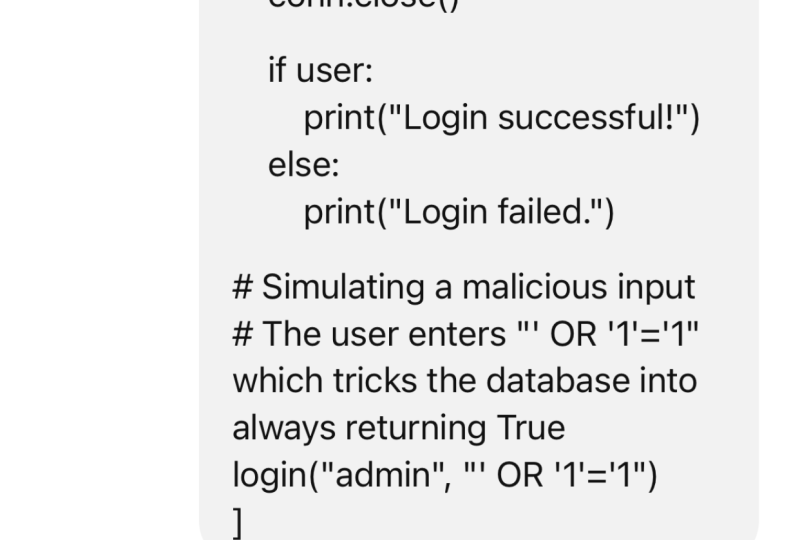
first thing is SQL injection. You can say the PHP script
is prone to SQUL injection. There's also lack of
input validation. And here we can see generating
the response pretty fast. So if you are only a developer, you do not have a background
in cybersecurity analysis, or maybe you have
limited exposure, but you are too much busy in the work and your team is small. This is generally useful
for a small team, and especially if you are
working with a large team, you do not have a
cybersecurity expert or dedicated software tester. This way, you can save a
lot of time and money. And here we can see
Charge EPT can help us suggest what changes
should be there. So based on this code, here it is analyzing the
SDML and PHP files. So in the PHP file, here we can see SQL
injection is there. This indirectly
interpolates user input into the SQL queries, making it susceptible to
SQL injection attacks. So this way, a person who can write the SQL
code in the username or password that can get unauthorized access and
manipulate the database. Here we can see we have the user variable the solution could
be done like this way. We can have the element defined. And prepare restatement to
prevent SCL injection here, it's correcting the code. The plain text,
password is storage. The second vulnerability
is the code assumes that password are stored in plain text.
This should not be there. The password should be
stored in the type password. So there's a difference
in plain text and password because whenever
you provide any input, and it converts to dots
or hashes or asters. It happens simply
because it has been considered as a category
password in SQL. Whenever it is
categorized as password, it cannot be read easily. It can be only
provided as an input. It cannot be retried
and can be checked. So this way, it is a better way. If you are storing password as plain text is a
major security risk, and hackers can retrive
all the passwords. It should be encrypted. Then third vulnerability is
lack of input validation. So there are not too
many validations on the STML side, I think, or this could this could result in the cross site
scripting attack excesses. This is a front
vulnerability that happens because improper Java script
code in the front end. So we can correct it. We can correct it from the
server end as well, and here we can find this
code. Then error handling. So this fourth error, the connection error handling exposes internal
database details, this should not be there
because sometimes you may have seen a website where
whenever there is an error, the error code is
shown on the website. Okay, like root not responding
or just anything else, we should not expose the
real database details. Otherwise, it would be easy for a hacker to understand
and plan for the attack because the first step to attack from the
hackers perspective is to know what infrastructure your company has
implemented, the website. And we have to hide it, mask it in order
to keep it safe. The problem in the
code and the solution. Here we can see the error log, we have to put in the log
whenever there's a thing. In the STML form, there are
several vulnerabilities. Uh, does not include
**** side validation. There should be client
side validation as well. The validation can be both
server side and client side. So for the excesses cross
side descripting attack, it could be prevented either
from PHP or from front end, as I've told you before. We can do it in CSS or directly in STML or we can
take help of JavaScript. Okay. Here's an example, we have the input type and then we can have
the password type. These are the two
different types. Here you can see if you define the type as text, it
will be plain text. If you define it as password, it will be considered
as password. If you put the required
parameter in SGML five, it will be required if a
person does not type it, it will not go forward. Cross site crypting attack, it should be sanitized and
then STTPS enforcement. So the STMLFm should
enforce this URL, STTPS the secured
version of STTP. Otherwise, there are more
vulnerabilities and risk in STTP there could be
other vulnerabilities, we could find as well. Now, could you list down other vulnerabilities that a web developer should be aware of when
writing food for a website? Here this way, we
can also identify other vulnerabilities that are not possessed here in this
code that we have uploaded. Maybe we want to know it
before to do any mistakes. Here we can see CSRF, cross site request
forgery attack. There's excess that we have already seen insecure
direct object reference, the security misconfiguration, the sensitive data exposure, and the using component
with known vulnerabilities, insufficient logging
and monitoring, we have to put the log for
most of the activities. Broken authentication
and session management, the session should
be properly managed, otherwise, it could be hacked. File Upload vulnerabilities,
server side request for Ri, remote code execution,
click jacking, a lot of things are there. Password reset,
poisoning and so on. So we should be aware
of having these things. So if you are a web developer and you're building a website, you can take help of hachPT
in evaluating the code, finding the box before
deploying it in the real world, and fix it with
the help of hachPT Chat GPT will also give you the solution code
as it has given us. And the same way,
you can also take help of hachPT in
identifying other risks or vulnerabilities
that may occur in the code if you are not
conscious about that. So I hope this example
finds you useful and you're going to learn more such concepts in
the coming lessons till then keep learning
and keep moving ahead.
4. Code vulnerability checks- Android App: Hi, welcome back, friends. Here in this lesson,
you are going to learn about analyzing the code for a mobile application where we were going to find vulnerabilities
that can be fixed. So let's get it started. Here I'm on hachPT using
the latest model of ChatCPT then I'm uploading
some code from my system. So here we have the XML
file and Java file. So here, I'm going to test the vulnerabilities for
this Android application. So for this Android application, we have two files. So at least we will
have two files. We can have more files once we create more activities
in our application. So for Android Java, we have main activity
dot Java file and activitmint XML file. So we want to check
the vulnerabilities. Could you list down all
the vulnerabilities or security risks in the code? And here we can
see the response. So Chat JBT is reviewing
both the files. So first, it is
reviewing the Java file. So here we can see this is
a risk for SQL injection. So in the main activity
dot Java file, attempt login method constructs a SQL query using the string. And this is a risk. The risk is approach. This approach is vulnerable to SQL injection where the attacker can manipulate with the input, execute arbery CIL commands. So SQL injection is a
method where a user can run SQL query in the user name or the password field
or a similar field, and we should have
the things protected. And the mitigation is to
use parameterized queries. So we have to put the query in a parameter and then we can pass it to server, and
it will be saved. Here, Char PT is pointing you the errors and
the mistakes in the code, and it is also providing you a mitigation strategy and
also explaining everything. That's a good way
to learn as well as to inspect the
vulnerabilities in the code. In the same way, if
you're working for IOS app or iPhone app, it would be or Swift code, and it will be very easy. If you have a
cutlin application, you can also analyze it or just like any other desktop
application as well, you can analyze for.net, C plus plus other applications. Then second vulnerability is
cross site scryptingEcessS. And here we can see the
code directly outputs user input to a text view
without sanitizing it. So if the input is displayed on a webpage interface
or an Android web view, it could lead to excess attacks. So how we can mitigate it, we can properly sanitize the user input before
displaying it. It's very important
because sometimes the server's secret code or the status code is
displayed on the screen, we need to sanitize it. The hard coded credentials, we can see the code contains
hard coded credentials for the sensitive information like password that could be
in the security risk. We can use Android's
shared preferences with encryption or a secured at. Then there's a
fourth vulnerability for insecure database handling. So the risk is the
database could be accessed by other applications
if not properly secure. The database has
been created and access without any
security considerations. The mitigation is to use any encryption techniques then the lack of
input validation, so there has to be
proper input validation. So for the web applications, we use front end validation
with JavaScript and back end validation with any back end descript
like PHP, ASP, GSP. In the same way,
for Android Java, we have to implement in Java. If you're using Kotlin, you have to implement
it in Kotlin. And how it can be
implemented, it will do. And it is providing
these things. Now we can write now provide
me the updated code. After mixing all
the variabilities. And here we can ask it to update the codes and we can
review it as well. So first of all, it will provide Android Java file where
we can see this writing, and then we can have
it is also putting the comment like how we can
which part it has secured, like securely created
or open the database, securely inserted default info
credentials and much more. And then what changes have
been made to the code, we can see the summary. Okay. So it's very useful. So JAGUPT can help you
identify any vulnerabilities. It will help you understand those vulnerabilities
and what are the risk, and it can also help you write a new code with
the fixed vulnerabilities. So hope you find
this example useful, especially if you
are working for Android applications or any other mobile
application projects. This will make your
process more secure, your applications more
secure and valuable. You're going to learn more in the coming lessons till then keep learning and
keep moving ahead.
5. System Vulnerability checks- Windows and Linux: Hi, welcome back, friends. Here in this lesson, we're
going to learn about how we can take
help of charitibt in generating certain
types of code that can help us identify
system vulnerabilities. So let's get it started. Here I will start a
new conversation, and now I will just
write a simple prompt. Write ten a SLA script. You check system webilities in Linux. Okay, so in servers or
in desktop environments, we use different
operating systems. So if you're using Linux, either on server or Desktop, you may want to check for
various vulnerabilities, and here are certain
Snipper chat VTune writing. So here we can see I
have asked it to write ten shell scripts to check for system
vulnerabilities in Linux, and it is writing
them one by one. So the first one,
we have to check for world writable files because it should not give
permission to all the users to write the files to
change this thing. Then check for weak passwords
if any of the user in the password is stored in
the shadow file in Linux. So it's referring to
the shadow directory, um then check for
the root login via SSH or we can check for the secure shell
for the root login. Once we run these shell
Scripts in Linux, we can check these
functionalities. Check for attended upgrades. So if there are any
security upgrades that needs to be done or any software patches, it will show you. And then it's important
like check for open ports, notice that function in the same way we can check
for the running services. If there are certain hidden
damons it will also show you. So Damons are the processes that run on the background,
we can check. Then we can check for
SUIDs and SGID files. These are different files. And then for the
outdated softwares, the unauthorized users check for insecure file
permissions and much more. Maybe we can write more prompts
to get more description. Now, right, ten
more shell scripts. And it will write
ten additional check for unknown files
and directories, check for insecure
SSH protocols, check for installed
packages with known vulnerabilities and so on. So here we can see checking
for various servers, OpenSSL, OpenSSH,
Apache two Nginx, nginx, PHP, mySQL,
post grad SQL, and if you're using any other, you just need to
modify it accordingly. Package dot get. And here we got
file permissions. We can check for the
user IDs with UID zero. We can check for the
disabled services for a large number
of failed attempts, for empty password
files, and so on. And here we can see we have asked it for ten codes and
have written an extra. So check for the recent logins, you can check for the last log. These are some security
based SL scripts. If you're using for the
Microsoft Server, just ask it. Write all the
scripts for Windows. Okay. And here it will write
the PowerShell scripts. We have not asked it to
write for PowerShell, but Chaibt smart enough to understand that
on Windows server, we would be able to run
only PowerShell scripts, not the shelly scripts directly. And here's changing
everything to PowerShell for weak password
for remote Textop access, for other things here we can see is generating all the code. For both of these environments, once we run these system checks, it will be very good for you. Especially if you're learning
about the cybersecurity, securing infrastructure, or if you do not have a background
in cybersecurity, you are a responsible person, being a system administrator
or a developer or just anybody who's in
charge of the system. You have to make sure the
system is not compromised. And for that security, you can take help of Chat GPT. And here we have not provided
any data to Chat GPT. We're just straightaway
ask it for the scripts. If there's any problem or you want the code to be
modified further, or if you find any
vulnerabilities or bug in the code itself generated by hachPT just ask Chart GPT to modify
as you feel like. I guess, for example, here, like in the check for
suspicious processes, here it is running for
different commands for Python, Ruby, PHP, Lua Pearl, maybe you
are also using ASP, so you just need to append
ASP as well at the end. You can put it here. If you're
not using PHP and you are sure there's no PHP script
running in the background, you can ignore it, drop it. You can modify the code
as pRE requirements. I hope this example
is useful for you. Try to implement it on your own, keep learning and keep moving.
6. Temporary chat for Privacy and Data Control: Hi, welcome back, friends. Here in this lesson,
you about how you can use a temporary chat
option in chat Jupity. That would be useful,
especially once you are concerned about the privacy and the security of your data. So let's understand
why it is important. So on Chat HPD homepage, just go to top left corner of the screen where you
can choose the models. So there are three
different models currently. We have on ChatPT. The latest one is
GPT 40 or Omni. Then we have GPT four
turbo and GPT 3.5. So as you can see, all
these three models have different
performance capabilities, and we can choose either one
for having a conversation. Okay. And just below GPD 3.5, you can see an option
for temporary chat. So what is a temporary chat
and where you should use? So if I enable it, by default, it is disable. If I enable it, you can see the prompt panel
changes to black color, and here on the top, it is written as temporary chat. And in the temporary chat, I have the option to choose
either of the models. Okay? So in the temporary chat, if you want to use GPT 3.5, you can use if you want to
use GPT four or GPD 40. So all these models
work perfectly well. Okay? So what is
the temporary chat? So whatever information you
provide in the conversation, like upload any dataset or upload any document file or
just provide any information, it will not be saved
on the hatGPT server, and Chat GBT will
not remember it. Also, it will not be saved in your history of the
conversations as well. So if you want to completely use an incognitive mode or the private browsing mode in a web browser, it
is just like that. It will be more safe in
terms of data security, and it will be useful,
especially once you are sharing sensitive
information or public, personal identifiable
information of your client, of your company,
or maybe yourself, it could be if you need to
use social security numbers, phone numbers, email
address, address, and such things,
it is recommended. First of all, you
should not share it with Chat JBT and secondly, if it has to be shared, always use the temporary chat. Let me show you an example. It looks just like
the same thing. This is a transcript
for the court hearing. Let me upload both of
the court hearing. Could you Could you write a copy of legal judgment based on the on these two hold hearings for a property dispute case. Okay, so here, I have
the two round of hearing the property
dispute case. And if I want to
draft a judgment, based on this information, it will draft a judgment.
Okay, so here it is. And I do not want to provide this sensitive
information to hat GPT or do not want
to retrieve it. Later on, I just want to get it done and then here I can use it, copy it and paste it
anywhere in the doc file, and I will just get
back to the world. You can see in the chat history, this conversation
is not recorded. Okay. So I hope you understand how we can use the temporary chat in different situations and
what's the advantage of using temporary chat
over the general ones. So I hope you find
this example useful, you're going to learn more in the coming lessons till then, keep learning and
keep moving ahead.
7. Generating python programs for data analysis: Hi, welcome back, friends. Here in this lesson, you're going to learn
about how you can generate the Python
code for data analysis. So let's get it started. Chat PT can help you
write the code in different languages
in different ways to solve the simple
to complex problems, and here we are
going to see how we can generate the
Python code for that. So here, I'm using GPT 40, latest version of hatPT although you can still use
GP four or GPT 3.5. If you want to
upload a dataset for Chat GPT to generate the code, it's better to use
GPT four or four On because these two models
allow you to upload the file. Otherwise, if you choose
to upload on GPT 3.5, you won't be able
to upload any file. So it depends on your situation. Here I'm uploading a dataset, the telecom dataset in CSU, this is a sample dataset
that I want to analyze. So here I'm writing
a simple prompt. Write five Python
programs to perform various operations
on this dataset, including data cleaning. Modeling, visualization,
and analysis. And here we go. This is a simple two
line of prom and asking hat GPT to generate five programs for different
set of operations. If you're already sure what
exact operations you want to do if you want to
remove the null values of a dataset or want to get all the values in a
column in a specific format, these set of operations comes under the
data gleaning part. If you want to create
clusters like Kmean clusters, it would be data modeling
or if you want to create a data visualization charts
such as the line charts, Sankey, tmp, any kind of chart. It would fall under the
visualization category if you want to analyze or find the critical insights
from the data set, it would be of the
analysis part. We can do pretty much
everything in Python. Library Python is the
most suitable language for performing set of operations for data science and analysis, here is the thing. Here we have the first program
related to data cleaning, and here we can see it reads
through this CSV file, create a dummy path and then
after we have the CSV file, will understand the
dataset and here it is changing the value like
the missing value. It is checking first for the null values wherever
there is no value, then it's supplying the
clean column names. So it's checking
for the lower case. Replace Ipacebr with underscore. Whenever there's space bar, it is changing it
with underscore. In the same way, convert date
columns to datetime format. So it is converting
the date time so that it can be
used for calculation because sometimes
people do enter the dates in different formats. So in the US, the
month is written before the day of the month and in other parts of the world, the day of the month is
written before the month. So it will be a
different formatting. So we want our thing to
be in a simple format. Then we want to handle
the missing values. It is checking for the mean of the numerical values
and you can check. Then it will convert
the categorical column to category type and
here's the thing. It has applied three, four different operations for data cleaning in
a single program. Python could be very
much efficient. If you have to implement it
with any other language, it will definitely require
more lines of put. That's why we are using Python. The same way, it
has then generated a second program for
exploratory data analysis. And here we have it first loads a dataset then convert the necessary column
to appropriate types. Again, the data time,
descriptive statistics, check, and then the churn rate because this is a
telecom data set and we want to identify the customers who are
more likely to churn. So we want to identify
those customers, and then we can then
take suitable actions. Depending on the plan type, we generally have three
plan types in this dataset, the basic, the premium, and the unlimited plan, and we want to identify which plan we should
push forward. So that's the analysis. So after it has done some exploratory data
analysis regarding the churn rate and creating a correlation matrix
using the data frame. And then here we go for
the data visualization. It's using Matt plot lib
and CBonn for representing the chart and churn distribution plot is being displayed after
we run this core. Here we can see the count plot and the churn distribution
is shown here. Then we have the
bill distribution. The correlation heat
map is also shown. So heat map will show us the coolness or the hotness
to show different values. After this visualization, it has generated three different
types of the charts. First for the churn
rate distribution plot, then for the monthly bill
distribution by plant type, and then for the
correlation heat map. Then it is writing the code
for predictive modeling. So predictive
modeling allows us to predict the future values
based on the data sets. So here, it takes
certain approaches by splitting the data set,
standardize the features, train the model, and
then we can predict the upcoming values based on the confusion matrix,
and other approaches. So there could be
different approach. We can go with the generated one or if you're
not sure about this model, you can ask hatch
PD two generator, take a different approach
or use a different model. Then we have the
customer segmentation. So definitely customers fall into different categories
and we want to identify the behavior of the customer whenever we
are analyzing a dataset, and that's why we can
take a specific set of actions on segregated customers. So we do not want to
disturb the customers who are less likely to churn, although the customers who
are more likely to churn, we want to retain them. So that could be the
implementation of this analysis. See here SK learned
clusters being used, the mat plot lab and the Pandas Pandas for
calculations definitely. The K means algorithm
cluster algorithm is being used here as we can see here it plots the elbow curve consisting
of different values. The X label and Y
label we can read here on the number of
clusters and W CSS, and here the optimal number of clusters is three checks
and then sub value. You want to get the explanation, explain the code for
customer segmentation, you can write it here, explain. The code or we can say program. You can write code for
customer segmentation. Okay. And here it will give you a good explanation or
maybe documentation. So first three parts
are the importing of the libraries used for
data manipulation. The pandas are used for data
manipulation and analysis, K means are used as a
clustering algorithm from psychic learn for
unsupervised learning, machine learning model and the matplot Pipe plot is
used for plotting chart. So first three lines are
clear then the loading of the dataset is a CSE file
followed by the file path. And then we have the feature
selection for clustering. So these are the three columns, monthly bill data usage and call duration are used as
a feature selection. Based on that, we want
to create clusters. Then we have to determine
the optimal number of clusters using the elbow
method. And here's the code. And once it is being identified, we can create a plot
for Elbow curve. And there's a
detailed explanation for other things in detail, you can read and
then understand. So here you can see
how easy it is to analyze a given dataset
with the help of hathPT, you can generate the
entire Python code, different types of programs, taking use of different
libraries in Python. And here if you are a student
or you are a beginner, you will get the explanation of each and every part of the code. If you're a professional,
you can still save a lot of time if you have to
manually type the code. Here, you will get
the context and you generate the code simply
based on the given data set. I hope this thing is useful
to you and you're going to learn more in the coming lessons still the keep learning
and keep moving it.
8. Generate an html page from an image: Hi, welcome back, friends. Here in this lesson, you're
going to learn about an interesting use case where we are going
to upload image. And based on that image, we are going to generate the
code or build a website. So let's get this started. Here I'm on ChatPT. I'm using GPT four model because we can upload
any image to Chat GPT, only using GPT
four or four only. Okay? So if you
switch to GPT three, we cannot upload image so far. Maybe in the later updates, they will allow this feature, but right now we have
to use four models. So here I'm going
to upload an image. Here's an image. Let me write a prompt before I can
show you the image. So this is the prompt
based on this image, create an STML form consisting of all the
STML CSS, and JavaScript. You know, single webpage. Okay, so this is the prompt. So whenever you are
uploading an image and asking CHAPT to do some task, we still need to
write some prompt. Okay, so here, as you
can see in the image, it consists of a
simple hand wrawn sketch on a piece of paper. It consists of the name field, a text box, an email field, another text box, a checkbox, agree to terms, and
then a login button. So we want our web page
to look like this, so we are going to
create an login page. So for those of us who
do not know how to write a website or
code for the website, we can generate the
code as easy as this. And for people who still know the programming languages or
know about web development, this would be a big time saver. Okay, so here you
can see ChaiPT has generated a huge
code for SDML CSS, and JavaScript, everything
is written here. We need to just check whether
this is working or not. So I have copied the code. I'm going to create
a new text file. Let me call it login. Underscore page. And then I'm copying the
code here, pasting it. So all the SML CSS and
JavaScript pages there. Then I would be renaming
this text file, change it to dot SGML. In form, and then I
will double click. So once I double click, here you can see it has
created a login page, although the UI is not perfect, but still we can
correct it later on. Here I can provide any name
like, my name is Herset. I'm providing this name, email if you can
type, otherwise, just let me check
whether if I do not type and here agree
to terms and log in, it tells me to fill
out this field. Okay, so it's working. So here
we have the SDML in place, the CSS, and the JavaScript. Everything is
working, and we have a simple web page
created very easily. So if you want to build
an entire website, maybe your website may contain
ten different web pages, you can draw it on
a piece of paper and ask hat chibty for the code. So it would be very quick
to create these things. Although it will work for
the basic level websites, if you have advanced
complexities like wherever you
are using JQuery, angular, bootie
strap, such things, you can also generate the code. So it will completely
depend on what you write, how you think, how you
break down the problem, and then you will
generate a code. This is how you can generate the front end web development
code in STML CSS, and JavaScript with the
help of cha chi patin. If you want to
correct it further, we need to tell it here. And whenever there is an
error, we can fix it. Now, Please add it please make it mobile friendly by modifying the code. Okay, so here we can
modify the code, ask hat HPT to make
it mobile friendly by adding a responsive
design elements in CSS, and it can use the boot
strap or other things. Although here we can see
a huge CSS being written. Interest, everything
should be the same. The JavaScript
elements are there, and let me copy this thing and check whether
how it is working. Okay, so now I'm
writing a new code, create a new text file
so that we can compare, call it page, simple,
copy the code here. Rename it. Sorry.
We need to rename it from THT to
STML then open it. And here you can see it
looks similar to that. And in order to check whether it's working responsive or not, I can simply change the size of the screen and it's
being adjusted. Okay, so it is a
responsive design, comparatively similar
to the previous one. And this is if you want to change the color
or user interface, you can definitely change
whatever is your requirement. So this is how you can
build a website or generate the front end code using hat HIPT and you can also generate a code
based on the image. You can also write it in the prompt or use a
combination of that. So I hope this example
would be useful to you. You're going to learn
more such concepts in the coming lessons till then, keep learning and
keep moving ahead.
 Harshit Srivastava, Developer on IBM Cloud, Bluemix