Transcripts
1. Introduction: Hello and welcome to this short course on creating your very fast application in C sharp. Now what are we going to make? We're going to make what's called a console calculator. The console is simply a fancy name for the command line, the terminal, the place where you type commands in Windows. The reason we're using the console is so that you can learn the basic concepts without getting all tied up and confused by graphical user interfaces. We're going to make the following program that asks you to enter a number c. You can put any number in, asks you for a second number, and then asks you for the process, add, subtract, multiply or divide. Well, if I select m and press enter, we get the result as in 1906. And then it gives you the option to close the app or to continue with the app. So we're just going to press N and Enter, which will close the application window. And we can now see the code behind. Okay, So that application might look really, really simple on its surface, but there's quite a lot of complexity that goes in there. And more importantly, there are a lot of very important principles you need to learn as a trainee software developer, it doesn't matter that we're learning this in C-Sharp and dotnet either because these principles are universal across all platforms, SDKs, languages, frameworks, whatever it is, you will use these everywhere. So what exactly are you going to learn? The very first thing, we'll go over our console apps. What are they? Why should we use them? Can we actually use console apps in production software? It may not seem like it. They look very basic, but there is a place for them. So even if you learn nothing from this course except for this, you'll know that you can use console apps in commercial productions. We'll learn all about variables which are memory stores of objects will learn about methods or functions and where they're appropriate to use and how to use them. More importantly, we'll look at classes versus objects. First of all, just what classes are because it's a common concept that you have across most languages and frameworks. But people get very confused when you contrast classes against objects. I'm going to explain that all very, very simply. Then we're going to look at types, specifically number types because we have a calculator. Those number types will also lead us on to the topic area of user input. Because a user needs to put something into our app in order to calculate it. From there, we're going to perform some kind of logic using if else, which case multiply, divide maths, et cetera. So I'm going to talk all about logic. Then the most important subject in any course, which is all about books. How is my software going to fail? Why is it going to fail? And what are the things that I can do now to stop that piece of software failing in people's hands whilst they using it, which will result in a bad review or your code customer not coming back to you for any updates. So we're going to talk all about bugs. And then related to bugs is the subject of refactoring, which is how and when do we shuffle our code around? So it makes more sense to us, specifically when we come back in a year and look at this code that we made a whole year ago and we've totally forgotten about. Can we refactor that code to make it more understandable so that when we do come back, we can immediately fix things and understand what's going on. And also when we upgrade things in our piece of software, there is a much lower chance of having bugs because if the refactor is good, then the bug count goes down drastically. So those are the basic things that we're going to learn in this course. But more importantly than this, I want to reiterate, this course isn't necessarily about these individual items, but it's how they come together as a package to turn you into a professional software engineer. And yes, it's worth thinking about yourself as a professional now before you actually start on this journey. Because if you think about it in that way now, and you put in the work that's associated with the word professional, then you'll come out the other end. Better than most professionals that I actually know probably better even than myself as a software engineer. So with that said, let's get going.
2. What is a Console App: So what is a console app? Well, it's pretty straightforward actually, on every operating system, you have a way of interacting with our operating system by just typing commands that it recognizes. This is known as the command line or sometimes it's called the console. You've probably used it before. If you've used Linux or Mac, you probably haven't. If you've used Windows, but if you're watching this, you're interested in texts or you might have actually used it. So what is a console app? Well, let's go back to our particular application. Let's say we have a C-Sharp application. Every app has an interaction layer, so it can receive the commands that you want to give it. That interaction layer takes those commands, does something with them, and then outputs it to a screen. For example. Some classic examples are a mobile phone scrolling up and down, typing stuff, sending it a PC while you're doing the same thing using a keyboard and mouse. And a console is simply a much simpler way of interacting with your app. So you don't have to make a graphical user interface. So we can hijack that functionality of the console to put commands into our particular app and to receive output from the app. Now, before I go, the final thing that you need to know is why do we use console apps? While you'll see teachers like myself use a console app because you don't have to learn all the intricacies of displaying data on a screen. You are simply outputting text or accepting texts from an end-user. And that allows you to learn the most basic concepts in programming without having to learn complicated concepts at the same time. And that really, really helps.
3. Create a Console App and Run It: All right, It is time to get our first app up and running. So go ahead and open up Visual Studio 2019, but not Visual Studio code or 2017. And you should be presented with a screen similar to this. And always there are updates in the bottom corner. I tend to ignore those at least for a while anyway, sometimes they can break your projects. Anyway, we are going to create a new project. So down here we're going to hit Create a new project. And if you can't see that menu up here in the top-left corner, you can go File New Project. Now in the project templates, it will give you a list of things that you can use. So we have to console apps, which is what we're going to make. One of them has a VB next to the icon in the top corner, and the other one has a C-sharp. We want C-sharp because we're not letting Visual Basic when learning C sharp. So select it and click Next. It's worth noting on the screen that you can filter all of this stuff down according to the kinds of projects that you're making. We are going to call this something like calculate torr. I'm going to call it, I'm going to leave as Calculator. Actually. You can store it somewhere. So I'm going to store it in repose. Just a word of warning. If you store projects on your Dropbox or OneDrive or whatever system you use to backup your files. The small files that it produces cause havoc with it and it ruins the battery life and older laptops. So sometimes it's better to have a different system, like GitHub to store your code on if you're happy with it being public, if you're not, you need to pay for GitHub. But that prevents the whole dropbox problems that I've had with sort of over a million and a half files because of the tiny ones. Anyway, we're going to leave this unchecked play solution and projects in the same directory. I'll explain the differences between those later on. And then we click Create. And when it's created, we are presented with a screen of code. Right? Now. I'm not going to go into what each of these words means. For example, Namespace, Class static, because I have little explained videos, three of them coming up after this lecture where I explained what a variable is. I explained what a method is. That is a method and I explained the difference between namespace and class. Okay? What's most important for us to understand that this point is that every.net program, I know I've said C-sharp program, but it's actually.net in this case, needs an entry point. In fact, every piece of software needs to know where to start in this particular case, and in pretty much all dotnet cases, we start here on the static void main. Now later on, I explain what static means in terms of a class, but you just need to know this is where we're starting. And the first line of code we're going to execute is the console dot write line. So now if we play this up at the top here we have this calculator play button. And if we click that, we should get a console display to us that says at the top hello, well so let me zoom that up for you. Okay, so it says Hello world. And then the program says, Is there anything else to do now? So it just stops basically. And then you press any key to close this window. So press any key and you'll be kicked back into your code and the whole program stops running. So now we can try and copy that line, paste it under. So I want you to follow along. My name is dot, dot, dot. And now if we run that, we get two lines. At the top there. Hello world, my name is okay. So there's the two lines. Now, what I want to show you before we end this section is that if I start typing something in Visual Studio, it has what they call IntelliSense, IE, it predicts what you're going to type. Console is typed very, very often by me. So it knows that's what I want. And if you press Enter, it automatically does it. And then you put dots, right line. So we're going to write something out. And if you hover over it, you can also press Tab instead of enter depending on how you type things. And then you open and close. And once you open a bracket, it tells you what this does. So that's a bit small. I'm not sure I can change that. And Visual Studio, I'm afraid, but it says writes the current line terminator to the standard output stream. Which is really informative, right? If you're just starting to code, all that means is it puts a current line terminated. It puts a carriage return at the end of the line, so it goes to the next line. If we press up and down whilst that's displaying. Well, it used to be up and down. I use 70 IDs. I forget what the shortcuts are for each one. But if you press these arrows at the side, it tells you the various things that you can put inside that Console.WriteLine that will let it right to the console. Okay, so that's that you've written your first piece of code. And you've understood that Visual Studio gives you intellisense to autocomplete whatever you are going to write.
4. What is a Variable in C Sharp: What is a variable in C Sharp? Well, first of all, let's start with our C Sharp program or software. This of course, could be any language because variables are universal in all programming languages. My particular one is stored on a floppy disk. And if you're under the age of 30, you probably have no idea what a floppy disk is. Anyway, back to the program. So that program is going to have pieces of data inside of it. We might have an integer which is a whole number. We might have a string which could be someone's name, and they might have a variable of type dog in our program. What those mean? It doesn't really matter at this point. We'll get to that. Secondly, your program is going to do some kind of operation on that data. I'll C-sharp program does stuff. And finally, it outputs what it did. So it tells you what it did stores in a database, puts it on a server, all that good stuff. A variable is simply a store of data. So that first line, when we have integers, strings, and variables of type dog, those are variables that are stored in memory. Now, why do we have different kinds of variables, integers, strings, and other? Well, the answer is fairly straightforward, but there are actually two reasons for it. Mainly. The first reason is because of why computers came from. So here I have a computer, a computer has inside of it random access memory or RAM. And RAM has finite blocks of memory inside of it. Ram is where all of your variables is stored whilst your program is running and requesting to use those particular variables, right? So that's why you have to be very careful when you're making software not to have what we call a memory leak because you fill up that RAM very, very quickly and that can make the computer crash as well as your program naturally. So when we look at the RAM and we really drill down all a variable is, is a store of data in a particular address or area on the memory. And if we have something like an integer which is just a whole number that takes up less memory than a string does. So that's why we have kinds of variables or types, which is the technical term for them so that we can optimize how we store them in memory. Now the second reason we have types in variables is for the following. Let's say we have a sum, 2 plus 6 equals 8, or 8 plus B equals C, As you might code it inside of your program, those are all integers. And because we're using integers and the plus sign, our underlying software or the framework that you're sitting on knows what to do with those. It knows what addition means between numbers. Now you might say, well, that's pretty obvious to you, but it isn't to a computer. Because if you gave a computer H plus I, it would put them together to make high, it would concatenate them. That's the big tech term for that. So types of there to make sure that we can perform compatible operations between different types so that we don't run into trouble later on when the program is executing. So if you get a type error, it's usually whilst you're making the software, which is a good thing because you don't want the air is to come up when the software is in the hands of your end-user because then it will crash. Now there are many, many other reasons that we have types, but those are just the two sort of high-level overviews as to why they exist and why to be honest that they should exist. So I hope that's explained what a variable isn't C-sharp. And if you want to know anything else, then just drop it in the comments.
5. What is a Method in C Sharp: A method in C Sharp. It's also called a method in other languages, or sometimes it's even called a function. Same thing, more or less. Seven c-sharp. Let's say you have some code. You have number a times number b equals number c. You have a print answer to screen so we can see the result. And then we divide by number c and then we store that on the server. So we kind of have a sequence of things that we're trying to do with our code, enter the variables. And if you just coated that straight as I've just said it, that would be procedural. We are proceeding along a route one way. What if you have the same code, but you want to swap the middle two steps, or what do you do then? The new people to code would usually say, well, I'll just type it out again and swap the middle two. But that is a terrible way to code because encode one of the overriding principles is called dry, which means do not repeat yourself. It also has some other much root of meanings which you'll discover if you get a job as a software engineer. Okay, so what can we do in that case? Well, what we can do is rely on a method, because the method is simply a collection of code that performs a particular function. So we would have a method called Multiply. We would have a method called divide. We would have a method called print and a method called store. And then when we're running our program, if we want to change the order, we can just swap them around without having to type out all the code again. So I can have literally any combination of those methods that I plays. And software is like that. You will have lots of different combinations of all the methods and classes that you create. So what is a method actually looked like? Well, in C-sharp, It's a little like this. And in fact, most languages like this, we have a method name which is multiply. We have some arguments. These are just pieces of data that we pass to the method or the method asks for. So it can do what it needs to do. So in this case, we're passing two numbers, number a and b. And then inside the method, we perform number a times number B. We get the answer for that multiplication. And then we return that to whatever called the method. So that's what a method looks like inside. Now, you kind of understand, I hope, why we use methods and what they are just a collection of code that allows us to call it in any order. But you might look at that and say, why is there only one line of code, the return line. And I've had to add an extra thing at the top of multiply with all the curly braces and all the rest of it. It seems a bit overkill. But in software engineering, that's not overkill. That's the way you do it. Because at some point, someone in the C-sharp gods of the sky is going to say, I'm going to change return, to return int or something ridiculous like that. So now if you haven't followed the method way of doing things, you'd have a thousand different places to change that return, to return int in your code. So you can imagine updating it is very, very painful. Now in reality, return int is never going to happen. But there are plenty of times when other versions of that do happen and you have a lot of code to change. So when you have a method, you just need to change the code in one place because obviously you don't need to change the name of your method. All the rest of the code that's using that method automatically gets the change because it's all stored or encapsulated inside of the multiply method. So that's what a method is. Just a collection of code that standalone, that can be called by any other part of your program that you specify.
6. Namespace vs Class in C Sharp: So oftentimes beginners get very confused between what a namespaces versus a classes in C-Sharp and in other languages, of course, first of all, we need to know what a class is. A class is simply a blueprint of code that makes objects. So in C-Sharp, when you see the new keyword, it means that we are creating an object out of a blueprint or a class. Let's say we have a class of dog. That dog has a name, it has a bug method and it has a sniff method, which are things that it does. The name is a property. Let's also say we have a class called cat, which has the same property of name, but it has different methods called Mao and sleep because cat sleep all the time. What we would like to do is actually group these logically. So if I was making an application that accessed cats and dogs, I wouldn't want to import a cat and import a dog. What I'd probably want to do, and you may construct this differently, but this gives you the idea of what a namespace is, is to put both of those a namespace in the following way. Namespace animals, class of dog and class of cat. So that when I'm creating my application somewhere else, I can import the animals namespace and then I can access dog and cat. The way you would access it without importing is to say animals doc dog and animals dot cat. So a namespace is simply a way of organizing your application into its own logical package. That's all it is. Whereas a class is basically something that does stuff that has properties, et cetera. A namespace does none of that and it shouldn't do any of that. It's just simply an organizational tool. Now, namespaces, what they do kind of varies between languages, frameworks, et cetera. But that's the basic idea of it. So if you have a namespace for, let's say your server, let's call it server library. Inside of that namespace, we would have only the data and methods that pertain to that particular server. So you have to think very, very logically about what you're putting in your namespace. And does it align with what the namespace is called and what the namespace is full.
7. Write Our Own Code – Maths in C#: Where we left off last time, our program was outputting a single line to the console of helloworld. We're going to change that. So let's totally remove the line and follow along with me. We are going to type the word int or the keyword int, that is short for integer. And as I explained a couple of videos ago about what variables are. An integer is simply a memory store of a whole number. And we're going to call this integer a. So every variable in C Sharp needs a name, a name that we recognize. Otherwise, you get a name that something like I don't know, something like that. It's a hex string or something similar to that, which is actually a location in the memory. And obviously, we can't remember that as humans. So we just use simple words and names. Now, when you are naming a variable, make sure you don't call it something like int, because that is a reserved word in C Sharp. And there are many reserved words in all programming languages that you cannot use as names of things. So you can see the little red squiggly line tells you that it expects an identifier. That's because it's getting confused, because you've said it twice. So this identifier or the name of the variable is a, and it's going to be a simple number, 22, and we end that with the colon. Then let's create another number. Int b is equal to, let's say 10. And now we can create a further variable. But before we do, notice there's a green squiggly line. It's tells you that B is assigned but its value is never use. Why is that important? Well, if you're putting things in memory, which we are here, and you never use them. They stay in memory until something called the garbage collector comes along and removes them. So we free up some space. But sometimes you'll put things in memory. The garbage collector will come along and say, it looks like you're still using that. So I'm not going to touch it in this case, that would probably be true. So we don't want to have things in memory that we aren't using. Visual Studio warns us about it. Now we're going to create int c, which is equal to a plus b. Simple enough, right? We are adding a and B. So now we can print that out to console dot, write line C and end with a colon. And then we can add one more line before we run this console dot read line. So this reads the next line of characters from the standard input stream. Don't worry about what that means for now. We're just going to leave it alone and run it as is. So let's hit play. And we should get two variables created. And then we just get one thing printed out, which is a big number, 32. Now because we've put Redline in, what that does is stop the end of execution script where it said before, press any key to terminate. So now it waits for us to type something, which if I do it, then terminates it and then allows us to press any key to close this window so that console read line, just for console apps allows us to keep the app alive until we actually press a key. So it's just a little buffer to the end there. Okay, so that's how you do basically maths. In C-Sharp. You just use your classic math skills plus, minus times and divide. So I am now going to set you some homework. I'm writing a comment here. Please divide, multiply, and subtract a and b and show on console. Okay, go ahead, pause the video now because I'm going to introduce the solution after the pose. So how was that? I'm guessing pretty easy. And you got to one particular point. If we want to subtract, we just put a minus M. If we want to divide, we put a forward slash. And if we want to multiply, we put an asterisk in, right, so forward slash and asterisk. I think most people know about forward slash asterisk may be not. So now we can multiply. What is interesting though is if I divide a by b and I run that, what answer do you think 22 divided by ten should give me, it should give me 2.2, right? But it's gonna give me just two. That is the wrong answer clearly. So we're going to get onto that subject area a little bit later on. But just be aware that when you're declaring variables, that kind of variable you're declaring who will have an effect on what you're planning to do with your code.
8. Number Types in C# – And Why: Right, So this is where this course kind of departs from a traditional teaching course. Because, hey, I hate tradition if it's not fulfilling what you need as a student and must causes dumped. So I'm gonna give you some skills that you definitely need when you're becoming a software engineer. The number one skill is the ability to search for things on a search engine such as Dr. go. Incidentally, I don't use Google anymore. I use dot-dot go because Dr. Gao give me more accurate results than Google, because Google have too many filters. Dr. Banko just gives me what I want. And it's also at privacy. An advocate, which is good in my world as a software engineer anyway. So what I'm saying you need to develop a skill for is the ability to find out why things doing that, what they're doing in your program using a search engine. So, you know, this line where we said a divided by b gave us a result of two, which is clearly incorrect. Well, what we need to do is go back up the chain and start to interrogate why. That gave us an answer of two. And the reason why is because an integer is a whole number. And if you store things in a whole number container, it will only give you whole numbers and not decimals, okay? So one of the skills you need to learn is when you come across a problem like this and yes, this is a trivial problem. And you probably know the answer. But you have to try and think about how you search for these things. So the very first thing I would do is put the name of the language. So C Sharp, and clearly, people pay play music a lot more than they program CAS C Sharp codes the wheels have problems with for each clearly. Okay, C-sharp. And then we're going to put int. And look what comes up. The first option is an int range. That's interesting. If we click that, what do we get? We get the Microsoft Docs, which here is let me zoom out for you. Usually the docs are okay, but they're not amazing. Okay. I mean, as a beginner of our staring at this, I would be very confused and I'd switch off instantly. And Microsoft never seem to have caught on to that. I think Android of caught on to that. Better to be honest. We've got the second result here. Index operators note. So you see what I mean. You can be searching for things for hours and not find the thing that you're looking for. So I'm gonna give you a shortcut. In this case, we're going to go C-sharp into types and we have integral numeric types. Perhaps if we change that to a number type, we have C data types, we have floating-point numeric types. There are lots of things to read here. So coming back to our particular problem, once you've gone through that process and I'm not gonna do it here x it takes awhile. But once you've gone through that process, you're actually building your understanding of the programming language more and more, not just fixing your problem. And that's how I learned. That's how I started to learn, was this isn't working. So I jumped on to a search engine and search for it, search for something similar. And then I read around the subject area. And as you get more and more experienced, you become more and more accurate with what you're searching. And the need to search becomes less and less. So eventually you don't really need a search engine to complete your projects. But right now as a beginner, I would advise that you do that. Okay, so what's going wrong here? Coming back to our problem is the fact these are whole numbers. I can change this to a different kind called float. Or in fact, I can leave that as an integer. And I can change C to a float. Now a float allows for decimals. Floats and doubles both allow for decimals. The problem is, we still get just the number 2. So that's interesting, isn't it? Why it's doing that? That might have something to do with the fact that these are integers. Let's change everything to a float. And let's hit Play on that. And now we get exactly the answer that we're looking for, which is 2.2 K. So float works. The other type you need to know about is a double. Okay? Now, languages like C Sharp don't like to mix floats and doubles in this way. They've really don't like it. You'd have to convert one to the other. But that's by the bike because we're not going to do any of that right now. So in the next video, I'm going to explain the difference between integers, floats, and doubles.
9. Difference between int float double in C Sharp: Here's the difference between an integer, a float, or double. Now there are other types in C Sharp and other languages that will store numbers for you, but these are the three most common. I'm going to discuss C-Sharp in particular, but a lot of this applies to other languages too, but always double-check if your app is mission critical. So first of all, we have an integer and integer stores a whole number. And it can go from a range of around minus 2 billion to over 2 billion. Number isn't exactly 2 billion, but that's about right. A float expands that range by a long way. So it goes from minus 3.4 times 10 to the eight. So 38 zeros after 3.4 to the positive version of that plus 3.4 with 38 zeros, a double goes from minus 1.79 to 308 zeros after that. So that is a very, very large and accurate number. Now always be aware that you take more processing power in order to process large numbers, more accurate numbers, et cetera. So when you're creating your application, don't make a counter using doubles besides, you wouldn't do that because it's inaccurate in a very strange precision kind of way. You'd use integers. If you're doing a financial application, you'd use doubles because you want your decimals to be on-point. So there isn't a rounding error when you come out the end of all the grove calculations. So an integer for counting, a float for decimal type variables. So for example, temperature and money and a double for the highest accuracy, as I've said, that is for financial applications.
10. Creating User Input: So we're making a calculator. Clearly, we don't want static values and that's what these are. And when I say static values, I'm not referring to what that word means. I'm just referring to the fact that these values can never change because we have no way to input new values. So let's remove all of this code in the main area. And I'm going to paste in a calculator code. Now it's worth noting this code comes from Microsoft's own documentation. So you can always go over there and check it out if you want. I thought it was better to create a course around what they recommend so that you have two reference points to learn from, right? So if you want to go ahead and pause the video, then you can do so now to copy this down. And then once you resume the video, I'll scroll down so you can copy the last couple of lines that didn't fit in a K. Now that we're back in the code, let's look at what happens here. You'll notice I've created two integers, number one and number two, and I've set them both to 0. Now I can put these on the same line because in C-Sharp we have the separator, which allows us to do that. Most programming styles say that we should have them on separate lines. I tend to agree with that. Anyway. We write a simple line, console, calculator and C-sharp. And then we put some dashes in lashes to make things look nice. Okay? Then we write another line which is type a number and press Enter. So we're giving our user instructions. This is called the user experience. And yes, even console apps need a user experience. If you just present a flashing console, they don't know what to do. So you have to tell them what to do. Then we get that number. And whatever they enter is going to be read as a string using the console dot read line. Okay? So console read line is whatever you enter gets put into memory. And then we're going to grab that value. We're going to convert it to a 32 bit integer. I explained the differences between integers, et cetera. Previously. What we're doing here is we're actually converting that string to an integer. Now in the next lecture, I'm going to explain to you what conversions are used for, why they're bad, mostly speaking, and why you should try not to use them, but because we're just learning at the start, we're going to have that here. And then we'd ask them to type another number. We do the same process, would get their input and we put it into variable number 2. And then we ask them to choose an option from the following list, which is a for add, subtract and multiply and D4 divide. Okay? You'll see what backslash t means when we run the program. And then we say, what's your option? Then the user is going to input whatever their option is for that. And we haven't actually written that out yet. But we will fill in this section where we use what's called a switch statement to do the actual maths that the user has asked us to do. And then finally, we have the same stuff we had before, which is press a key to close the calculator and then really key. So if we just run this, it's easier to understand if you can see it. So that looks quite nice. Doesn't it? Type a number and press Enter seven, type interval number 6. And then you can choose one of the options. And that backslash t gives you a tab space. So a fixed number of spaces before it shows things. It's just a nice little formatting trick. So we can put a SMD, but we haven't set any of that up yet. And we're just going to press a key to close the calculator. There we go. So that's all gone, right? So in the next couple of lectures, I'm going to explain using a couple of drawings what conversion between types is. And also actually I'm going to also explain what a type is to go along with that. And I'm also going to explain this section. Use a switch statement to do the math. So I'm going to explain what a switch statement is. And then the lecture following that, we're actually going to fill in the switch statement to do all the reading of the add, subtract, multiply, divide, and to output the answer to the console.
11. What is a Type Conversion in C Sharp: Let's look at type conversion in seashell. Let's say you have a variable. In this case we have an integer which is equal to 8. If I want to show that on a screen, generally, I have to pass over a string in order to display text on a screen. So I would need to convert that integer to a string. And in C-Sharp, it's literally called that two string is the method name. We can convert the integer to a string, which is now eight, but in quotes to show you that it's a string, and the computer will happily display that. Now this is okay if you're going from a simple types like an integer to a more complex type like a string. It doesn't work so well if you go from complex to simple, okay, so going from string to integer could work, but it might also explode. Let's see how if we have a string in quotes, eight to integer, and again in C Sharp, it's just two inches. The method name that converts to eight, no problem. It's as we expect. But if I have a string with some text in it like high and I convert that to an integer, the whole thing explodes. Our program fails at that point and we get a runtime error, which is the worst kind Vera all the areas we want a compile time so we can address them before we hand this to the end customer. So going from a complex string to a simple one can explode your program. There is one further era. Before I go there, I'm going to leave you with, which is to go from something like a float 10.2 to an integer. Now an integer cannot store a decimal. So what it does is just simply lops off the end of that number at the point 2 and we're just left with ten. So it's done the conversion for us, it's 10. Same if we had a double to an integer. And there are a whole host of conversions in all programming languages that you need to be very careful of. Because things like this happen. Things can also happen like, let's say we have an integer 10 or a float 10 to, for example, a double. We might get some weird artifacts of 10, 2, 000, 000, 000, 000, 000, 001. For the most part, those kinds of errors have been teased out of a lot of software development systems. But I still see them occasionally. I don't think I've seen in C-Sharp for a long time if I ever saw it, I can't really remember because I don't do conversions. And I've just shown you why you should avoid conversions like the plague unless you really, really have to. But it's a much better idea to change your data structure in the first place to think about your problems carefully than to rely on conversions later on down the line.
12. What is Switch Case in C Sharp: Switch case in C-Sharp. It's very, very simple. Let's say we have a variable. This case it's a string and it's called name, and it's my name ground. You can tell it's a string because it's in double quotes. What if we want to perform a test on that string to see if that variable name is longer than five letters. Performing tests in C-Sharp or any language for that matter, is quite a common task because you want to see what a variable is and then perform some code action according to the results of the test. Traditionally, we would use if else for this, but switch case is much more convenient when we have a lot of options to go through. It's also much more readable in most languages then if else. So, first of all, the syntax goes like this and this isn't C-sharp syntax. I've just simplified it so it's easy for you to understand. We have switch and then we have the thing that we're looking at. And in this case, it's the length of the name, variable, name dot length. Then below that, we give our switch case statements, a bunch of cases to see if it matches. So if the case where that length is equal to five, we run some code. If it's greater than five, we run a different piece of code, and if it's less than five, we run yet another piece of code. Now, it's important to note that your cases are all different and they should all be unique. So you only run one of these cases at a time. You could also have a default case at the end of switch case, so that it runs that if it doesn't match any of the preceding cases. So that's all a Switched Cases. Test a variable, use the result to perform a certain piece of code.
13. Program Logic – Switch Case: Right, So we have our basic app running here. We have this method where we enter the app and we have a whole bunch of code to take two numbers from an end-user and to take the math operator from them. Now we need a way to actually perform the calculation and show them the result. Now, just worth noting, little shortcuts you have in Visual Studio. This little minus at the side here, I can click it and I can collapse or my methods, I can collapse classes. I can collapse namespaces. So if you're running out of room in any one particular page and you shouldn't be if you're your apps well architected. But it happens because none of us are perfect. Then you can hit those to hide them away. It also makes sure you don't edit the wrong sections, which happens more often than you'd think, right? So let's scroll down to the area where it says we're going to use a switch statement to do the maths. I'm going to select all of that. So I deleted and then I'm going to paste in the code that I want you to pause and copy right now. Okay, so you've got that down. What we're gonna do is we're going to read the line from the end-user. So up here we've said your option is, they put in their option. We read that value and now we're opening this in a switch statement. So we're going to compare the value of this against all the cases that we've listed down below. And those cases correspond to the letters that we're asking for up here AS MD, right? So we have a case a and for case a, we are going to write line the result with number one plus number two. Now, here means we are going to, what's the word I'm looking for? Looking to evaluate some variables in this string. So instead of doing it this way, so let me show you what I mean. The classic way you do this is the following. It's a write line and you put in brackets result. And then you go outside the brackets and you would add, let's say num 1. And we would add num two, et cetera. Or, or we could say plus is the answer. Okay? So what you're doing there is you're doing something called concatenation, where when you add a string is simply puts them next to each other to make one big string. This version of that is simply a more readable way of doing it and less faceted type because there's lots of quotation marks and you can mess that up really easy. Trust me, I have done it. So that dollar simply means we're going to evaluate something in a string where we have num1 plus num2, which are enclosed in curly braces, is equal to. And then we perform the actual addition there, num1 plus num2. And we enclose that in brackets because we want it to evaluate it before it shows us something. I'll k. Now for case S, we're going to do subtraction for m for multiply with u times. So it's just an asterisk. So you can see all these lines of code very similar, which is a bad thing if you start to see that in your code, or we want to do is collapse that down. But we're just learning at this point. So we weren't. The other words that you're going to see here is break. Break means we're going to end the execution right there. So the program, or rather the switch case statement will stop evaluating, right? So won't continue down the list of items. So coming back to the actual switch case, switch basically takes a valid measure that against the case. If it's true, then it does the code inside of that case section. So if we hit play on our calculator, we are going to get some requests, type a number for another number three. Let's have multiply, which is m. Press Enter. That's when the switch case runs, and it finds that we've pressed M. So it runs the case for m, which is 4 times 3. Press any key to close and off we go. Right now your homework before we move on to the next section is to look at how we do this using something called an if else statement. So jump on to Dr. go and just search for if-else in C-Sharp. Because if else provides exactly the same functionality as switch case. But Switched Cases nicer to read when you have a lot of options, which is why I've introduced it to you first. If else allows you to do the same thing. So if you're feeling up to it, go ahead and repeat this exercise, but replace all the switch case lines with if elses. Now, I'm not gonna give you the answer for that because that's part of learning. You'll need to learn to do these by yourselves. All I will say is all you need to replace is the first line. And these lines where it says case, you can leave the actual execution as it currently stands.
14. If Else in C Sharp: If else is a very important concept in C-Sharp. And in fact, every single programming language has been around since the beginning. Why? Because it allows you to dictate the flow of your program. So let's see an example of it. Let's say we have a variable name, which is a string equal to my name. Grant, what if we want to perform a test on that variable to see if it's longer than five letters. Well, that's where if else comes into the picture, if the name dot length. So this isn't exactly C Sharp syntax. I've just shorted everything for simplicity here. If the length of name is equal to 5, the double equals means equal, then we're going to do something else. If name length is greater than five, we're gonna do something else. Else, we're going to do a final option. So what if else does is allow you to compare the thing that you're looking at. So the length of name with some values you've pre-programmed into here. So five, greater than five. And then it allows you to execute something. Now, once you're going through an if else statement, the very first thing that matches will be the thing that executes the code and nothing else will execute it. Some languages allow you to have a final execution statement, but not C sharp as far as I can remember. Or at least I've never used it. So but it's important to know that you are only going to execute one of these statements. If you go through and nothing executes, then it will execute what's in the bottom section, the else section. The other thing worth noting is that you can just have an if statement by itself. So you can have the fast if name dot length is equal to 52 something you don't need else's. And you can have any number of else ifs that you like, but you can only have one else.
15. What is a Bug in C Sharp: So what is a bug in C-Sharp? Well, let's say you have a piece of software that you're creating. And that piece of software has a bunch of code. All these bits of code in your software are interacting with each other all the time. They're doing things, they're sending data back and forth. Ideally, in a software developer as well, we make those things to a design pattern and a strict specification so that we avoid any problems. But in reality that never really happens. A 100 percent and 90 percent developer, I would say, is a good developer, someone who gets 90% of the way there. So what tends to happen with that is you get unexpected results. So let's say you're fetching data off the server. You expect some data back. Your software gives you no data. So you check the connection. The connection is fine, and that means there must be a bug or a mistake somewhere in your software. So that's basically what a bug is, it's a mistake. Now what's much more important than what a bug is, is how to avoid them. How or what to think about as a software developer so that you don't run into that mess. When you start software development, 70 to 90 percent of your time is spent fixing bugs. As you move on. That's shrinks to maybe 50 percent, 30 percent, but I would say probably stalls around there. 30% of your time is spent fixing bugs. On the first release, there'll be bugs throughout the lifetime of your app. It's just something you need to accept. So how do you avoid them in the first place? Well, the number one reason that people get bugs is they don't understand code. So they go on, for example, StackOverflow, they find the line of code and they just paste it into their app. But then also aware of the context around that piece of code and what it's doing depending on where you've put it, because that can have an effect. So the shortcut for that is RTL fm, which means read the something manual, right? That means read the documentation, understand what you're putting into your app. The second thing is bad architecture. So all those bits of code talking to each other On are not a good thing. If your architecture is bad, right? If you have an architecture of MVVM, which means Model-View-ViewModel or MVC, Model-View-Controller. There are tons of other architectures, not just for views, but for everything really. You need to stick to it and understand it further. So that comes back to the first understand architecture and then apply it strictly to your app and you'll really cut down on the number of bugs. The final thing, the final reason why people get a lot of bugs is they're doing too much in their software. Or more precisely, they're doing too much in a singular chunk of code. So a classic example is you've got a view where you're showing a list of items on iOS, for example, using Xamarin for C sharp. So you'll also put your server fetching code. In that view. The problem is when you go away from that view, the view code gets terminated, gets wiped, removed. So your server code where you're fetching stuff also gets removed. So next time you load the view, you might expect that you'll view list, your list of server data has scrolled along a certain way and it's going off to fetch another page of data. But in reality it's starting the whole process again. So that would be a classic bug from doing too much in the same piece of code. So don't do that. Whenever you have a piece of code, put some comments at the top of the code and say, what I'm doing with this code is x, y, z. I am just showing the view. I'm not getting data from a server or the database or whatever it is. So don't do too much and that reminds me I do ice skating. One of my coaches from many years ago had a phrase that stuck in my head and he always said less is more. And that is so true in software development as well.
16. Bugs and Number Types: It's time to correct the bug that we saw previously. So if we run our app and we type some kind of number such as six, we divide it by seven. The answer when we select Divide is going to be 0. That's clearly not true. It's more like 0.9 or whatever the answer is, 0.9 something, 0.8, something. That bug is stems from the fact that we are using integers for our variables. And integers only store whole numbers. So I want you to pause the video now, and I want you to fix that problem in the code. I've shown you a video on the difference between integer float and double. I've also shown you that you can't mix the two when you're doing calculations. So I want you to go off, figure out how to fix this problem, pause the video now and then I'll come back with a solution. So how did you get on? Well, if you simply replace a float here and I float here, then that's pretty much all we need to do because down here, when we work out the outset, we're not actually calculating the result and then storing it in a variable which is calculating it. So by default, this is going to automatically assign itself to a float in temporary memory. If we were calculating it, we would say something like float. Our answer is equal to whatever num 1 plus num 2. And that would automatically, of course give us a float, right? But we're not doing it that way. We are repeating code which we shouldn't, but we'll fix that in a later, at a later stage. So that's basically all you have to do. Now if you wrote the following double and double, you should be alright to, because again, a double is just a more precise number, a lot more precise than a float. For example. The accuracy of numbers isn't an issue on a desktop computer because we have so much power available to us. Now if you are running on, for example, Apple watch, a smartwatch of some sort, then you need to start to be aware of how much processing power certain things take so you don't overstep the mock, destroy your users Patreon life by overusing the CPU, which will also slow down your app. So on desktop software, different types of fine, we don't really need to think about the consequences. But on limited devices or programs that need to operate very, very fast, you need to be aware of the advantages and disadvantages of certain types.
17. Bugs that Cause Crashes and User Input Cleansing: All right, it's time for a bug that we haven't seen before and a notice to show you this bug. I've changed the two types of num1 and num2 back to integers. Obviously, you can leave it as doubles and floats if you want your calculus to work correctly. The reason I changed it back is because you can't see the bug if you use a double or float. And that bug, if we run the app, has to do with dividing by 0. So if we say six divided by 0, we get a crash. So the whole program kills itself. And Visual Studio tells us where that crash happened, what line of code and takes us to it. And it tells us we had an exception which was attempted to divide by 0, a system dot divide by 0 exception. Now you don't get this with float and double. I think you're used to many years ago, but obviously that's changed them. So we have to figure out a way to stop that from happening. Because what we have to do, let's just stop this running using Shift F3. Well, we have to do is to cleanse the user input. So this is really part of your user experience design. If you search Google for UX, you can learn all about UX is a deep, fascinating subject. And every time you login to Facebook and scroll, that's the UX Maestro is at work grabbing your attention and denote legs. I know it works because you can't stop scrolling, right? In fact, I actually installed an extension on Chrome that's blocked the Facebook feed. And then I noticed I kept going into it and I didn't know why. It's because they user experience was so powerful that I was basically addicted like everyone is these days. And that help break the back of it. So now I don't really go on social media anyway, coming back to the subject. So what we wanna do here is it's only really divide where this is going to happen. If we have add, subtract and multiply 0 doesn't really matter. It's only divide where it's an issue. So what we're gonna do here is have what's called a while loop. Now this loop is going to go round and round and execute whatever is in here as long as a certain condition is true. Now usually I say, we don't like to use while loops. They kind of dangerous unless you know what you're doing. But in this case, it is actually a useful solution and it's not that dangerous because while loops can get you stuck in a loop going round and round. If you forget to put in a line of code that escapes you from the lip. All right, so what are we doing in this while loop? While number two is equal to 0? We're going to tell the user, please enter a non-zero divisor. And then we are going to set num to, to the new item that they enter. So let's try that out. Calculator 60, divide, enter a non-zero divisor 0, and it will just keep going round that loop as long as I keep pressing 0, if I press something else, I get the answer that I want. Okay, so that's how we basically solved that user input error. Okay, I think that's all there really is to say about that, except for the fact that I'll just do one more demonstration for you if we change these back to floats, which obviously we're going to keep because we want the calculator to work, then we don't actually need all of these lines. Okay? So if I remove those and run it, watch what happens. If I divide by 0, 6, 0, divide, we get the symbol for infinity. So that does work if we use a float. Okay? I am going to leave that in because we never want to use it to divide by 0. Most calculators don't actually allow it.
18. What is Refactoring in C Sharp: Refactoring. Many people know that refactoring has something to do with moving around code, but they don't know why we do it or why it ends up being actually necessary. So we're going to discuss that here. First of all, let's say we have some code. And in the app development world, for example, in iOS, which is kind of one of the places I started, you have some code to show stuff, and in iOS it's called the ViewController. Things have moved on a little bit from that, but people still use the ViewController concept. We have a bunch of code in there and the temptation is to put code in there that has nothing to do with the ViewController. Something to do with fetching the data to show in the ViewController. Now you shouldn't actually do that. You should separate things out. But in reality, as developers a lazy sometimes we just throw a method in and say, it'll be fine. I don't need to make a whole new class for that. I'll just throw it into the code. So what ends up happening is we have a whole bunch of unrelated functionality to the original class. So in the future, when there's a bug where jumping around through all the classes trying to decipher where we've done certain things wrong. But it makes that job much, much more difficult if the code isn't neat and ordered. So what do we call this? Well, a GB FM, which is a great big blank mess, and I'm sure you can fill in the blank on that. So that's when refactoring comes into the equation. Refactoring is simply taking that code and splitting it up into its constituent elements. So if I have a big block of code with something to do with the view and subjects do with fetching something from a server. What I would do as per the bottom diagram is split it up into just view. And another class for just fetching stuff from the server. So everything's nice and separate. The interface between classes is clear. So when I come back to review my code in six months and I've forgotten everything about my code because no matter how good you are, you do forget your code. If everything is neatly audit, then you can come back and immediately or almost immediately grasp what was going on six months ago when you wrote this code and fix whatever needs to be fixed or change whatever needs to be changed. So that's refactoring, ordering stuff into logical areas.
19. Refactoring – Lessons for Junior Devs: Right, you should have just watched a quick video on what refactoring is and what it's all about. But just in case you haven't for some reason, refactoring basically happens when we put a lot of code into our various code files and decide at a later point that it's too clogged, too many things are happening in each file. And what we want to do is kind of separate out those functionalities into their own distinct classes. So what we're gonna do is we are basically going to remove this calculation area and we're going to put it into its own new class. So underneath namespace of calculator, I'm going to paste in the following. I'm just going to do that so we can see it all kind of on one screen. So what I paste it in was a class called Calculator. And this class has a static operation. I haven't covered static yet with you, but for the purposes of learning, we'll just leave stuff a static. This class or this method rather this public static method returns. So whenever you see a type declared before the method name, so in this case, double is declared before do operation. It means that you're going to return a double from this method. So you're gonna do something and then give a number back. Do operation is the name of the method. And we're going to pass in the number one, number two, and the string that represents the operation. So multiply, add, subtract, and divide. So go ahead and copy this down. You can pause the video at any point to do that. I'll just carry on talking because you can pause it anytime. We have a variable is going to store the result of our answer, which currently is set to a double. So we're going to have all our numbers as tuples from now on because it's the most accurate type there is and this is a calculator, so accuracy is important. Double-dot nan, nan means not a number in pretty much all programming languages. What we're doing here is we're saying this hasn't been given a number yet. And by doing that, if we try to return that result right now, I think we should get an error. So if I go here and I say return the result, please. Do we get an error? As it turns out, we don't because it's still of type double. It's just not a number. Okay. Well, I was a fun little experiment. I didn't even know it was going to do that on. All right, so double dot n. Then we have the switch case which takes the operator which we passed in up here. And we run through the familiar loop where we have case a SMD. We set the result as whatever the sum is or the subtraction multiplication in here. If we have num two is not equal to 0, then the result is going to be num1 divided by num2. Okay? Otherwise it is going to break. So it's not going to do anything. Now you might wonder why we don't ask for user input here. That's because when we're refactoring, what we want to do is separate those individual items out to different parts of the code. So class of calculator does literally one thing or one group of things, which is to calculate answers, right? There is no input, there is no output. It just takes the numbers in and spit some numbers out. And then finally, I haven't done this with you, but in switch case you can have a default. So if nothing matches, it's just going to break and return nothing from that. And then the, in that case, it would return the double-dot ANN knows the number. Okay, so that's the first refactor that we're going to do here. So if I zoom out a little, you can see the whole thing in its entirety. So it's a little clearer. So in the namespace of calculator, and I believe I've shown that to you in a video. We're going to have the class of calculator, which just does calculations and simply returns a double, which means that we are now ready down here to remove all of this switch case code and go about the refactoring process with this main method, where we focus it more on getting user input and outputting stuff and then offloading that calculator problem to the calculator class we just created.
20. Refactoring the Main Program: Right, it's time to refactor our main program now that we've added a class to do the calculator operations, so clearly we don't need everything that's down here. So what I'm gonna do is I'm actually going to just remove everything in here and I'm going to start again more or less. So you can see what is going on much more clearly, I'm going to paste in some code to start with. So this code, first of all, we have the console right line which tells the user what it is that's from before. So we had that. I'm just going to remove this comment up here. But above that is the important area, they important variable that makes sure that our app keeps running. So we have a boolean which is a true or false and the app variable. And then down here in the while not end up, we are going to keep running our programs. So I-I whilst end up is false. We're going to keep going round to this while loop. So if the user wants to do a second calculation, then they're welcome to. At the moment we're getting a red area here because it's expecting another close of a curly brace. What have I missed here? Welcome to debugging 101. So that's that one. We got clasp that we get what we want it down there. Okay, so that's all good now. So all of our action really is going to take place in this wild loop, right? So within the while loop, we're going to have the following code. If you need to copy it down and go ahead and pause right now and get that code down. I'll highlight it so you can see it a little easier. All right, So if you've got that down, let's start going through it. I'll just zoom in to make this easier to look at. First of all, we are changing the input scheme, right? So remember when we're inputting text on the console, it automatically comes back to us as a string type, not as a number type. So what we're gonna do is we're going to grab that input and we're going to call it appropriately number input one and number two. At the moment, there's nothing there, so we just set them as blank. And then our calculation result is going to be 0 because that's what the current result is. Then we give the user some instructions to type a number and press enter. We read that into the number input one. And then what we're going to do is create another variable called Claim Number 1, which is a double currently set to 0. And what we're going to try and do in the next couple of lines is take the input and put it into the clean number one. So what we're doing here is we're getting into the Double class and we're going to try to pause it. Now, pausing just means we're going to read it and then try and put it into the double basically. So tripods, if I type that out, we should get this tiny texts. Sorry about that. That says tripods at doesn't actually give us any hints as to what it's doing. There we go. Converts the string representation of a number to its double-precision floating point number equivalent, a return value indicates whether the conversion succeeded or failed. So it's going to take an input and then it's going to try and output to clean num one. Don't worry about this keyword for now. That's sort of a later topic that we'll cover. But this is basically the syntax of the statement. So whilst this is false, then we're going to show the user this is not valid input, please enter an integer value. And then we're going to try and read that again. Once we read it, it goes back into here and we repeat the process until they get it right. Now I don't think I would write integer value. I'll put a valid number. Okay? So once we've gotten through that, that little roadblock, what we're going to do is console dot write. We're going to type another number and press Enter. So again, same process, but we're doing it for number input to exactly the same thing with try pass, exactly the same thing with the console, right? Except I'm also going to change this to the following. Okay, so we've got our inputs and we've cleansed them along the way. Now it's worth noting. What we're doing here is refactoring. We're condensing our code, putting it into logical blocks, logical areas. I bet you can already see that we are repeating code here and here. So those things, those are candidates that could actually move out to different areas, right? They could go into their own class. It could be called an input cleansing class, what, whatever you wanna call it. Okay, so onto the next part of this code. So I'll just paste this in and highlighted. You can again pause and copy. Right? So this is very similar to what we had before. We're just asking the user chooses an operator from the following list and they choose ASM D. And then of course, we read that line. So that will be stored in a string called the operator string. Now if we go back to the top here where we created our du operation, you'll notice we pass in the string up here. So that's where that's going to get evaluated eventually, right? So back down at the bottom. The next thing we're gonna do is make note of the fact that this calculation might fail in some strange way. What we're going to have here is called a try catch statement. Okay? And what try-catch does is the following. Whatever code I tried to execute in the try statement, if it fails, if it causes a crash, if it comes back as the null value, if anything odd happens that the program isn't expecting. I'm con handle. It catches that instead of destroying the whole program and brings you to this block of code instead. And this exception e tells you the exact thing that went wrong. So. It's noble to think that your software will never crash. If you're really, really smart, that you can code stuff. So nothing bad ever happens in reality. That's not true. And there are times when you cannot avoid this, okay, it's just how things are coded in the library that you want to use, in the online service you want to use. And so you have to have a try-catch. Try catches. One of the most useful things in C Sharp, but also the most overused things. To be honest, people use them everywhere, but you should use them sparingly. And for those particular cases where, you know, there's going to be a crash. So inside there, we're actually ready to start doing our calculation. Now, in the try section, we're going to have the following. We're going to set that result variable as the calculator do operation and we pass the two numbers and the operator in. So that's gonna give us our result simple enough. Now if you're new to C sharp or new to object oriented programming, what you would expect to see if you just browse and people's code is to say new calculator, dot, do, operation, etc. The reason we don't have that in this case, that we just go straight into the class is because everything is static. Static means the method belongs to the class and not to the object. Now if you still confused about classes and objects, don't worry. So as i for yes, actually, the more you do it, the more you'll get used to the idea that classes make objects. But classes can also be their own separate storage container. Okay, enough of that. So what happens if the double is not a numbers? Remember we set the DoubleTree not a number in the calculator class. Well then we can just tell the user your operation will result in a mathematical error. Okay? Otherwise we tell the user your result is, and we'll see what this comes out to in the end. Write. The one thing we have to add down here is a message to our end user. And exception occurred. And we're going to tell them what it was. E.me. So that e is the exception that's passed in here and that contains a message that tells you in plain English what happened. Well, I say plain English, but programmers don't like plain English. I wish they would sometimes. Anyway, that will tell the end user what's happening. So if we've run through that, all that's left to do is to ask the end-user, What do you want to do now? So we paste in the following code. We just put a nice little terminator that tells the user we're at the end of that operation. This is going to wait for the user to respond. So press N and Enter to close the app, or press any other key and enter to continue. And then if we read the line and it says end, we're going to set end app equals true. Now if you've never seen this, if else on the same line, you can do that. Which means you don't have to add your curly braces like this. If you have a single sink, single simple statement for just an if or indeed an else, then you could have your next statement on the same line. So that's just a handy little time-saving tip. And if n the app is true, what's going to happen is up at the top, we're going to be kicked out of this while loop. Okay? If it's not true, it'll go back to the top and keep going. This just simply puts a space, a carriage return if you like. So I'm going to go through all of that Now. Where are we on this section? So after the while, we're going to end the app. But if we get kicked out of the while loop, what we wanna do is actually just return and say that's it. I've had enough. Back we go. So now if I hit play on the calculator icon at the top, type a number six. I'm going to try and type a letter H, not a valid inputs. Let's try five. Let's add them. And the result is 11. Press N and entity close the app or press any key and ends to continue. Right, so we can enter a number. So let's try 670. Divide. Your operation will result in a mathematical error. So now in this particular case, we've got rid of that infinity symbol. And we've told the end-user you can't divide by 0. So basically we've overridden the default behavior by running the following. So if the number is not equal to 0 will give a result. If it is equal to 0, then we return the result which we set as a double dot naught a number. Okay, so that's the whole main program, completely refactor it. And now, I suppose if you wanted to do some homework, I'm not gonna do this in the course. Figure out a way to put these into a different class. C, you're not repeating this input, all these input lines and what have you, because they're very, very similar. So I think that you could actually find a way to condense that down somehow. Again, I'm not going to show you how totally voluntary homework for you. If you wanna do it.
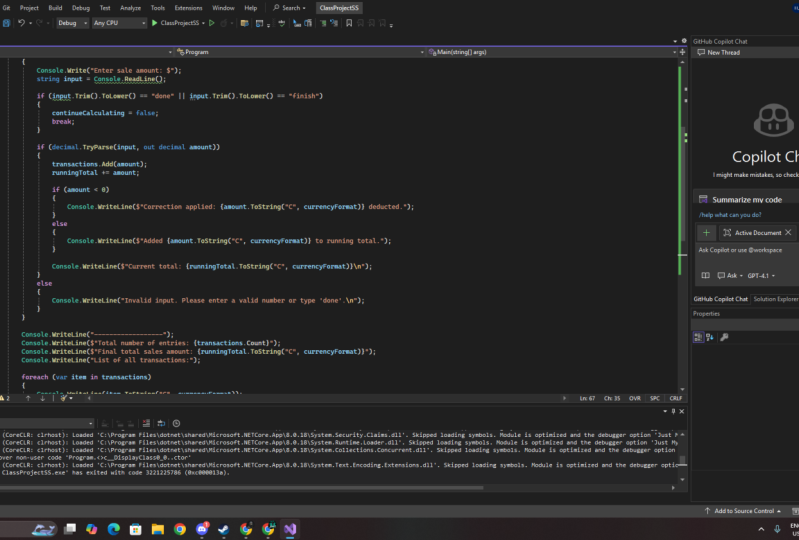
21. Class Project: Right, it's time for your class projects now, what is your project? Well, it's to create a basic console app very similar to the one we've created together in this class. But what I want you to do is put a slight spin on it. What I want you to do is create an app that allows you to add up sales. For example, $4.5 dollars plus $2, et cetera. Once you've added up those sales or every time you add another sale, I want the program to automatically display a running total so you don't have to ask the user. It automatically tells them what they're running total is. And this may seem simple, but this is the basics of something like an accounting app keeping track of a running total. So that's the basic project and I'd like you to stop that from scratch. You can go and consult the videos that we've made together. You can consult the software that we've just made together, but it's always better if you run things from scratch. So you're forced to use your active memory to remember how to actually do these things, right? If that's too simple and you do it in a couple of minutes, then I have a more advanced project for you. And that is to add a second layer to the app, which is to allow for corrections, for example, minus $6 or minus $10. And you can see if this is an accounting app, those are the two sides of the accounting coin. You've got your income and you've got your sales. No, you don't no income of sales. What I meant to say was income and expenses. Income comes from sales, of course. So the corrections of these negative numbers would be your costs or your expenses. I want you to add that to the project and also display the running total once you subtract those. So that's your project. Once you've completed it, I'd like you to take a screenshot of the relevant part that's different to the software we just made. And then post that in the Skillshare project class area thing where you can actually post all of these works of art if you like. Right? So that's the briefing from me. Good luck with that, and I look forward to seeing what you can come up with.
 Grant Klimaytys, Software Engineer