Transcripts
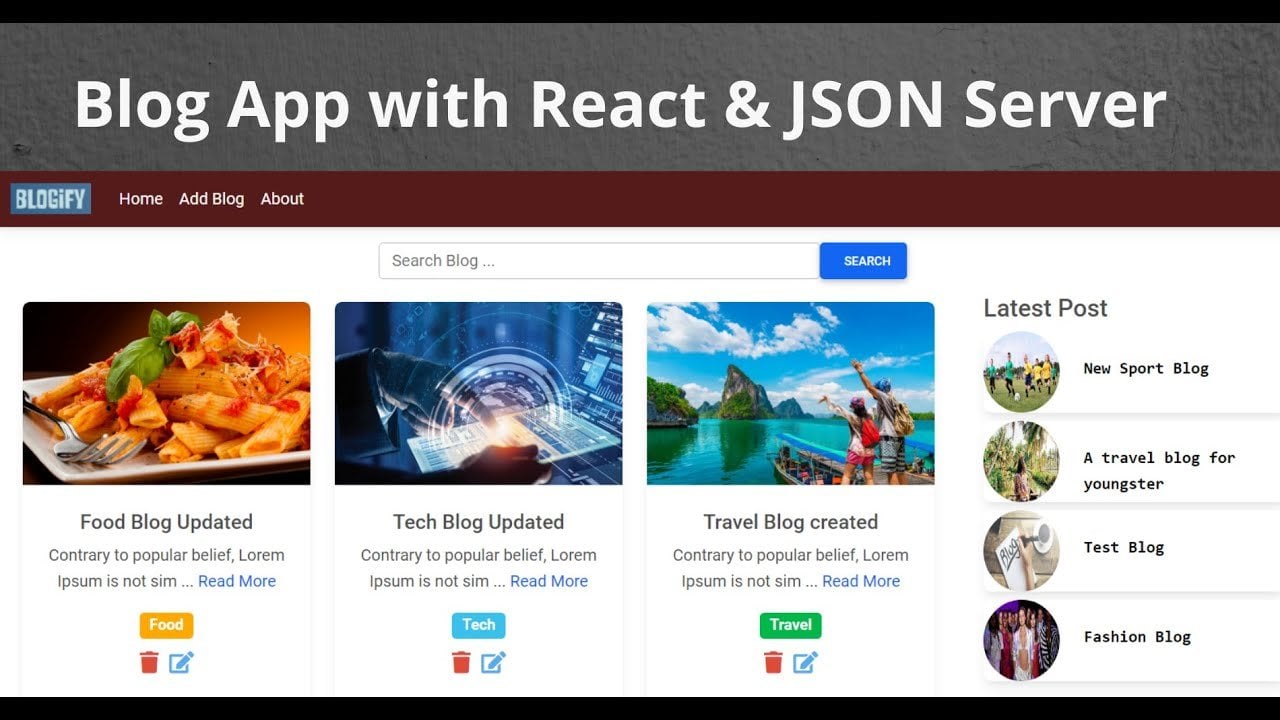
1. Introduction: Hello guys, how it's going. My name is Michelle and I'm having a more than 50 years of working experience that Trenton and developer in its software industry. And today I'm going to teach you that how you can integrate the reader turned into a React application and perform all read operation with the help of gifts and forever. So let's move on to the slide. So what you are going to learn in this score. So you'll be building a React application from its crest. And we'll be building a React component with the help of material UI. And in this React application via going to upon all current operation with the help of adjacent forever. And you don't have to write any back-end code to work with the API that is read, delete, update, and create. So absolutely, geocoding required to, to work with the API. In this application. We're also be using to manage the application state. And we are going to use a, a redex middleware to making a API request with our JSON. So what skills are required for this course? So you must have a basic understanding of HTML here and JavaScript. You also need a basic understanding of ES6 and it's good to have some sort of React knowledge. But anyway, I'll be explaining every thing from scratch if you don't know anything about the act. And it's also good to have a little bit understanding on redox. But again, I'm going to explain everything from scratch. And you don't need any experience required working with the JSON server. Now, what's cools and technology we are going to use in this project. So you must have a Visual Studio code to write out all the code related to reactant, a redex. And on top of that, you must have Node installed on your system. And once you have installed that node, you will have access to the NPM. So that with the help of npm, we will install some dependencies in our project. Because art project also is going to support the react router dom. And we are going to install this dependency, redox tank x here, material, UI, and React router, dom as well, and Acks, yes. If if you're not aware of excess, excess is help us to make the HTTP 2 a and material. You, I have already told where the beginning that we are going to build a component in this application with the help of material USO. And we are going to basically, he's writing in this, in this course. So that's why I have used material UI. So let's demo the application. So we are going to perform all read operations one by one with a hunk and adjacent, however, in our React application. So let's explore each read operation one-by-one. So indicate the highest operation. Aware am able to load all the EU budget from the JSON server. And we are also adding the accent that you can see that we're adding the data collection, forget all the here data from the server. Now we are going to perform the second operation called period adding the, you get into the adjacent side of a. So I will give namely change in. And then I read gmail.com something random contact number and address will be a failure. And I will admit this in detail. And I will get updated table here with the updated and data. So we have also upon the create operation like, like adding the EU get into the adjacent forever. Now, the next operation is to delete the user. So I will delete this one hello. Now, we are also able to do a delete the data from the table and read a text and also getting hired in order to delete an item from the table. The next thing is live to update the detail. So I will click on update and I will land into the idiot home, okay? And I will just update the name here and just click on our debt for now. We are also able to upon the update operation with the injections Harvard and there you'd have time. So I owe you all the functionality with GFF harbor and a reader.
2. Understand Redux, Redux-thunk & it's Flow Diagram: So guys, before I wanted to start writing any code on React, and just I wanted to give you overview on reader. So what is a redox? Redox? Is it predictable, is good and tenor, or a JavaScript application, it's basically manage your entire application, the state, and it's commonly used with a library called React or Angular snow, three principles followed by a reader that is single source of truth is stated a read only. And whatever changes we made in each state, We use your function and this is the component of x and the reducer is to view. So in order to update the statin reducer, we've acyclic create an action. And the action get dispatched from the component and is stored basically hold the entire application state. And view is nothing but our React component. So now let's understand what a redox. So read f, thank you. The middleware that let you call an accent creator that return a function is instead of action object. And that function will receive the store dispatch method, which is then used to dispatch regular synchronous action inside a function body was the asynchronous operation had been completed. So why do I need this time? Because middleware extend the in-store availability and let you write a logic that interact with the store. So what is the pivot tang here? So a tank, another what part of function, but it's not just any old function. It's a special name for a function that's returned by another. And so you will get more understanding about the tank or once we start writing the code in our application. So let's understand the flow diagram of overall redox. So guys, this data flow diagram, and you can see that here. So here you can see that at, at the below, we have a component. A component is a dispatching an action. And here action don't have any logic to update the term. And it's just act as a messenger. So it's a reach towards the middleware. But here, the middle various optional and middleware could be anything like Hancock, saga. And in this course we are using redex tongue. Then it reached where the reducer and update the escaped. So reducer basically replaced the oldest date with the new state. The image tour immutable. So we have yet centerline is turn where we store all the application estate and from the store it past the updated state as the refs who the complainant. So 1 fifth after updated, if that rubs its trigger, the re-rendering of your UI components. So the component will notice holder content with the updated state or L0. So they say the overall concept of redex and its flow diagram. And I hope you understand this concept of redox and you understand the flow diagram as well. And in the next video, we are going to react project in order to start working on this application.
3. Set-up React Project: I'm going to use material UI to bury this cable Home button. So we're going to work with material UI and you have to also installed Jenkins head of a globally. So I hope you are aware of the side of it. So it provided pick a rate APA and without coding. So you don't have to, so you don't have to write any code to run the injections forever. You just have to look it all up again. So you have all the different npm install minus g, JSON iRobot. So let me start building the application. So I will go into my directory and I will open this chaotic paraphernalia. And I will get the application. So I will give the obligation name and text field. And the application name will be very actor JSON that Rudolf, the federal obligation name. So it will take some time to install all the dependencies and I will be back once all the dependency if can get uninstalled. So guys, I'm back and it seems like all dependently is installed.
4. Install Packages & JSON Server: So before do npm is I will install some packages. So let us go into the project folder that I have created, like UD, react j, then read out. And before doing n timess start, I will store it. I get it here like React redux. So I need to build this application. Now, hurried up. Then redacted lava heavy tank. Then we need material us with the component in our project. So far now, this much packages required in our application to build a whole spread application in a react with j from Harvard. I read f times middleware. Let's wait for the install. The package is installed. Now, you guys also have to install this JSON carver. So I have already installed the JSON server on my machine. So I am just showing you how to install the JDK in machine. So you have to do so. You have paint on the injection however evidence. So let's wait for the package installation. And I've opened up a project in VS Code as well. So the decade open in VS board adder.
5. Set-up JSON Server in React App: Now we need to create a variable for finest military db.json to work with the JSON Haraway. And not here. Let's delete this. We need to create a file here. It will be db dot JSON and one more file, dot ENV file. So let's get the add-on also, dot ENV file. But with Italy we are told the API here. And you don't want this one, Untitled one. Now, we're going to start the React development, kind of a mesh curve. You are in the directory. Something is wrong per react. But they take the folder name. And I will do and Tim star. And meanwhile, the very day starting, I will add one here. To get you started in Jacob forever. I will add one carbon derivative here. So inside of a, inside that Start application is a start. So let's go into the VS code and add the script here. Though it will be watch db.json file. They hit the hilum, which we have in given here. And it will run on the court. I 100 again. And I'm just going to paste them and the media tab here. So they say that dummy data, I'm just editing instead the David and JSON file. So we have a re record here, okay, in our db.json, you can also read the data in the browser asic. So in order to read the data in browser, you have to run the height of a, which we have added just now. So I'll just go here and I will run the npm run out of us. And you can see that ours hardware running on this URL. So I'll just copy this URL. And I will just go into the embrasure and paste it here. So this is a more use now. But you can see whatever the data is there in our db dot. I is loading in the browser as it. And you can also read the data lie if they fake ID. So you can also do this.
6. Create Folder Structure: So let's start working on the app application. So I'll go into my VS Code and I will add some older yet. So I'll have the pages. Then. I will have four let off. And you say the pages. And I'll have one more folder called redox.
7. Set up Redux & Route: So let's do that. And you get it up. In our obligation. I will create some file here, Node.js and action here. And then dot js. Then there will be a root node. And at the last is toe a little bigger. So firstly, we need to head up the store. So I would import some stuff from the data, perform in-depth. So let's import from redex, create, store, apply middleware. And then the next thing, we're going to import the logger, logger. Logger to basically drag the application state. And next state. Then we need to import. And you know, we also need root reading. Say our, let's import the rubric, which we have to define yet. Now. We'll be having it, middleware, middlewares. And inside it I will put them every day. Now. I will check in process JK, process, process dot a and a, guard AN a and B, that to Nebula. And then for this lava into the area. Now I'm really going to push logger. Now. Defined the store, their storage, but it will create a store. You would reduce it. Applying middleware. Middleware at Ford default, sorry, export default store. Now, let's go back to the root reducer. So we need the readings that I earlier. But let's first define the basic initially state of the reducer. Go. Here it will, you will aid us in each pill. I'm demanding the initial application. So it'd be like YuJa. So we will having a lot of YuJa and will be also working with the angle you that. So single usually it'll be just on an object and there will be one more leg loading. So it will be a false. And I'll pass root, not rotor. Give it the name like yours. Reduce. Okay. No. I will use arrow function yet. And I will assign this to the initial state, will be an action. Stage back. And add that now, I will just return, the default is dead. I think complex add up now. And I will export default user. Now. I will go to the root. And here I will combine the three, reduce it from the very depth. So I'm importing the combined and it is there. Then I will define the road ratings and do today say experimental combined reading Sara. And I will, providing the key here, user to access. Take the lead in for the hour, you reduce it as well. So yes, he said, and I'm adding the eugenics to the UV editor is here. So with the help of did you get p I will be able to act as the page table from the data is stored. So let port, don't reduce m. Now we have rotor to say here is important in a store. And let me go to the index, not in JS file. So in index.js file, we needed provider on the React book provided directly to post to basically provide the state overall the application. So that way we used provider for that application can access a state store for that by its name. Like providers though it is providing the application is tailored to our entire React application and it is stored. Now, we will need a browser router as well in order to have the routing app every day in our obligations. So I will also important from React router dot I and I think we haven't installed the react router dot o. Let it all that package, NPM install React router, dom. So I forget to install the Skype guest. So meanwhile is installing, I'll just import React router at all. And the package will be, I'm in the comparability, the browser router. And again, I'm going to wrap the application with them The other out with our application now have the routing capability. Yep. Now, we have provided a route and a store in our application.
8. Working with Table on Home Page: So let me start the width PDF here, though I will carry it Feist homepage, the home.html. And I will use reactive snippets to generate an n-bit. So if you're not, if you're not aware of this as snippets. So you can install that tension or reactor redex and grok, even though this has helped to generate a snippet. So I'm using that text I can send in my VS code. So let us give either. It's not just all. And I'm going to register this route here in our app.js file. I'm going to move this stuff and I'm going to import React router dom, I will import React not only thing, there is some issue. So I think it doesn't store it in this park. So actually by mistake, it is stored in R, So we have to go into this folder. So I just can go inside this folder. You do react. Yes. But you'd have and now I'm going to install the end all react router down. Make sure you are in that folder to install the additional independency. Though. Meanwhile, I will import switch and route. I. I'll use pitch. Then the out, let an act. And I will give the path that I'm now home. And the component will be the home. So it's automatically imported. Vf Corp hydrogen kilometer or to import. So let's wait for the iteration overreact auto Dom installed in our obligation. So let's go into the browser and refresh. Now, we are able to load the homepage. Though from now on, what is I am going to refer the material UI in order to build the tables in our application. So I will just go to the component here and just find out where a stock table table should be in the data display. Yeah. So here is the table and I'm using this table. I'll show you by using this table. So five time going to be all these ones. So you guys also just open this link and copy all this history. And I'm going to paste in my VS code. So that is home. So I updated all the file, yeah, I mean all the import. Now. I also need this all thing I need actually. So I will call peak. I will copy all of these now. So let's go into the homepage. I don't have to copy being hired here. I'll just copy this thing outside the component. Okay, So I have poppy oil, this thing out header component. And then I'm going to copy all this thing. So make sure you are also popping along with me. So yeah, I'm I'm being a related stuff. So Paige taped into the VS Code. Well, I'll paste that in there and add up, no, I don't have the raw data. So I'll just comment this one. And I apply some styling mine on my own it tiling. So I gave you mean with 900 and margin top bargain power play, a 100. Suddenly styling and giving my own and we have to copy the firm has in order to apply the style. Yes. No. So and I've now just left it. And and just p and then the URL where we are able to see the table or not. So we are able to see that they have a lot of money to deleting row. In our case. What we have we have we don't have a day without actually having name. Then he will then contact and then name, email, address and the last. And here we are having an action. And everything should be the standard line. So I'm just giving you a center. And let's go into the browser. So now we have a proper heading in the table. And now to get the data, though initially we have already data and their db.json file, but we need the data in the table.
9. Writing Our First Redux Action & Reducer to Get User Data from JSON Server: We are going to write a and redact faction. So I'll be giving the ash can type here. Again. You just you just OK. And now come, come to work here in inactions file. I will import times. I can type and I will give one. Usually here, I will define what an action here. Get users. And D If you usually will have habitable. So this action will have the EU budget as the argument. And now we are going to write a dividend in tech fee or actually a little bit types. And then type dot. And the payload will be you. Yes. Okay. So they say the accent. Now, we have to write one accent expansion as the live load. You just and it will be export actually going for cost lower do yes. So before writing the accent dispatcher, but make sure you have added APA. Yes. Oh, first, I'm going to add the APA React app API. And the API will be this one. Okay? So in this API we need here. And hence I have updated the environment highly. So I need to do start with Herbert Eye, then. I'll come over this node. I taught the development had about and really tap into this thing we have to do if you're working with the environment variable. Now, come to the taxane. And meanwhile I will be writing the accident at a time function. So it's opening in the browser. So meanwhile I'll just write the picture because it will take some time to load into the browser. And we need that kit as well. So if I put the kids I'm importing the Acks. Yes. Now, let's come over here and do X. Yes, I did. And here I'll be using process and, or T and V dot PNG API. After that, I'll do in the, then let it be that as bar. And after that, I will be defecting and the action will be laid. Get you get it as POME data. And I would also put a console log yet that we can take whether we are able to get the data from the get-go, however are not. And if you have any air, then we are going to catch here. And so long, not headed. So now come to this file. And here I'm going to add the K type. But we need to also import the types here. So I just copy this one. And I'm going to paste here. And types dot get to yet. And in return, I will just spread out the state. And the state will be at Chandon payload and initial value, it will be the blue. Now. It will be false bloating.
10. Dispatch an Action to Get User Data on Table: So we have ride the action to dispatch. Now, let's go into the home page. But this into homepage. And from here we're going to dispatch and I can so let's bring from React redux. U is selected. And you did parents, though. I'm importing the US silicon and USDA staff. And, and bust this path and action. And p, whether we are able to store the user can do tail into the reader with that are not. Well, I'll keep it on a dispatch variable. And I'm going to use a huge effect here. So important to you at the fair, then that is really prevalent. Typically do a API call. It mapped. And here we are back to dispatch lower YuJa. So if we equities automatically identity me though I desk important and also make sure it's important like the top. So yeah, the importer, you lower the user. So we have this test, the Lord. Now we're on to the browser. Just replace the application. And even next semester, whether we are able to continue to tell our narc. And here we are getting all the user which we have in our db.json file. So this is the db.json file and all the data now, we have in our letter do you say? So let's go and display all the detail here. So what I'm going to do, the fetch the state from the store. I have two unit a huge selector inside the home component. So I'm going to be structure and I'm going to use sanitary era. And the state is take the Artesia below as you can thin the root reduced and the reducing agent. Adding the key here. So I'm going to use them. Ted dot user. And from the data.txt, I'm going to structure the users. So I hope it won't make country and effort for making unpaired. Then I'm just going to change this one. So I'm just making the data yet if you have any confusion. So now what I will do every year puja is tf.data and all families, ted dot data, I'm going to describe to you, yes. So here I'm going to give texture. And here what I'm going to do, I'm just going to comment and uncomment. And I will do you will get and you just go, we don't get any era by doing the thing. So I'm going to change everything yet. So it will be juicer. For key. I'm giving a naught rho dot name like user.name tidy I'm giving here. And here I am giving user dot name, dot, what do we have? And then I can call him. So we have e-mail, but we have to just map everything. And here it will be the contact, and here it will look the anchor. And here we have to basically add the button to actually, well, I will left as I know. And and this one will get a huge hit. And also make sure the alignment is 1010 and all the data and enter. So let's go into the browser. Reload. Now we are able to load all the data in the table from the store.
11. Adding Delete & Edit Button on Table: So the next operation we are going to perform, delete n. For that, we have to add up by 10 in order to add the button. And I'm going again to our material UI, and I'm going to look out for the button inputs. So this is the button input. And, and I'm going to use this button, Okay? So I'm actually going to hit the button group actually, so I'm going to use this one. I'll just copy. And I'll go to the VM code. And you just paste it. And let me remove this one. And we gave this one, delete. And it did. And I'll remove the color from primary here. Primary will be like this one, and this one will be the second day. Well, I'm giving the second brain. I and we need to also import the button group. So I'll just open everything. And I'll import these two thing. So I'll just copy and I'll just put here. And we also need gave his style. Okay. So let's copy this and paste it at the top. And huge tally the already taken. So I will be giving here, use a botanist tile. And I need this botanical tile and the bottom. So here I need my tiny tiles and use, but anytime. And now I'm going to use this button style. And third, yeah. Let's go into again how they have you. So they have added one day via I'll just copy the files. And I guess close this again here. And we don't have class or table where we have Bhutanese tile. And we have some issue. So let's go to display. And we have I think we have imported react twice. Yes, So yeah, you know one important. Now, go to the browser. Now we got our delete any beta1. And the next thing what we are going to do is and also provide some space in between. But I'm, so it's nice to have some gap between different but I know what I'm going to do. I'm not going to write any CIMP Thailand file. I'm all willing to provide the inline style. It will be like from I to j. And i. And I will give my pixel that we can have some space. Yes, now, we have the space.
12. Working on Delete Action & Reducer: So now we have put upon the delete operation. So we are again going to write the accent type. Vintage time will be deleted queues, yes, we're deleting. One union will make it delete a UGA. And I'll just call charisma. And I'll go to the accents. And I'll just copy this one because of the fidelity talk more about that thing will add it into this equation, a chain length from gate to delete. And it will receive the ID. I will change the name, delete you there. It will add a few ID, I will add the ID here. And I predict that different actions a time. So let's provide the action the user deleted. Okay? So it won't have any argument. Action with a type, a type delete either. So I'm going to defer that one. Delete either. Not kill you too. Yeah. I mean, you then delete. Did you live deleted. Now, go towards a reducer. And here we are going to add this case. So it'll be very baking kf here. Delete and just get it done instead and make the loading bars. So we have done with the delete action.
13. Dispatch action to remove user data from Table: Now come to the homepage and just hit the delete one. So what I'm going to do, I'm going to write one onclick. And on-click we'll have one handle, delete methods. And delete. And death will be the parking the ID, user. Id. Now created this handler outside that return a create the file. And it will defeat the ID. And, and I'm going to make it lean, provide one window. And formulae if you hey, deleting that. So I just wanted to warn the user mythically. But anyway, I wanted to remove you that when the invoice are not here, I'm going to provide the window a warning dialog box, and it will have a method laid over. You want to delete the a inverse. So we can generate the dialog box using the window.com bar and and we can give a lake or a shared. Are you sure wanted to delete the year then? The data map is and click Okay, then it will entertain that if condition and found there, I'm going to dispatch delete you the and diluting hearing automatically imported from the VS Code. You can see at the top, VS Code is hitting me in my MDF board. So let path if Id not years. So I think I mistakenly, you'd get the handle dealing outside the component. We don't have to create the outer component. We need to create the intact the component. Basically outside the return. Yes. Ted here. And we need to pass the ID. And one thing makes sure it in the action. For once you delete, you have to also need the updated data from the GitHub. So here I am again going to dispatch the load YuJa in order to get the updated data from the JSON P wherever it is working or not. So I'm going to delete the last record, delete, and I'm going to click OK regarding our delete. So no problem. Now we have issues with that can tie. So it is fine here. Okay. I have maze here, flatMap, that's not deleting. So let's give it one more try here. So again, going to delete the last record. And now we are able to delete the record. We have of all read operation and delete operation using NADH and FADH over n. Every deck.
14. Working on Form Component: So next thing we are going to work on the form component. So in order to work on the form component, we have to add one at the top to add the user. So let's add the button. So I'll go to the home component. Hand here. And we're going to add one button. Here, I'm getting the button. And then we covariant. I'll just copy one button. Actually they've been WO will just copy this one and just paste it here. And it will be a variant. Variant contained and angry. And it will be the name leg you there. And I'm going to put this in battalion in one day because I need to apply one class name here. So I'm just painting in the div. And the class name will be not the style class name. So we have button tile roof. So let's see in the browser. So now we are getting the ad you that over time. So on click Get Data route. So what I'm going to do, I'm going to bring the image h3 from the react router dom 0. It will be used h3 and come below. And if you retain the t variable, huge tree. And just what you have to do on click, hey, x3, dot push. So I'm going to push toward the tower to go this route. If not, test. So let's add this route. So here in app.js, by period the page at you, they're not ds. And just create a data conveyed as of now. The total relate that ad you there. And I haven't gotten to that route here. And I will provide that out name like add user. And the compressible we add Egypt, so it automatically imported in my VS Code. And now and just click the ADA you that now we're able to move Adi pay then and there outage also getting chain. So let's start working on the Add area, though here we have to work with the fall. But again, I'm going to material UI and I'm going to use the text field. So this is the very basic text field. I'm going to say so this one I'm going to you. So I guess how good it's been. Also open this entire source code. Let import these two things. In this upper year as of now. And now what we have go copy. May have to copy this stuff. And just paste inside here and remove the first two. But only need and also copy this tie. Yeah, I have a copy. And here I am where you can create a width by, but what if I hit, okay, now from 25 to 45, bad. And given that with Let's go and check out. So we are getting the proper. Input home. Okay. Oh, let add other inputs. Will dad went, Oh, I'm just going to copy Apala or time because over there and I'm going to provide some value here of, let's try to find a state of the application. So we need to provide the value to the input field as well. So I need you instead. And I will define the state here. State that steak you listed and what we value late name, email, and then contact. And then we have had great. So everything is in pretty either now. And right away I'm going to get, but we don't have to write like head.next test.html in the value. So name, e-mail on deck, address. Now, the value will be named here. And the label we are going to change lanes name. And I will be there. And we're going to give a break. Now. And more brain here. Here. And here I'll zoom in, in MPF and here. And yes, pocket these two thing. It will be it will be a email. Yeah, so let's engage and this one to email. And the email and the label will be now content. Value will be contact. And that will be the number. And this one will be the address. And valuable V. Drift will be the text. And let anger, but an average. So I guess copy one button from here. Let's copy and just paste it here. So we don't need onclick. Can even type, but type millimeter summit. And to collaborate with timely variant and the tile will be so important actually, we are not letting us ideation for less important buttons now, yes, cooperative import statement. And I'll just paste it here. So the statement is painted. And let's give it a title here. So style basically we just want to add just a bit of the button. So it will be the 100 pixel. And, and just give it the name will be some neck. So some of it. And the next thing we're going to do leg. Let's go to the doctor. We're getting the form here. Now. What we could do, we could do some styling here. Let's get some margin at the top. So I'll add margin talk. And I'll give calm. I don't have any show yet is burned to the Rajah. Yes, Now, I will give one heading. So here we need one heading, lay add user. Okay, So the dead heading. And we need and we need also a button. So if, if you wanted to go back in, I'm going to copy that button. So let us copy differ. I will copy the entire thing and I'll just paste it. And this color wheel with a secondary. So I'm giving secondary. Modern marketing town will be margin. Top, will be epic film. And it'll stay theme. And in onclick, let's change the button name agile. And onclick. We'll go back to the homepage. So we have to bring here is from the react router down. Let's contain day is to react router dom, huge HJ, and restore the three variable. And story. Well, you retain the variable history. And I'll just change it around, like history, History, dot push, and just remove the type from it. But don't blade times 100, we have low, we don't have any show. Well, let's go into the browser and check. Yes. Now, go back. So it's working. So let's start button under functionality, every input failure will having the onchange and so on. Can you make an ion defined here? I'll demand off-grid this statement. And input change. And this will be, it will FEV. And I'm going to capture lambda e dot target. And that target, I need name and value and I'm going to set the state, state, name. And so on every keystroke, I need to store the value in a state that's very unique handling input change. And I'm going to apply it if handle input change in all inputs one by one. So I'll just provide this point change and they'll input change. So I guess while PDS now based here, I'll paste here, and I will paste here. So we have done with the and, and the form level. We need on some it handles, I'm going to define gets handled some way. So let us define. And I think we're also having me and we are going to prevent the default behavior of Roger am writing all gain, so we just need to write u dot prevent default. And here, in order to proceed in the handle summit, we have to add the axial. But before writing and I just defined by the state here as well. So I'm going to have to empathy definitely you then cannot form impiety to them. And j. So for that I will having one is tail, head. And you're the state and equilibrium the invitation. And in the handle submit past, I will check. So if any input in potato, I'm not going to allow to just submit the form to the injection server. So let's gave each input will be in the next 18 email and the last 20th contact. So I'm going to set the error message is and put all the input hand. And the LD kid, we are going to write the code to somebody to form the Watergate.
15. Working on Add Action & Reducer for Adding User to JSON sever: So let's write the accent type must. So I'll just talk in it. One, I add a user, add a user. And in add a user, sorry, in the Actions. I'll have to just copy this one. Paste. Gave the name leg ADA you there. And here we'll do the filter you there. And I'll change request. Where do the post. And I will remove this one and I will pass. And the second argument, he knew them, and this will lead to change. So let's write here one action. So I'll just copy this one. And I will give you their added and it will be add you there. Let's update this one. I will see you there. And if not, I don't think we need because we are going to push toward the homepage after the bomb submission. So in the form summation also, by default, we are loading the you that detail from the reading cell so we can leave that one as it is. I mean, you can just come in different now and go to the reducer and add this case so I can just append it, it defined here. Because it's going to stay, add it in and add that.
16. Dispatch an action to add User Data: Guiding the user. Now, go towards the higher you they've component. And inside there, in the L part, we need to write the code. In writing. We didn't bring the base pairs. So we get to bring the apple up thing. Playing DOM react. We made a huge difference. And we did push toward the dispatching a variable. So let it is fast. But until you fetch. And lets the stats here after the if there is no error in the fall when all input field is provided by the EU there. So we are going to be fat pad. So I am getting rid ethics. And I guess then from the VF board. And I'm going to provide this state. So in this state, we have all the EU there. Again. I'm going to provide this state. And after that, I am going to push the extra dot, push towards the homepage. And also we have to split the empathy if there is error occurred. And this time you there entered all the detail in the input will, then we have to make the error. So let's define the editor has been. So we need to define the error here. So I'm going to display the area method of the ADA you there. And here I'm taking if David an error, then I'm going to display the area that has three time and style. And I'm just giving the color. Let's turn to the other. I'm loading this one and just unwittingly without providing any detail yet. Just sounded. So we are getting the adenoma and there is no higher. For now, let's provide the input detail here. So let's begin games. So on chaining method is not working. So let's go ahead and go on kinda I haven't provided here we go guys. We're missing one attribute here. We need to provide a name attribute as well. But that failure not getting anything here, namely contain email, sorry, maybe I'm going to name your name will be email. And here name will be then number, not number, I'm in contact. And here name will be the address. So now let's give it one more try in the browser. So I'll just give some detail yet games, games, gmail.com on type number, address that, give plans. And tired of submit to you that even getting added. But we have not been getting no data yet. Not looking at it in the js inside of our admin. So there is some issue with it, whether you've already read it, but to VIV, We are not getting the updated data. What the EU then redirect over to the homepage. So let me fix that issue. So what you can do. So let's add one more data. I'm just getting something. Okay, so mind and gain something random stuff. And now let that. But this time added. So there might be some issue. It was not adding. So now we are getting the data. Once you get funded the hall and then here the data and getting better at. So let us update one, our data. Now I am getting here. We'll add a at gmail.com contact. And this time I'm going to give you gave and hit somebody. Works are going on. Now again. It's not getting updated. So once I refresh, then I'm only getting their data. So let's do one thing. So what do the accents and just uncomment differ. So let us now add the user. So again, I'm going to give proper huge area, that is TFs tail and the head, gmail.com. The random number address will be the Australian if good. And hit Submit. Now is kVA getting at it properly and we are, and getting the updated value under you, their navigation. So we are done with the user.
17. Working on Edit Form: So the next thing we are going to work on the functionality, but you get a little bit that came a mins and we're going to have the same code. We have to adjust a little bit code, okay? So this copy entire core and create one file, yeah. And give the review them. Not the case. It will be new to you that alpha chain discipline like update and change the name here I will. And yet it available to everybody there. Okay. And let's go and tell that out. In the app.js. By just bulky. It will be the it. And I'm like I think the ID and an important idea to use it. So VS code automatically import. Now come to home board, yes. And in Idiot, we have to provide the onclick. Onclick. What's going to happen? Like it's going to pool is going to pose to you that you did either case though, did you live when you buy a ticket? And here I'm going to provide the ID. Again, I need to give you the dark ID. So let's give it a try in their overall that. And I'm going to click they did.
18. Populate an Existing value on Edit Form using Action: It now we need all the value here. So whatever the value we have in the table for that specific user. So we need all the detail into the input field so far that we need to die to an action again. So we hear that we are going to write to get the finger you just go, we need the thing, really use that here. So I've given you there good. Either. And go to the actions. And yes, wow, period. But the God, the familiar female ID. So we're in will you, they're just kinda good. And go to the desktop and create one timeshare. So okay. Use it and change the type of thing. Well, you there and I'll use the remove this one. We don't make me get you the and here we need to pass that as bonds that has passed dot data. So we have to pass this, the attack to the data and into DKA. We have to write this hybrid case for this types dot value there. And I'm going to return, and I'm going to read out the state NTU there that we have here. Usually then i in a empty array, and now it will be header, payload. And loading will be the walls. So go to the DTU there. So we are done here. And did you to use it? We need to need the ID. So whenever you there and navigating, we are getting the tidy the how we are going to get a tidy. So we, we are going to get the idea. You think the US para 0, we need use pattern from the react router. So we need use that'm. And intent the component. Here. I'm going to de factor dy, dy. So use patterns. Well, we are going to date after the ID. Few things just we need to adjust here, so we have ID and we need to bring the US effect here. As soon as we have ID in that you do to you, the component will need to dispatch of action in real user ID. So I'll write you the effect here. And the next thing, just gain per day hand. I'm going to this pastor, the faction dispatch, and we'll get you that. Okay. So they said the action that we have created earlier. Now get angry. You look. So let's go to a DTU there and just provide the ID because it is accepting the ID on the back and it will return that you use a specific EU there. 2010 that Asia and the ADA now and just go into the browser and go back and click on the first one. But we are dispatching the action, getting value there. And you can see in this state you that is undefined. Okay? So we are not getting the EU there. Okay, if no, let's, let's see the console. So in the console we have DU there, but somehow you that it's not a waiting in the reducer. Mythically, though, in the console we have like at line 54, if you go to the accident. So at 64 we have the control. But it's not going towards it did is it will go to the Getty you there and engaged to use the we have to provide this year. There are meant Okay, Lord. And He user. So now let's, oh, let's see in the browser. So now go to the data. And now we have the u that here. Go back and click the third one. Now, see, we have the respective user data or not, but we have that data. And now what we are going to do, we are going to be hitting Danish director. If you use a lambda is state 0. Let's take away that we have a huge selected or not imported. So we don't have used selective, so we need to use selector. And, and use selector. What we're going to do, we're just going to give times if the EU, the US collector t8, t8 dot data. Now we have u that okay. Over the next thing we have to basically saw the detail yet, all the detail we have to pre-fill here when you right-click on the again. So part of that, we have to write one more. Mythically use stake here. Sorry, use the FFT here. So I'm going to provide one more year in effect. And in fact that I will check it daily view, that means this huge factor will run a 30 day you there. And now I'm taking if there is there, then step, notice that take you there. So so let us go into the browser. Provides saying undefined. Okay, now it's coming. Let's go into the browser. And now here, regard to the data. And we are getting one warning yet. Played a component is changing a control input on TV and control where the value changing formative Manto undefined. So this editor usually cause because we haven't provided some value yet and the chain definitely we are defining the undefined actually on the component mode, the value is undefined that way. It isn't getting the warning in the console. So in order to avoid that L, we're going to simply, you just thought Advocate here. So it is borrowed thoughts adequately evaluation. You can give that one and the editor will go on. It's not an ironic like warning. So let's go into the browser, reload. And we don't get the warning now in the console.
19. Dispatch an Action to Update User Detail: Let's go to the DTU, their component. And in handle submit, we have to dispel the update to you there, Not to add either. It's so deadly there and make sure it imported. So yeah. Okay. The important to move the ADA you that we don't need in this component. And so let's go and check whether the parties are creating are not. I will leave it out. And I will give gems and volunteer and let some date. So it's not updating the energy issue request filled with the status for undefined not found. So let's go to the action. So the have definitely problem in the chain. So data user. Now, let's see the console console. The data is not updated as well. I can yeah. The console also a data not on Decker. What is three what can be the issue? It's the EU, they're updated. And go to the reducer. Everything looks fine. Go to the edit view there and NAD to you there. So the issue is like we are not providing the ID here. We have to provide the ID because Our am send, receive the tuatara moment. You there detail and ID. So let us go into the browser and give it one more. Try. It again. This one, I gave them some bond. Let's see. Now, they you that detail is getting updated. So we have a form all the read operation here in React application like create, read, update, and delete. And I'm going to perform all operation again so that we don't have any issue. So let me start with the letter E So we are able to read all the data from our GFF hideaway. Now, let delete it. It's been LacA. So data is getting delicate at faithfully. Let's add the EU there. So again, I'm going to add the user is tail. And I'll give them an email, um, random contact. And that will be clear. These files doc create operation. So we are able to add the user into the JSON server as well. Let's go and indeed the detail adverbs, so Adam, Marcus, and add the contact either at that grid handle. So I gave you and Adam 1, 2, 3, 0. As you can see that we are able to update the you that you tell either 0. We have a form. All the third operation with the help of React, do deck thank and defense.
20. Conclusion: If you're watching this video, that means you have completed this course. And I'm sure you have gained a lot of knowledge on a redex. Now, you will be able to work with the redox in any React application. And also, you have a little bit over those people who have only knowledge about React. So thank you guys for taking this course, and I will see you in another course section.
 Saumitra Vishal, Front End Developer