Microsoft Excel: from Beginner to Intermediate/Advanced level (French Version)
 Joanna Nseir, PhD, University Instructor
Schau dir diesen Kurs und Tausende anderer Kurse an
Schau dir diesen Kurs und Tausende anderer Kurse an
Einheiten dieses Kurses
-
-
1.
Introduction
2:27
-
2.
Généralités
5:05
-
3.
Introduction de texte
7:41
-
4.
Introduction de numéros
9:52
-
5.
Création de tableaux
7:34
-
6.
Validation des données
7:48
-
7.
Mise en forme conditionnelle part 1
8:53
-
8.
Mise en forme conditionnelle part 2
11:20
-
9.
Mise en forme conditionnelle part 3
8:10
-
10.
Lancer un calcul
9:56
-
11.
Fonctions logiques part 1
6:22
-
12.
Fonctions logiques part 2
10:52
-
13.
Fonctions statistiques
9:35
-
14.
Fonctions mathématiques
14:39
-
15.
Collage spécial
18:41
-
16.
Création de graphe sur excel part 1
9:24
-
17.
Création de graphe sur excel part 2
9:05
-
18.
Graphique Sparkline
7:29
-
19.
Impression
8:17
-
20.
Commentaire - protection de la feuille excel
6:11
-
21.
RechercheV et RechercheH
11:47
-
22.
Index - Equiv
17:01
-
23.
Triage et filtrage
14:52
-
24.
Calcul matriciel
5:19
-
25.
Système d'équations à plusieurs inconnues
3:07
-
26.
Somme Si - NB si - Moyenne Si
4:55
-
27.
Solveur - Valeur cible
6:10
-
28.
Table de données
5:57
-
29.
Gestionnaire de scénarios
7:12
-
30.
Tableau croisé dynamique (TCD)
14:18
-
31.
Controles de formulaires - Controles ActiveX
18:04
-
32.
Macros
4:35
-
-
- --
- Anfänger-Niveau
- Fortgeschrittenes Niveau
- Fortgeschrittenes Niveau
- Jedes Niveau
Von der Community generiert
Das Niveau wird anhand der mehrheitlichen Meinung der Teilnehmer:innen bestimmt, die diesen Kurs bewertet haben. Bis das Feedback von mindestens 5 Teilnehmer:innen eingegangen ist, wird die Empfehlung der Kursleiter:innen angezeigt.
435
Teilnehmer:innen
9
Projekte
Über diesen Kurs
This class is designed for all types of users

Praxisnahes Kursprojekt
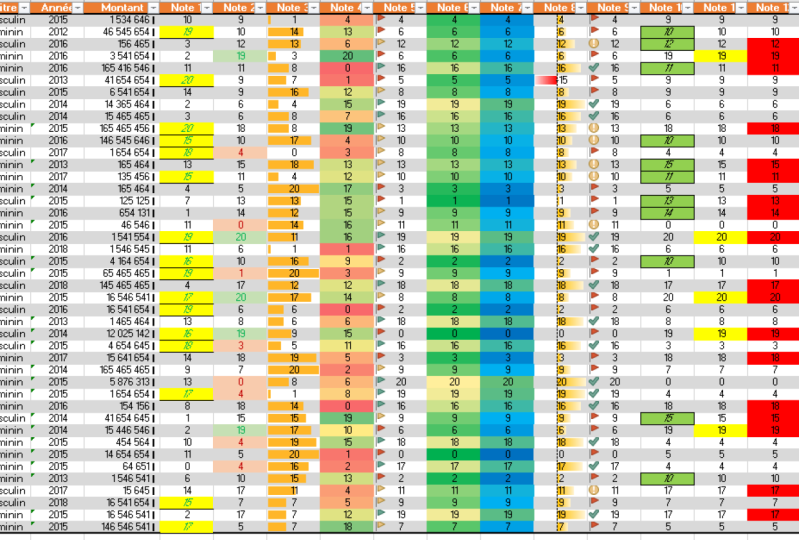
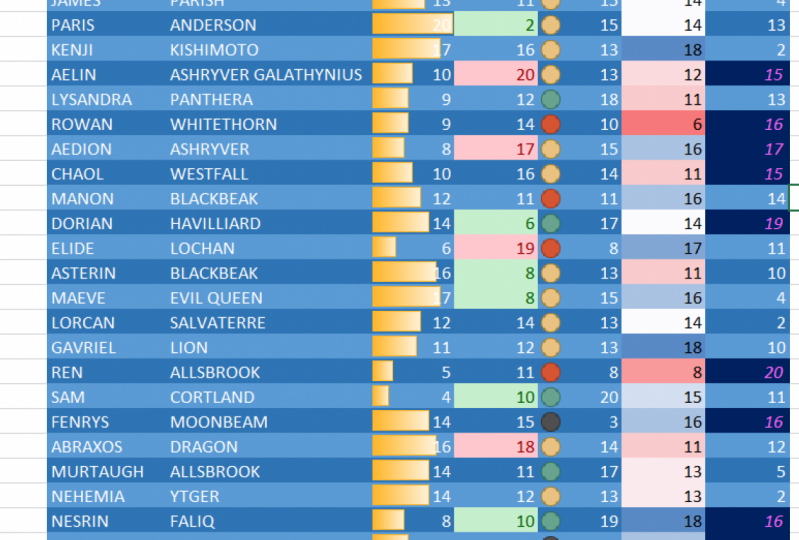
In this project you will be able to make your own calculation excel sheet. You should start by entering:
1- Numbers and text
2- Selecting an entire table
3- Applying a conditional formatting to your table
Afterwards, you are asked to try and develop the two attached excel sheets provided here and submit or share your work with me so we can be able to discuss it and review it together.
I am sure you can do it! all you have to do is follow the lessons step-by-step!
Feel free to share any shortcoming or problem you are facing and i will be here to review it.
(both French and English versions are welcomed)
Good luck !

Kursbewertung
Warum lohnt sich eine Mitgliedschaft bei Skillshare?
Nimm an prämierten Skillshare Original-Kursen teil
Jeder Kurs setzt sich aus kurzen Einheiten und praktischen Übungsprojekten zusammen
Mit deiner Mitgliedschaft unterstützt du die Kursleiter:innen auf Skillshare
Lerne von überall aus
Ob auf dem Weg zur Arbeit, zur Uni oder im Flieger - streame oder lade Kurse herunter mit der Skillshare-App und lerne, wo auch immer du möchtest.


Ähnliche Kurse